mirror of
https://github.com/okhsunrog/vpnhide.git
synced 2026-04-28 14:44:43 +00:00
 35b3dcdf50
Two related changes that ship together because they touch the same
build-script + docs surface and were verified together on-device.

16 KiB alignment
  - zygisk/build.rs: pass `-Wl,-z,max-page-size=16384` to lld so the
    cdylib's LOAD segments line up on 16 KiB pages. NDK r28+ already
    does this by default, but the flag keeps r27 builds compatible.
  - lsposed/native/build.rs: new file, same flag, for libvpnhide_checks.so.
  - docs/development.md: bumped the NDK requirement to r28+ and noted
    the 16 KiB rationale.

Verified via `llvm-readelf -l`: both libvpnhide_zygisk.so and
libvpnhide_checks.so now show `Align 0x4000` on every LOAD segment.

Unified build entry points
  - kmod/build.py replaces kmod/build-zip.py. Single script that
    auto-detects whether to build natively (we're inside the DDK image
    or `--kdir` was passed) or to spawn `ghcr.io/ylarod/ddk-min` via
    podman/docker. CI uses the same script with `--inside-container`.
  - zygisk/build-zip.py renamed to zygisk/build.py for symmetry; logic
    unchanged.
  - kmod/BUILDING.md rewritten — local build is now one command:
    `./kmod/build.py --kmi android14-6.1` (or `--all`). The old
    hand-rolled podman/docker recipes are gone.
  - .github/workflows/ci.yml updated to call the new entry points.
    The DDK image tag in CI now has a comment pointing at
    `DDK_IMAGE_TAG` in kmod/build.py as the source of truth.
  - README.{md,en.md}, kmod/README.md, zygisk/README.md, docs/releasing.md,
    scripts/build_lib.py: reference updates.
  - README.en.md: also fixes a "bacame" typo and tightens the Windows
    zygisk-build note (the aux.rs / libgit2 issue is still real).

Verified end-to-end on Pixel 8 Pro (husky, android14-6.1, Android 16):
APK installs, kmod + zygisk modules load, all 26 self-checks PASS in
Enforcing, 22/26 PASS in Permissive (the same 4 by-design FAILs as
before — kmod doesn't cover those paths in Permissive).
257 lines
16 KiB
Markdown
257 lines
16 KiB
Markdown
<p align="center">
|
|
<img src="assets/logo.png" width="200" alt="VPN Hide" />
|
|
</p>
|
|
|
|
<h1 align="center">VPN Hide</h1>
|
|
|
|
<p align="center">Hide an active Android VPN connection from selected apps.</p>
|
|
|
|
<p align="center">
|
|
<a href="https://github.com/okhsunrog/vpnhide/actions/workflows/ci.yml"><img src="https://img.shields.io/github/actions/workflow/status/okhsunrog/vpnhide/ci.yml?label=CI" alt="CI"></a>
|
|
<a href="https://github.com/okhsunrog/vpnhide/releases/latest"><img src="https://img.shields.io/github/v/release/okhsunrog/vpnhide" alt="Release"></a>
|
|
<a href="https://github.com/okhsunrog/vpnhide/releases"><img src="https://img.shields.io/github/downloads/okhsunrog/vpnhide/total" alt="Downloads"></a>
|
|
<a href="LICENSE"><img src="https://img.shields.io/badge/license-MIT-blue" alt="License"></a>
|
|
</p>
|
|
|
|
<p align="center"><strong><a href="README.md">Русская версия</a></strong></p>
|
|
|
|
## Why vpnhide over alternatives?
|
|
|
|
Existing modules like [NoVPNDetect](https://bitbucket.org/yuri-project/novpndetect) and [NoVPNDetect Enhanced](https://github.com/BlueCat300/NoVPNDetectEnhanced) only cover **Java API** detection and hook **inside the target app's process** via Xposed. This has two critical problems:
|
|
|
|
1. **Invisible to anti-tamper** — any app with memory injection checks detects the Xposed hooks and refuses to work. The NoVPNDetect Enhanced author explicitly states: *"The module will not work if the target app has LSPosed protection or memory injection checks. For example, MirPay, T-Bank."*
|
|
2. **No native coverage** — apps using C/C++ code, cross-platform frameworks (Flutter, React Native), or direct syscalls can detect VPN through `ioctl`, `getifaddrs`, netlink sockets, and `/proc/net/*`. These vectors are completely missed by Java-only hooks.
|
|
|
|
vpnhide solves both problems with a layered architecture:
|
|
|
|
**Layer 1 — Java API (lsposed module):** hooks `system_server`, not the target app. `NetworkCapabilities`, `NetworkInfo`, and `LinkProperties` are filtered at the Binder level *before* data reaches the app's process. The app receives clean data over IPC — no injection into its process, nothing for anti-tamper to detect.
|
|
|
|
**Layer 2 — Native (kmod or zygisk):** covers every native detection path:
|
|
- **kmod** (recommended) — kernel-level `kretprobe` hooks. Filters `ioctl` (SIOCGIFFLAGS, SIOCGIFNAME, SIOCGIFCONF), `getifaddrs`/netlink dumps (RTM_GETLINK, RTM_GETADDR), and `/proc/net/route` reads — all before the syscall returns to userspace. Other `/proc/net/*` files (`tcp*`, `udp*`, `dev`, `if_inet6`, etc.) are blocked by SELinux for untrusted apps on Android 10+, so no hook is needed there. Zero in-process footprint. No library injection. Nothing to detect.
|
|
- **zygisk** (alternative) — inline-hooks `libc.so` inside the app process. Same native coverage as kmod but runs in-process, so it's theoretically detectable by advanced anti-tamper. Use this if your kernel isn't supported by kmod.
|
|
|
|
**Layer 3 — Additional app-level controls (integrated into the VPN Hide app):**
|
|
- **Interface hiding** — hide VPN interfaces, routes, and Java API VPN state from selected apps
|
|
- **Port hiding** — block selected apps from reaching `127.0.0.1` / `::1` so they cannot probe locally bound VPN / proxy daemons
|
|
- **App hiding** — hide selected apps from selected observer apps at the PackageManager level
|
|
|
|
The target app's process is completely untouched (with kmod + lsposed) — no Xposed, no inline hooks, no modified memory regions. Because of that, vpnhide works with banking and government apps that actively detect and block Xposed-based modules.
|
|
|
|
## What vpnhide hides
|
|
|
|
vpnhide is not just one toggle. It combines three different protections that can be enabled per app:
|
|
|
|
1. **Interface hiding** — the core VPN-hiding layer. It removes VPN interfaces and routes from native APIs (`ioctl`, `getifaddrs`, `/proc/net/*`, `NetworkInterface`) and from Java APIs (`NetworkCapabilities`, `NetworkInfo`, `LinkProperties`).
|
|
2. **Port hiding** — blocks localhost access for selected apps so they cannot detect Clash, sing-box, V2Ray, Happ, and similar tools by probing local ports.
|
|
3. **App hiding** — hides selected installed apps from selected observer apps. Useful against package visibility checks, for example when an app tries to determine whether a VPN or proxy client is installed.
|
|
|
|
## Which modules do I need?
|
|
|
|
You always need the **VPN Hide app** (`vpnhide.apk`) plus one native module for interface hiding. The app can also use the optional Ports module if you want localhost port blocking:
|
|
|
|
- **`kmod`** (recommended) — fully out-of-process, invisible to anti-tamper. Requires a supported GKI kernel.
|
|
- **`zygisk`** — use this if your kernel isn't supported by kmod.
|
|
- **`portshide`** (optional) — install this if you want to block selected apps from probing localhost ports.
|
|
|
|
See [Install](#install) for step-by-step instructions.
|
|
|
|
## Install
|
|
|
|
Download the latest release from [Releases](https://github.com/okhsunrog/vpnhide/releases).
|
|
|
|
### Step 1 — VPN Hide app + LSPosed
|
|
|
|
1. Install `vpnhide.apk` as a regular app
|
|
2. In LSPosed manager, enable the VPN Hide module and add **"System Framework"** to its scope
|
|
3. Reboot the device (required — LSPosed hooks are injected into `system_server` at boot, so the module must be active before `system_server` starts)
|
|
4. Open the VPN Hide app and grant it root access (Magisk will prompt automatically; on KernelSU-Next, grant permission manually in the manager)
|
|
|
|
### Step 2 — Native module for interface hiding
|
|
|
|
Open the VPN Hide app. The **Dashboard** tab will detect your device and kernel, and tell you exactly which native module to install:
|
|
|
|
- If your kernel is supported, it will recommend a specific kmod file (e.g. `vpnhide-kmod-android14-6.1.zip`)
|
|
- If not, it will recommend the zygisk module (`vpnhide-zygisk.zip`)
|
|
|
|
Install the recommended module:
|
|
- **kmod:** via KernelSU-Next manager → Modules → Install from storage
|
|
- **zygisk:** via KernelSU-Next or Magisk manager → Modules
|
|
|
|
Reboot the device after installing the native module.
|
|
|
|
### Step 3 — Optional: install the Ports module
|
|
|
|
If you want localhost port blocking, install `vpnhide-ports.zip` via KernelSU-Next or Magisk manager.
|
|
|
|
This module is independent from kmod / zygisk and is only needed for the **Ports** mode in the app.
|
|
|
|
### Step 4 — Configure protections
|
|
|
|
Open the VPN Hide app → **Protection** tab.
|
|
|
|
- **Tun** mode: use the **L** / **K** / **Z** toggles to control interface hiding layers for each app (LSPosed, Kernel module, Zygisk), or tap the row to toggle all layers at once
|
|
- **Apps** mode: choose which apps should be hidden and which apps should act as observers
|
|
- **Ports** mode: choose which apps should be blocked from accessing localhost ports
|
|
|
|
Tap Save after making changes.
|
|
|
|
After changing targets, force-stop and restart the affected apps — hooks take effect on the next app launch.
|
|
|
|
> **Note:** some apps detect Zygisk hooks. For those apps, keep **Z** disabled and rely on kmod + LSPosed.
|
|
|
|
<details>
|
|
<summary><b>Shell configuration (advanced)</b></summary>
|
|
|
|
Edit `/data/adb/vpnhide_kmod/targets.txt`, `/data/adb/vpnhide_zygisk/targets.txt`, or `/data/adb/vpnhide_lsposed/targets.txt` directly (one package name per line). Force-stop and restart affected apps for changes to take effect.
|
|
|
|
</details>
|
|
|
|
<details>
|
|
<summary><b>Manual GKI lookup (if you want to pick the kmod file yourself)</b></summary>
|
|
|
|
1. On your phone, go to **Settings → About phone** and find the **Kernel version** line. It looks something like `6.1.75-android14-11-g...`
|
|
2. You need two parts from this string: the kernel version (`6.1`) and the android generation (`android14`). Together they form your GKI generation: `android14-6.1`
|
|
3. Download the matching file from the release: `vpnhide-kmod-android14-6.1.zip`
|
|
|
|
Alternatively, run `adb shell uname -r` to see the kernel version string.
|
|
|
|
> **Important:** `android14` in the kernel string is NOT your Android version — it's the kernel generation. For example, Pixels from 6 to 9a all use the `android14-6.1` kernel regardless of whether they run Android 14 or 15.
|
|
|
|
</details>
|
|
|
|
## Screenshots
|
|
|
|
| Dashboard — all OK | Dashboard — issues | Install recommendation |
|
|
|:-:|:-:|:-:|
|
|
| <img src="assets/screenshots/dashboard-all-ok.png" width="250"> | <img src="assets/screenshots/dashboard-issues.jpg" width="250"> | <img src="assets/screenshots/dashboard-install-recommendation.jpg" width="250"> |
|
|
|
|
| Protection — Tun | App hiding | Ports hiding |
|
|
|:-:|:-:|:-:|
|
|
| <img src="assets/screenshots/protection-tunnels-list.png" width="250"> | <img src="assets/screenshots/app-hiding-list.png" width="250"> | <img src="assets/screenshots/ports-hiding-list.png" width="250"> |
|
|
|
|
| App hiding help | Ports hiding help | Diagnostics |
|
|
|:-:|:-:|:-:|
|
|
| <img src="assets/screenshots/app-hiding-help.png" width="250"> | <img src="assets/screenshots/ports-hiding-help.png" width="250"> | <img src="assets/screenshots/diagnostics-native.jpg" width="250"> |
|
|
|
|
## Verify
|
|
|
|
The app has a built-in diagnostics system that catches most setup problems automatically.
|
|
|
|
**Dashboard** (runs on every app launch):
|
|
- Module status for all three layers (installed, active, version, target count)
|
|
- LSPosed configuration validation — reads the LSPosed database to verify that VPN Hide is enabled, System Framework is in scope, and no extra apps are scoped (a common misconfiguration)
|
|
- Version mismatch detection — compares installed module versions with the running app version and tells you exactly what to update
|
|
- Native module recommendation — detects your kernel and maps it to the right kmod artifact, or recommends zygisk if unsupported
|
|
- Live protection check (when VPN is active) — runs 16 native checks and 5 Java API checks to verify that VPN is actually hidden
|
|
|
|
Any issues found are shown as actionable cards with specific instructions.
|
|
|
|
**Diagnostics** tab — detailed per-check breakdown with individual PASS/FAIL results for all 26 detection vectors. Useful for troubleshooting when the Dashboard shows partial protection.
|
|
|
|
## Components
|
|
|
|
| Directory | What | How |
|
|
|---|---|---|
|
|
| **[kmod/](kmod/)** | Kernel module (C) | `kretprobe` hooks in kernel space. Zero footprint in the target app's process. ([details](kmod/README.md)) |
|
|
| **[lsposed/](lsposed/)** | LSPosed module + app (Kotlin + Rust) | Hooks `writeToParcel` in `system_server` for per-UID Binder filtering. The APK provides a dashboard (module status, version checks, LSPosed config validation, install recommendations), Protection modes for interface / port / app hiding, and diagnostics. ([details](lsposed/README.md)) |
|
|
| **[portshide/](portshide/)** | Ports module (Shell + iptables) | Blocks selected apps from reaching `127.0.0.1` / `::1`, hiding locally bound VPN / proxy daemons from localhost port probes. ([details](portshide/README.md)) |
|
|
| **[zygisk/](zygisk/)** | Zygisk module (Rust) | Inline-hooks `libc.so` in the target app's process. Alternative to kmod. ([details](zygisk/README.md)) |
|
|
|
|
## Detection coverage
|
|
|
|
| # | Detection vector | SELinux | kmod | zygisk | lsposed |
|
|
|---|---|---|---|---|---|
|
|
| 1 | `ioctl(SIOCGIFFLAGS)` on tun0 | | x | x | |
|
|
| 2 | `ioctl(SIOCGIFNAME)` resolve index to name | | x | x | |
|
|
| 3 | `ioctl(SIOCGIFMTU)` MTU fingerprinting | | x | x | |
|
|
| 4 | `ioctl(SIOCGIFCONF)` interface enumeration | | x | x | |
|
|
| 5 | All other `SIOCGIF*` (INDEX, HWADDR, ADDR, etc.) | | x | x | |
|
|
| 6 | `getifaddrs()` (uses netlink internally) | | x | x | |
|
|
| 7 | netlink `RTM_GETLINK` dump | blocked | x | x | |
|
|
| 8 | netlink `RTM_GETADDR` dump (IPv4 + IPv6) | blocked | x | | |
|
|
| 9 | netlink `RTM_GETROUTE` dump | blocked | | | |
|
|
| 10 | `/proc/net/route` | blocked | x | x | |
|
|
| 11 | `/proc/net/ipv6_route` | blocked | | x | |
|
|
| 12 | `/proc/net/if_inet6` | blocked | | x | |
|
|
| 13 | `/proc/net/tcp`, `tcp6` | blocked | | | |
|
|
| 14 | `/proc/net/udp`, `udp6` | blocked | | | |
|
|
| 15 | `/proc/net/dev` | blocked | | | |
|
|
| 16 | `/proc/net/fib_trie` | blocked | | | |
|
|
| 17 | `/sys/class/net/tun0/` | blocked | | | |
|
|
| 18 | `NetworkCapabilities` (hasTransport, NOT_VPN, transportInfo) | | | | x |
|
|
| 19 | `NetworkInfo` (getType, getTypeName) | | | | x |
|
|
| 20 | `ConnectivityManager.getActiveNetwork()` | | | | x |
|
|
| 21 | `ConnectivityManager.getAllNetworks()` + VPN scan | | | | x |
|
|
| 22 | `LinkProperties` (interfaceName) | | | | x |
|
|
| 23 | `LinkProperties` (routes via VPN interfaces) | | | | x |
|
|
| 24 | `NetworkInterface.getNetworkInterfaces()` | | x | x | |
|
|
| 25 | `System.getProperty` (proxy settings) | | | x | |
|
|
| 26 | `/proc/net/route` via Java `FileInputStream` | blocked | x | x | |
|
|
|
|
**blocked** = SELinux denies access for untrusted apps (Android 10+). No hook needed.
|
|
|
|
Rows 1-6, 21, and 24 are the only vectors reachable by regular apps. Everything else is either blocked by SELinux or goes through Java APIs (covered by lsposed).
|
|
|
|
## Building from source
|
|
|
|
- **kmod**: `./kmod/build.py --kmi android14-6.1` (or `--all`) — auto-spawns the DDK container via podman/docker. Full guide: [kmod/BUILDING.md](kmod/BUILDING.md).
|
|
- **zygisk**: `cd zygisk && ./build.py` (Rust + NDK + cargo-ndk)
|
|
- **lsposed**: `cd lsposed && ./gradlew assembleDebug` (JDK 17 + Rust + NDK + cargo-ndk)
|
|
|
|
### Notes for contributors stuck on Windows
|
|
|
|
If you're on Windows, there are some inconveniences with building some subprojects.
|
|
|
|
**lsposed**: builds fine in Android Studio.
|
|
|
|
**portshide**: `cd .\portshide\; python .\build-zip.py` runs fine.
|
|
|
|
For the next two, you'll (unfortunately) need to install [Docker for Windows](https://docs.docker.com/desktop/setup/install/windows-install/).
|
|
|
|
**kmod**: `python .\kmod\build.py --kmi android14-6.1` — the script picks up Docker and pulls the same `ddk-min` image that CI uses.
|
|
|
|
**zygisk**:
|
|
```powershell
|
|
docker run --rm -it -v "${PWD}:/workspace" -v "vpnhide_cargo_cache:/usr/local/cargo/registry" -w /workspace ghcr.io/okhsunrog/vpnhide/ci:latest bash -c 'cd zygisk && python3 ./build.py'
|
|
```
|
|
The reason `zygisk` can't be built directly on Windows is that the `zygisk-api` dependency contains a file named `aux.rs`. Cargo uses `libgit2` for git operations, and `libgit2` refuses to create files whose names _contain_ reserved Windows device names (`AUX`, `CON`, `NUL`, …). You'll get: `cannot checkout to invalid path 'src/aux.rs'; class=Checkout (20)`. [Someone reports](https://superuser.com/a/1929659) that some Windows update made it possible to create files containing reserved words **with** an extension, but `libgit2` hasn't been updated to relax the guard.
|
|
|
|
## Verified against
|
|
|
|
- [RKNHardering](https://github.com/xtclovver/RKNHardering/) — all detection vectors clean
|
|
- [YourVPNDead](https://github.com/loop-uh/yourvpndead) — all detection vectors clean
|
|
|
|
Both implement the official Russian Ministry of Digital Development VPN/proxy detection methodology ([source](https://t.me/ruitunion/893)).
|
|
|
|
## Split tunneling
|
|
|
|
Works correctly with split-tunnel VPN configurations. Only the apps in the target list are affected.
|
|
|
|
Using split tunneling together with VPN Hide is strongly recommended.
|
|
|
|
Detection apps that compare the device-reported public IP against external checkers should stay outside the tunnel — their traffic should go through the carrier, not the VPN.
|
|
|
|
## Threat model
|
|
|
|
vpnhide hides an active VPN from specific apps. It is NOT designed for:
|
|
- Hiding root or custom ROM presence
|
|
- Bypassing Play Integrity
|
|
- Fooling server-side detection (DNS leakage, IP blocklists, latency/TLS fingerprinting)
|
|
|
|
## Known limitations
|
|
|
|
- `kmod` requires a GKI kernel with `CONFIG_KPROBES=y` (standard on Android 12+ devices)
|
|
- `lsposed` requires LSPosed, LSPosed-Next, or Vector
|
|
- `zygisk` is arm64 only
|
|
- Direct `svc #0` syscalls bypass zygisk's libc hooks — that's what kmod is for
|
|
- Server-side detection is unfixable client-side — use split tunneling
|
|
|
|
## License
|
|
|
|
MIT. See [LICENSE](LICENSE).
|
|
|
|
The kernel module declares `MODULE_LICENSE("GPL")` as required by the Linux kernel to resolve `EXPORT_SYMBOL_GPL` symbols at runtime.
|
|
|
|
## Star History
|
|
|
|
[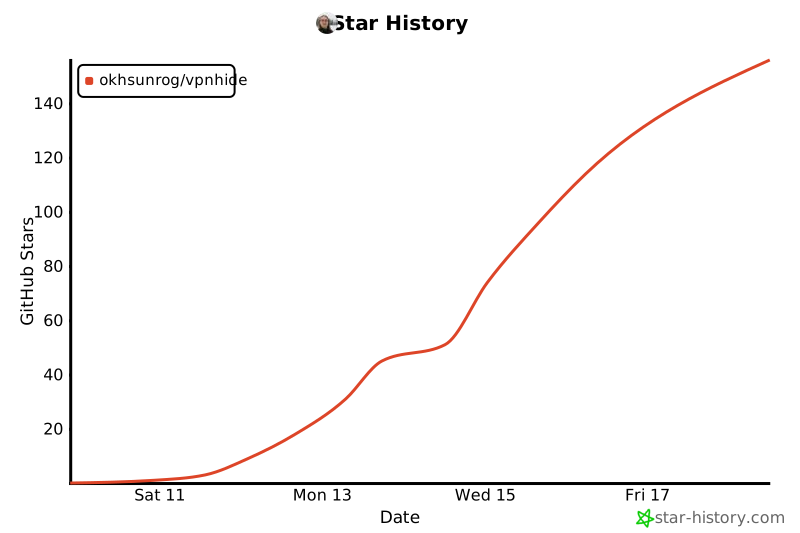](https://star-history.com/#okhsunrog/vpnhide&Date)
|