mirror of
https://github.com/supermemoryai/supermemory.git
synced 2026-05-18 23:36:00 +00:00

145 lines
6.3 KiB
Markdown
145 lines
6.3 KiB
Markdown
|
|
|
|
# SuperMemory
|
|
|
|
Interested in helping build the best second brain for everyone? Join the discord https://discord.gg/2X2XsKz5AU. Contributions welcome.
|
|
|
|
<div align="center">
|
|
<a href="https://github.com/Dhravya/Supermemory/stargazers">
|
|
<img src="https://img.shields.io/github/stars/Dhravya/Supermemory?style=flat-square&logo=github" alt="GitHub stars">
|
|
</a>
|
|
<a href="https://github.com/Dhravya/Supermemory/network/members">
|
|
<img src="https://img.shields.io/github/forks/Dhravya/supermemory?style=flat-square&logo=github&color=8ae8ff" alt="GitHub forks">
|
|
</a>
|
|
<a href="https://github.com/Dhravya/Supermemory/graphs/contributors">
|
|
<img src="https://img.shields.io/github/contributors/Dhravya/Supermemory?style=flat-square&logo=github" alt="GitHub contributors">
|
|
</a>
|
|
<a href="https://chrome.google.com/webstore/detail/supermemory/afpgkkipfdpeaflnpoaffkcankadgjfc">
|
|
<img src="https://img.shields.io/chrome-web-store/v/afpgkkipfdpeaflnpoaffkcankadgjfc?style=flat-square&color=yellow" alt="Chrome Web Store">
|
|
</a>
|
|
</div>
|
|
|
|
## 👀 What is this?
|
|
|
|
Build your own second brain with supermemory. It's a ChatGPT for your bookmarks. Import tweets or save websites and content using the [Chrome extension](https://chromewebstore.google.com/detail/supermemory/afpgkkipfdpeaflnpoaffkcankadgjfc?hl=en-GB&authuser=0)
|
|
|
|
Well, here's the thing - me and @yxshv save a _lot_ of content on the internet.
|
|
|
|
Twitter bookmarks, websites, snippets, etc.
|
|
|
|
But we never look back to it - to us, it's like throwing information in the void.
|
|
|
|
Supermemory fixes this.
|
|
|
|
## Key Features
|
|
|
|
- 💡 **Ideation**: Capture and save ideas effortlessly.
|
|
- 🔖 **Bookmarks**: Import, organize, and resurface bookmarks when needed.
|
|
- 📇 **Contacts**: Store and manage information about people you know.
|
|
- 🐦 **Twitter Bookmarks**: Import and utilize your saved tweets.
|
|
- 🔍 **Powerful Search**: Quickly find any saved information.
|
|
- 💬 **Chat with Collections**: Interact with specific knowledge bases.
|
|
- 🖼️ **Knowledge Canvas**: Organize information visually in a 2D canvas.
|
|
- ✍️ **Writing Assistant**: Use a markdown editor with AI assistance for content creation.
|
|
- 🔒 **Privacy Focused**: Ensures data security and privacy.
|
|
- 🏠 **Self Hostable**: Open source and easy to deploy locally.
|
|
- 🔗 **Integrations**: Compatible with Telegram, Twitter, and more to come.
|
|
|
|
## How do I use this?
|
|
|
|
Just go to [supermemory.ai](https://supermemory.ai) and sign in with your google account.
|
|
|
|
To use the chrome extension,
|
|
|
|
> [!WARNING]
|
|
> You need to be signed in before installing the supermemory extension, or you may experience problems
|
|
|
|
1. Download from [Chrome Web Store](https://chromewebstore.google.com/detail/supermemory/afpgkkipfdpeaflnpoaffkcankadgjfc?authuser=0&hl=en-GB)
|
|
2. Now you can see on any page on bottom right (just click on it to save)
|
|
<img width="1058" alt="image" src="https://github.com/MaheshtheDev/supermemory/assets/38828053/f24b0988-cd2b-4216-a75b-e9ff0dbfaa6a">
|
|
|
|
### Import Twitter Bookmarks
|
|
|
|
1. Make sure you signed into supermemory and installed chrome extension
|
|
2. Open Twitter/X, you will see the save icon as follows
|
|
|
|
<img width="480" alt="image" src="https://github.com/MaheshtheDev/supermemory/assets/38828053/2efb06a5-912a-48e7-ad1c-d527e7ffbc94">
|
|
|
|
3. Click on save button and give it 10 - 20 secs, where supermemory extension will sync all your twitter bookmarks to supermemory.ai
|
|
4. Voila! Now your second brain has all your twitter bookmarks.
|
|
|
|
## 👨💻 The Stack
|
|
|
|
<div align="center">
|
|
<img src="https://tech-orbit.wontory.dev/api?title=SuperMemory&tech=React,Next.js,Tailwind%20CSS,shadcn/ui,Drizzle,Cloudflare,Cloudflare%20Pages,Cloudflare%20Workers&size=900&duration=20" alt="SuperMemory" width="400">
|
|
</div>
|
|
|
|
#### Architecture:
|
|
|
|
<img width="715" alt="image" src="https://github.com/user-attachments/assets/f2e38b28-8cfe-4331-9b84-a91902682ddd">
|
|
|
|
|
|
Supermemory has three main modules, managed by [turborepo](https://turbo.build):
|
|
|
|
#### `apps/web`: The main web UI.
|
|
|
|
The database, auth etc logic is here
|
|
|
|

|
|
|
|
Built with:
|
|
|
|
- [Nextjs 14](https://nextjs.org/)
|
|
- [Next Auth](https://next-auth.js.org/)
|
|
- [Drizzle ORM](https://drizzle.team/)
|
|
- [Cloudflare D1 database](https://developers.cloudflare.com/d1/get-started/)
|
|
- [Cloudflare ratelimiter](https://developers.cloudflare.com/workers/runtime-apis/bindings/rate-limit/)
|
|
- [TailwindCSS](https://tailwindcss.com)
|
|
- [shadcn-ui](https://ui.shadcn.com)
|
|
- And some other amazing open source projects like [Novel](https://novel.sh) and [vaul](https://vaul.emilkowal.ski/)
|
|
- Hosted on [Cloudflare Pages](https://pages.cloudflare.com/)
|
|
|
|
#### `apps/extension`: Chrome extension
|
|
|
|
The chrome extension is one of the most important part of the setup, but is not required.This is to easily add pages to your memory.
|
|
|
|
<img width="290" alt="image" src="https://github.com/MaheshtheDev/supermemory/assets/38828053/fa4993bb-c447-46a8-a301-9e0fa84d406a">
|
|
|
|
Built with:
|
|
|
|
- [CRXJS](https://crxjs.dev/vite-plugin/getting-started/react/create-project)
|
|
- [Vite](https://vitejs.dev/)
|
|
- [TailwindCSS](https://tailwindcss.com)
|
|
- [shadcn-ui](https://ui.shadcn.com)
|
|
- [React](https://react.dev/)
|
|
|
|
#### `apps/cf-ai-backend`: This module handles the vector store and AI response generation
|
|
|
|
This is where the magic happens!
|
|
Built with:
|
|
|
|
- [Cloudflare Workers](https://workers.cloudflare.com/)
|
|
- [Cloudflare AI](https://ai.cloudflare.com)
|
|
- [Cloudflare Vectorize](https://developers.cloudflare.com/vectorize/)
|
|
- [Cloudflare Queues](https://developers.cloudflare.com/queues/)
|
|
- [Cloudflare Browser Rendering](https://developers.cloudflare.com/browser-rendering/)
|
|
- [Cloudflare KV](https://developers.cloudflare.com/kv)
|
|
- [mem0](https://app.mem0.ai)
|
|
|
|
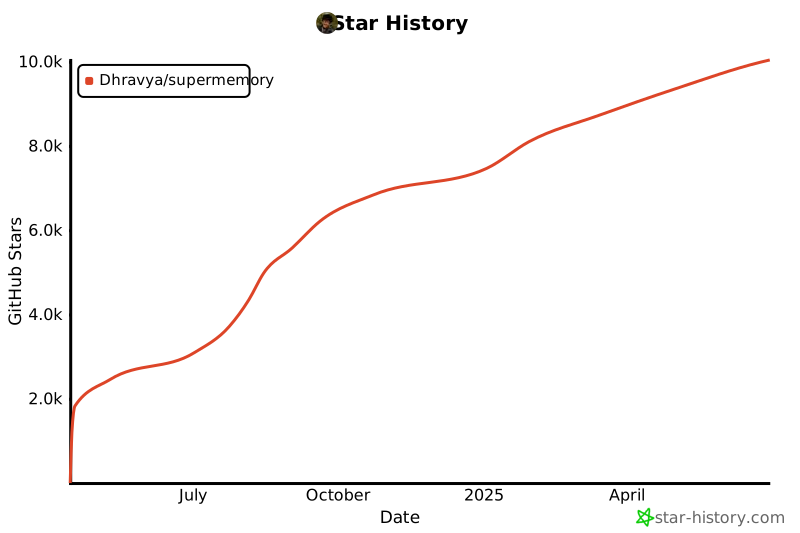
## Star History
|
|
|
|
[](https://star-history.com/#Dhravya/supermemory&Date)
|
|
|
|
## Contribute or self host
|
|
|
|
Supermemory is design to be set up easily locally and super duper easy to set up 💫
|
|
|
|
Please see the [SETUP-GUIDE.md](SETUP-GUIDE.md) for setup instructions.
|
|
|
|
### Contributing
|
|
|
|
Contributions are very welcome! A contribution can be as small as a ⭐ or even finding and creating issues.
|
|
|
|
<a href="https://github.com/Dhravya/SuperMemory/graphs/contributors">
|
|
<img src="https://contrib.rocks/image?repo=Dhravya/SuperMemory" />
|
|
</a>
|