mirror of
https://github.com/QwenLM/qwen-code.git
synced 2026-04-28 19:52:02 +00:00
 0aedfbd779
为了让更多用户能够使用 Qwen Code,将 Qwen OAuth 的免费额度从每天 2000 次降低到每天 1000 次。修改涉及以下文档:
- CHANGELOG.md: 更新版本说明
- README.md: 更新功能介绍
- docs/developers/tools/web-search.md: 更新 Web Search 工具文档
- docs/users/configuration/auth.md: 更新认证文档

Co-authored-by: Qwen-Coder <qwen-coder@alibabacloud.com>
160 lines
5.9 KiB
Markdown
160 lines
5.9 KiB
Markdown
# Authentication
|
||
|
||
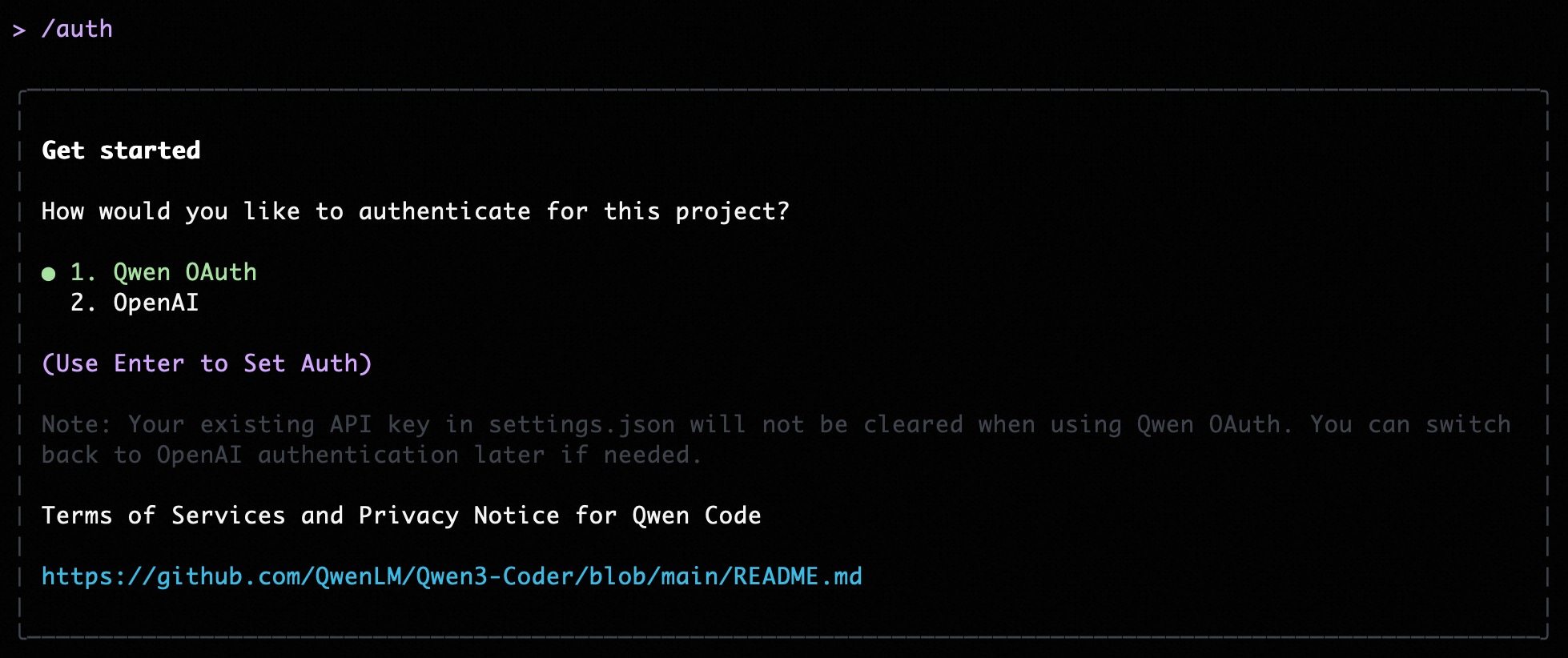
Qwen Code supports two authentication methods. Pick the one that matches how you want to run the CLI:
|
||
|
||
- **Qwen OAuth (recommended)**: sign in with your `qwen.ai` account in a browser.
|
||
- **OpenAI-compatible API**: use an API key (OpenAI or any OpenAI-compatible provider / endpoint).
|
||
|
||
|
||
|
||
## Option 1: Qwen OAuth (recommended & free) 👍
|
||
|
||
Use this if you want the simplest setup and you're using Qwen models.
|
||
|
||
- **How it works**: on first start, Qwen Code opens a browser login page. After you finish, credentials are cached locally so you usually won't need to log in again.
|
||
- **Requirements**: a `qwen.ai` account + internet access (at least for the first login).
|
||
- **Benefits**: no API key management, automatic credential refresh.
|
||
- **Cost & quota**: free, with a quota of **60 requests/minute** and **1,000 requests/day**.
|
||
|
||
Start the CLI and follow the browser flow:
|
||
|
||
```bash
|
||
qwen
|
||
```
|
||
|
||
## Option 2: OpenAI-compatible API (API key)
|
||
|
||
Use this if you want to use OpenAI models or any provider that exposes an OpenAI-compatible API (e.g. OpenAI, Azure OpenAI, OpenRouter, ModelScope, Alibaba Cloud Bailian, or a self-hosted compatible endpoint).
|
||
|
||
### Recommended: Coding Plan (subscription-based) 🚀
|
||
|
||
Use this if you want predictable costs with higher usage quotas for the qwen3-coder-plus model.
|
||
|
||
> [!IMPORTANT]
|
||
>
|
||
> Coding Plan is only available for users in China mainland (Beijing region).
|
||
|
||
- **How it works**: subscribe to the Coding Plan with a fixed monthly fee, then configure Qwen Code to use the dedicated endpoint and your subscription API key.
|
||
- **Requirements**: an active Coding Plan subscription from [Alibaba Cloud Bailian](https://bailian.console.aliyun.com/cn-beijing/?tab=globalset#/efm/coding_plan).
|
||
- **Benefits**: higher usage quotas, predictable monthly costs, access to latest qwen3-coder-plus model.
|
||
- **Cost & quota**: varies by plan (see table below).
|
||
|
||
#### Coding Plan Pricing & Quotas
|
||
|
||
| Feature | Lite Basic Plan | Pro Advanced Plan |
|
||
| :------------------ | :-------------------- | :-------------------- |
|
||
| **Price** | ¥40/month | ¥200/month |
|
||
| **5-Hour Limit** | Up to 1,200 requests | Up to 6,000 requests |
|
||
| **Weekly Limit** | Up to 9,000 requests | Up to 45,000 requests |
|
||
| **Monthly Limit** | Up to 18,000 requests | Up to 90,000 requests |
|
||
| **Supported Model** | qwen3-coder-plus | qwen3-coder-plus |
|
||
|
||
#### Quick Setup for Coding Plan
|
||
|
||
When you select the OpenAI-compatible option in the CLI, enter these values:
|
||
|
||
- **API key**: `sk-sp-xxxxx`
|
||
- **Base URL**: `https://coding.dashscope.aliyuncs.com/v1`
|
||
- **Model**: `qwen3-coder-plus`
|
||
|
||
> **Note**: Coding Plan API keys have the format `sk-sp-xxxxx`, which is different from standard Alibaba Cloud API keys.
|
||
|
||
#### Configure via Environment Variables
|
||
|
||
Set these environment variables to use Coding Plan:
|
||
|
||
```bash
|
||
export OPENAI_API_KEY="your-coding-plan-api-key" # Format: sk-sp-xxxxx
|
||
export OPENAI_BASE_URL="https://coding.dashscope.aliyuncs.com/v1"
|
||
export OPENAI_MODEL="qwen3-coder-plus"
|
||
```
|
||
|
||
For more details about Coding Plan, including subscription options and troubleshooting, see the [full Coding Plan documentation](https://bailian.console.aliyun.com/cn-beijing/?tab=doc#/doc/?type=model&url=3005961).
|
||
|
||
### Other OpenAI-compatible Providers
|
||
|
||
If you are using other providers (OpenAI, Azure, local LLMs, etc.), use the following configuration methods.
|
||
|
||
### Configure via command-line arguments
|
||
|
||
```bash
|
||
# API key only
|
||
qwen-code --openai-api-key "your-api-key-here"
|
||
|
||
# Custom base URL (OpenAI-compatible endpoint)
|
||
qwen-code --openai-api-key "your-api-key-here" --openai-base-url "https://your-endpoint.com/v1"
|
||
|
||
# Custom model
|
||
qwen-code --openai-api-key "your-api-key-here" --model "gpt-4o-mini"
|
||
```
|
||
|
||
### Configure via environment variables
|
||
|
||
You can set these in your shell profile, CI, or an `.env` file:
|
||
|
||
```bash
|
||
export OPENAI_API_KEY="your-api-key-here"
|
||
export OPENAI_BASE_URL="https://api.openai.com/v1" # optional
|
||
export OPENAI_MODEL="gpt-4o" # optional
|
||
```
|
||
|
||
#### Persisting env vars with `.env` / `.qwen/.env`
|
||
|
||
Qwen Code will auto-load environment variables from the **first** `.env` file it finds (variables are **not merged** across multiple files).
|
||
|
||
Search order:
|
||
|
||
1. From the **current directory**, walking upward toward `/`:
|
||
1. `.qwen/.env`
|
||
2. `.env`
|
||
2. If nothing is found, it falls back to your **home directory**:
|
||
- `~/.qwen/.env`
|
||
- `~/.env`
|
||
|
||
`.qwen/.env` is recommended to keep Qwen Code variables isolated from other tools. Some variables (like `DEBUG` and `DEBUG_MODE`) are excluded from project `.env` files to avoid interfering with qwen-code behavior.
|
||
|
||
Examples:
|
||
|
||
```bash
|
||
# Project-specific settings (recommended)
|
||
mkdir -p .qwen
|
||
cat >> .qwen/.env <<'EOF'
|
||
OPENAI_API_KEY="your-api-key"
|
||
OPENAI_BASE_URL="https://api-inference.modelscope.cn/v1"
|
||
OPENAI_MODEL="Qwen/Qwen3-Coder-480B-A35B-Instruct"
|
||
EOF
|
||
```
|
||
|
||
```bash
|
||
# User-wide settings (available everywhere)
|
||
mkdir -p ~/.qwen
|
||
cat >> ~/.qwen/.env <<'EOF'
|
||
OPENAI_API_KEY="your-api-key"
|
||
OPENAI_BASE_URL="https://dashscope.aliyuncs.com/compatible-mode/v1"
|
||
OPENAI_MODEL="qwen3-coder-plus"
|
||
EOF
|
||
```
|
||
|
||
## Switch authentication method (without restarting)
|
||
|
||
In the Qwen Code UI, run:
|
||
|
||
```bash
|
||
/auth
|
||
```
|
||
|
||
## Non-interactive / headless environments (CI, SSH, containers)
|
||
|
||
In a non-interactive terminal you typically **cannot** complete the OAuth browser login flow.
|
||
Use the OpenAI-compatible API method via environment variables:
|
||
|
||
- Set at least `OPENAI_API_KEY`.
|
||
- Optionally set `OPENAI_BASE_URL` and `OPENAI_MODEL`.
|
||
|
||
If none of these are set in a non-interactive session, Qwen Code will exit with an error.
|
||
|
||
## Security notes
|
||
|
||
- Don’t commit API keys to version control.
|
||
- Prefer `.qwen/.env` for project-local secrets (and keep it out of git).
|
||
- Treat your terminal output as sensitive if it prints credentials for verification.
|