 489890cf93
Add Anthropic/Gemini protocols, modelProviders config, and env var priority docs

Co-authored-by: Qwen-Coder <qwen-coder@alibabacloud.com>
10 KiB
Authentication
Qwen Code supports two authentication methods. Pick the one that matches how you want to run the CLI:
- Qwen OAuth (recommended): sign in with your
qwen.aiaccount in a browser. - API-KEY: use an API key to connect to any supported provider. More flexible — supports OpenAI, Anthropic, Google GenAI, Alibaba Cloud Bailian, and other compatible endpoints.
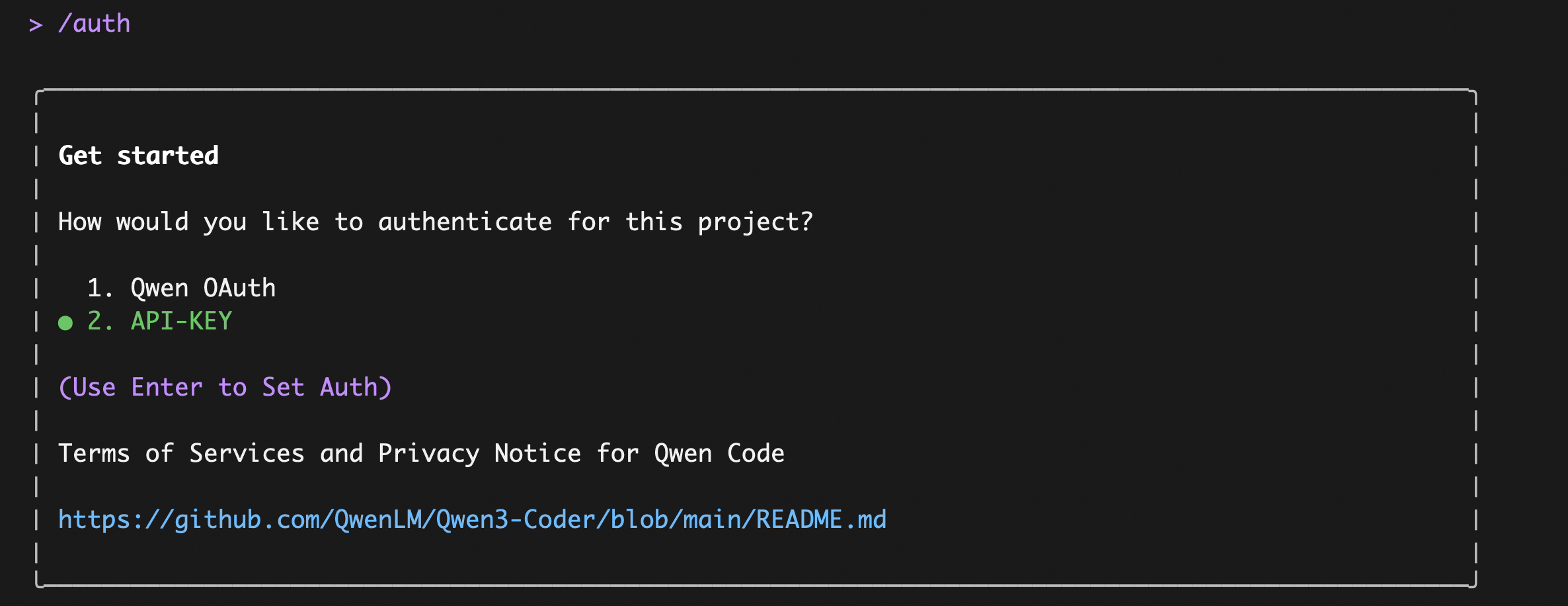
👍 Option 1: Qwen OAuth (recommended & free)
Use this if you want the simplest setup and you're using Qwen models.
- How it works: on first start, Qwen Code opens a browser login page. After you finish, credentials are cached locally so you usually won't need to log in again.
- Requirements: a
qwen.aiaccount + internet access (at least for the first login). - Benefits: no API key management, automatic credential refresh.
- Cost & quota: free, with a quota of 60 requests/minute and 1,000 requests/day.
Start the CLI and follow the browser flow:
qwen
Note
In non-interactive or headless environments (e.g., CI, SSH, containers), you typically cannot complete the OAuth browser login flow.
In these cases, please use the API-KEY authentication method.
🚀 Option 2: API-KEY (flexible)
Use this if you want more flexibility over which provider and model to use. Supports multiple protocols and providers, including OpenAI, Anthropic, Google GenAI, Alibaba Cloud Bailian, Azure OpenAI, OpenRouter, ModelScope, or a self-hosted compatible endpoint.
Option1: Coding Plan(Aliyun Bailian)
Use this if you want predictable costs with higher usage quotas for the qwen3-coder-plus model.
- How it works: Subscribe to the Coding Plan with a fixed monthly fee, then configure Qwen Code to use the dedicated endpoint and your subscription API key.
- Requirements: Obtain an active Coding Plan subscription from Alibaba Cloud Bailian.
- Benefits: Higher usage quotas, predictable monthly costs, access to the latest qwen3-coder-plus model.
- Cost & quota: View Alibaba Cloud Bailian Coding Plan documentation.
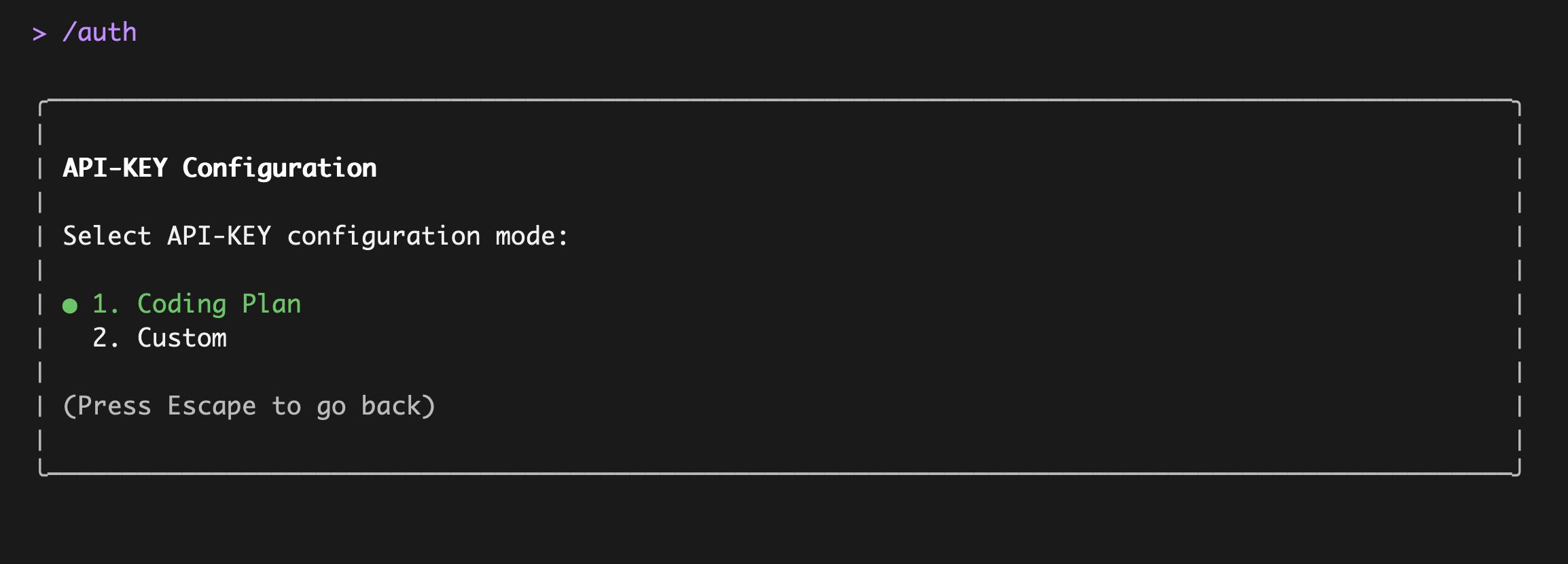
Enter qwen in the terminal to launch Qwen Code, then enter the /auth command and select API-KEY
After entering, select Coding Plan:
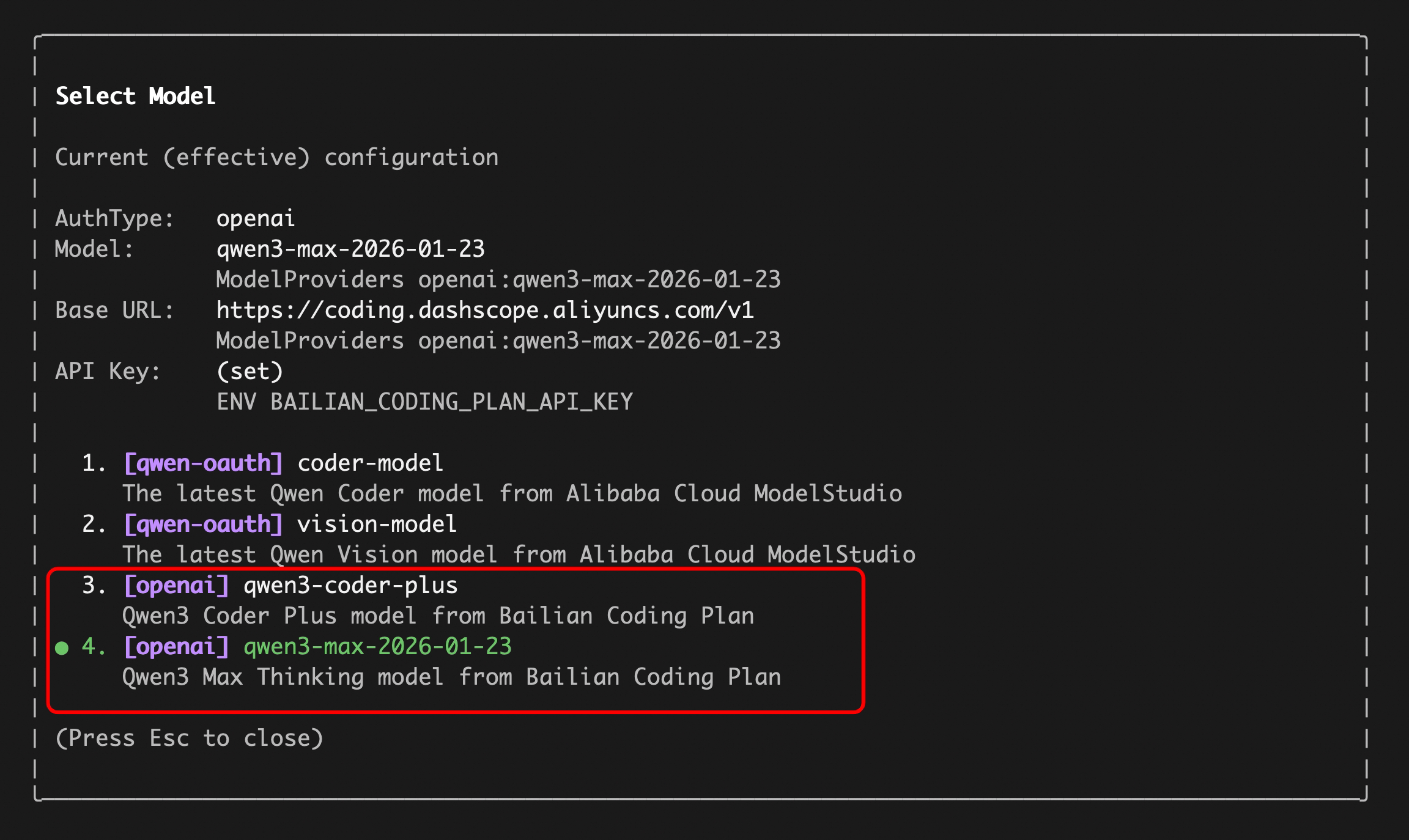
Enter your sk-sp-xxxxxxxxx key, then use the /model command to switch between all Bailian Coding Plan supported models:
Option2: Third-party API-KEY
Use this if you want to connect to third-party providers such as OpenAI, Anthropic, Google, Azure OpenAI, OpenRouter, ModelScope, or a self-hosted endpoint.
The key concept is Model Providers (modelProviders): Qwen Code supports multiple API protocols, not just OpenAI. You configure which providers and models are available by editing ~/.qwen/settings.json, then switch between them at runtime with the /model command.
Supported protocols
| Protocol | modelProviders key |
Environment variables | Providers |
|---|---|---|---|
| OpenAI-compatible | openai |
OPENAI_API_KEY, OPENAI_BASE_URL, OPENAI_MODEL |
OpenAI, Azure OpenAI, OpenRouter, ModelScope, Alibaba Cloud Bailian, any OpenAI-compatible endpoint |
| Anthropic | anthropic |
ANTHROPIC_API_KEY, ANTHROPIC_BASE_URL, ANTHROPIC_MODEL |
Anthropic Claude |
| Google GenAI | gemini |
GEMINI_API_KEY, GEMINI_MODEL |
Google Gemini |
| Google Vertex AI | vertex-ai |
GOOGLE_API_KEY, GOOGLE_MODEL |
Google Vertex AI |
Step 1: Configure modelProviders in ~/.qwen/settings.json
Define which models are available for each protocol. Each model entry requires at minimum an id and an envKey (the environment variable name that holds your API key).
Important
It is recommended to define
modelProvidersin the user-scope~/.qwen/settings.jsonto avoid merge conflicts between project and user settings.
Edit ~/.qwen/settings.json (create it if it doesn't exist):
{
  "modelProviders": {
    "openai": [
      {
        "id": "gpt-4o",
        "name": "GPT-4o",
        "envKey": "OPENAI_API_KEY",
        "baseUrl": "https://api.openai.com/v1"
      }
    ],
    "anthropic": [
      {
        "id": "claude-sonnet-4-20250514",
        "name": "Claude Sonnet 4",
        "envKey": "ANTHROPIC_API_KEY"
      }
    ],
    "gemini": [
      {
        "id": "gemini-2.5-pro",
        "name": "Gemini 2.5 Pro",
        "envKey": "GEMINI_API_KEY"
      }
    ]
  }
}
You can mix multiple protocols and models in a single configuration. The ModelConfig fields are:
| Field | Required | Description |
|---|---|---|
id |
Yes | Model ID sent to the API (e.g. gpt-4o, claude-sonnet-4-20250514) |
name |
No | Display name in the /model picker (defaults to id) |
envKey |
Yes | Environment variable name for the API key (e.g. OPENAI_API_KEY) |
baseUrl |
No | API endpoint override (useful for proxies or custom endpoints) |
generationConfig |
No | Fine-tune timeout, maxRetries, samplingParams, etc. |
Note
Credentials are never stored in
settings.json. The runtime reads them from the environment variable specified inenvKey.
For the full modelProviders schema and advanced options like generationConfig, customHeaders, and extra_body, see Settings Reference → modelProviders.
Step 2: Set environment variables
Qwen Code reads API keys from environment variables (specified by envKey in your model config). There are multiple ways to provide them, listed below from highest to lowest priority:
1. Shell environment / export (highest priority)
Set directly in your shell profile (~/.zshrc, ~/.bashrc, etc.) or inline before launching:
# Alibaba Dashscope
export DASHSCOPE_API_KEY="sk-..."

# OpenAI / OpenAI-compatible
export OPENAI_API_KEY="sk-..."

# Anthropic
export ANTHROPIC_API_KEY="sk-ant-..."

# Google GenAI
export GEMINI_API_KEY="AIza..."
2. .env files
Qwen Code auto-loads the first .env file it finds (variables are not merged across multiple files). Only variables not already present in process.env are loaded.
Search order (from the current directory, walking upward toward /):
.qwen/.env(preferred — keeps Qwen Code variables isolated from other tools).env
If nothing is found, it falls back to your home directory:
~/.qwen/.env~/.env
Tip
.qwen/.envis recommended over.envto avoid conflicts with other tools. Some variables (likeDEBUGandDEBUG_MODE) are excluded from project-level.envfiles to avoid interfering with Qwen Code behavior.
3. settings.json → env field (lowest priority)
You can also define environment variables directly in ~/.qwen/settings.json under the env key. These are loaded as the lowest-priority fallback — only applied when a variable is not already set by the system environment or .env files.
{
  "env": {
    "DASHSCOPE_API_KEY":"sk-...",
    "OPENAI_API_KEY": "sk-...",
    "ANTHROPIC_API_KEY": "sk-ant-...",
    "GEMINI_API_KEY": "AIza..."
  },
  "modelProviders": {
    ...
  }
}
Note
This is useful when you want to keep all configuration (providers + credentials) in a single file. However, be mindful that
settings.jsonmay be shared or synced — prefer.envfiles for sensitive secrets.
Priority summary:
| Priority | Source | Override behavior |
|---|---|---|
| 1 (highest) | CLI flags (--openai-api-key) |
Always wins |
| 2 | System env (export, inline) |
Overrides .env and settings.env |
| 3 | .env file |
Only sets if not in system env |
| 4 (lowest) | settings.json → env |
Only sets if not in system env or .env |
Step 3: Switch models with /model
After launching Qwen Code, use the /model command to switch between all configured models. Models are grouped by protocol:
/model
The picker will show all models from your modelProviders configuration, grouped by their protocol (e.g. openai, anthropic, gemini). Your selection is persisted across sessions.
You can also switch models directly with a command-line argument, which is convenient when working across multiple terminals.
# In one terminal

qwen --model "qwen3-coder-plus"

# In another terminal

qwen --model "qwen3-coder-next"
Security notes
- Don’t commit API keys to version control.
- Prefer
.qwen/.envfor project-local secrets (and keep it out of git). - Treat your terminal output as sensitive if it prints credentials for verification.