 d9159276af
* feat(action): extract reusable OpenCodeReview PR review GitHub Action

Consolidate the reusable-action work into one commit:
- Add composite action (action.yml at repo root for GitHub Marketplace;
  helper at scripts/github-actions/post-review-comments.js) porting the
  sticky summary, incremental posting, and retry idempotency logic.
- Add unit tests covering the ported idempotency behavior.
- Switch the in-repo CI workflow to use the reusable action.
- Add and refine example reusable workflows for consumers.

* ci(workflow): point ocr-review at root action.yml and quote boolean inputs

- Fix uses: to ./ now that action.yml lives at the repo root.
- Quote sticky_summary/incremental/upload_artifacts as strings to
  match action.yml's input declarations (composite-action inputs are
  always strings) and silence actionlint.
- Enable upload_artifacts for this workflow.

* docs(examples): point reusable demo at root action.yml

The example workflow referenced alibaba/open-code-review/action@v1,
but action.yml now lives at the repo root, so the /action subpath no
longer resolves. Use alibaba/open-code-review@v1 and update the stale
action/README.md comment to point at the root action.yml.

* docs(examples): sync README to root action.yml references

The example README still pointed at the relocated/deleted locations:
action.yml is now at the repo root, so update all 11
alibaba/open-code-review/action@v1 references to
alibaba/open-code-review@v1, and repoint the action/ directory and
action/README.md links to the root action.yml.

* fix(examples): prevent unrelated PR comments from canceling ocr-review

GitHub Actions evaluates concurrency before the job-level if-condition.
The flat group mapped every issue_comment event on a PR into the review's
group, so any comment (even a skipped conversation reply) canceled any
in-progress review.

Match the reusable demo's conditional group: PR events and human-authored
/open-code-review/@open-code-review comments share a per-PR group, while
non-matching comments fall back to a unique noop-<run_id> group that can
never collide with a real review.

* fix(action): address code-review findings across reusable PR review

- post-review-comments: parse retry delays via parseNonNegInt (0/negative fix);
  paginate findExistingSummaryComment through readAllPages; remove dead
  rangeOf and hasIssueCommentWithId (plus duplicated comment block)
- action.yml: move ${{ }} interpolations into env: (resolve refs, PR_NUM,
  ocr_version); fail fast on PR head fetch instead of swallowing errors
- workflows: add timeout-minutes: 30; gate issue_comment on
  author_association; tighten pr-context if to == 'issue_comment'

* fix(action): harden review posting after code review

- pass incremental_overlap_threshold via env to avoid github-script injection
- capture ocr review exit code directly instead of &&/|| chain
- drop redundant SUMMARY_MARKER prepend in postSummary (callers already add it)
- align example job if-condition bot check with its concurrency group

* fix(action): always upload review artifacts and capture ocr exit code

* fix(action): merge posting statistics into the summary header

The PR summary issue comment used to present two overlapping breakdowns:
a leading "posted as inline / posted as summary" header and a trailing
"📊 Posting Statistics" block. Their definitions overlapped (the header's
"summary" count included failures the trailer also listed as failed), and
when incremental filtering skipped comments the header counts no longer
summed to the total, making the summary hard to interpret.

Merge them into a single header whose four counts (inline / summary /
skipped / failed) are mutually exclusive and sum to the total, and drop
the trailing Posting Statistics section. buildSummaryBody now takes an
options object.

* fix(action): support local action resolution in container/self-hosted setups

- Checkout trusted base + mark workspace safe for pull_request_target so
  the local `uses: ./` action can be resolved and loaded
- Check for git/Node.js and install git when missing, making the
  composite action resilient across runner images
- Move Setup Node.js earlier and make it conditional on availability
- Resolve post-review-comments helper at runtime via
  GITHUB_ACTION_PATH falling back to GITHUB_WORKSPACE, fixing helper
  lookup for local actions where the action path is a host path
  invisible inside containers

* refactor(examples): consolidate github_actions demo to reusable action

Drop the inline-script full-control demo; the renamed ocr-review.yml
(from ocr-review-reusable.yml) is now the single demo, invoking
alibaba/open-code-review@main.

Sync the README to the current implementation:
- normalize action refs to @main; point self-hosted-runner users to the
  repo's own workflow (noting uses: ./ is internal-only)
- document config via action inputs (posting modes: sticky/incremental)
- update the comment-trigger if with defensive bot/author_association
  guards and the concurrency mirror
- fix Example Output to cover the summary comment + inline comments
- replace the non-existent OCR_DEBUG debugging with
  artifacts/outputs/ACTIONS_STEP_DEBUG
- use --replace-all for safe.directory

* fix(action): harden withRetry against silent undefined return

withRetry's for loop had no terminal return/throw after the loop body.
Although the current loop invariant (last attempt always throws, and
parseNonNegInt guards against negative MAX_RETRIES) makes fall-through
unreachable, an async function that falls through resolves to undefined,
which would surface as a confusing downstream TypeError for the read-API
callers that rely on it.

Capture lastErr in the loop and add an explicit terminal throw so any
future break of the invariant fails loudly instead of silently returning
undefined.

* docs(readme): document the reusable GitHub Action in CI/CD section

* fix(action): restore language config via a language input

The old inline workflow ran `ocr config set language English`, but the
composite action's Configure OCR step only set llm.extra_body, with no
language input. Add a language input (default English) and write it via
`ocr config set language` so review output language is no longer left
to the tool's default.

Addresses #337 (discussion_r3550069843).

* fix(action): warn when incremental comment listing hits page cap

listExistingReviewComments silently dropped comments beyond its 10-page
cap, unlike readAllPages which logs when truncation occurs. Add the
same max-page-limit warning after the loop so a partial walk during
incremental dedup is visible in the logs.

Addresses #337 (discussion_r3550069871).

* docs(readme): sync GitHub Action section to localized READMEs
40 KiB

OpenCodeReview











English | 简体中文 | 日本語 | 한국어 | Русский
Open Code Review란?
Open Code Review는 AI 기반 코드 리뷰 CLI 도구입니다. Alibaba Group의 내부 공식 AI 코드 리뷰 어시스턴트에서 시작했으며, 지난 2년 동안 수만 명의 개발자에게 제공되어 수백만 건의 코드 결함을 찾아냈습니다. 대규모 환경에서 충분히 검증한 뒤 커뮤니티를 위해 오픈 소스 프로젝트로 공개했습니다. 모델 endpoint만 설정하면 바로 사용할 수 있습니다.
이 도구는 Git diff를 읽고, 변경 파일을 tool-use 기능을 가진 agent를 통해 설정 가능한 LLM으로 전달한 뒤, 라인 단위 위치 정보가 포함된 구조화된 리뷰 코멘트를 생성합니다. agent는 전체 파일 내용 읽기, 코드베이스 검색, 다른 변경 파일 확인 등을 통해 맥락을 확보하고 표면적인 diff 피드백이 아닌 깊이 있는 리뷰를 수행할 수 있습니다. diff 리뷰 외에도 ocr scan은 전체 파일을 리뷰할 수 있어, 익숙하지 않은 코드베이스를 감사하거나 의미 있는 diff가 없는 디렉터리를 검토하는 데 유용합니다.
자세한 내용은 공식 웹사이트를 참조하세요.

벤치마크
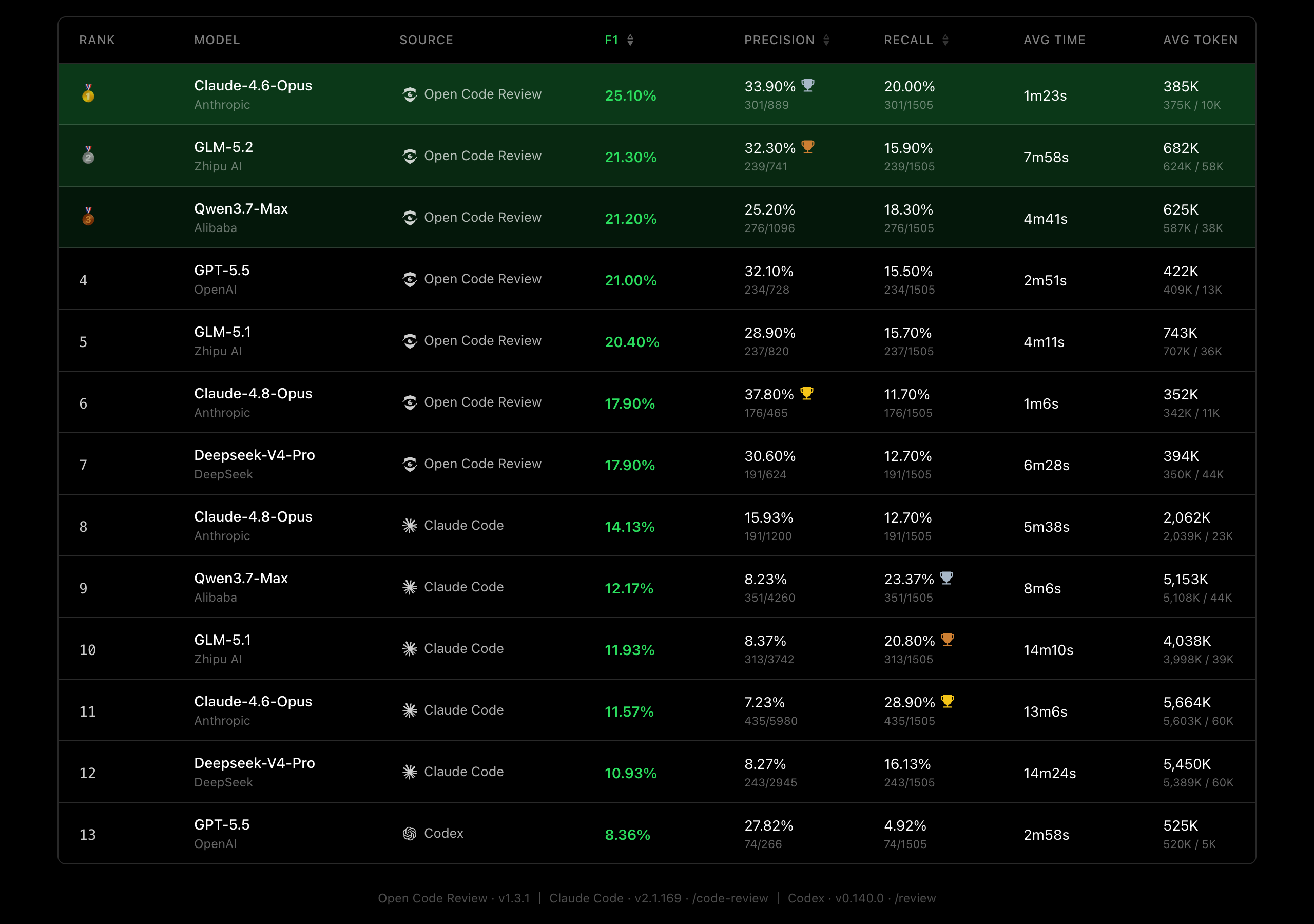
범용 Agent(Claude Code)와 비교할 때, Open Code Review는 동일한 기반 모델에서 유의미하게 높은 **정밀도(Precision)**와 F1 점수를 달성하며, 토큰 소비량은 약 1/9 수준이고 리뷰 속도도 더 빠릅니다. 다만 재현율(Recall)은 범용 Agent보다 낮습니다 — 이는 노이즈를 줄이고 정밀도를 우선하는 설계적 트레이드오프입니다.
실제 코드 리뷰 기반 벤치마크. 50개 인기 오픈소스 저장소에서 200개 실제 Pull Request를 엄선하고, 10개 프로그래밍 언어를 커버 — 80명 이상의 시니어 엔지니어가 교차 검증(1,505개 어노테이션된 결함).
| 지표 | 측정 내용 | 중요한 이유 |
|---|---|---|
| F1 | 정밀도와 재현율의 조화 평균 | 리뷰 품질을 나타내는 최적의 단일 지표 |
| 정밀도 (Precision) | 보고된 이슈 중 실제 결함 비율 | 높을수록 확인할 오탐이 적음 |
| 재현율 (Recall) | 실제 결함 중 발견된 비율 | 높을수록 놓치는 이슈가 적음 |
| 평균 시간 (Avg Time) | 리뷰당 실제 소요 시간 | CI 파이프라인 대기 시간에 영향 |
| 평균 토큰 (Avg Token) | 리뷰당 총 토큰 소비량 | API 비용에 직접 영향 |
왜 Open Code Review인가?
범용 Agent의 문제
Claude Code Skills 같은 범용 agent로 코드 리뷰를 해봤다면 다음 문제를 경험했을 수 있습니다.
- 불완전한 커버리지: 큰 changeset에서는 일부 파일만 선택적으로 리뷰하고 중요한 파일을 놓치기 쉽습니다.
- 위치 드리프트: 지적된 문제가 실제 코드 위치와 맞지 않거나 라인 번호와 파일 참조가 어긋나는 일이 자주 발생합니다.
- 불안정한 품질: 자연어 기반 Skill은 디버깅이 어렵고, 작은 prompt 변화에도 리뷰 품질이 크게 흔들릴 수 있습니다.
근본 원인은 순수 언어 중심 아키텍처가 리뷰 프로세스에 강한 제약을 제공하지 못한다는 점입니다.
핵심 설계: 결정적 엔지니어링과 Agent의 하이브리드
Open Code Review의 핵심 철학은 결정적 엔지니어링과 agent를 결합해 각자가 가장 잘하는 일을 맡기는 것입니다.
결정적 엔지니어링: 강한 제약
반드시 정확해야 하는 리뷰 단계는 언어 모델이 아니라 엔지니어링 로직이 보장합니다.
- 정확한 파일 선택: 어떤 파일을 리뷰하고 어떤 파일을 필터링할지 결정해 중요한 변경이 누락되지 않도록 합니다.
- 스마트 파일 번들링: 관련 파일을 하나의 리뷰 단위로 묶습니다. 예를 들어
message_en.properties와message_zh.properties를 함께 묶습니다. 각 번들은 독립된 context를 가진 sub-agent로 실행되며, 대규모 changeset에서도 안정적인 divide-and-conquer 전략과 동시 리뷰를 지원합니다. - 세밀한 rule 매칭: 각 파일의 특성에 맞는 리뷰 rule을 매칭해 모델의 주의를 집중시키고 정보 노이즈를 줄입니다. 순수 자연어 기반 rule 안내보다 template engine 기반 rule 매칭이 더 안정적이고 예측 가능합니다.
- 외부 위치 지정 및 reflection 모듈: 독립적인 comment positioning과 comment reflection 모듈이 AI 피드백의 위치 정확도와 내용 정확도를 체계적으로 개선합니다.
Agent: 동적 의사결정
agent의 강점은 동적 판단과 동적 context 검색이 중요한 지점에 집중됩니다.
- 시나리오 최적화 prompt: 코드 리뷰에 깊이 최적화된 prompt template으로 효과를 높이고 token 사용량을 줄입니다.
- 시나리오 최적화 toolset: 대규모 production 데이터의 tool-call trace를 분석해 도출했습니다. 호출 빈도 분포, tool별 반복률, 신규 tool이 전체 call chain에 미치는 영향 등을 반영해 범용 agent toolkit보다 코드 리뷰에 더 안정적이고 예측 가능한 전용 toolset을 제공합니다.
사용 방법
사전 요구 사항
- Git >= 2.41 — Open Code Review는 diff 생성, 코드 검색, 저장소 작업에 Git을 사용합니다.
CLI
설치
NPM 사용(권장)
npm install -g @alibaba-group/open-code-review
설치 후 ocr 명령을 전역에서 사용할 수 있습니다.
업데이트
NPM으로 설치했다면 최신 버전으로 수동 업데이트할 수 있습니다:
npm install -g @alibaba-group/open-code-review@latest
NPM 설치의 ocr은 기본적으로 백그라운드에서 새 버전을 확인하고 자동으로 업데이트합니다. 자동 업데이트를 끄려면 OCR_NO_UPDATE=1을 설정하세요.
설치 스크립트나 수동 다운로드한 binary로 설치했다면 같은 설치/다운로드 명령을 다시 실행해 로컬 binary를 최신 release로 교체할 수 있습니다. 특정 release tag로 고정해야 한다면 OCR_VERSION을 사용하세요.
GitHub Release 사용
명령 한 번으로 사용 중인 OS/아키텍처에 맞는 최신 binary를 설치합니다 (macOS / Linux):
curl -fsSL https://raw.githubusercontent.com/alibaba/open-code-review/main/install.sh | sh
이 스크립트는 알맞은 릴리스 binary를 선택하고 SHA-256 체크섬을 검증한 뒤 ocr로 /usr/local/bin에 설치합니다. 설치 위치는 OCR_INSTALL_DIR로, 릴리스 버전은 OCR_VERSION으로 재정의할 수 있습니다:
OCR_INSTALL_DIR="$HOME/.local/bin" OCR_VERSION=v1.3.13 \
  sh -c "$(curl -fsSL https://raw.githubusercontent.com/alibaba/open-code-review/main/install.sh)"
수동 다운로드 (Windows 포함 모든 플랫폼)
GitHub Releases에서 사용 중인 플랫폼의 binary를 다운로드합니다.
# macOS (Apple Silicon)
curl -Lo ocr https://github.com/alibaba/open-code-review/releases/latest/download/opencodereview-darwin-arm64
chmod +x ocr && sudo mv ocr /usr/local/bin/ocr

# macOS (Intel)
curl -Lo ocr https://github.com/alibaba/open-code-review/releases/latest/download/opencodereview-darwin-amd64
chmod +x ocr && sudo mv ocr /usr/local/bin/ocr

# Linux (x86_64)
curl -Lo ocr https://github.com/alibaba/open-code-review/releases/latest/download/opencodereview-linux-amd64
chmod +x ocr && sudo mv ocr /usr/local/bin/ocr

# Linux (ARM64)
curl -Lo ocr https://github.com/alibaba/open-code-review/releases/latest/download/opencodereview-linux-arm64
chmod +x ocr && sudo mv ocr /usr/local/bin/ocr

# Windows (x86_64): ocr.exe를 PATH에 포함된 디렉터리로 이동하세요
curl -Lo ocr.exe https://github.com/alibaba/open-code-review/releases/latest/download/opencodereview-windows-amd64.exe

# Windows (ARM64): ocr.exe를 PATH에 포함된 디렉터리로 이동하세요
curl -Lo ocr.exe https://github.com/alibaba/open-code-review/releases/latest/download/opencodereview-windows-arm64.exe
소스에서 빌드
git clone https://github.com/alibaba/open-code-review.git
cd open-code-review
make build
sudo cp dist/opencodereview /usr/local/bin/ocr
Quick Start
1. LLM 설정
코드 리뷰를 실행하기 전에 반드시 LLM을 설정해야 합니다.
OCR은 통합 Provider 시스템으로 LLM 설정을 관리합니다. 다양한 주요 provider가 내장되어 있으며, 프라이빗 배포 또는 기타 호환 엔드포인트에 연결하기 위한 커스텀 provider 추가도 지원합니다. 설정은 ~/.opencodereview/config.json에 저장됩니다.
Option A: 대화형 설정 (권장)
ocr config provider          # built-in provider 선택 또는 custom provider 추가
ocr config model             # 활성 provider의 model 선택
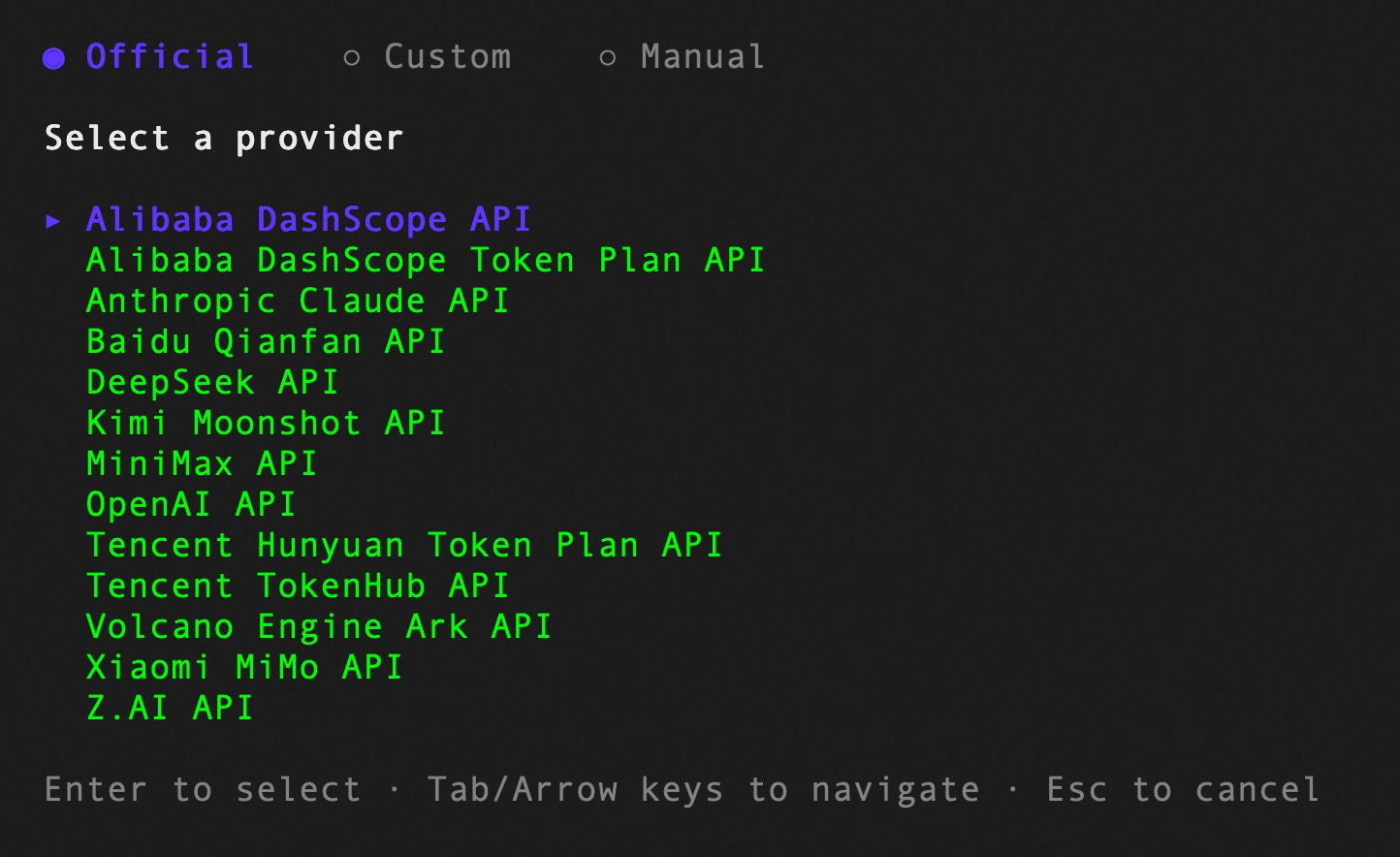
대화형 UI가 provider 선택, API key 입력, model 설정을 안내하며, 완료 후 자동으로 연결 테스트를 수행합니다.
ocr llm providers를 실행하면 모든 built-in provider를 확인할 수 있습니다. Built-in provider에는 API URL과 프로토콜이 사전 설정되어 있어 API key만 제공하면 바로 사용할 수 있습니다. 해당 환경 변수(예: ANTHROPIC_API_KEY, OPENAI_API_KEY)가 이미 설정되어 있으면 API key가 자동으로 읽힙니다.
커스텀 provider도 대화형 UI에서 추가할 수 있습니다 — provider 이름, API URL, 프로토콜 타입(anthropic 또는 openai), API key를 입력합니다.
Option B: CLI 설정 (CI/CD 등 비대화형 환경용)
ocr config set 명령으로 provider 설정을 직접 작성합니다. 스크립트 및 자동화에 적합합니다.
Built-in provider 사용:
ocr config set provider anthropic
ocr config set providers.anthropic.api_key your-api-key-here
ocr config set providers.anthropic.model claude-sonnet-4-6
커스텀 provider 사용 (프라이빗 게이트웨이 또는 기타 호환 엔드포인트):
ocr config set provider my-gateway
ocr config set custom_providers.my-gateway.url https://my-llm-gateway.internal/v1
ocr config set custom_providers.my-gateway.protocol openai
ocr config set custom_providers.my-gateway.api_key your-api-key-here
ocr config set custom_providers.my-gateway.model gpt-4o
커스텀 provider에서는
url과protocol이 필수입니다. 지원 프로토콜:anthropic,openai.
선택 설정:
| 키 | 설명 |
|---|---|
providers.<name>.auth_header |
인증 header: x-api-key 또는 authorization (기본값: authorization) |
providers.<name>.extra_body |
요청 body에 병합되는 커스텀 JSON 필드 |
providers.<name>.extra_headers |
쉼표로 구분된 key=value 쌍, 각 요청에 추가되는 커스텀 HTTP 헤더 |
providers.<name>.models |
대화형 선택용 model 목록 |
extra_headers (선택사항): 모든 LLM API 요청에 커스텀 HTTP 헤더를 추가합니다. 프록시, 게이트웨이, 추가 헤더가 필요한 엔터프라이즈 엔드포인트(조직 ID, 트레이싱 ID 등)에 유용합니다. 형식은 쉼표로 구분된 key=value 쌍입니다. 쉼표가 포함된 값은 큰따옴표로 묶으세요:
ocr config set llm.extra_headers "X-Org-ID=org-123,X-Forwarded-For=\"1.2.3.4,5.6.7.8\""
provider 별로 추가 헤더를 설정할 수도 있습니다:
ocr config set providers.anthropic.extra_headers "X-Org-ID=org-123"
환경 변수 (가장 높은 우선순위)
환경 변수는 설정 파일의 값을 덮어씁니다. 설정 파일 작성이 불편한 CI/CD 시나리오에 적합합니다:
export OCR_LLM_URL=https://api.anthropic.com/v1/messages
export OCR_LLM_TOKEN=your-api-key-here
export OCR_LLM_MODEL=claude-opus-4-6
export OCR_USE_ANTHROPIC=true
Claude Code 환경 변수(ANTHROPIC_BASE_URL, ANTHROPIC_AUTH_TOKEN, ANTHROPIC_MODEL)와도 호환되며, ~/.zshrc / ~/.bashrc의 export도 파싱합니다.
CC-Switch 사용자 참고: CC-Switch를 routing service와 함께 사용한다면, provider의
url을 CC-Switch proxy 주소로 지정하여 추가 설정 없이 사용할 수 있습니다:
- Claude provider:
providers.anthropic.url을http://127.0.0.1:15721로 설정- Codex provider: 해당 provider의
url을http://127.0.0.1:15721/v1로 설정api_key는 아무 값이나 사용 가능,extra_body설정은 그대로 적용됨
2. 연결 테스트
ocr llm test
3. 리뷰 실행
cd your-project

# Workspace mode: staged, unstaged, untracked 변경을 모두 리뷰
ocr review

# Branch range: 두 ref 비교
ocr review --from main --to feature-branch

# 단일 commit
ocr review --commit abc123

# 중단된 range 또는 단일 commit review 재개
ocr session list
ocr review --from main --to feature-branch --resume <session-id>

# 전체 파일 스캔 — diff 대신 파일 전체를 리뷰 (git 이력 불필요)
ocr scan                          # 전체 repository 스캔
ocr scan --path internal/agent    # 디렉터리 또는 특정 파일 스캔
Coding Agent와 통합
OCR은 AI coding agent에 slash command로 자연스럽게 통합할 수 있으며, agent workflow 안에서 바로 코드 리뷰를 실행할 수 있습니다.
Option 1: Skill로 설치
npx로 OCR skill을 프로젝트에 설치합니다.
npx skills add alibaba/open-code-review --skill open-code-review
이 명령은 skills registry의 open-code-review skill을 설치합니다. 이 skill은 coding agent가 ocr을 호출해 코드 리뷰를 수행하고, issue를 우선순위별로 분류하며, 필요한 경우 fix를 적용하는 방법을 알려줍니다.
Option 2: Claude Code Plugin으로 설치
Claude Code에서는 Claude Code 안에서 다음 명령으로 command plugin을 설치합니다.
/plugin marketplace add alibaba/open-code-review
/plugin install open-code-review@open-code-review
이렇게 하면 OCR을 실행하고 issue를 자동으로 필터링 및 수정하는 /open-code-review:review slash command가 등록됩니다.
Option 3: Codex Plugin으로 설치
local Codex에서는 이 repository에서 Open Code Review plugin을 설치합니다.
codex plugin marketplace add alibaba/open-code-review
codex
/plugins
local checkout이나 fork에서는 다음을 사용할 수 있습니다.
codex plugin marketplace add .
codex
/plugins
Open Code Review를 설치하고 활성화한 뒤, 새 Codex thread를 시작해 명시적으로 호출합니다.
@Open Code Review review my current changes
@Open Code Review review this branch against main
@Open Code Review review and fix high-confidence issues
이 plugin은 local OCR CLI를 실행하는 Codex skill을 등록합니다.
ocr review --audience agent
이 통합은 OCR의 내부 LLM backend를 변경하지 않으며 Codex용 OpenAI Responses API endpoint 설정을 요구하지 않습니다. OCR 자체는 CLI 설정 섹션에 설명된 대로 ocr CLI 설치와 설정이 필요합니다.
한국어 가이드: plugins/open-code-review/CODEX.ko-KR.md
Option 4: Cursor Plugin으로 설치
Cursor에서는 이 repository에서 Open Code Review plugin을 설치합니다:
cursor-plugin marketplace add alibaba/open-code-review
수동으로 marketplace를 추가할 수도 있습니다. Cursor에서 /plugins를 열고 Open Code Review를 검색하여 설치합니다.
local checkout이나 fork에서는 다음을 사용할 수 있습니다:
cursor-plugin marketplace add .
설치 후, Cursor에서 다음과 같이 호출합니다:
@Open Code Review review my current changes
@Open Code Review review this branch against main
@Open Code Review review and fix high-confidence issues
이 plugin은 local OCR CLI를 실행하는 Cursor skill을 등록합니다:
ocr review --audience agent
이 통합은 OCR의 내부 LLM backend를 변경하지 않습니다. OCR 자체는 CLI 설정 섹션에 설명된 대로 ocr CLI 설치와 설정이 필요합니다.
Option 5: Command 파일 직접 복사
package manager 없이 빠르게 설정하려면 command 파일을 복사해 Claude Code에서 /open-code-review slash command를 사용할 수 있습니다.
Project-level(git으로 팀과 공유):
mkdir -p .claude/commands
curl -o .claude/commands/open-code-review.md \
  https://raw.githubusercontent.com/alibaba/open-code-review/main/plugins/open-code-review/commands/review.md
User-level(여러 프로젝트에서 개인 전역 사용):
mkdir -p ~/.claude/commands
curl -o ~/.claude/commands/open-code-review.md \
  https://raw.githubusercontent.com/alibaba/open-code-review/main/plugins/open-code-review/commands/review.md
전제 조건: 모든 통합 방식은
ocrCLI가 설치되어 있고 LLM이 설정되어 있어야 합니다. 위의 설치와 LLM 설정을 참고하세요.
CI/CD 통합
OCR은 CI/CD pipeline에 통합해 Merge Request / Pull Request 코드 리뷰를 자동화할 수 있습니다.
CI 통합의 핵심 명령:
ocr review \
  --from "origin/main" \
  --to "origin/feature-branch" \
  --format json
--format json flag는 CI script에서 파싱하기 좋은 machine-readable 결과를 출력합니다.
각 finding에는 두 개의 구조화된 field가 포함되어, CI 통합에서 comment 텍스트를 다시 파싱하지 않고도 정렬·그룹화·필터링하거나 build를 gate할 수 있습니다:
| Field | 허용 값 | 설명 |
|---|---|---|
category |
bug, security, performance, maintainability, test, style, documentation, other |
이슈가 속한 카테고리. |
severity |
critical, high, medium, low |
이슈의 중요도. |
JSON 출력에서 두 field는 content, start_line 등과 같은 수준의 sibling으로 나타납니다. 터미널에서는 comment 앞에 인라인 [category · severity] badge로 표시되며 severity에 따라 색상이 지정됩니다.
통합 예시는 examples/ 디렉터리를 참고하세요.
github_actions/: GitHub Actions 통합 예시gitlab_ci/: GitLab CI 통합 예시gitflic_ci/: GitFlic CI 통합 예시
GitHub Action
GitHub의 경우, 이 리포지터리는 루트에 바로 사용할 수 있는 composite Action(action.yml)을 제공합니다. 직접 ocr review 스크립트를 작성하는 대신 이를 참조하기만 하면 전체 파이프라인 — checkout, OCR 설치, review 실행, inline/summary comment 게시, artifact 업로드, 재시도 및 멱등성 — 을 모두 처리합니다:
- uses: alibaba/open-code-review@main
  with:
    llm_url: ${{ secrets.OCR_LLM_URL }}
    llm_auth_token: ${{ secrets.OCR_LLM_AUTH_TOKEN }}
    llm_model: ${{ vars.OCR_LLM_MODEL }}
    llm_use_anthropic: ${{ vars.OCR_LLM_USE_ANTHROPIC }}
재현성을 위해 version tag나 commit SHA에 고정하세요. 전체 workflow 데모와 inputs/outputs, comment 게시 모드(sticky summary, incremental non-destructive posting)의 전체 목록은 examples/github_actions/ 디렉터리를 참고하세요.
Commands
| Command | Alias | Description |
|---|---|---|
ocr review |
ocr r |
diff 기반 코드 리뷰 시작 |
ocr scan |
ocr s |
전체 파일 리뷰 (diff 불필요) |
ocr rules check <file> |
- | 파일 경로에 적용될 리뷰 rule 미리보기 |
ocr config provider |
- | 대화형 provider 설정 (built-in, custom, 수동) |
ocr config model |
- | 활성 provider의 대화형 model 선택 |
ocr config set <key> <value> |
- | config 값 설정 |
ocr config unset custom_providers.<name> |
- | custom provider 삭제 |
ocr llm test |
- | LLM 연결 테스트 |
ocr llm providers |
- | built-in LLM provider 목록 표시 |
ocr session list |
ocr sessions list, ocr session ls |
저장된 review session 목록 표시 |
ocr session show <id> |
ocr sessions show <id> |
단일 session과 파일별 checkpoint 확인 |
ocr viewer |
ocr v |
localhost:5483에서 WebUI session viewer 실행 |
ocr version |
- | version 정보 표시 |
ocr review Flags
| Flag | Shorthand | Default | Description |
|---|---|---|---|
--repo |
- | current dir | Git repository root |
--from |
- | - | Source ref 예: main |
--to |
- | - | Target ref 예: feature-branch |
--commit |
-c |
- | 리뷰할 단일 commit |
--exclude |
- | - | 건너뛸 파일의 쉼표 구분 gitignore 스타일 패턴; rule.json의 excludes와 병합 |
--preview |
-p |
false |
LLM 실행 없이 리뷰 대상 파일 미리보기 |
--resume |
- | - | 이전의 호환되는 range 또는 단일 commit review session에서 재개 |
--format |
-f |
text |
Output format: text 또는 json |
--concurrency |
- | 8 |
최대 동시 파일 리뷰 수 |
--timeout |
- | 10 |
동시 task timeout(분) |
--audience |
- | human |
human(progress 표시) 또는 agent(summary only) |
--background |
-b |
- | 리뷰를 위한 선택적 요구사항/비즈니스 컨텍스트. --commit 사용 시 미지정이면 commit message에서 자동 추출 |
--background-file |
-B |
- | Markdown 파일에서 읽어오는 선택적 요구사항/비즈니스 컨텍스트. --background와 함께 사용하면 inline 값이 먼저 배치됩니다 |
--model |
- | - | 이번 리뷰에서 LLM model 선택 또는 override |
--rule |
- | - | custom JSON review rules 경로 |
--max-tools |
- | built-in | 파일별 최대 tool call round. template default보다 클 때만 적용 |
--max-git-procs |
- | built-in | 최대 동시 git subprocess 수 |
--tools |
- | - | custom JSON tools config 경로 |
Resumable Reviews and Sessions
모든 ocr review 실행은 ~/.opencodereview/sessions/ 아래에 local session log를 저장합니다.
정상 완료된 text output은 review 결과에 집중하며 session ID를 출력하지 않습니다.
저장된 session은 ocr session list/show로 찾을 수 있고, --format json을 사용하면
machine-readable output에 session_id가 포함됩니다. range 또는 단일 commit review가 중단된 경우,
저장된 session을 나열한 뒤 동일한 review target과 일치하는 session에서 재개합니다.
ocr session list
ocr session show <session-id>
ocr review --from main --to feature-branch --resume <session-id>
ocr review --commit abc123 --resume <session-id>
Resume은 의도적으로 엄격합니다. branch range와 단일 commit review만 지원하고 workspace review는 지원하지 않습니다.
현재 --from/--to 또는 --commit은 저장된 session과 일치해야 합니다. --preview와 --resume은 함께 사용할 수 없습니다.
--format json을 사용하면 재개된 run에는 다음 field가 포함됩니다.
session_id: 현재 run의 session IDresume.resumed_from: source session IDresume.reused_files: 저장된 checkpoint에서 재사용한 파일 수resume.rerun_files: 현재 run에서 다시 review한 파일 수
ocr session Flags
| Command | Flag | Default | Description |
|---|---|---|---|
ocr session list |
--repo |
current dir | session을 나열할 repository |
ocr session list |
--json |
false |
session summary를 JSON으로 출력 |
ocr session list |
--limit |
20 |
나열할 session 수 제한. 0은 unlimited |
ocr session show <id> |
--repo |
current dir | 확인할 session의 repository |
ocr session show <id> |
--json |
false |
session metadata와 파일별 item을 JSON으로 출력 |
ocr scan Flags
ocr scan은 diff가 아닌 전체 파일을 리뷰합니다 — 익숙하지 않은 코드베이스 감사, 마이그레이션 전 스캔, 의미 있는 diff가 없는 디렉터리 등에 유용합니다. 비-git 디렉터리에서도 작동합니다 (.gitignore를 따르는 파일 시스템 탐색으로 폴백).
| Flag | Shorthand | Default | Description |
|---|---|---|---|
--path |
- | 전체 repo | 스캔할 쉼표 구분 디렉터리/파일 |
--exclude |
- | - | 건너뛸 파일의 쉼표 구분 gitignore 스타일 패턴; rule.json의 excludes와 병합 |
--preview |
-p |
false |
LLM 실행 없이 스캔 대상 파일 목록 표시 |
--max-tokens-budget |
- | 0 (무제한) |
총 토큰 사용량 제한; 초과 시 dispatch 중단 |
--no-plan |
- | false |
파일별 planning 사전 처리 건너뛰기 |
--no-dedup |
- | false |
배치별 유사 comment 중복 제거 건너뛰기 |
--no-summary |
- | false |
프로젝트 수준 요약 건너뛰기 |
--batch |
- | by-language |
배치 전략: none, by-language, 또는 by-directory |
--format |
-f |
text |
Output format: text 또는 json (JSON에 project_summary 필드 포함) |
--concurrency |
- | 8 |
최대 동시 파일 스캔 수 |
--rule |
- | - | custom JSON review rules 경로 |
--repo |
- | current dir | 스캔할 repository 또는 디렉터리 루트 |
각 실행 전에 ocr scan은 대략적인 토큰 비용 추정치를 출력합니다. --preview로 먼저 파일 목록을 확인하고, --max-tokens-budget으로 대규모 repository의 비용을 제한할 수 있습니다.
Examples
# 대화형 provider 및 model 설정
ocr config provider
ocr config model
ocr llm providers

# custom provider 삭제
ocr config unset custom_providers.my-gateway

# 리뷰 대상 파일 미리보기(LLM call 없음)
ocr review --preview
ocr review -c abc123 -p

# default 설정으로 workspace 변경 리뷰
ocr review

# 더 높은 concurrency로 branch diff 리뷰
ocr review --from main --to my-feature --concurrency 4

# 특정 commit을 verbose JSON output으로 리뷰
ocr review --commit abc123 --format json --audience agent

# 중단된 range 또는 단일 commit review 재개
ocr session list
ocr session show <session-id>
ocr review --from main --to my-feature --resume <session-id>
ocr review --commit abc123 --resume <session-id>

# 이번 리뷰에서 model 선택 또는 override
ocr review --model claude-opus-4-6
ocr review --commit abc123 --model claude-sonnet-4-6

# 요구사항 컨텍스트를 제공하여 더 정확한 리뷰 수행
ocr review --background "로그인 API에 rate limiting 추가"

# Markdown 파일에서 요구사항 컨텍스트 제공
ocr review --background-file ./docs/my_business_context.md

# inline 컨텍스트와 로컬 컨텍스트 파일을 함께 사용(둘 다 적용됨)
ocr review --background "인증에 집중" --background-file ./docs/my_business_context.md

# custom review rules 사용
ocr review --rule /path/to/my-rules.json

# 파일에 적용될 rule 미리보기
ocr rules check src/main/java/com/example/Foo.java
ocr rules check --rule custom.json src/main/resources/mapper/UserMapper.xml

# 전체 파일 스캔: 먼저 파일 목록 미리보기 (LLM call 없음)
ocr scan --preview

# 전체 repo 스캔, 비용을 ~500k 토큰으로 제한
ocr scan --max-tokens-budget 500000

# 하위 디렉터리 스캔, 생성/테스트 파일 건너뛰기
ocr scan --path internal --exclude '**/*_test.go,**/generated/**'

# 비-git 디렉터리를 JSON output으로 스캔 (project_summary 포함)
ocr scan --repo /path/to/plain/dir --format json

# 가장 빠른 스캔: planning, 중복 제거, 프로젝트 요약 건너뛰기
ocr scan --no-plan --no-dedup --no-summary

# browser에서 review session history 보기
ocr viewer
ocr viewer --addr :3000
Viewer 보안
viewer는 session JSONL 내용(LLM request messages와 responses)을 HTTP로 제공합니다. 모든 request에 대해 Host header allowlist를 적용합니다. loopback 이름(localhost, 127.0.0.0/8, ::1)과 실제 bind host는 항상 허용됩니다. wildcard bind(--addr :3000, --addr 0.0.0.0:3000)와 다른 non-loopback hostname은 OCR_VIEWER_ALLOWED_HOSTS 환경 변수에 comma-separated 값으로 추가해야 합니다.
OCR_VIEWER_ALLOWED_HOSTS=review.internal,ocr.lan ocr viewer --addr :3000
이 설정은 local viewer를 대상으로 하는 DNS rebinding 공격을 차단합니다.
Review Rules
OCR은 네 계층의 priority chain으로 review rule을 해석합니다. 각 계층은 first-match-wins 방식입니다. 파일 경로가 pattern에 match되면 해당 rule을 사용하고, 아니면 다음 계층으로 넘어갑니다.
| Priority | Source | Path | Description |
|---|---|---|---|
| 1 (highest) | --rule flag |
User-specified path | CLI explicit override |
| 2 | Project config | <repoDir>/.opencodereview/rule.json |
project별 rule, git commit 가능 |
| 3 | Global config | ~/.opencodereview/rule.json |
user-wide 개인 선호 |
| 4 (lowest) | System default | Embedded system_rules.json |
일반 language와 file type을 다루는 built-in rule |
Rule File Format
모든 계층은 같은 JSON format을 공유합니다.
{
  "rules": [
    {
      "path": "force-api/**/*.java",
      "rule": "All new methods must validate required parameters for null values",
      "merge_system_rule": true
    },
    {
      "path": "**/*mapper*.xml",
      "rule": "Check SQL for injection risks, parameter errors, and missing closing tags"
    }
  ]
}
path는**recursive matching과{java,kt}brace expansion을 지원합니다.merge_system_rule은 optional입니다.true이면 매칭된 built-in system rule을 이 user rule과 병합합니다.- 각 계층 안에서는 rule이 선언 순서대로 평가되며 첫 번째 match가 선택됩니다.
- rule file이 없으면 조용히 건너뜁니다.
rule 필드는 인라인 콘텐츠와 파일 경로를 모두 지원합니다. 시스템이 다음 순서로 자동 판별합니다:
- 값에 줄바꿈이 포함된 경우 → 인라인 콘텐츠 (여러 줄 규칙은 파일 경로로 간주되지 않습니다).
- 값이 한 줄이고 공백이 없으며
.md/.txt/.markdown으로 끝나는 경우 → 파일 경로.- 절대 경로(
/로 시작)는 그대로 사용됩니다. - 상대 경로는 프로젝트 루트에서 확인합니다. 경로 탐색(예:
../../etc/passwd.md)은 차단됩니다. 없으면[WARN]을 출력하고 규칙이 지워집니다 (인라인으로 폴백 없음). - 파일은 유효성 검사를 통과해야 합니다: 허용된 확장자, ≤ 512 KB, 심볼릭 링크 해석 후 대상도 허용된 확장자여야 합니다. 검증 실패 시 규칙이 지워집니다.
- 절대 경로(
- 그 외의 경우 → 인라인 콘텐츠.
{
  "rules": [
    {
      "path": "**/*mapper*.xml",
      "rule": "docs/sql-rules.md"
    },
    {
      "path": "**/*.java",
      "rule": "Always check for null safety and resource leaks"
    },
    {
      "path": "**/*.go",
      "rule": "shared/go-concurrency.md"
    },
    {
      "path": "**/*.py",
      "rule": "/Users/me/team-rules/python.md"
    }
  ]
}
docs/sql-rules.md— 상대 경로,<project>/docs/sql-rules.md에서 로드.Always check for null safety…— 인라인 문자열, 그대로 사용.shared/go-concurrency.md— 상대 경로, 동일하게 해결./Users/me/team-rules/python.md— 절대 경로, 그대로 사용.
절대 경로는 프로젝트 외부 파일에 접근할 수 있으며, 이는 의도된 설계입니다.
rule.json은 프로젝트 메인테이너가 작성하는 신뢰된 입력입니다. 팀은 공유 규칙을 공통 경로(예:/opt/company-rules/)에 두어 각 프로젝트에 복사할 필요가 없습니다.
Configuration Reference
Config file: ~/.opencodereview/config.json
| Key | Type | Example |
|---|---|---|
provider |
string | anthropic | openai | dashscope | deepseek | z-ai |
providers.<name>.api_key |
string | Provider별 API key |
providers.<name>.url |
string | Provider base URL override |
providers.<name>.protocol |
string | anthropic | openai |
providers.<name>.model |
string | Provider의 model 이름 |
providers.<name>.models |
array | 대화형 선택에 사용할 optional provider model 목록 |
providers.<name>.auth_header |
string | x-api-key | authorization |
providers.<name>.extra_body |
object | 모든 요청 본문에 병합되는 JSON 객체 |
providers.<name>.timeout_sec |
integer | 요청당 HTTP timeout(초), 기본값 300 |
providers.<name>.extra_headers |
string | 쉼표로 구분된 key=value HTTP 헤더 |
custom_providers.<name>.* |
— | optional models를 포함한 providers.<name>.*과 동일한 필드 |
llm.url |
string | https://api.openai.com/v1/chat/completions |
llm.auth_token |
string | sk-xxxxxxx |
llm.auth_header |
string | Anthropic only: x-api-key | authorization |
llm.extra_body |
object | 모든 요청 본문에 병합되는 JSON 객체 |
llm.timeout_sec |
integer | 요청당 HTTP timeout(초), 기본값 300 |
llm.extra_headers |
string | 쉼표로 구분된 key=value HTTP 헤더 |
llm.model |
string | claude-opus-4-6 |
llm.use_anthropic |
boolean | true | false |
mcp_servers.<name>.command |
string | MCP 서버를 시작하는 명령어 |
mcp_servers.<name>.args |
array | MCP 서버의 커맨드라인 인수 |
mcp_servers.<name>.env |
array | 환경 변수 (KEY=VALUE 형식) |
mcp_servers.<name>.tools |
array | 허용할 도구 이름 (비어 있으면 모든 도구 허용) |
mcp_servers.<name>.setup |
string | 서버 시작 전에 실행할 설정 명령어 |
language |
string | 임의의 언어 이름, 예: English, Chinese (기본값: English) |
telemetry.enabled |
boolean | true | false |
telemetry.exporter |
string | console | otlp |
telemetry.otlp_endpoint |
string | OTLP collector address |
telemetry.content_logging |
boolean | telemetry에 prompt 포함 여부 |
환경 변수는 config file보다 우선합니다.
MCP Server
Open Code Review는 Model Context Protocol (MCP) 서버를 지원하여 리뷰 에이전트가 stdio 전송을 통해 코드 리뷰 중에 외부 도구를 사용할 수 있습니다.
CLI로 MCP 서버를 설정합니다:
# MCP 서버 추가
ocr config set mcp_servers.<name>.command <command>
ocr config set mcp_servers.<name>.args '["arg1","arg2"]'
ocr config set mcp_servers.<name>.env '["KEY=VALUE"]'
ocr config set mcp_servers.<name>.tools '["tool_name"]'
ocr config set mcp_servers.<name>.setup '<setup command>'

# MCP 서버 삭제
ocr config unset mcp_servers.<name>
| 필드 | 필수 | 설명 |
|---|---|---|
command |
예 | MCP 서버를 시작하는 실행 명령어 |
args |
아니오 | 서버에 전달할 커맨드라인 인수 |
env |
아니오 | 환경 변수 (KEY=VALUE 형식) |
tools |
아니오 | 허용할 도구 이름. 비어 있으면 서버의 모든 도구 사용 가능 |
setup |
아니오 | 서버 시작 전에 실행할 셸 명령어 (예: 인덱스 빌드) |
참고: MCP 도구의 이름이 내장 도구와 충돌하면 경고와 함께 건너뜁니다.
setup명령어의 타임아웃은 5분입니다.
예시: CodeGraph를 추가하여 코드 구조 분석 강화
ocr config set mcp_servers.codegraph.command codegraph
ocr config set mcp_servers.codegraph.args '["serve","--mcp"]'
ocr config set mcp_servers.codegraph.tools '["codegraph_explore"]'
ocr config set mcp_servers.codegraph.setup 'codegraph init && codegraph index'
Environment Variables
| Variable | Purpose |
|---|---|
OCR_LLM_URL |
LLM API endpoint URL |
OCR_LLM_TOKEN |
API key / auth token |
OCR_LLM_AUTH_HEADER |
Anthropic auth header (x-api-key 또는 authorization) |
OCR_LLM_EXTRA_HEADERS |
쉼표로 구분된 key=value HTTP 헤더 |
OCR_LLM_MODEL |
Model name |
OCR_LLM_TIMEOUT |
요청당 HTTP timeout(초), config file의 timeout_sec를 override |
OCR_USE_ANTHROPIC |
true = Anthropic, false = OpenAI |
Telemetry
관측성을 위한 OpenTelemetry 통합(spans, metrics)입니다. 기본값은 disabled입니다.
ocr config set telemetry.enabled true
ocr config set telemetry.exporter otlp
ocr config set telemetry.otlp_endpoint localhost:4317
exported data에 LLM prompt와 response를 포함하려면 telemetry.content_logging을 설정합니다.
프로토콜 선택: 환경 변수 OTEL_EXPORTER_OTLP_PROTOCOL로 export 프로토콜을 선택할 수 있습니다:
| 값 | 전송 방식 | 설명 |
|---|---|---|
grpc (기본값) |
gRPC | 기본 포트 4317 |
http/protobuf |
HTTP | 기본 포트 4318 |
Endpoint 형식: telemetry.otlp_endpoint는 host:port 또는 http://host:port 형식의 base URL을 지정합니다. 경로를 포함할 필요가 없습니다. SDK가 OTLP 사양에 따라 signal 경로(예: /v1/traces)를 자동으로 추가합니다.
Contributing
이 프로젝트는 기여해 주신 모든 분들 덕분에 존재합니다. 개발 환경 설정, coding guideline, pull request 제출 방법은 CONTRIBUTING.ko-KR.md를 참고하세요.
License
Apache-2.0 Copyright 2026 Alibaba