mirror of
https://github.com/nfstream/nfstream.git
synced 2026-04-28 06:59:28 +00:00

630 lines
25 KiB
Markdown
630 lines
25 KiB
Markdown

|
|
|
|
--------------------------------------------------------------------------------
|
|
[**NFStream**][repo] is a multiplatform Python framework providing fast, flexible, and expressive data structures designed to make
|
|
working with **online** or **offline** network data easy and intuitive. It aims to be Python's fundamental high-level
|
|
building block for doing practical, **real-world** network flow data analysis. Additionally, it has the broader
|
|
goal of becoming **a unifying network data analytics framework for researchers** providing data reproducibility
|
|
across experiments.
|
|
|
|
<table>
|
|
<tr>
|
|
<td><b>Live Notebook</b></td>
|
|
<td>
|
|
<a href="https://mybinder.org/v2/gh/nfstream/nfstream-tutorials/master?filepath=demo_notebook.ipynb">
|
|
<img src="https://img.shields.io/badge/notebook-launch-blue?logo=jupyter&style=for-the-badge" alt="live notebook" />
|
|
</a>
|
|
</td>
|
|
</tr>
|
|
<tr>
|
|
<td><b>Project Website</b></td>
|
|
<td>
|
|
<a href="https://www.nfstream.org/">
|
|
<img src="https://img.shields.io/website?down_color=red&down_message=down&label=nfstream.org&logo=github&up_color=blue&up_message=up&url=https%3A%2F%2Fnfstream.org%2F&style=for-the-badge" alt="website" />
|
|
</a>
|
|
</td>
|
|
</tr>
|
|
<tr>
|
|
<td><b>Discussion Channel</b></td>
|
|
<td>
|
|
<a href="https://gitter.im/nfstream/community">
|
|
<img src="https://img.shields.io/badge/chat-on%20gitter-blue?color=blue&logo=gitter&style=for-the-badge" alt="Gitter" />
|
|
</a>
|
|
</td>
|
|
</tr>
|
|
<tr>
|
|
<td><b>Latest Release</b></td>
|
|
<td>
|
|
<a href="https://pypi.python.org/pypi/nfstream">
|
|
<img src="https://img.shields.io/pypi/v/nfstream.svg?logo=pypi&style=for-the-badge" alt="latest release" />
|
|
</a>
|
|
</td>
|
|
</tr>
|
|
|
|
<tr>
|
|
<td><b>Supported Versions</b></td>
|
|
<td>
|
|
<a href="https://pypi.org/project/nfstream/">
|
|
<img src="https://img.shields.io/pypi/pyversions/nfstream?logo=python&style=for-the-badge" alt="python3" />
|
|
</a>
|
|
<a href="https://pypi.org/project/nfstream/">
|
|
<img src="https://img.shields.io/badge/pypy-3.11-blue?logo=pypy&style=for-the-badge" alt="pypy3" />
|
|
</a>
|
|
</td>
|
|
</tr>
|
|
<tr>
|
|
<td><b>Project License</b></td>
|
|
<td>
|
|
<a href="https://github.com/nfstream/nfstream/blob/master/LICENSE">
|
|
<img src="https://img.shields.io/pypi/l/nfstream?logo=gnu&style=for-the-badge&color=blue" alt="License" />
|
|
</a>
|
|
</td>
|
|
</tr>
|
|
<tr>
|
|
<td><b>Continuous Integration</b></td>
|
|
<td>
|
|
<a href="https://github.com/nfstream/nfstream/actions/workflows/build_test_linux.yml">
|
|
<img src="https://img.shields.io/github/actions/workflow/status/nfstream/nfstream/build_test_linux.yml?branch=master&logo=linux&style=for-the-badge&label=linux" alt="Linux WorkFlows" />
|
|
</a>
|
|
<a href="https://github.com/nfstream/nfstream/actions/workflows/build_test_macos.yml">
|
|
<img src="https://img.shields.io/github/actions/workflow/status/nfstream/nfstream/build_test_macos.yml?branch=master&logo=apple&style=for-the-badge&label=macos" alt="MacOS WorkFlows" />
|
|
</a>
|
|
<a href="https://github.com/nfstream/nfstream/actions/workflows/build_test_windows.yml">
|
|
<img src="https://img.shields.io/github/actions/workflow/status/nfstream/nfstream/build_test_windows.yml?branch=master&logo=windows&style=for-the-badge&label=windows" alt="Windows WorkFlows" />
|
|
</a>
|
|
</td>
|
|
</tr>
|
|
<tr>
|
|
<td><b>Code Quality</b></td>
|
|
<td>
|
|
<a href="https://oss-fuzz-build-logs.storage.googleapis.com/index.html#nfstream">
|
|
<img src="https://img.shields.io/endpoint?url=https%3A%2F%2Fraw.githubusercontent.com%2Fnfstream%2Foss-fuzz-status-endpoint%2Fmain%2Fstatus.json" alt="Coverage" />
|
|
</a>
|
|
<a href="https://codecov.io/gh/nfstream/nfstream/">
|
|
<img src="https://img.shields.io/codecov/c/github/nfstream/nfstream?color=brightgreen&logo=codecov&style=for-the-badge" alt="Fuzzing" />
|
|
</a>
|
|
<a href="https://www.codefactor.io/repository/github/nfstream/nfstream">
|
|
<img src="https://img.shields.io/codefactor/grade/github/nfstream/nfstream?label=codefactor%3A%20Python%2C%20C&logo=codefactor&style=for-the-badge&logoWidth=18)" alt="Quality" />
|
|
</a>
|
|
</td>
|
|
</tr>
|
|
</table>
|
|
|
|
## Table of Contents
|
|
|
|
- [Table of Contents](#table-of-contents)
|
|
- [Main Features](#main-features)
|
|
- [How to get it?](#how-to-get-it)
|
|
- [How to use it?](#how-to-use-it)
|
|
- [Encrypted application identification and metadata extraction](#encrypted-application-identification-and-metadata-extraction)
|
|
- [System visibility](#system-visibility)
|
|
- [Post-mortem statistical flow features extraction](#post-mortem-statistical-flow-features-extraction)
|
|
- [Early statistical flow features extraction](#early-statistical-flow-features-extraction)
|
|
- [Pandas export interface](#pandas-export-interface)
|
|
- [CSV export interface](#csv-export-interface)
|
|
- [Extending NFStream](#extending-nfstream)
|
|
- [Machine Learning models training and deployment](#machine-learning-models-training-and-deployment)
|
|
- [Training the model](#training-the-model)
|
|
- [ML powered streamer on live traffic](#ml-powered-streamer-on-live-traffic)
|
|
- [Building from sources ](#building-from-sources---)
|
|
- [Contributing](#contributing)
|
|
- [Ethics](#ethics)
|
|
- [Credits](#credits)
|
|
- [Citation](#citation)
|
|
- [Authors](#authors)
|
|
- [Supporting organizations](#supporting-organizations)
|
|
- [Publications that use NFStream](#publications-that-use-nfstream)
|
|
- [License](#license)
|
|
|
|
## Main Features
|
|
|
|
* **Performance:** NFStream is designed to be fast: [**AF_PACKET_V3/FANOUT**][packet] on Linux, multiprocessing, native
|
|
[**CFFI based**][cffi] computation engine, and [**PyPy**][pypy] full support.
|
|
* **Encrypted layer-7 visibility:** NFStream deep packet inspection is based on [**nDPI**][ndpi].
|
|
It allows NFStream to perform [**reliable**][reliable] encrypted applications identification and metadata
|
|
fingerprinting (e.g. TLS, SSH, DHCP, HTTP).
|
|
* **System visibility:** NFStream probes the monitored system's kernel to obtain information on open Internet sockets
|
|
and collects guaranteed ground-truth (process name, PID, etc.) at the application level.
|
|
* **Statistical features extraction:** NFStream provides state of the art of flow-based statistical feature extraction.
|
|
It includes post-mortem statistical features (e.g., minimum, mean, standard deviation, and maximum of packet size and
|
|
inter-arrival time) and early flow features (e.g. sequence of first n packets sizes, inter-arrival times, and directions).
|
|
* **Flexibility:** NFStream is easily extensible using [**NFPlugins**][nfplugin]. It allows the creation of a new flow
|
|
feature within a few lines of Python.
|
|
* **Machine Learning oriented:** NFStream aims to make Machine Learning Approaches for network traffic management
|
|
reproducible and deployable. By using NFStream as a common framework, researchers ensure that models are trained using
|
|
the same feature computation logic, and thus, a fair comparison is possible. Moreover, trained models can be deployed
|
|
and evaluated on live networks using [**NFPlugins**][nfplugin].
|
|
|
|
## How to get it?
|
|
|
|
Binary installers for the latest released version are available on Pypi.
|
|
|
|
```bash
|
|
pip install nfstream
|
|
```
|
|
|
|
> **Windows Notes**: NFStream does not include capture drivers on Windows (license restrictions). It is required to
|
|
> install [Npcap drivers][npcap] before installing NFStream.
|
|
> If Wireshark is already installed on Windows, then Npcap drivers are already installed, and you do not need to perform
|
|
> any additional action.
|
|
|
|
## How to use it?
|
|
|
|
### Encrypted application identification and metadata extraction
|
|
|
|
Dealing with a big pcap file and want to aggregate into labeled network flows? **NFStream** make this path easier in
|
|
a few lines:
|
|
|
|
```python
|
|
from nfstream import NFStreamer
|
|
# We display all streamer parameters with their default values.
|
|
# See documentation for detailed information about each parameter.
|
|
# https://www.nfstream.org/docs/api#nfstreamer
|
|
my_streamer = NFStreamer(source="facebook.pcap", # or live network interface
|
|
decode_tunnels=True,
|
|
bpf_filter=None,
|
|
promiscuous_mode=True,
|
|
snapshot_length=1536,
|
|
idle_timeout=120,
|
|
active_timeout=1800,
|
|
accounting_mode=0,
|
|
udps=None,
|
|
n_dissections=20,
|
|
statistical_analysis=False,
|
|
splt_analysis=0,
|
|
n_meters=0,
|
|
max_nflows=0,
|
|
performance_report=0,
|
|
system_visibility_mode=0,
|
|
system_visibility_poll_ms=100)
|
|
|
|
for flow in my_streamer:
|
|
print(flow) # print it.
|
|
```
|
|
|
|
```python
|
|
# See documentation for each feature detailed description.
|
|
# https://www.nfstream.org/docs/api#nflow
|
|
NFlow(id=0,
|
|
expiration_id=0,
|
|
src_ip='192.168.43.18',
|
|
src_mac='30:52:cb:6c:9c:1b',
|
|
src_oui='30:52:cb',
|
|
src_port=52066,
|
|
dst_ip='66.220.156.68',
|
|
dst_mac='98:0c:82:d3:3c:7c',
|
|
dst_oui='98:0c:82',
|
|
dst_port=443,
|
|
protocol=6,
|
|
ip_version=4,
|
|
vlan_id=0,
|
|
tunnel_id=0,
|
|
bidirectional_first_seen_ms=1472393122365,
|
|
bidirectional_last_seen_ms=1472393123665,
|
|
bidirectional_duration_ms=1300,
|
|
bidirectional_packets=19,
|
|
bidirectional_bytes=5745,
|
|
src2dst_first_seen_ms=1472393122365,
|
|
src2dst_last_seen_ms=1472393123408,
|
|
src2dst_duration_ms=1043,
|
|
src2dst_packets=9,
|
|
src2dst_bytes=1345,
|
|
dst2src_first_seen_ms=1472393122668,
|
|
dst2src_last_seen_ms=1472393123665,
|
|
dst2src_duration_ms=997,
|
|
dst2src_packets=10,
|
|
dst2src_bytes=4400,
|
|
application_name='TLS.Facebook',
|
|
application_category_name='SocialNetwork',
|
|
application_is_guessed=0,
|
|
application_confidence=4,
|
|
requested_server_name='facebook.com',
|
|
client_fingerprint='t12d1310h2_27a29bd8d6e6_85173d161f9a',
|
|
server_fingerprint='2d1eb5817ece335c24904f516ad5da12',
|
|
user_agent='',
|
|
content_type='')
|
|
```
|
|
|
|
### System visibility
|
|
|
|
NFStream probes the monitored system's kernel to obtain information on open Internet sockets and collects guaranteed
|
|
ground-truth (process name, PID, etc.) at the application level.
|
|
|
|
```python
|
|
from nfstream import NFStreamer
|
|
my_streamer = NFStreamer(source="Intel(R) Wi-Fi 6 AX200 160MHz", # Live capture mode.
|
|
# Disable L7 dissection for readability purpose only.
|
|
n_dissections=0,
|
|
system_visibility_poll_ms=100,
|
|
system_visibility_mode=1)
|
|
|
|
for flow in my_streamer:
|
|
print(flow) # print it.
|
|
```
|
|
|
|
```python
|
|
# See documentation for each feature detailed description.
|
|
# https://www.nfstream.org/docs/api#nflow
|
|
NFlow(id=0,
|
|
expiration_id=0,
|
|
src_ip='192.168.43.18',
|
|
src_mac='30:52:cb:6c:9c:1b',
|
|
src_oui='30:52:cb',
|
|
src_port=59339,
|
|
dst_ip='184.73.244.37',
|
|
dst_mac='98:0c:82:d3:3c:7c',
|
|
dst_oui='98:0c:82',
|
|
dst_port=443,
|
|
protocol=6,
|
|
ip_version=4,
|
|
vlan_id=0,
|
|
tunnel_id=0,
|
|
bidirectional_first_seen_ms=1638966705265,
|
|
bidirectional_last_seen_ms=1638966706999,
|
|
bidirectional_duration_ms=1734,
|
|
bidirectional_packets=98,
|
|
bidirectional_bytes=424464,
|
|
src2dst_first_seen_ms=1638966705265,
|
|
src2dst_last_seen_ms=1638966706999,
|
|
src2dst_duration_ms=1734,
|
|
src2dst_packets=22,
|
|
src2dst_bytes=2478,
|
|
dst2src_first_seen_ms=1638966705345,
|
|
dst2src_last_seen_ms=1638966706999,
|
|
dst2src_duration_ms=1654,
|
|
dst2src_packets=76,
|
|
dst2src_bytes=421986,
|
|
# The process that generated this reported flow.
|
|
system_process_pid=14596,
|
|
system_process_name='FortniteClient-Win64-Shipping.exe')
|
|
```
|
|
|
|
### Post-mortem statistical flow features extraction
|
|
|
|
NFStream performs 48 post-mortem flow statistical features extraction, which includes detailed TCP flags analysis,
|
|
minimum, mean, maximum, and standard deviation of both packet size and inter-arrival time in each direction.
|
|
|
|
```python
|
|
from nfstream import NFStreamer
|
|
my_streamer = NFStreamer(source="facebook.pcap",
|
|
# Disable L7 dissection for readability purpose.
|
|
n_dissections=0,
|
|
statistical_analysis=True)
|
|
for flow in my_streamer:
|
|
print(flow)
|
|
```
|
|
|
|
```python
|
|
# See documentation for each feature detailed description.
|
|
# https://www.nfstream.org/docs/api#nflow
|
|
NFlow(id=0,
|
|
expiration_id=0,
|
|
src_ip='192.168.43.18',
|
|
src_mac='30:52:cb:6c:9c:1b',
|
|
src_oui='30:52:cb',
|
|
src_port=52066,
|
|
dst_ip='66.220.156.68',
|
|
dst_mac='98:0c:82:d3:3c:7c',
|
|
dst_oui='98:0c:82',
|
|
dst_port=443,
|
|
protocol=6,
|
|
ip_version=4,
|
|
vlan_id=0,
|
|
tunnel_id=0,
|
|
bidirectional_first_seen_ms=1472393122365,
|
|
bidirectional_last_seen_ms=1472393123665,
|
|
bidirectional_duration_ms=1300,
|
|
bidirectional_packets=19,
|
|
bidirectional_bytes=5745,
|
|
src2dst_first_seen_ms=1472393122365,
|
|
src2dst_last_seen_ms=1472393123408,
|
|
src2dst_duration_ms=1043,
|
|
src2dst_packets=9,
|
|
src2dst_bytes=1345,
|
|
dst2src_first_seen_ms=1472393122668,
|
|
dst2src_last_seen_ms=1472393123665,
|
|
dst2src_duration_ms=997,
|
|
dst2src_packets=10,
|
|
dst2src_bytes=4400,
|
|
bidirectional_min_ps=66,
|
|
bidirectional_mean_ps=302.36842105263156,
|
|
bidirectional_stddev_ps=425.53315715259754,
|
|
bidirectional_max_ps=1454,
|
|
src2dst_min_ps=66,
|
|
src2dst_mean_ps=149.44444444444446,
|
|
src2dst_stddev_ps=132.20354676701294,
|
|
src2dst_max_ps=449,
|
|
dst2src_min_ps=66,
|
|
dst2src_mean_ps=440.0,
|
|
dst2src_stddev_ps=549.7164925870628,
|
|
dst2src_max_ps=1454,
|
|
bidirectional_min_piat_ms=0,
|
|
bidirectional_mean_piat_ms=72.22222222222223,
|
|
bidirectional_stddev_piat_ms=137.34994188549086,
|
|
bidirectional_max_piat_ms=398,
|
|
src2dst_min_piat_ms=0,
|
|
src2dst_mean_piat_ms=130.375,
|
|
src2dst_stddev_piat_ms=179.72036811192467,
|
|
src2dst_max_piat_ms=415,
|
|
dst2src_min_piat_ms=0,
|
|
dst2src_mean_piat_ms=110.77777777777777,
|
|
dst2src_stddev_piat_ms=169.51458475436397,
|
|
dst2src_max_piat_ms=409,
|
|
bidirectional_syn_packets=2,
|
|
bidirectional_cwr_packets=0,
|
|
bidirectional_ece_packets=0,
|
|
bidirectional_urg_packets=0,
|
|
bidirectional_ack_packets=18,
|
|
bidirectional_psh_packets=9,
|
|
bidirectional_rst_packets=0,
|
|
bidirectional_fin_packets=0,
|
|
src2dst_syn_packets=1,
|
|
src2dst_cwr_packets=0,
|
|
src2dst_ece_packets=0,
|
|
src2dst_urg_packets=0,
|
|
src2dst_ack_packets=8,
|
|
src2dst_psh_packets=4,
|
|
src2dst_rst_packets=0,
|
|
src2dst_fin_packets=0,
|
|
dst2src_syn_packets=1,
|
|
dst2src_cwr_packets=0,
|
|
dst2src_ece_packets=0,
|
|
dst2src_urg_packets=0,
|
|
dst2src_ack_packets=10,
|
|
dst2src_psh_packets=5,
|
|
dst2src_rst_packets=0,
|
|
dst2src_fin_packets=0)
|
|
```
|
|
|
|
### Early statistical flow features extraction
|
|
|
|
NFStream performs early (up to 255 packets) flow statistical features extraction (referred to as SPLT analysis in the
|
|
literature). It is summarized as a sequence of these packets' directions, sizes, and inter-arrival times.
|
|
|
|
```python
|
|
from nfstream import NFStreamer
|
|
my_streamer = NFStreamer(source="facebook.pcap",
|
|
# We disable l7 dissection for readability purpose.
|
|
n_dissections=0,
|
|
splt_analysis=10)
|
|
for flow in my_streamer:
|
|
print(flow)
|
|
```
|
|
|
|
```python
|
|
# See documentation for each feature detailed description.
|
|
# https://www.nfstream.org/docs/api#nflow
|
|
NFlow(id=0,
|
|
expiration_id=0,
|
|
src_ip='192.168.43.18',
|
|
src_mac='30:52:cb:6c:9c:1b',
|
|
src_oui='30:52:cb',
|
|
src_port=52066,
|
|
dst_ip='66.220.156.68',
|
|
dst_mac='98:0c:82:d3:3c:7c',
|
|
dst_oui='98:0c:82',
|
|
dst_port=443,
|
|
protocol=6,
|
|
ip_version=4,
|
|
vlan_id=0,
|
|
tunnel_id=0,
|
|
bidirectional_first_seen_ms=1472393122365,
|
|
bidirectional_last_seen_ms=1472393123665,
|
|
bidirectional_duration_ms=1300,
|
|
bidirectional_packets=19,
|
|
bidirectional_bytes=5745,
|
|
src2dst_first_seen_ms=1472393122365,
|
|
src2dst_last_seen_ms=1472393123408,
|
|
src2dst_duration_ms=1043,
|
|
src2dst_packets=9,
|
|
src2dst_bytes=1345,
|
|
dst2src_first_seen_ms=1472393122668,
|
|
dst2src_last_seen_ms=1472393123665,
|
|
dst2src_duration_ms=997,
|
|
dst2src_packets=10,
|
|
dst2src_bytes=4400,
|
|
# The sequence of 10 first packet direction, size and inter arrival time.
|
|
splt_direction=[0, 1, 0, 0, 1, 1, 0, 1, 0, 1],
|
|
splt_ps=[74, 74, 66, 262, 66, 1454, 66, 1454, 66, 463],
|
|
splt_piat_ms=[0, 303, 0, 0, 313, 0, 0, 0, 0, 1])
|
|
```
|
|
|
|
### Pandas export interface
|
|
|
|
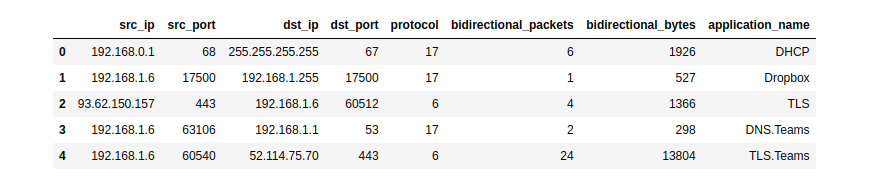
NFStream natively supports Pandas as an export interface.
|
|
|
|
```python
|
|
# See documentation for more details.
|
|
# https://www.nfstream.org/docs/api#pandas-dataframe-conversion
|
|
from nfstream import NFStreamer
|
|
my_dataframe = NFStreamer(source='teams.pcap').to_pandas()[["src_ip",
|
|
"src_port",
|
|
"dst_ip",
|
|
"dst_port",
|
|
"protocol",
|
|
"bidirectional_packets",
|
|
"bidirectional_bytes",
|
|
"application_name"]]
|
|
my_dataframe.head(5)
|
|
```
|
|
|
|
|
|
|
|
### CSV export interface
|
|
|
|
NFStream natively supports CSV file format as an export interface.
|
|
|
|
```python
|
|
# See documentation for more details.
|
|
# https://www.nfstream.org/docs/api#csv-file-conversion
|
|
flows_count = NFStreamer(source='facebook.pcap').to_csv(path=None,
|
|
columns_to_anonymize=(),
|
|
flows_per_file=0,
|
|
rotate_files=0)
|
|
```
|
|
|
|
### Extending NFStream
|
|
|
|
Didn't find a specific flow feature? add a plugin to **NFStream** in a few lines:
|
|
|
|
```python
|
|
from nfstream import NFPlugin
|
|
|
|
class MyCustomPktSizeFeature(NFPlugin):
|
|
def on_init(self, packet, flow):
|
|
# flow creation with the first packet
|
|
if packet.raw_size == self.custom_size:
|
|
flow.udps.packet_with_custom_size = 1
|
|
else:
|
|
flow.udps.packet_with_custom_size = 0
|
|
|
|
def on_update(self, packet, flow):
|
|
# flow update with each packet belonging to the flow
|
|
if packet.raw_size == self.custom_size:
|
|
flow.udps.packet_with_custom_size += 1
|
|
|
|
|
|
extended_streamer = NFStreamer(source='facebook.pcap',
|
|
udps=MyCustomPktSizeFeature(custom_size=555))
|
|
|
|
for flow in extended_streamer:
|
|
# see your dynamically created metric in generated flows
|
|
print(flow.udps.packet_with_custom_size)
|
|
```
|
|
|
|
### Machine Learning models training and deployment
|
|
|
|
The following simplistic example demonstrates how to train and deploy a machine-learning approach for traffic
|
|
flow categorization.
|
|
We want to run a classification of Social Network category flows based on bidirectional_packets and bidirectional_bytes
|
|
as input features. For the sake of brevity, we decide to predict only at the flow expiration stage.
|
|
|
|
#### Training the model
|
|
|
|
```python
|
|
from nfstream import NFPlugin, NFStreamer
|
|
import numpy
|
|
from sklearn.ensemble import RandomForestClassifier
|
|
|
|
df = NFStreamer(source="training_traffic.pcap").to_pandas()
|
|
X = df[["bidirectional_packets", "bidirectional_bytes"]]
|
|
y = df["application_category_name"].apply(lambda x: 1 if 'SocialNetwork' in x else 0)
|
|
model = RandomForestClassifier()
|
|
model.fit(X, y)
|
|
```
|
|
|
|
#### ML powered streamer on live traffic
|
|
|
|
```python
|
|
class ModelPrediction(NFPlugin):
|
|
def on_init(self, packet, flow):
|
|
flow.udps.model_prediction = 0
|
|
def on_expire(self, flow):
|
|
# You can do the same in on_update entrypoint and force expiration with custom id.
|
|
to_predict = numpy.array([flow.bidirectional_packets,
|
|
flow.bidirectional_bytes]).reshape((1,-1))
|
|
flow.udps.model_prediction = self.my_model.predict(to_predict)
|
|
|
|
ml_streamer = NFStreamer(source="eth0", udps=ModelPrediction(my_model=model))
|
|
for flow in ml_streamer:
|
|
print(flow.udps.model_prediction)
|
|
```
|
|
|
|
More NFPlugin examples and details are provided in the official [**documentation**][documentation]. You can also test
|
|
NFStream without installation using our [**live demo notebook**][demo].
|
|
|
|
## Building from sources ![l] ![m] ![w]
|
|
|
|
To build **NFStream** from sources, please read the [**installation guide**][install] provided in the official
|
|
documentation.
|
|
|
|
## Contributing
|
|
|
|
Please read [**Contributing**][contribute] for details on our code of conduct and the process for submitting pull
|
|
requests to us.
|
|
|
|
## Ethics
|
|
|
|
**NFStream** is intended for network data research and forensics. Researchers and network data scientists can use this
|
|
framework to build reliable datasets and train and evaluate network-applied machine learning models.
|
|
As with any packet monitoring tool, **NFStream** could be misused. **Do not run it on any network that you do not own or
|
|
administrate**.
|
|
|
|
## Credits
|
|
|
|
### Citation
|
|
|
|
[**NFStream paper**][doi] is published in [**Computer Networks (COMNET)**][comnet]. If you use NFStream in a scientific
|
|
publication, we would appreciate citations to the following article:
|
|
|
|
``` latex
|
|
@article{AOUINI2022108719,
|
|
title = {NFStream: A flexible network data analysis framework},
|
|
author = {Aouini, Zied and Pekar, Adrian},
|
|
doi = {10.1016/j.comnet.2021.108719},
|
|
issn = {1389-1286},
|
|
journal = {Computer Networks},
|
|
pages = {108719},
|
|
year = {2022},
|
|
publisher = {Elsevier},
|
|
volume = {204},
|
|
url = {https://www.sciencedirect.com/science/article/pii/S1389128621005739}
|
|
}
|
|
```
|
|
|
|
### Authors
|
|
|
|
The following people contributed to NFStream:
|
|
|
|
* [**Zied Aouini**](mailto:aouinizied@gmail.com): Creator and core developer.
|
|
* [**Adrian Pekar**](mailto:adrian.pekar@gmail.com): Co-creator and core developer.
|
|
* [**Romain Picard**](mailto:romain.picard@oakbits.com): MDNS and DHCP plugins implementation.
|
|
* [**Radion Bikmukhamedov**](mailto:radion.bikmukhamedov@pm.me): Initial work on SPLT analysis NFPlugin.
|
|
* [**Jorge Casajús-Setién**](mailto:jcasajus@titaniumindustrialsecurity.com): JA4 signature plugin implementation.
|
|
|
|
### Supporting organizations
|
|
|
|
The following organizations supported NFStream:
|
|
|
|
* [**SoftAtHome**](https://www.softathome.com/): Supporter of NFStream development.
|
|
* [**Technical University of Košice**](https://www.tuke.sk/): Hardware and infrastructure for datasets generation and
|
|
storage.
|
|
* [**ntop**](https://www.ntop.org/): Technical support of [**nDPI**][ndpi] integration.
|
|
* [**The Nmap Project**](https://nmap.org): Technical support of [**Npcap**][npcap] integration
|
|
(NPCAP OEM installer on Windows CI).
|
|
* [**Google OSS Fuzz**](https://google.github.io/oss-fuzz/): Continious fuzzing
|
|
testing support of NFStream project.
|
|
|
|
[![sah]](https://www.softathome.com/) [![tuke]](https://www.tuke.sk/) [![ntop]](https://www.ntop.org/) [![nmap]](https://nmap.org/) [![google]](https://google.github.io/oss-fuzz/)
|
|
|
|
## Publications that use NFStream
|
|
|
|
More than [**100 research papers**](https://scholar.google.com/scholar?hl=en&as_sdt=2005&sciodt=0,5&cites=14084093141225707606&scipsc=) have already used NFStream as part of their processing pipelines.
|
|
|
|
## License
|
|
|
|
This project is licensed under the LGPLv3 License - see the [**License**][license] file for details
|
|
|
|
[license]: https://github.com/nfstream/nfstream/blob/master/LICENSE
|
|
[contribute]: https://nfstream.org/docs/community
|
|
[documentation]: https://nfstream.org/
|
|
[ndpi]: https://github.com/ntop/nDPI
|
|
[npcap]: https://npcap.org
|
|
[nfplugin]: https://nfstream.org/docs/api#nfplugin
|
|
[reliable]: http://people.ac.upc.edu/pbarlet/papers/ground-truth.pam2014.pdf
|
|
[repo]: https://nfstream.org/
|
|
[demo]: https://mybinder.org/v2/gh/nfstream/nfstream/master?filepath=demo_notebook.ipynb
|
|
[pypy]: https://www.pypy.org/
|
|
[cffi]: https://cffi.readthedocs.io/en/latest/goals.html
|
|
[sah]:https://raw.githubusercontent.com/nfstream/nfstream/master/assets/sah_logo.png?raw=true
|
|
[tuke]:https://raw.githubusercontent.com/nfstream/nfstream/master/assets/tuke_logo.png?raw=true
|
|
[ntop]:https://raw.githubusercontent.com/nfstream/nfstream/master/assets/ntop_logo.png?raw=true
|
|
[nmap]:https://raw.githubusercontent.com/nfstream/nfstream/master/assets/nmap_logo.png?raw=true
|
|
[google]:https://raw.githubusercontent.com/nfstream/nfstream/master/assets/google_logo.png?raw=true
|
|
[l]:https://github.com/ryanoasis/nerd-fonts/wiki/screenshots/v1.0.x/linux-pass-sm.png
|
|
[m]:https://github.com/ryanoasis/nerd-fonts/wiki/screenshots/v1.0.x/mac-pass-sm.png
|
|
[w]:https://github.com/ryanoasis/nerd-fonts/wiki/screenshots/v1.0.x/windows-pass-sm.png
|
|
[install]: https://www.nfstream.org/docs/#building-nfstream-from-sources
|
|
[doi]: https://doi.org/10.1016/j.comnet.2021.108719
|
|
[comnet]: https://www.sciencedirect.com/journal/computer-networks/vol/204/suppl/C
|
|
[packet]: https://manned.org/packet.7
|