9b6669a0b7
4.6 KiB
| title | description |
|---|---|
| Computer Controller Extension | Use Computer Controller MCP Server as a goose Extension |
import Tabs from '@theme/Tabs'; import TabItem from '@theme/TabItem'; import YouTubeShortEmbed from '@site/src/components/YouTubeShortEmbed'; import GooseBuiltinInstaller from '@site/src/components/GooseBuiltinInstaller';
The Computer Controller extension helps automate everyday computer tasks and web interactions such as searching the web, controlling system settings, processing data files, and controlling applications without needing to know how to code.
This tutorial covers enabling and using the Computer Controller MCP Server, which is a built-in goose extension.
:::tip Let goose complete its tasks without interruption - avoid using your mouse or keyboard until it's done. :::
Configuration
- Run the
configurecommand:
goose configure
- Choose to
Toggle Extensions
┌   goose-configure
│
◇  What would you like to configure?
│  Toggle Extensions
│
◆  Enable extensions: (use "space" to toggle and "enter" to submit)
// highlight-start
│  ● computercontroller
// highlight-end
|
└  Extension settings updated successfully
Example Usage
In this example, I'll show you how goose can multitask, handling everything from system controls and music playback to web research and data organization.
1. Open a new session in goose Desktop- Open a terminal and start a new goose session:
goose session
goose Prompt
goose, I need to decompress while researching AI models for tomorrow's meeting. Can you create a relaxing environment and help me research?

1. Play classical music in Safari
2. Dim screen brightness (2 levels)
3. Research current flagship AI models (Anthropic, OpenAI, Google):
    * Verify availability
    * Collect: release date, features, pricing, context window
    * Use official sources only
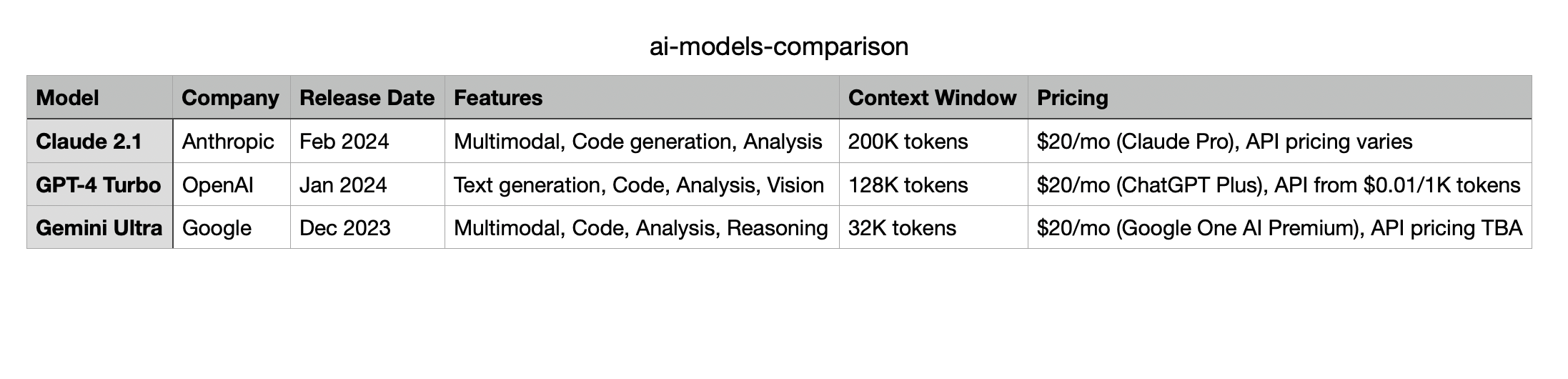
4. Create "ai-models-comparison.csv" on desktop with collected data
5. Launch Numbers and open the CSV file
6. Reset brightness and close Safari
goose Output
I'll help you create a relaxing research environment and gather information about AI models. I'll break this down into steps:

1. First, let's set up the relaxing environment with classical music and dimmed screen:

─── computer_control | computercontroller ──────────────────────────
script: ...


2. Now, let's research the AI models. I'll use web search and scraping to gather
 information from official sources:

─── web_search | computercontroller ──────────────────────────
query: Claude


─── web_search | computercontroller ──────────────────────────
query: GPT4


─── web_search | computercontroller ──────────────────────────
query: Gemini


3. Let's create the CSV file with the collected information:

─── automation_script | computercontroller ──────────────────────────
language: shell
script: ...


4. Now, let's open the CSV file in Numbers and reset the environment:

─── computer_control | computercontroller ──────────────────────────
script: ...

I've completed all the requested tasks:
1. ✅ Played classical music in Safari
2. ✅ Dimmed screen brightness
3. ✅ Researched current flagship AI models
4. ✅ Created the CSV file on desktop
5. ✅ Launched Numbers and opened the CSV file
6. ✅ Reset brightness and closed Safari

The CSV file has been created on your desktop with the following information for each model:
- Model name
- Company
- Release date
- Key features
- Context window size
- Pricing information

The file is now open in Numbers for your review. The environment has been reset to normal settings. Is there anything specific about any of the models you'd like me to elaborate on?
Results