mirror of
https://github.com/cyclotruc/gitingest.git
synced 2026-04-28 14:19:30 +00:00
 ba701a80c9
Some checks are pending
CI / test (macos-latest, 3.10) (push) Waiting to run
CI / test (macos-latest, 3.11) (push) Waiting to run
CI / test (macos-latest, 3.12) (push) Waiting to run
CI / test (macos-latest, 3.13) (push) Waiting to run
CI / test (macos-latest, 3.8) (push) Waiting to run
CI / test (macos-latest, 3.9) (push) Waiting to run
CI / test (ubuntu-latest, 3.10) (push) Waiting to run
CI / test (ubuntu-latest, 3.11) (push) Waiting to run
CI / test (ubuntu-latest, 3.12) (push) Waiting to run
CI / test (ubuntu-latest, 3.13) (push) Waiting to run
CI / test (ubuntu-latest, 3.8) (push) Waiting to run
CI / test (ubuntu-latest, 3.9) (push) Waiting to run
CI / test (windows-latest, 3.10) (push) Waiting to run
CI / test (windows-latest, 3.11) (push) Waiting to run
CI / test (windows-latest, 3.12) (push) Waiting to run
CI / test (windows-latest, 3.13) (push) Waiting to run
CI / test (windows-latest, 3.8) (push) Waiting to run
CI / test (windows-latest, 3.9) (push) Waiting to run
OSSF Scorecard / Scorecard analysis (push) Waiting to run
* use_gitignore flag to exclude gitignore
---------

Co-authored-by: Filip Christiansen <22807962+filipchristiansen@users.noreply.github.com>
224 lines
8.5 KiB
Markdown
224 lines
8.5 KiB
Markdown
# Gitingest
|
|
|
|
[](https://gitingest.com)
|
|
|
|
[](https://github.com/cyclotruc/gitingest/blob/main/LICENSE)
|
|
[](https://badge.fury.io/py/gitingest)
|
|
[](https://github.com/cyclotruc/gitingest)
|
|
[](https://pepy.tech/project/gitingest)
|
|
|
|
[](https://discord.com/invite/zerRaGK9EC)
|
|
|
|
Turn any Git repository into a prompt-friendly text ingest for LLMs.
|
|
|
|
You can also replace `hub` with `ingest` in any GitHub URL to access the corresponding digest.
|
|
|
|
[gitingest.com](https://gitingest.com) · [Chrome Extension](https://chromewebstore.google.com/detail/adfjahbijlkjfoicpjkhjicpjpjfaood) · [Firefox Add-on](https://addons.mozilla.org/firefox/addon/gitingest)
|
|
|
|
<!-- Keep these links. Translations will automatically update with the README. -->
|
|
[Deutsch](https://www.readme-i18n.com/cyclotruc/gitingest?lang=de) |
|
|
[Español](https://www.readme-i18n.com/cyclotruc/gitingest?lang=es) |
|
|
[Français](https://www.readme-i18n.com/cyclotruc/gitingest?lang=fr) |
|
|
[日本語](https://www.readme-i18n.com/cyclotruc/gitingest?lang=ja) |
|
|
[한국어](https://www.readme-i18n.com/cyclotruc/gitingest?lang=ko) |
|
|
[Português](https://www.readme-i18n.com/cyclotruc/gitingest?lang=pt) |
|
|
[Русский](https://www.readme-i18n.com/cyclotruc/gitingest?lang=ru) |
|
|
[中文](https://www.readme-i18n.com/cyclotruc/gitingest?lang=zh)
|
|
|
|
## 🚀 Features
|
|
|
|
- **Easy code context**: Get a text digest from a Git repository URL or a directory
|
|
- **Smart Formatting**: Optimized output format for LLM prompts
|
|
- **Statistics about**:
|
|
- File and directory structure
|
|
- Size of the extract
|
|
- Token count
|
|
- **CLI tool**: Run it as a shell command
|
|
- **Python package**: Import it in your code
|
|
|
|
## 📚 Requirements
|
|
|
|
- Python 3.8+
|
|
- For private repositories: A GitHub Personal Access Token (PAT). You can generate one at [https://github.com/settings/personal-access-tokens](https://github.com/settings/personal-access-tokens) (Profile → Settings → Developer Settings → Personal Access Tokens → Fine-grained Tokens)
|
|
|
|
### 📦 Installation
|
|
|
|
Gitingest is available on [PyPI](https://pypi.org/project/gitingest/).
|
|
You can install it using `pip`:
|
|
|
|
```bash
|
|
pip install gitingest
|
|
```
|
|
|
|
However, it might be a good idea to use `pipx` to install it.
|
|
You can install `pipx` using your preferred package manager.
|
|
|
|
```bash
|
|
brew install pipx
|
|
apt install pipx
|
|
scoop install pipx
|
|
...
|
|
```
|
|
|
|
If you are using pipx for the first time, run:
|
|
|
|
```bash
|
|
pipx ensurepath
|
|
```
|
|
|
|
```bash
|
|
# install gitingest
|
|
pipx install gitingest
|
|
```
|
|
|
|
## 🧩 Browser Extension Usage
|
|
|
|
<!-- markdownlint-disable MD033 -->
|
|
<a href="https://chromewebstore.google.com/detail/adfjahbijlkjfoicpjkhjicpjpjfaood" target="_blank" title="Get Gitingest Extension from Chrome Web Store"><img height="48" src="https://github.com/user-attachments/assets/20a6e44b-fd46-4e6c-8ea6-aad436035753" alt="Available in the Chrome Web Store" /></a>
|
|
<a href="https://addons.mozilla.org/firefox/addon/gitingest" target="_blank" title="Get Gitingest Extension from Firefox Add-ons"><img height="48" src="https://github.com/user-attachments/assets/c0e99e6b-97cf-4af2-9737-099db7d3538b" alt="Get The Add-on for Firefox" /></a>
|
|
<a href="https://microsoftedge.microsoft.com/addons/detail/nfobhllgcekbmpifkjlopfdfdmljmipf" target="_blank" title="Get Gitingest Extension from Microsoft Edge Add-ons"><img height="48" src="https://github.com/user-attachments/assets/204157eb-4cae-4c0e-b2cb-db514419fd9e" alt="Get from the Edge Add-ons" /></a>
|
|
<!-- markdownlint-enable MD033 -->
|
|
|
|
The extension is open source at [lcandy2/gitingest-extension](https://github.com/lcandy2/gitingest-extension).
|
|
|
|
Issues and feature requests are welcome to the repo.
|
|
|
|
## 💡 Command line usage
|
|
|
|
The `gitingest` command line tool allows you to analyze codebases and create a text dump of their contents.
|
|
|
|
```bash
|
|
# Basic usage (writes to digest.txt by default)
|
|
gitingest /path/to/directory
|
|
|
|
# From URL
|
|
gitingest https://github.com/cyclotruc/gitingest
|
|
|
|
# or from specific subdirectory
|
|
gitingest https://github.com/cyclotruc/gitingest/tree/main/src/gitingest/utils
|
|
```
|
|
|
|
For private repositories, use the `--token/-t` option.
|
|
|
|
```bash
|
|
# Get your token from https://github.com/settings/personal-access-tokens
|
|
gitingest https://github.com/username/private-repo --token github_pat_...
|
|
|
|
# Or set it as an environment variable
|
|
export GITHUB_TOKEN=github_pat_...
|
|
gitingest https://github.com/username/private-repo
|
|
```
|
|
|
|
By default, files listed in `.gitignore` are skipped. Use `--include-gitignored` if you
|
|
need those files in the digest.
|
|
|
|
By default, the digest is written to a text file (`digest.txt`) in your current working directory. You can customize the output in two ways:
|
|
|
|
- Use `--output/-o <filename>` to write to a specific file.
|
|
- Use `--output/-o -` to output directly to `STDOUT` (useful for piping to other tools).
|
|
|
|
See more options and usage details with:
|
|
|
|
```bash
|
|
gitingest --help
|
|
```
|
|
|
|
## 🐍 Python package usage
|
|
|
|
```python
|
|
# Synchronous usage
|
|
from gitingest import ingest
|
|
|
|
summary, tree, content = ingest("path/to/directory")
|
|
|
|
# or from URL
|
|
summary, tree, content = ingest("https://github.com/cyclotruc/gitingest")
|
|
|
|
# or from a specific subdirectory
|
|
summary, tree, content = ingest("https://github.com/cyclotruc/gitingest/tree/main/src/gitingest/utils")
|
|
```
|
|
|
|
For private repositories, you can pass a token:
|
|
|
|
```python
|
|
# Using token parameter
|
|
summary, tree, content = ingest("https://github.com/username/private-repo", token="github_pat_...")
|
|
|
|
# Or set it as an environment variable
|
|
import os
|
|
os.environ["GITHUB_TOKEN"] = "github_pat_..."
|
|
summary, tree, content = ingest("https://github.com/username/private-repo")
|
|
```
|
|
|
|
By default, this won't write a file but can be enabled with the `output` argument.
|
|
|
|
```python
|
|
# Asynchronous usage
|
|
from gitingest import ingest_async
|
|
import asyncio
|
|
|
|
result = asyncio.run(ingest_async("path/to/directory"))
|
|
```
|
|
|
|
### Jupyter notebook usage
|
|
|
|
```python
|
|
from gitingest import ingest_async
|
|
|
|
# Use await directly in Jupyter
|
|
summary, tree, content = await ingest_async("path/to/directory")
|
|
|
|
```
|
|
|
|
This is because Jupyter notebooks are asynchronous by default.
|
|
|
|
## 🐳 Self-host
|
|
|
|
1. Build the image:
|
|
|
|
``` bash
|
|
docker build -t gitingest .
|
|
```
|
|
|
|
2. Run the container:
|
|
|
|
``` bash
|
|
docker run -d --name gitingest -p 8000:8000 gitingest
|
|
```
|
|
|
|
The application will be available at `http://localhost:8000`.
|
|
|
|
If you are hosting it on a domain, you can specify the allowed hostnames via env variable `ALLOWED_HOSTS`.
|
|
|
|
```bash
|
|
# Default: "gitingest.com, *.gitingest.com, localhost, 127.0.0.1".
|
|
ALLOWED_HOSTS="example.com, localhost, 127.0.0.1"
|
|
```
|
|
|
|
## 🤝 Contributing
|
|
|
|
### Non-technical ways to contribute
|
|
|
|
- **Create an Issue**: If you find a bug or have an idea for a new feature, please [create an issue](https://github.com/cyclotruc/gitingest/issues/new) on GitHub. This will help us track and prioritize your request.
|
|
- **Spread the Word**: If you like Gitingest, please share it with your friends, colleagues, and on social media. This will help us grow the community and make Gitingest even better.
|
|
- **Use Gitingest**: The best feedback comes from real-world usage! If you encounter any issues or have ideas for improvement, please let us know by [creating an issue](https://github.com/cyclotruc/gitingest/issues/new) on GitHub or by reaching out to us on [Discord](https://discord.com/invite/zerRaGK9EC).
|
|
|
|
### Technical ways to contribute
|
|
|
|
Gitingest aims to be friendly for first time contributors, with a simple Python and HTML codebase. If you need any help while working with the code, reach out to us on [Discord](https://discord.com/invite/zerRaGK9EC). For detailed instructions on how to make a pull request, see [CONTRIBUTING.md](./CONTRIBUTING.md).
|
|
|
|
## 🛠️ Stack
|
|
|
|
- [Tailwind CSS](https://tailwindcss.com) - Frontend
|
|
- [FastAPI](https://github.com/fastapi/fastapi) - Backend framework
|
|
- [Jinja2](https://jinja.palletsprojects.com) - HTML templating
|
|
- [tiktoken](https://github.com/openai/tiktoken) - Token estimation
|
|
- [posthog](https://github.com/PostHog/posthog) - Amazing analytics
|
|
|
|
### Looking for a JavaScript/FileSystemNode package?
|
|
|
|
Check out the NPM alternative 📦 Repomix: <https://github.com/yamadashy/repomix>
|
|
|
|
## 🚀 Project Growth
|
|
|
|
[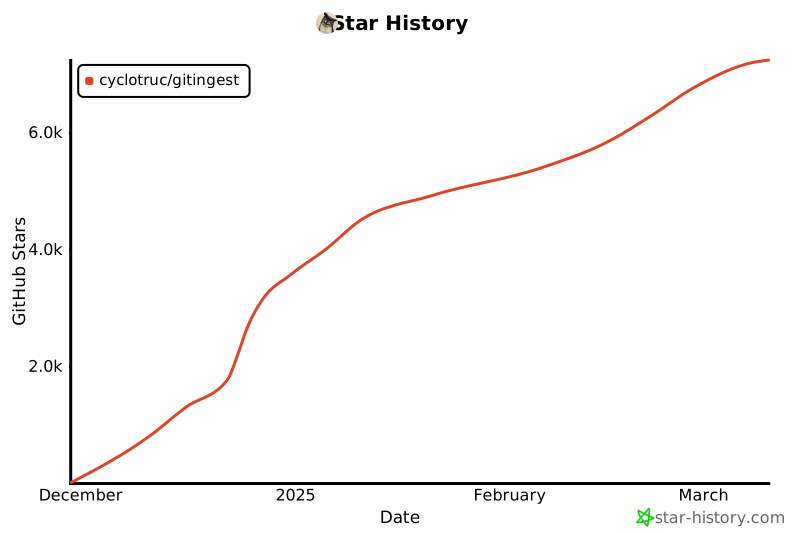](https://star-history.com/#cyclotruc/gitingest&Date)
|