
6.3 KiB

CodeBurn
See where your AI coding tokens go.




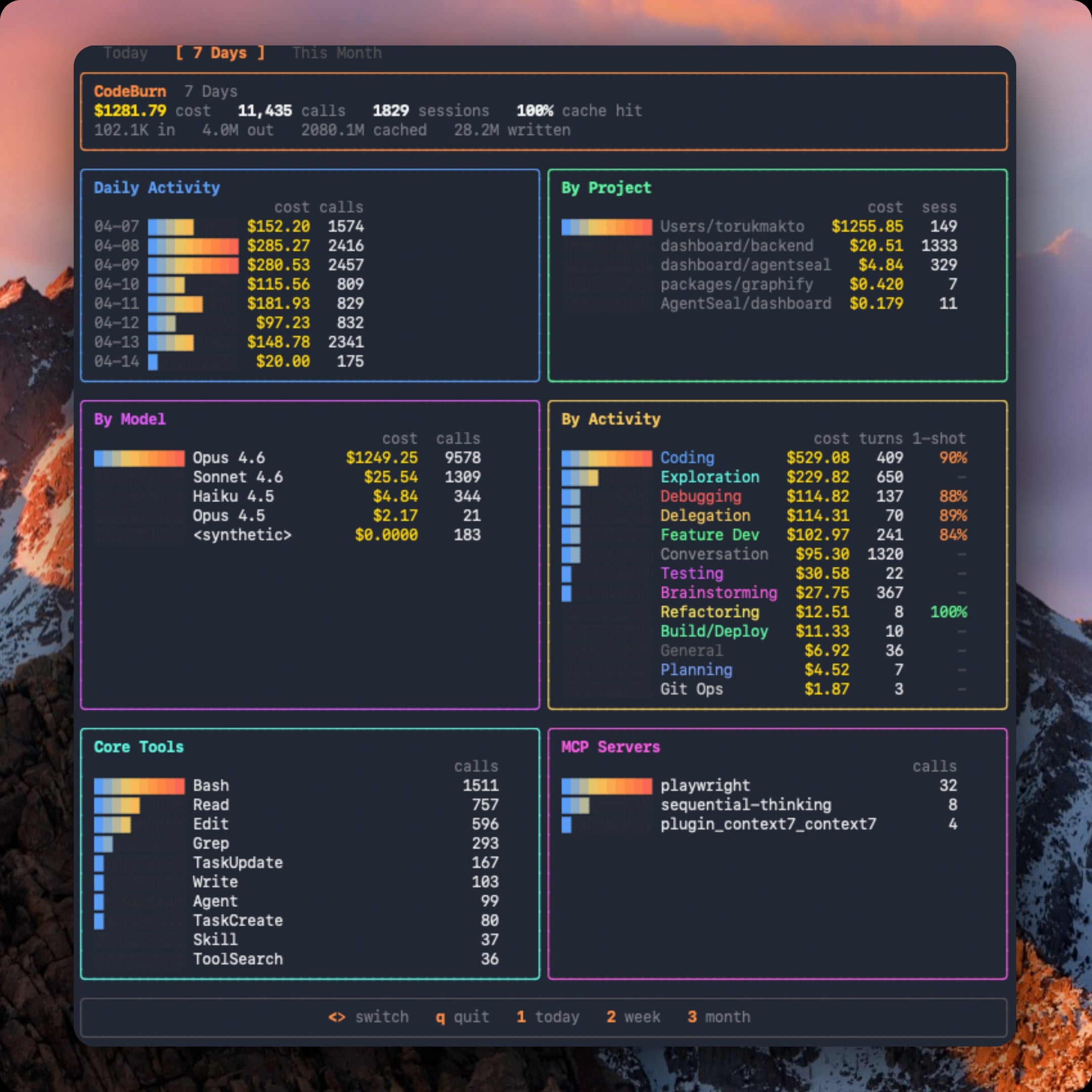
By task type, tool, model, MCP server, and project. Tracks one-shot success rate per activity type so you can see where the AI nails it first try vs. burns tokens on edit/test/fix retries. Interactive TUI dashboard with gradient charts, responsive panels, and keyboard navigation. macOS menu bar widget via SwiftBar. CSV/JSON export.
Works by reading Claude Code session transcripts directly from disk. No wrapper, no proxy, no API keys. Pricing from LiteLLM (auto-cached, all models supported).
Install
npm install -g codeburn
Or run without installing:
npx codeburn
Requirements
- Node.js 20+
- Claude Code (reads
~/.claude/projects/session data)
Usage
codeburn                    # interactive dashboard (default: 7 days)
codeburn today              # today's usage
codeburn month              # this month's usage
codeburn report -p month    # same as above
codeburn status             # compact one-liner (today + month)
codeburn status --format json
codeburn export             # CSV with today, 7 days, 30 days
codeburn export -f json     # JSON export
Arrow keys switch between Today / 7 Days / Month. Press q to quit, 1 2 3 as shortcuts.
Menu Bar
codeburn install-menubar    # install SwiftBar/xbar plugin
codeburn uninstall-menubar  # remove it
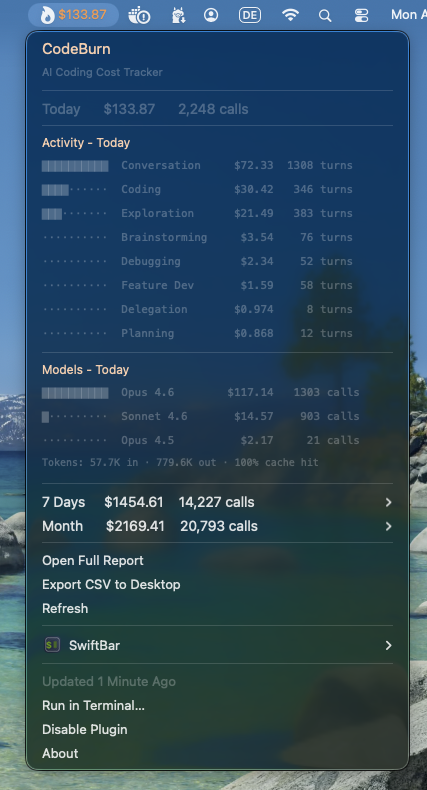
Requires SwiftBar (brew install --cask swiftbar). Shows today's cost in the menu bar with a flame icon. Dropdown shows activity breakdown, model costs, and token stats for today, 7 days, and month. Refreshes every 5 minutes.
Currency
By default, costs are shown in USD. To display in a different currency:
codeburn config currency GBP     # set to British Pounds
codeburn config currency AUD     # set to Australian Dollars
codeburn config currency JPY     # set to Japanese Yen
codeburn config currency         # show current setting
codeburn config currency --reset # back to USD
Any ISO 4217 currency code is supported (162 currencies). Exchange rates are fetched from Frankfurter (European Central Bank data, free, no API key) and cached for 24 hours at ~/.cache/codeburn/. Config is stored at ~/.config/codeburn/config.json.
The currency setting applies everywhere: dashboard, status bar, menu bar widget, CSV/JSON exports, and JSON API output.
The menu bar widget also includes a currency picker with 16 common currencies. For any currency not listed in the menu bar, use the CLI command above.
What it tracks
13 task categories classified from tool usage patterns and user message keywords. No LLM calls, fully deterministic.
| Category | What triggers it |
|---|---|
| Coding | Edit, Write tools |
| Debugging | Error/fix keywords + tool usage |
| Feature Dev | "add", "create", "implement" keywords |
| Refactoring | "refactor", "rename", "simplify" |
| Testing | pytest, vitest, jest in Bash |
| Exploration | Read, Grep, WebSearch without edits |
| Planning | EnterPlanMode, TaskCreate tools |
| Delegation | Agent tool spawns |
| Git Ops | git push/commit/merge in Bash |
| Build/Deploy | npm build, docker, pm2 |
| Brainstorming | "brainstorm", "what if", "design" |
| Conversation | No tools, pure text exchange |
| General | Skill tool, uncategorized |
Breakdowns: daily cost chart, per-project, per-model (Opus/Sonnet/Haiku/GPT-4o/Gemini), per-activity with one-shot rate, core tools, MCP servers.
One-shot rate: For categories that involve code edits, CodeBurn detects edit/test/fix retry cycles (Edit -> Bash -> Edit patterns). The 1-shot column shows the percentage of edit turns that succeeded without retries. Coding at 90% means the AI got it right first try 9 out of 10 times.
Pricing: Fetched from LiteLLM model prices (auto-cached 24h at ~/.cache/codeburn/). Handles input, output, cache write, cache read, and web search costs. Fast mode multiplier for Claude. Fallback to hardcoded prices if fetch fails.
How it reads data
Claude Code stores session transcripts as JSONL at ~/.claude/projects/<sanitized-path>/<session-id>.jsonl. Each assistant entry contains model name, token usage (input, output, cache read, cache write), tool_use blocks, and timestamps.
CodeBurn reads these files, deduplicates messages by API message ID (prevents double-counting across sessions), filters by date range per entry (not per session), and classifies each turn.
Project structure
src/
  cli.ts          Commander.js entry point
  dashboard.tsx   Ink TUI (React for terminals)
  parser.ts       JSONL reader, dedup, date filter
  models.ts       LiteLLM pricing, cost calculation
  classifier.ts   13-category task classifier
  types.ts        Type definitions
  format.ts       Text rendering (status bar)
  menubar.ts      SwiftBar plugin generator
  export.ts       CSV/JSON multi-period export
  config.ts       Config file management (~/.config/codeburn/)
  currency.ts     Currency conversion, exchange rates, Intl formatting
License
MIT
Credits
Inspired by ccusage. Pricing data from LiteLLM.
Built by AgentSeal.