mirror of
https://github.com/ChrispyBacon-dev/DockFlare.git
synced 2026-05-01 21:20:58 +00:00

188 lines
No EOL
8.6 KiB
Markdown
188 lines
No EOL
8.6 KiB
Markdown
<p align="center">
|
|
<a href="https://dockflare.app" title="Now you're thinking with tunnels">
|
|
<img src="images/bannertr.png" width="500px" alt="DockFlare Banner" />
|
|
</a>
|
|
</p>
|
|
|
|
<h1 align="center">Automate Cloudflare Tunnels with Docker Labels</h1>
|
|
|
|
<p align="center">
|
|
<em>Go from container to publicly-secured URL in seconds. No manual Cloudflare dashboard configuration required.</em>
|
|
</p>
|
|
<p align="center">
|
|
<a href="https://dockflare.app/podcast" target="_blank" rel="noopener noreferrer">
|
|
<img src="https://img.shields.io/badge/DockFlare-Podcast-20a6e2?style=for-the-badge&logo=soundcloud" alt="Listen to the DockFlare Podcast">
|
|
</a>
|
|
</p>
|
|
<p align="center">
|
|
<a href="https://github.com/ChrispyBacon-dev/DockFlare/releases/tag/v2.1.7"><img src="https://img.shields.io/badge/Release-v2.1.7-blue.svg?style=for-the-badge" alt="Release"></a>
|
|
<a href="https://hub.docker.com/r/alplat/dockflare"><img src="https://img.shields.io/docker/pulls/alplat/dockflare?style=for-the-badge" alt="Docker Pulls"></a>
|
|
<a href="https://www.python.org/"><img src="https://img.shields.io/badge/Made%20with-Python-1f425f.svg?style=for-the-badge" alt="Python"></a>
|
|
<a href="https://github.com/ChrispyBacon-dev/DockFlare/blob/main/LICENSE.MD"><img src="https://img.shields.io/badge/License-GPL--3.0-blue.svg?style=for-the-badge" alt="License"></a>
|
|
<a href="#"><img src="https://img.shields.io/badge/Swiss_Made-FFFFFF?style=for-the-badge&labelColor=FF0000&logo=data:image/svg%2bxml;base64,PHN2ZyB2ZXJzaW9uPSIxIiB3aWR0aD0iNTEyIiBoZWlnaHQ9IjUxMiIgdmlld0JveD0iMCAwIDMyIDMyIiB4bWxucz0iaHR0cDovL3d3dy53My5vcmcvMjAwMC9zdmciPgogIDxyZWN0IHdpZHRoPSIzMiIgaGVpZHRoPSIzMiIgZmlsbD0idHJhbnNwYXJlbnQiLz4KICA8cGF0aCBkPSJtMTMgNmg2djdoN3Y2aC03djdoLTZ2LTdoLTd2LTZoN3oiIGZpbGw9IiNmZmYiLz4KPC9zdmc+" alt="Swiss Made"></a>
|
|
</p>
|
|
|
|
<p align="center">
|
|
<a href="https://dockflare.app">🌐 Website</a> ·
|
|
<a href="https://dockflare.app/docs">📚 Documentation</a> ·
|
|
<a href="https://github.com/ChrispyBacon-dev/DockFlare/issues">🐛 Report a Bug</a> ·
|
|
<a href="https://ko-fi.com/chrispybacon">❤️ Sponsor</a>
|
|
</p>
|
|
|
|
<p align="center">
|
|
<img src="images/status_web.png" alt="DockFlare Dashboard" style="border-radius: 8px; box-shadow: 0 20px 25px -5px rgba(0, 0, 0, 0.1), 0 10px 10px -5px rgba(0, 0, 0, 0.04);" />
|
|
</p>
|
|
|
|
---
|
|
|
|
## Introduction
|
|
|
|
DockFlare is a powerful, self-hosted ingress controller that simplifies Cloudflare Tunnel and Zero Trust management. It uses Docker labels for automated configuration while providing a robust web UI for manual service definitions and policy overrides.
|
|
|
|
It enables secure, hassle-free public access to both Dockerized and non-Dockerized applications with minimal direct interaction with Cloudflare, making it the perfect tool for centralizing and streamlining your access management.
|
|
|
|
### ✨ What's New in DockFlare 2.1: The Usability & Security Update
|
|
|
|
This release overhauls the user experience, focusing on security and ease of use.
|
|
|
|
- **Browser-Based Setup**: Say goodbye to `.env` files! A new "Pre-Flight" wizard guides you through the initial setup in your browser.
|
|
- **Enhanced Security**: The UI is now password-protected. All credentials are encrypted and stored in a secure `dockflare_config.dat` file.
|
|
- **Seamless Migration**: Existing users are automatically guided through a simple migration process to adopt the new security model.
|
|
- **Full UI Configuration**: Core settings can now be modified directly from the UI after setup.
|
|
- **⚠️ Breaking Change**: `.env` files are no longer used for configuration after the initial setup/migration.
|
|
|
|
## Getting Started & Documentation
|
|
|
|
For comprehensive documentation, please refer to the official project website:
|
|
|
|
- **[Quick Start Guide](https://dockflare.app/docs)** - Step-by-step guide to get up and running.
|
|
- **[Label Reference](https://dockflare.app/docs/container-labels)** - Detailed information on all available Docker labels.
|
|
- **[Advanced Configuration](https://dockflare.app/docs/managing-dns-zones)** - Details on multi-zone setups, external mode, and more.
|
|
|
|
### Prerequisites
|
|
|
|
Before you begin, ensure you have the following:
|
|
- Docker & Docker Compose installed.
|
|
- A Cloudflare Account.
|
|
- Your **Cloudflare Account ID**.
|
|
- The **Zone ID** for the domain you wish to use.
|
|
- A **Cloudflare API Token** with the following permissions:
|
|
- `Account:Cloudflare Tunnel:Edit`
|
|
- `Account:Account Settings:Read`
|
|
- `Account:Access: Apps and Policies:Edit`
|
|
- `Zone:Zone:Read`
|
|
- `Zone:DNS:Edit`
|
|
|
|

|
|
|
|
<details>
|
|
<summary>🚀 Quick Start Docker Compose</summary>
|
|
|
|
1. **Create `docker-compose.yml`**:
|
|
```yaml
|
|
version: '3.8'
|
|
services:
|
|
dockflare:
|
|
image: alplat/dockflare:stable
|
|
container_name: dockflare
|
|
restart: unless-stopped
|
|
ports:
|
|
- "5000:5000"
|
|
volumes:
|
|
- /var/run/docker.sock:/var/run/docker.sock:ro
|
|
# This volume is crucial for persisting your encrypted configuration
|
|
- ./dockflare_data:/app/data
|
|
networks:
|
|
- cloudflare-net
|
|
|
|
volumes:
|
|
dockflare_data:
|
|
|
|
networks:
|
|
cloudflare-net:
|
|
name: cloudflare-net
|
|
external: true
|
|
```
|
|
|
|
2. **Run DockFlare**:
|
|
```bash
|
|
docker compose up -d
|
|
```
|
|
|
|
3. **Complete the Pre-Flight Setup**: Open `http://your-server-ip:5000` in your browser. You will be guided through a one-time setup wizard to enter your Cloudflare credentials and create a password for the UI.
|
|
|
|
4. **For Existing Users**: If you are upgrading, DockFlare will detect your old `.env` file and automatically guide you through a quick migration process.
|
|
|
|
</details>
|
|
|
|
## 🏷️ How It Works & Labeling Containers
|
|
|
|
DockFlare's power comes from its flexible, layered approach to configuration.
|
|
|
|
- **Access Groups First (Recommended)**: The easiest and most maintainable way to secure services is to create an **Access Group** in the UI and apply it with a single label.
|
|
- **Individual Labels for One-Offs**: For services that don't fit a group, you can still use individual `dockflare.access.*` labels for initial configuration.
|
|
- **UI for Dynamic Overrides**: The Web UI can override the access policy for any service, whether it was configured by a group or by individual labels. UI changes are persistent and stored in the encrypted `dockflare_config.dat` file.
|
|
|
|
<details>
|
|
<summary>📝 Labeling Your Containers (Examples)</summary>
|
|
|
|
#### 1. Recommended Method: Using an Access Group
|
|
|
|
Assuming you created an Access Group with the ID `nas-family` in the UI:
|
|
|
|
```yaml
|
|
services:
|
|
picoshare:
|
|
image: mtlynch/picoshare
|
|
labels:
|
|
- "dockflare.enable=true"
|
|
- "dockflare.hostname=files.example.com"
|
|
- "dockflare.service=http://picoshare:8080"
|
|
|
|
# Apply the entire policy with one label:
|
|
- "dockflare.access.group=nas-family"
|
|
```
|
|
|
|
#### 2. Alternative Method: Using Individual Labels
|
|
|
|
For a service with a unique, one-off policy:
|
|
|
|
```yaml
|
|
services:
|
|
my-service:
|
|
image: nginx:latest
|
|
labels:
|
|
- "dockflare.enable=true"
|
|
- "dockflare.hostname=my-service.example.com"
|
|
- "dockflare.service=http://my-service:80"
|
|
|
|
# Optional individual labels for a one-off policy
|
|
- "dockflare.access.policy=authenticate"
|
|
- "dockflare.access.allowed_idps=YOUR_IDP_UUID_HERE"
|
|
```
|
|
|
|
</details>
|
|
|
|
<details>
|
|
<summary>🛡️ All Access Policy Labels (for one-off configs)</summary>
|
|
|
|
Use these labels only when **not** using `dockflare.access.group`.
|
|
|
|
| Label | Description | Default | Example |
|
|
| :--- | :--- | :--- | :--- |
|
|
| `dockflare.access.policy` | Type: `bypass` (public app), `authenticate` (IdP login), `default_tld` (inherits from `*.domain.com` policy). If unset, service is public (no Access App). | (None/Public) | `dockflare.access.policy="authenticate"` |
|
|
| `dockflare.access.name` | Custom name for the Cloudflare Access Application. | `DockFlare-{hostname}` | `dockflare.access.name="My Web App Access"` |
|
|
| `dockflare.access.session_duration` | Session duration (e.g., `24h`, `30m`). | `24h` | `dockflare.access.session_duration="1h"` |
|
|
| `dockflare.access.custom_rules` | JSON string array of [Cloudflare Access Policy rules](https://developers.cloudflare.com/api/operations/access-policies-create-an-access-policy). Overrides basic `access.policy` decisions. | (None) | `'...=[{"email":{"email":"user@example.com"},"action":"allow"},{"action":"block"}]'` |
|
|
| ... | *Other `access.*` labels for launcher visibility, IdPs, etc. are also available.* | | |
|
|
|
|
|
|
</details>
|
|
|
|
## License
|
|
|
|
DockFlare is open-source software licensed under the [GPL-3.0 license](LICENSE.MD).
|
|
|
|
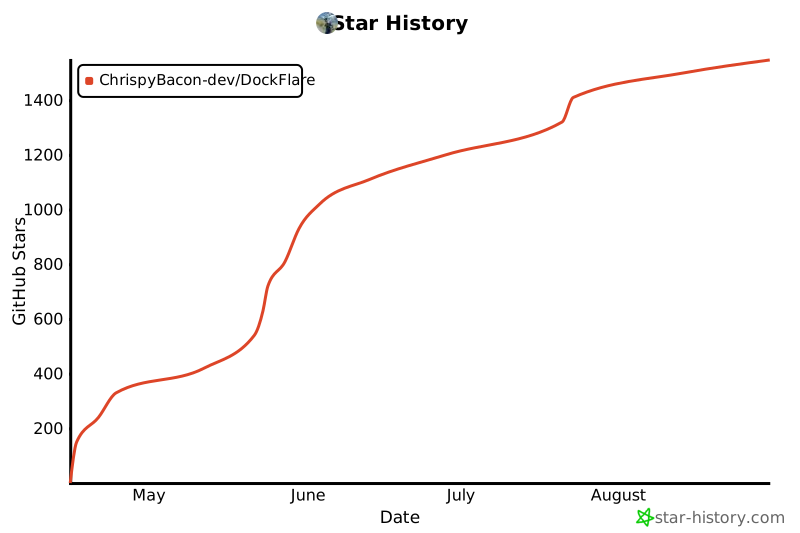
## Star History
|
|
|
|
[](https://www.star-history.com/#ChrispyBacon-dev/DockFlare&Date) |