mirror of
https://github.com/NeuralNomadsAI/CodeNomad.git
synced 2026-07-09 16:00:52 +00:00
 cb3d4841e1
## Summary
Fixes #468 and #470. The quick-start examples crashed on first run
without a password, and the browser self-signed certificate warning was
not documented anywhere a new user would see it.

## Changes
- Add `--password` to all npx quick-start examples (main README + server
README)
- Document the three ways to configure auth: `--password`, env var,
`auth.json`
- Show `auth.json` schema so users understand the expected format
- Add browser warning note to self-signed certificates section with
step-by-step instructions for Chrome/Brave and Firefox
- Mention `--https=false --http=true` as an alternative for local-only
use

## Validation
- Reviewed rendered markdown structure
- Verified auth.json schema matches AuthFile interface in auth-store.ts
186 lines
5.1 KiB
Markdown
186 lines
5.1 KiB
Markdown
# CodeNomad
|
|
|
|
## The AI Coding Cockpit for OpenCode
|
|
|
|
CodeNomad transforms OpenCode from a terminal tool into a **premium desktop workspace** — built for developers who live inside AI coding sessions for hours and need control, speed, and clarity.
|
|
|
|
> OpenCode gives you the engine. CodeNomad gives you the cockpit.
|
|
|
|

|
|
|
|
---
|
|
|
|
## Features
|
|
|
|
- **🚀 Multi-Instance Workspace**
|
|
- **🌐 Remote Access**
|
|
- **🧠 Session Management**
|
|
- **🎙️ Voice Input & Speech**
|
|
- **🌳 Git Worktrees**
|
|
- **💬 Rich Message Experience**
|
|
- **🧩 SideCars**
|
|
- **⌨️ Command Palette**
|
|
- **📁 File System Browser**
|
|
- **🔐 Authentication & Security**
|
|
- **🔔 Notifications**
|
|
- **🎨 Theming**
|
|
- **🌍 Internationalization**
|
|
|
|
---
|
|
|
|
## Getting Started
|
|
|
|
### 🖥️ Desktop App
|
|
|
|
Available as both Electron and Tauri builds — choose based on your preference.
|
|
|
|
Download the latest installer for your platform from [Releases](https://github.com/shantur/CodeNomad/releases).
|
|
|
|
| Platform | Formats |
|
|
|----------|---------|
|
|
| macOS | DMG, ZIP (Universal: Intel + Apple Silicon) |
|
|
| Windows | NSIS Installer, ZIP (x64, ARM64) |
|
|
| Linux | AppImage, deb, tar.gz (x64, ARM64) |
|
|
|
|
### 💻 CodeNomad Server
|
|
|
|
Run as a local server and access via browser. Perfect for remote development.
|
|
|
|
```bash
|
|
npx @neuralnomads/codenomad --password <your-password> --launch
|
|
```
|
|
|
|
> **Authentication required:** The server requires a password on first run. You can pass it via `--password`, the `CODENOMAD_SERVER_PASSWORD` environment variable, or create an `auth.json` file (see [Server Documentation](packages/server/README.md)).
|
|
|
|
> **Self-signed certificate:** On first launch with HTTPS enabled (the default), your browser will show a "Your connection is not private" warning. This is expected — the server generates a local self-signed certificate automatically. Click **Advanced → Proceed to localhost** to continue. For local-only use without the warning, run with `--https=false --http=true`.
|
|
|
|
See [Server Documentation](packages/server/README.md) for flags, TLS, auth, and remote access.
|
|
|
|
### 🧪 Dev Releases
|
|
|
|
Bleeding-edge builds from the `dev` branch:
|
|
|
|
```bash
|
|
npx @neuralnomads/codenomad-dev --password <your-password> --launch
|
|
```
|
|
|
|
---
|
|
|
|
## SideCars
|
|
|
|
SideCars let you open local web tools inside CodeNomad as tabs.
|
|
|
|
<details>
|
|
<summary><strong>Configuration</strong></summary>
|
|
|
|
- **Name**: Display name used in CodeNomad
|
|
- **Port**: Local HTTP or HTTPS service running on `127.0.0.1:<port>`
|
|
- **Base path**: Mounted under `/sidecars/:id`
|
|
- **Prefix mode**:
|
|
- **Preserve prefix** forwards the full `/sidecars/:id/...` path upstream
|
|
- **Strip prefix** removes `/sidecars/:id` before forwarding the request upstream
|
|
|
|
</details>
|
|
|
|
<details>
|
|
<summary><strong>VSCode (OpenVSCode Server)</strong></summary>
|
|
|
|
Run with Docker:
|
|
|
|
```bash
|
|
docker run -it --init -p 8000:3000 -v "${HOME}:${HOME}:cached" -e HOME=${HOME} gitpod/openvscode-server --server-base-path /sidecars/vscode
|
|
```
|
|
|
|
Add SideCar as:
|
|
|
|
- **Name**: `VSCode`
|
|
- **Port**: `http://127.0.0.1:8000`
|
|
- **Base path**: `/sidecars/vscode`
|
|
- **Prefix mode**: `Preserve prefix`
|
|
|
|
</details>
|
|
|
|
<details>
|
|
<summary><strong>Terminal (ttyd)</strong></summary>
|
|
|
|
Run with:
|
|
|
|
```bash
|
|
ttyd --writable zsh
|
|
```
|
|
|
|
Add SideCar as:
|
|
|
|
- **Name**: `Terminal`
|
|
- **Port**: `http://127.0.0.1:7681`
|
|
- **Base path**: `/sidecars/terminal`
|
|
- **Prefix mode**: `Strip prefix`
|
|
|
|
</details>
|
|
|
|
---
|
|
|
|
## Requirements
|
|
|
|
- **[OpenCode CLI](https://opencode.ai)** — must be installed and in your `PATH`
|
|
- **Node.js 18+** — for server mode or building from source
|
|
|
|
---
|
|
|
|
## Development
|
|
|
|
CodeNomad is a monorepo built with:
|
|
|
|
| Package | Description |
|
|
|---------|-------------|
|
|
| **[packages/server](packages/server/README.md)** | Core logic & CLI — workspaces, OpenCode proxy, API, auth, speech |
|
|
| **[packages/ui](packages/ui/README.md)** | SolidJS frontend — reactive, fast, beautiful |
|
|
| **[packages/electron-app](packages/electron-app/README.md)** | Desktop shell — process management, IPC, native dialogs |
|
|
| **[packages/tauri-app](packages/tauri-app)** | Tauri desktop shell (experimental) |
|
|
|
|
### Quick Start
|
|
|
|
```bash
|
|
git clone https://github.com/NeuralNomadsAI/CodeNomad.git
|
|
cd CodeNomad
|
|
npm install
|
|
npm run dev
|
|
```
|
|
|
|
---
|
|
|
|
## Troubleshooting
|
|
|
|
<details>
|
|
<summary><strong>macOS: "CodeNomad.app is damaged and can't be opened"</strong></summary>
|
|
|
|
Gatekeeper flag due to missing notarization. Clear the quarantine attribute:
|
|
|
|
```bash
|
|
xattr -dr com.apple.quarantine /Applications/CodeNomad.app
|
|
```
|
|
|
|
On Intel Macs, also check **System Settings → Privacy & Security** on first launch.
|
|
</details>
|
|
|
|
<details>
|
|
<summary><strong>Linux (Wayland + NVIDIA): Tauri App closes immediately</strong></summary>
|
|
|
|
WebKitGTK DMA-BUF/GBM issue. Run with:
|
|
|
|
```bash
|
|
WEBKIT_DISABLE_DMABUF_RENDERER=1 codenomad
|
|
```
|
|
|
|
See full workaround in the original README.
|
|
</details>
|
|
|
|
---
|
|
|
|
## Community
|
|
|
|
[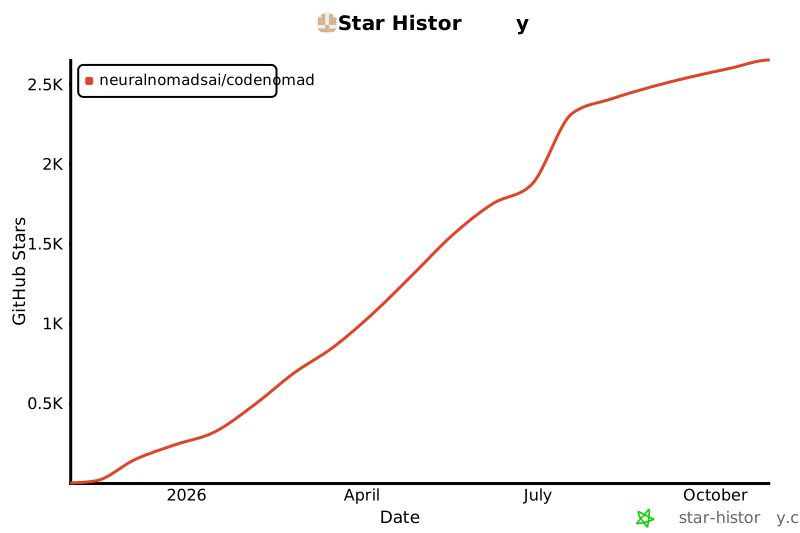](https://star-history.com/#NeuralNomadsAI/CodeNomad&Date)
|
|
|
|
---
|
|
|
|
**Built with ♥ by [Neural Nomads](https://github.com/NeuralNomadsAI)** · [MIT License](LICENSE)
|