mirror of
https://github.com/NeuralNomadsAI/CodeNomad.git
synced 2026-08-21 06:13:26 +00:00
 719dccf007
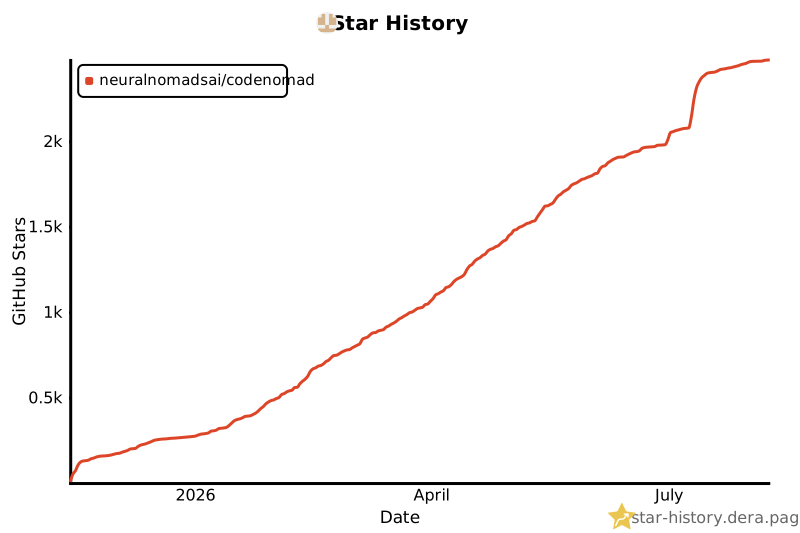
The Star History chart was broken because it depended on the GitHub
stargazer API. Switch it to an alternative provider using the same data
source so the community chart renders correctly. No API token required.

Co-authored-by: OctoBored <212877535+OctoBored@users.noreply.github.com>
188 lines
5.2 KiB
Markdown
188 lines
5.2 KiB
Markdown
# CodeNomad
|
|
|
|
## The AI Coding Cockpit for OpenCode
|
|
|
|
CodeNomad transforms OpenCode from a terminal tool into a **premium desktop workspace** — built for developers who live inside AI coding sessions for hours and need control, speed, and clarity.
|
|
|
|
> OpenCode gives you the engine. CodeNomad gives you the cockpit.
|
|
|
|

|
|
|
|
---
|
|
|
|
## Features
|
|
|
|
- **🚀 Multi-Instance Workspace**
|
|
- **🌐 Remote Access**
|
|
- **🧠 Session Management**
|
|
- **🎙️ Voice Input & Speech**
|
|
- **🌳 Git Worktrees**
|
|
- **💬 Rich Message Experience**
|
|
- **🧩 SideCars**
|
|
- **⌨️ Command Palette**
|
|
- **📁 File System Browser**
|
|
- **🔐 Authentication & Security**
|
|
- **🔔 Notifications**
|
|
- **🎨 Theming**
|
|
- **🌍 Internationalization**
|
|
|
|
---
|
|
|
|
## Getting Started
|
|
|
|
### 🖥️ Desktop App
|
|
|
|
Available as both Electron and Tauri builds — choose based on your preference.
|
|
|
|
Download the latest installer for your platform from [Releases](https://github.com/shantur/CodeNomad/releases).
|
|
|
|
| Platform | Formats |
|
|
|----------|---------|
|
|
| macOS | DMG, ZIP (Universal: Intel + Apple Silicon) |
|
|
| Windows | NSIS Installer, ZIP (x64, ARM64) |
|
|
| Linux | Tauri deb, Electron portable tar.gz (x64) |
|
|
|
|
The Tauri deb is currently built and installation-tested on Ubuntu 24.04. Compatibility with older Debian-based distributions is not yet guaranteed.
|
|
|
|
### 💻 CodeNomad Server
|
|
|
|
Run as a local server and access via browser. Perfect for remote development.
|
|
|
|
```bash
|
|
npx @neuralnomads/codenomad --password <your-password> --launch
|
|
```
|
|
|
|
> **Authentication required:** The server requires a password on first run. You can pass it via `--password`, the `CODENOMAD_SERVER_PASSWORD` environment variable, or create an `auth.json` file (see [Server Documentation](packages/server/README.md)).
|
|
|
|
> **Self-signed certificate:** On first launch with HTTPS enabled (the default), your browser will show a "Your connection is not private" warning. This is expected — the server generates a local self-signed certificate automatically. Click **Advanced → Proceed to localhost** to continue. For local-only use without the warning, run with `--https=false --http=true`.
|
|
|
|
See [Server Documentation](packages/server/README.md) for flags, TLS, auth, and remote access.
|
|
|
|
### 🧪 Dev Releases
|
|
|
|
Bleeding-edge builds from the `dev` branch:
|
|
|
|
```bash
|
|
npx @neuralnomads/codenomad-dev --password <your-password> --launch
|
|
```
|
|
|
|
---
|
|
|
|
## SideCars
|
|
|
|
SideCars let you open local web tools inside CodeNomad as tabs.
|
|
|
|
<details>
|
|
<summary><strong>Configuration</strong></summary>
|
|
|
|
- **Name**: Display name used in CodeNomad
|
|
- **Port**: Local HTTP or HTTPS service running on `127.0.0.1:<port>`
|
|
- **Base path**: Mounted under `/sidecars/:id`
|
|
- **Prefix mode**:
|
|
- **Preserve prefix** forwards the full `/sidecars/:id/...` path upstream
|
|
- **Strip prefix** removes `/sidecars/:id` before forwarding the request upstream
|
|
|
|
</details>
|
|
|
|
<details>
|
|
<summary><strong>VSCode (OpenVSCode Server)</strong></summary>
|
|
|
|
Run with Docker:
|
|
|
|
```bash
|
|
docker run -it --init -p 8000:3000 -v "${HOME}:${HOME}:cached" -e HOME=${HOME} gitpod/openvscode-server --server-base-path /sidecars/vscode
|
|
```
|
|
|
|
Add SideCar as:
|
|
|
|
- **Name**: `VSCode`
|
|
- **Port**: `http://127.0.0.1:8000`
|
|
- **Base path**: `/sidecars/vscode`
|
|
- **Prefix mode**: `Preserve prefix`
|
|
|
|
</details>
|
|
|
|
<details>
|
|
<summary><strong>Terminal (ttyd)</strong></summary>
|
|
|
|
Run with:
|
|
|
|
```bash
|
|
ttyd --writable zsh
|
|
```
|
|
|
|
Add SideCar as:
|
|
|
|
- **Name**: `Terminal`
|
|
- **Port**: `http://127.0.0.1:7681`
|
|
- **Base path**: `/sidecars/terminal`
|
|
- **Prefix mode**: `Strip prefix`
|
|
|
|
</details>
|
|
|
|
---
|
|
|
|
## Requirements
|
|
|
|
- **[OpenCode CLI](https://opencode.ai)** — must be installed and in your `PATH`
|
|
- **Node.js 18+** — for server mode or building from source
|
|
|
|
---
|
|
|
|
## Development
|
|
|
|
CodeNomad is a monorepo built with:
|
|
|
|
| Package | Description |
|
|
|---------|-------------|
|
|
| **[packages/server](packages/server/README.md)** | Core logic & CLI — workspaces, OpenCode proxy, API, auth, speech |
|
|
| **[packages/ui](packages/ui/README.md)** | SolidJS frontend — reactive, fast, beautiful |
|
|
| **[packages/electron-app](packages/electron-app/README.md)** | Desktop shell — process management, IPC, native dialogs |
|
|
| **[packages/tauri-app](packages/tauri-app)** | Tauri desktop shell (experimental) |
|
|
|
|
### Quick Start
|
|
|
|
```bash
|
|
git clone https://github.com/NeuralNomadsAI/CodeNomad.git
|
|
cd CodeNomad
|
|
npm install
|
|
npm run dev
|
|
```
|
|
|
|
---
|
|
|
|
## Troubleshooting
|
|
|
|
<details>
|
|
<summary><strong>macOS: "CodeNomad.app is damaged and can't be opened"</strong></summary>
|
|
|
|
Gatekeeper flag due to missing notarization. Clear the quarantine attribute:
|
|
|
|
```bash
|
|
xattr -dr com.apple.quarantine /Applications/CodeNomad.app
|
|
```
|
|
|
|
On Intel Macs, also check **System Settings → Privacy & Security** on first launch.
|
|
</details>
|
|
|
|
<details>
|
|
<summary><strong>Linux (Wayland + NVIDIA): Tauri App closes immediately</strong></summary>
|
|
|
|
WebKitGTK DMA-BUF/GBM issue. Run with:
|
|
|
|
```bash
|
|
WEBKIT_DISABLE_DMABUF_RENDERER=1 codenomad-tauri
|
|
```
|
|
|
|
See full workaround in the original README.
|
|
</details>
|
|
|
|
---
|
|
|
|
## Community
|
|
|
|
[](https://star-history.dera.page/#NeuralNomadsAI/CodeNomad&Date)
|
|
|
|
---
|
|
|
|
**Built with ♥ by [Neural Nomads](https://github.com/NeuralNomadsAI)** · [MIT License](LICENSE)
|