
20 KiB
English | Español | 中文 | Français | Deutsch | Português | 日本語 | Русский
The main documentation is in russian. This is a translation. It may contain errors. If you a native speaker, you can help improve this translation. Thanks!
Assayo
Creates an HTML-report with analysis of commit statistics. A tool for team leaders.
Links: demo, online version, docker, reddit, habr.
Video: english, español, русский.


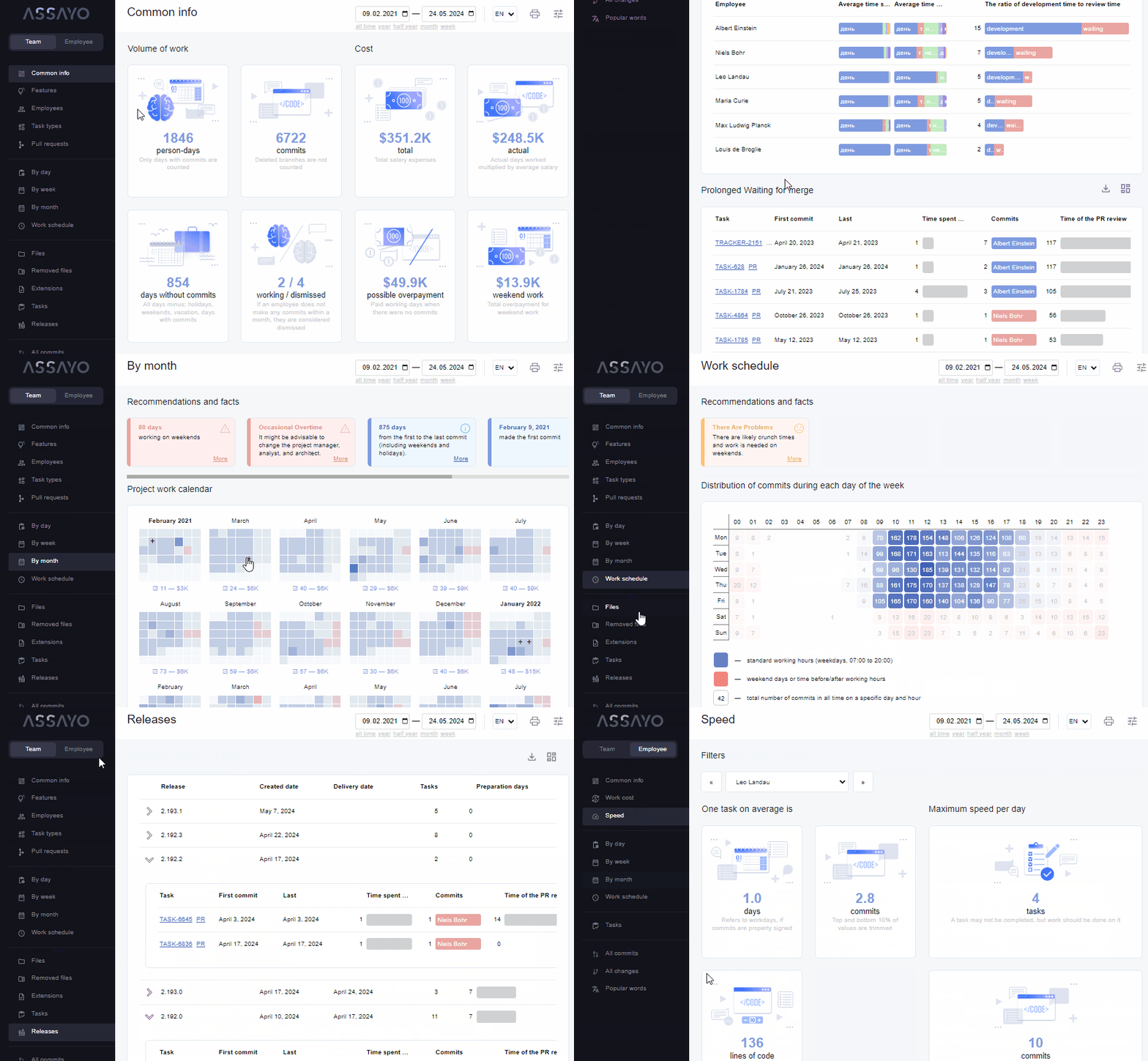
👨💻 At your new workplace, you can instantly find out:
- the work pace and number of overtime hours;
- zones of responsibility, number of features and bugs;
- colleagues working style;
- the rate of employee turnover and the makeup of the team;
- location of developers;
- release schedule and vacation calendar;
- cost of features and project as a whole;
- places for refactoring, deleted files, etc.
Table of contents
- Table of contents
- How to quickly view the number of commits?
- How to export data from git?
- How to create and view the report?
- How to rebuild the HTML report from source code?
- How to view a report on a group of microservices?
- How to brand the interface?
- How to sign commits?
- How to add checking for commit message?
- How to automate data collection?
- DevOps
- ️ About application
🚀 How to quickly view the number of commits?
In the root directory of your project, run:
git shortlog -s -n -e
🎭 How to concat authors?
In the root directory of your project, you need to create a .mailmap file.
Example of the contents of the file:
Alex B <alex@mail.uk>
Alex B <alex@mail.uk> <alex@gov.tk>
Alex B <alex@mail.uk> <bakhirev@ya.kz>
Alex B <alex@mail.uk> <man64@yahoo.com>
Read more about the format of this file you can here.
📤 How to export data from git?
For online viewing
In the root directory of your project run:
git --no-pager log --raw --numstat --oneline --all --reverse --date=iso-strict --pretty=format:"%ad>%aN>%aE>%s" > log.txt
For offline viewing
git --no-pager log --raw --numstat --oneline --all --reverse --date=iso-strict --pretty=format:"%ad>%aN>%aE>%s" | sed -e 's/\\/\\\\/g' | sed -e 's/`/"/g' | sed -e 's/\$/S/g' | sed -e '1s/^/R(f\`/' | sed -e '$s/$/\`\);/' > log.txt
Git will create a file log.txt. This file contains data for show a report. The difference between the online and offline format is the presence of a wrapper for strings. The offline format will be pulled up like a js file if you just opened /build/index.html
If you use PowerShell in Windows
By default, the output encoding may not match UTF-8 and the resulting log file will be unreadable. Before saving the log, you can change the encoding with the command.
[Console]::OutputEncoding = [System.Text.Encoding]::UTF8
Or open a saved file and manually change the encoding to UTF-8.
📈 How to create and view the report?
Using website
Use the library NodeJS
- run
npx assayo - open
./assayo/index.html
Use the library PHP
- run
composer require bakhirev/assayo - run
vendor/bin/assayo - open
./assayo/index.html
Use the library Python
- run
pipx install assayo - run
assayo - open
./assayo/index.html
Use the library Ruby
- run
gem install assayo - run
assayo - open
./assayo/index.html
Use the library Go
- run
go get github.com/bakhirev/assayo - run
go install github.com/bakhirev/assayo - run
assayo - open
./assayo/index.html
Use source code
-
download this repository
git clone https://github.com/bakhirev/assayo.git; -
drop the
log.txtfile to the/buildfolder; -
run
/build/index.html; -
or drop the
/buildfolder to your repository (where thelog.txtis located). You can change the name. For example, from/buildto/report.In this case, it is important that the
log.txtfile is generated by the command for offline viewing.
🏭 How to rebuild the HTML report from source code?
- download this repository
git clone https://github.com/bakhirev/assayo.git - run
npm install - run
npm run build:local - the new HTML build will be in the
/buildfolder
🗃️ How to view a report on a group of microservices?
- generate for each microservice file
log.txt(log-1.txt,log-2.txt,log-3.txtand etc.) You can do this manually, or use the Assayo Crawler module for automatic log collection; - see “How to view an online report?”. At the last step, drag all the files at once into the browser window.
- see “How to see a report offline?”. At the second step, drag all microservice files (
log-1.txt,log-2.txt,log-3.txtand etc.) to the report folder (/build).
🎨 How to brand the interface?
You can create your own interface theme. Options:
- Title. You can set default document title in the URL parameter
title. Example:?title=You Company - Visual theme. To do this, you need to prepare a CSS file with new styles and specify its URL in the
themeparameter. Example:?theme=//company.com/some.css. You can use class names as selectors. Most of them do not change in new versions. - Language. You can set language in the URL parameter
lang. Example:?lang=es
Example: demo
📝 How to sign commits?
Follow the Conventional Commits 1.0.0. Example:
JIRA-1234 feat(profile): Added avatar for user
- task number in the task tracker
(JIRA-1234) - type of work
(feat, fix, style, refactor, test, doc and etc.) - feature
(profile - new page on site or new function, use one (two) short word or an abbreviation) - what problem were solved
(Added avatar for user)
👮 How to add checking for commit message?
Use file commit-msg
- Create file
commit-msgin folder.git/hooks/ - Add this text in file:
#!/usr/bin/env bash
if ! grep -iqE "(JIRA-[0-9]{1,5})(\s)(feat|fix|docs|style|refactor|test|chore)((\([a-z0-9_-]{1,}\)){0,})(:\s)([a-z]{1,})" "$1"; then
   echo "Need commit message like: JIRA-12 fix(profile): some text. Read Semantic Commit Messages" >&2
   exit 1
fi
Use package pre-commit
- Add in file
package.jsonpropertycommit-msg:
  ...
  "commit-msg": {
    "regex": "(JIRA-[0-9]{1,5})(\\s)(feat|fix|docs|style|refactor|test|chore)((\\([a-z0-9_-]{1,}\\)){0,})(:\\s)([a-z]{1,})",
    "error-message": "Need commit message like: JIRA-12 fix(profile): some text Read Semantic Commit Messages"
  },
  ...
📚 How to automate data collection?
With backend
- use module Assayo Crawler;
Without backend
-
create a clone of the repository you need;
-
copy the
buildfolder to the root; -
open
build/index.htmlin the browser and add it to bookmarks; -
add a shortcut to
build/assets/ci-cd.shto the startup folder (Windows);Every time you restart the computer, the script will update statistics on all the data that automatically merged into the main branch.
🛠️ DevOps (CI/CD)
Github Actions
Add script in folder .github/workflows/ or use this action from the marketplace.
Public server
You can upload the data file for report construction to a public URL. And use the website’s assayo to visualize it.
https://bakhirev.github.io/demo/?dump=//you_site.com/some/log.txt
Private server
- download the docker image;
- run it on your local network;
- use the web interface to view the reports, set the URL of the data in the URL parameter
dump:
http://assayo_url/?dump=//you_url/some/log.txt
assayo_url - URL of the assayo container, it listens on port 80;
you_url    - URL of your container with git logs;
By default, the image will run at http://127.0.0.1:80/. If it doesn't work, check if port 80 is free.
🛠️ ️ About application
📐 Architecture

- Reports showcase UI displays a list of available reports. Each report consists of a title, description, and a list of repositories.
- Crawler service collects repository logs for the report.
- Log visualization UI (you here) displays report. Needs a log file for work.
🈯 How to add or edit a translation?
You can add a new translation or correct an existing one in the ts/translations/ folder.
Instruction
🗺️ RoadMap:
Releases are planned approximately once every six months. What’s next:
- more recommendations and achievements;
- annual/monthly summaries, report printing;
- localization and internationalization;
- file analysis;
- different roles for statistics (hiding finances);
- development of the backend, integration with other systems;
📧 Feedback, comments
- 📱 https://t.me/bakhirev (priority method of communication)
- 📧 alexey-bakhirev@yandex.ru
- 🌐 https://bakhirev.github.io/