Adds a `markdown_preview_code_font_family` setting that overrides the
font used in the markdown preview for code — inline `code` spans and
fenced code blocks.
This is the counterpart to `markdown_preview_font_family` (#54003),
which already does this for body text. Together they let you choose a
typographically matched body + code font pair for the preview without
forcing the code font onto editor buffers, where it may not be a good
coding font:

```json
{
  "markdown_preview_font_family": "Noto Serif",
  "markdown_preview_code_font_family": "Noto Sans Mono"
}
```

Behavior mirrors `markdown_preview_font_family`:
- Scoped to the markdown preview only (`MarkdownFont::Preview`). The
agent panel, notifications, hover popovers, and REPL output are
unaffected — they keep using the buffer font for code.
- Falls back to the buffer font family when unset, so existing previews
are unchanged.
- Overrides the font family only; fallbacks and features still come from
the buffer font.

Before (uses buffer font, here Iosevka):

<img width="509" height="368" alt="Screenshot 2026-05-14 at 1 39 51 PM"
src="https://github.com/user-attachments/assets/6b7e49b2-fc6e-4db1-9679-392b3447f411"
/>

After (uses specified font, here Noto Sans Mono):

<img width="508" height="368" alt="Screenshot 2026-05-14 at 1 40 51 PM"
src="https://github.com/user-attachments/assets/f911c99b-08f8-4336-83eb-54b555f11c54"
/>

Release Notes:

- Added `markdown_preview_code_font_family` to override the code font in
the markdown preview
This PR makes editor diff hunk colors configurable from themes, instead
of hardcoded values.

It introduces 6 new optional theme keys:

- `editor.diff_hunk.added.background`
- `editor.diff_hunk.added.hollow_background`
- `editor.diff_hunk.added.hollow_border`
- `editor.diff_hunk.deleted.background`
- `editor.diff_hunk.deleted.hollow_background`
- `editor.diff_hunk.deleted.hollow_border`

When a theme omits these keys, each color falls back to the existing
version-control color with the previous hardcoded opacity values:

- Light defaults:
  - background_opacity = 0.16
  - hollow_background_opacity = 0.08
  - hollow_border_opacity = 0.48
- Dark defaults:
  - background_opacity = 0.12
  - hollow_background_opacity = 0.06
  - hollow_border_opacity = 0.36

There is an existing feature request
https://github.com/zed-industries/zed/discussions/51667

## Screenshots

I used `Modus Themes` (Modus Vivendi) since these themes provide highly
accessible themes.

Original version:

<img width="3248" height="2120" alt="CleanShot 2026-03-17 at 20 26
41@2x"
src="https://github.com/user-attachments/assets/730be802-835d-436e-a1fc-4c60dcb5fce8"
/>

This version:

<img width="3248" height="2120" alt="CleanShot 2026-03-17 at 20 23
09@2x"
src="https://github.com/user-attachments/assets/785c86d3-147e-437f-9624-9576bc201551"
/>

Before you mark this PR as ready for review, make sure that you have:

- [x] Added a solid test coverage and/or screenshots from doing manual
testing
- [x] Done a self-review taking into account security and performance
aspects
- [x] Aligned any UI changes with the [UI
checklist](https://github.com/zed-industries/zed/blob/main/CONTRIBUTING.md#uiux-checklist)

Release Notes:

- Added theme keys for configuring editor diff hunk colors.

---------

Co-authored-by: MrSubidubi <finn@zed.dev>
No, sadly, the title is not a typo. See
https://www.githubstatus.com/incidents/zsg1lk7w13cf for the context.
I'll read with joy and popcorn through that root cause analysis.

It makes literally zero sense what happened here, but for some completly
bonkers reason GitHub completely messed up the merge queue with
https://github.com/zed-industries/zed/pull/54632.

I have no idea how it happened. It makes literally zero sense. A PR
going into the merge queue should have the same LoC when getting out of
it. GitHub obviously does not check this. GitHub causes extra work with
a feature that is supposed to save time.

Thanks, I guess.

Release Notes:

- N/A

---------

Co-authored-by: Danilo Leal <daniloleal09@gmail.com>
## Summary

Adds two user-facing settings that let the markdown preview render with
a font family and theme independent from the editor. Both are optional
and fall back to the editor defaults when unset.

```json
{
  "markdown_preview_font_family": "Georgia",
  "markdown_preview_theme": "Solarized Light"
}
```

## Details

- New `MarkdownFont::Preview` variant, used only by the preview surface.
- New `MarkdownStyle::themed_with_overrides()` that accepts explicit
`ThemeColors` and `SyntaxTheme` so the preview can render with a theme
other than the active editor theme. Existing `themed()` callers are
unchanged.
- The preview pane background adopts the chosen theme's
`editor_background`.
- Follows the pattern already used by `agent_ui_font_size` /
`agent_buffer_font_size`.

## Scope

Sizing-related changes (`markdown_preview_font_size`,
`markdown_preview_line_height`, typography tweaks, responsive max-width
container) were in an earlier revision of this PR and have been removed
per review feedback — they interact with the Cmd+/- zoom behavior in
ways that still need design work, and will land in a follow-up.

## Files Changed

- `crates/settings_content/src/theme.rs` — schema
- `crates/theme_settings/src/settings.rs` — runtime + accessor
- `crates/markdown/src/markdown.rs` — `MarkdownFont::Preview` +
`themed_with_overrides()`
- `crates/markdown_preview/src/markdown_preview_view.rs` — theme
resolution, style selection, background
- `crates/markdown_preview/Cargo.toml` — `theme` dependency
- `crates/settings/src/vscode_import.rs` — new fields in struct literal

Release Notes:

- Added `markdown_preview_font_family` and `markdown_preview_theme`
settings to customize the markdown preview independently from the
editor.

Co-authored-by: Chris Biscardi <chris@christopherbiscardi.com>
This PR brings back the button to filter remote branches when accessing
the title bar's branch picker with the mouse. It was unintentionally
removed when we introduced the new worktree picker.

Release Notes:

- N/A
# Helix Amp Jump Navigation
## Overview
Implements Helix-style "amp jump" (`g w`) navigation for jump-to-word
functionality. This feature displays two-character labels on each word
in the visible area, allowing users to quickly jump to any word by
typing its label. Labels alternate between forward and backward
directions (same algorithm as in the Helix) from the cursor position,
giving closer jump targets easier-to-type labels.
## Context
- **Request:** Implement "amp jump" navigation similar to Helix editor's
jump-to-word feature.
- **Scope:** Full implementation including label generation, UI
rendering, and input handling.
- **Inspiration:** Helix editor's "amp jump" and vim-easymotion/hop.nvim
plugins.
## How It Works
1. Press `g w` to activate "amp jump"
2. Two-character labels appear on all words in visible area
3. User types the two-character label shown on the target word
4. Cursor jumps to that word
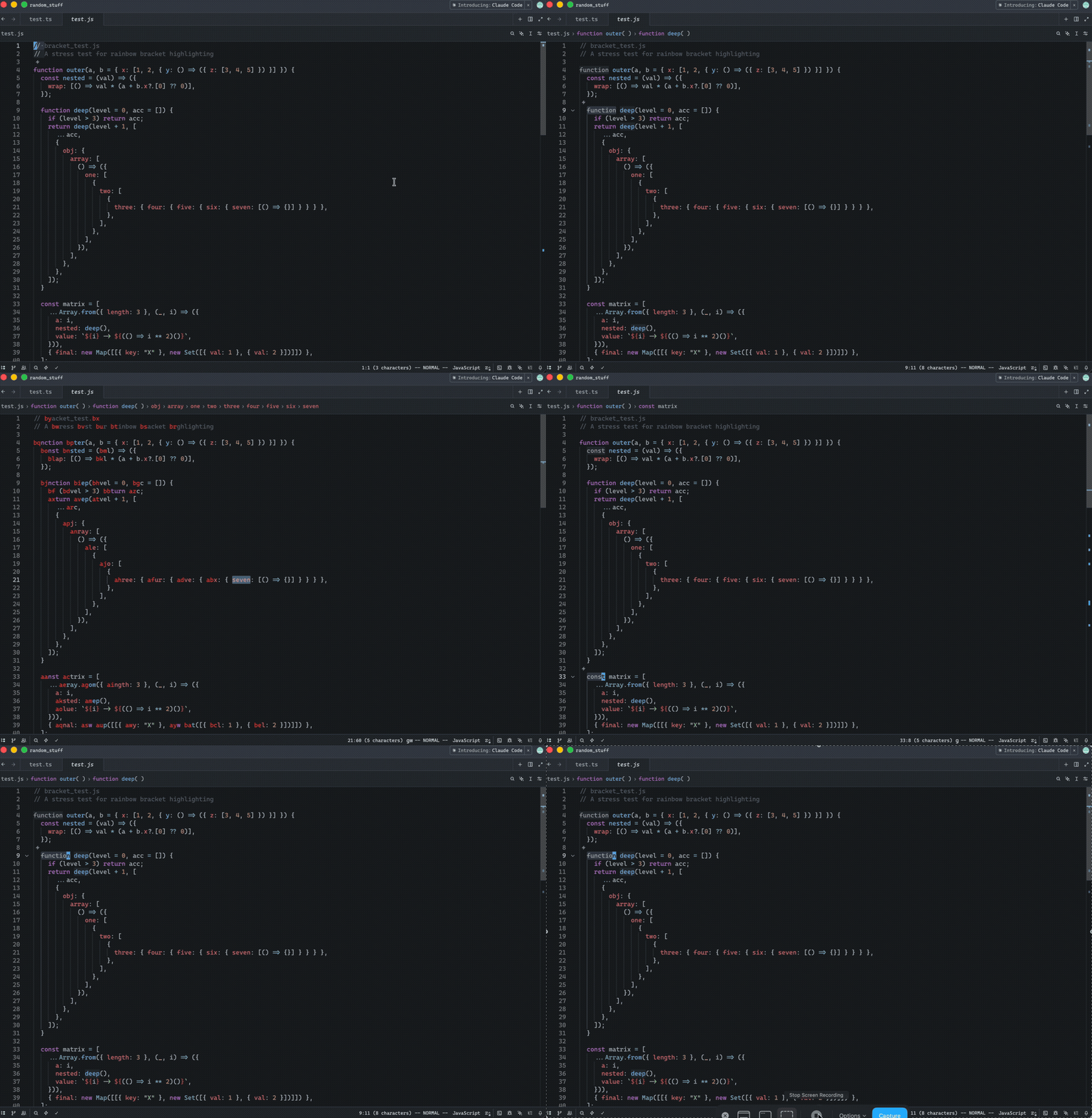
Release Notes:
- Added in Helix mode the "amp jump" navigation (`g w`) that displays
two-character labels on words for quick cursor navigation. Labels
alternate between forward and backward directions from the cursor,
prioritizing closer targets with easier-to-type labels. The color of the
labels can be controlled via a new `helix.jump_label_accent` setting
---------
Co-authored-by: Jakub Konka <kubkon@jakubkonka.com>
Split the shared `AgentFontSize` in-memory global into separate
`AgentBufferFontSize` and `AgentUiFontSize` globals. Previously, both
`adjust_agent_ui_font_size` and `adjust_agent_buffer_font_size` read
from and wrote to the same global, so calling them back-to-back in
`handle_font_size_action` applied the delta twice.
Self-Review Checklist:
- [x] I've reviewed my own diff for quality, security, and reliability
- [ ] Unsafe blocks (if any) have justifying comments
- [x] The content is consistent with the [UI/UX
checklist](https://github.com/zed-industries/zed/blob/main/CONTRIBUTING.md#uiux-checklist)
- [ ] Tests cover the new/changed behavior
- [x] Performance impact has been considered and is acceptable
Closes#53368.
Release Notes:
- Fixed Agent Panel font size incrementing by 2px instead of 1px
Follow-up of https://github.com/zed-industries/zed/pull/53452

* disables mouse wheel zooming in agent, debugger, keymap editor, dev
inspector and repl-related editors
* adjusts the code to call for theme changes directly instead of sending
the events, so that agent following does not capture the events and
changes its font size

Release Notes:

- N/A
This will allow us to use UI crate on the web

Self-Review Checklist:

- [ ] I've reviewed my own diff for quality, security, and reliability
- [ ] Unsafe blocks (if any) have justifying comments
- [ ] The content is consistent with the [UI/UX
checklist](https://github.com/zed-industries/zed/blob/main/CONTRIBUTING.md#uiux-checklist)
- [ ] Tests cover the new/changed behavior
- [ ] Performance impact has been considered and is acceptable

Closes #ISSUE

Release Notes:

- N/A

---------

Co-authored-by: Zed Zippy <234243425+zed-zippy[bot]@users.noreply.github.com>
Self-Review Checklist:

- [ ] I've reviewed my own diff for quality, security, and reliability
- [ ] Unsafe blocks (if any) have justifying comments
- [ ] The content is consistent with the [UI/UX
checklist](https://github.com/zed-industries/zed/blob/main/CONTRIBUTING.md#uiux-checklist)
- [ ] Tests cover the new/changed behavior
- [ ] Performance impact has been considered and is acceptable

Closes #ISSUE

Release Notes:

- N/A


