Add support for Helix' buffer picker that is opened via `space b` by
default.

Self-Review Checklist:

- [x] I've reviewed my own diff for quality, security, and reliability


Closes https://github.com/zed-industries/zed/issues/55867
Added Ctrl-D/Ctrl-U for Vim navigation in the Git graph
https://github.com/user-attachments/assets/8d3ad67c-829a-4a80-9508-80d48cf0decf
Self-Review Checklist:
- [x] I've reviewed my own diff for quality, security, and reliability
- [x] Unsafe blocks (if any) have justifying comments
- [x] The content is consistent with the [UI/UX
checklist](https://github.com/zed-industries/zed/blob/main/CONTRIBUTING.md#uiux-checklist)
- [x] Tests cover the new/changed behavior
- [x] Performance impact has been considered and is acceptable
Closes#55485
Release Notes:
- Improved Vim navigation in the git graph with Ctrl-U and Ctrl-D
half-page scrolling.
---------
Co-authored-by: Anthony Eid <anthony@zed.dev>
#53609 introduced a regression where Git Graph keybindings could take
precedence over the search bar. As a result, typing characters like `j`
or `k` in the search field could move the table selection instead of
updating the search query.

This PR fixes that regression by scoping Vim table navigation bindings
away from the search bar. It also adds dedicated `tab` and `shift-tab`
handling for Git Graph focus traversal, with the search bar and graph
table participating as separate tab groups.

Self-Review Checklist:

- [x] I've reviewed my own diff for quality, security, and reliability
- [x] Unsafe blocks (if any) have justifying comments
- [x] The content is consistent with the [UI/UX
checklist](https://github.com/zed-industries/zed/blob/main/CONTRIBUTING.md#uiux-checklist)
- [ ] Tests cover the new/changed behavior
- [x] Performance impact has been considered and is acceptable

Release Notes:

- N/A
Added Vim mode navigation (`j`, `k`, `gg`, `G`) to the Git Graph view.
[gitgraph-vim.webm](https://github.com/user-attachments/assets/b2dd31a5-deb0-48ab-a48d-8721ee500dad)
Self-Review Checklist:
- [x] I've reviewed my own diff for quality, security, and reliability
- [x] Unsafe blocks (if any) have justifying comments
- [x] The content is consistent with the [UI/UX
checklist](https://github.com/zed-industries/zed/blob/main/CONTRIBUTING.md#uiux-checklist)
- [x] Tests cover the new/changed behavior
- [x] Performance impact has been considered and is acceptable
Closes#53525
Release Notes:
- Added vim mode navigation to git graph
---------
Co-authored-by: Anthony Eid <anthony@zed.dev>
Closes#41580
This implements Helix's jump list, Zed already supports jumplists, so
all that is done is re-binding ctrl-s to to that instead. In another PR
we can extend this by adding space+j functionility to see all selections
in jumplist.
after this change:
Pressing Ctrl+S saves the current cursor position to the jumplist,
allowing the user to navigate back to this position using Ctrl+O
(backward) and Ctrl+I (forward), consistent with regular Helix's
behavior.
Release Notes:
- N/A *or* Added/Fixed/Improved ...
---------
Co-authored-by: Jakub Konka <kubkon@jakubkonka.com>
No, sadly, the title is not a typo. See
https://www.githubstatus.com/incidents/zsg1lk7w13cf for the context.
I'll read with joy and popcorn through that root cause analysis.

It makes literally zero sense what happened here, but for some completly
bonkers reason GitHub completely messed up the merge queue with
https://github.com/zed-industries/zed/pull/54632.

I have no idea how it happened. It makes literally zero sense. A PR
going into the merge queue should have the same LoC when getting out of
it. GitHub obviously does not check this. GitHub causes extra work with
a feature that is supposed to save time.

Thanks, I guess.

Release Notes:

- N/A

---------

Co-authored-by: Danilo Leal <daniloleal09@gmail.com>
This PR brings back the button to filter remote branches when accessing
the title bar's branch picker with the mouse. It was unintentionally
removed when we introduced the new worktree picker.

Release Notes:

- N/A
# Helix Amp Jump Navigation
## Overview
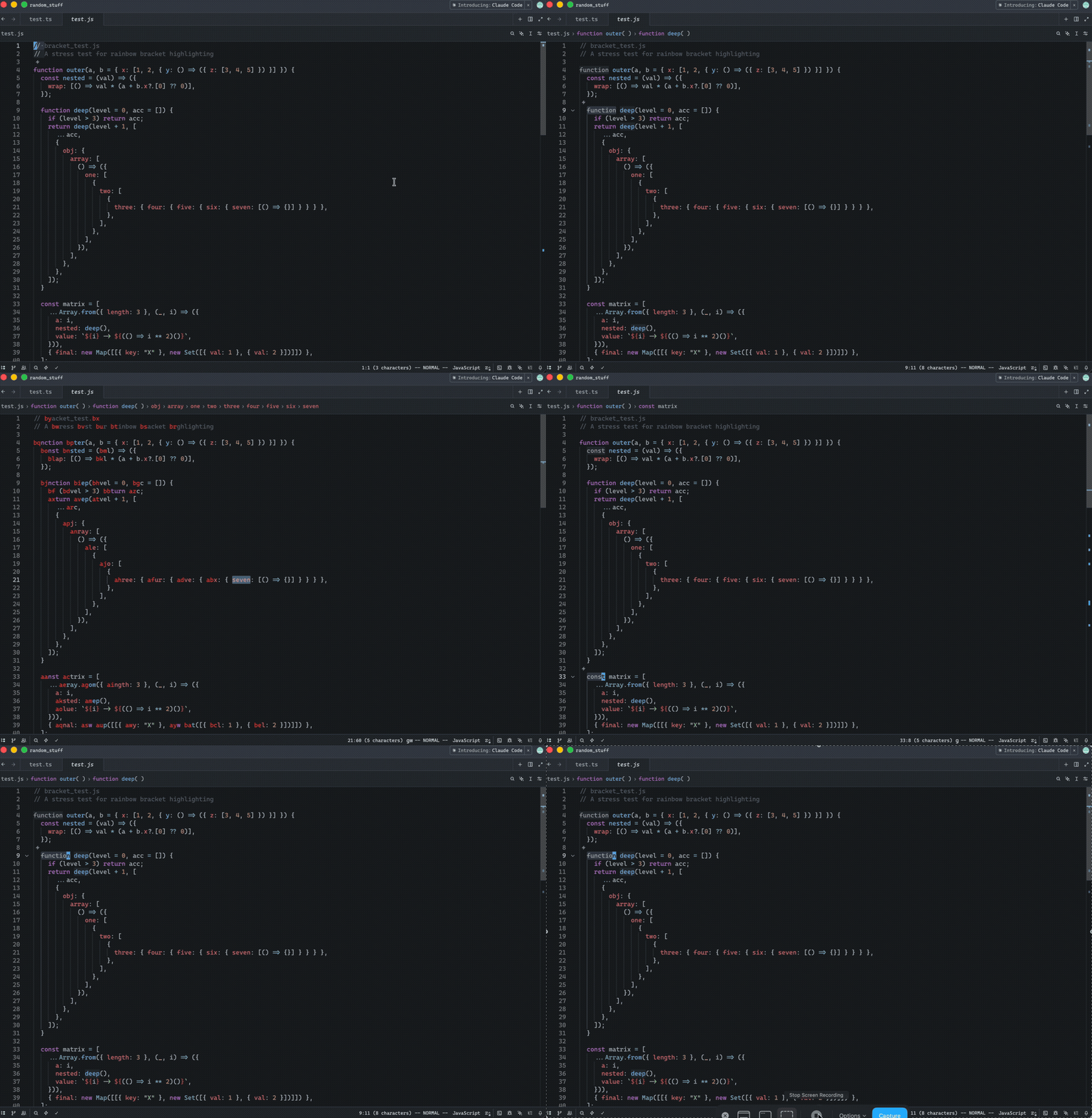
Implements Helix-style "amp jump" (`g w`) navigation for jump-to-word
functionality. This feature displays two-character labels on each word
in the visible area, allowing users to quickly jump to any word by
typing its label. Labels alternate between forward and backward
directions (same algorithm as in the Helix) from the cursor position,
giving closer jump targets easier-to-type labels.
## Context
- **Request:** Implement "amp jump" navigation similar to Helix editor's
jump-to-word feature.
- **Scope:** Full implementation including label generation, UI
rendering, and input handling.
- **Inspiration:** Helix editor's "amp jump" and vim-easymotion/hop.nvim
plugins.
## How It Works
1. Press `g w` to activate "amp jump"
2. Two-character labels appear on all words in visible area
3. User types the two-character label shown on the target word
4. Cursor jumps to that word
Release Notes:
- Added in Helix mode the "amp jump" navigation (`g w`) that displays
two-character labels on words for quick cursor navigation. Labels
alternate between forward and backward directions from the cursor,
prioritizing closer targets with easier-to-type labels. The color of the
labels can be controlled via a new `helix.jump_label_accent` setting
---------
Co-authored-by: Jakub Konka <kubkon@jakubkonka.com>
Release Notes:

- Fixed an issue where pressing `Escape` in the search bar did not dismiss it when using the Helix keymap, while it worked correctly in Vim mode.

Co-authored-by: buildingvibes <buildingvibes@users.noreply.github.com>
Co-authored-by: Jakub Konka <kubkon@jakubkonka.com>
Release Notes:

- helix: Fix some commands that you might want use when you have no
panes open, like project or symbol search.

---------

Co-authored-by: Jakub Konka <kubkon@jakubkonka.com>
Closes#4751
## Testing
- Manually tested by comparing the behaviors with vscode.
- Those requirements are added to unit tests.
Release Notes:
- Added action to toggle block comments
---------
Co-authored-by: ozacod <ozacod@users.noreply.github.com>
- Introducing NotebookMode state and handlers (EnterEditMode,
EnterCommandMode, RunAndAdvance).
- Wire up UI to switch modes,focus editors appropriately, and advance
selection while in command mode.
- Update default and vim keymaps to use the new bindings (shift-enter
runs+advances, escape enters command mode,
and enter/up/down work in command mode).
- Reveal and Focus the new Cell when inserted
Before you mark this PR as ready for review, make sure that you have:
- [x] Added a solid test coverage and/or screenshots from doing manual
testing
- [x] Done a self-review taking into account security and performance
aspects
- [x] Aligned any UI changes with the [UI
checklist](https://github.com/zed-industries/zed/blob/main/CONTRIBUTING.md#uiux-checklist)
Release Notes:
- N/A
Context
The markdown preview had no search functionality — pressing Ctrl+F did
nothing. This PR implements the SearchableItem trait for
MarkdownPreviewView, enabling in-pane text search with match
highlighting and navigation.
Changes span four crates:
- project: Added SearchQuery::search_str() — a synchronous method to
search plain &str text, since the existing search() only works on
BufferSnapshot.
- markdown: Added search highlight storage to the Markdown entity and
paint_search_highlights to MarkdownElement. Extracted the existing
selection painting into a reusable paint_highlight_range helper to avoid
duplicating quad-painting logic.
- markdown_preview: Implemented SearchableItem with full match
navigation, active match tracking, and proper SearchEvent emission
matching Editor behavior.
- Keymaps: Added buffer_search::Deploy bindings to the MarkdownPreview
context on all three platforms.
The PR hopefully Closes
https://github.com/zed-industries/zed/issues/27154
How to Review
1. crates/project/src/search.rs — search_str method at the end of impl
SearchQuery. Handles both Text (AhoCorasick) and Regex variants with
whole-word and multiline support.
2. crates/markdown/src/markdown.rs — Three areas:
- New fields and methods on Markdown struct (~line 264, 512-548)
- paint_highlight_range extraction and paint_search_highlights (~line
1059-1170)
- The single-line addition in Element::paint (~line 2003)
3. crates/markdown_preview/src/markdown_preview_view.rs — The main
change. Focus on:
- SearchEvent::MatchesInvalidated emission in schedule_markdown_update
(line 384)
- EventEmitter<SearchEvent> and as_searchable (lines 723, 748-754)
- The SearchableItem impl (lines 779-927), especially active_match_index
which computes position from old highlights to handle query changes
correctly
4. Keymap files — Two lines each for Linux/Windows, one for macOS.
Self-Review Checklist
- [ x ] I've reviewed my own diff for quality, security, and reliability
- [ x ] Unsafe blocks (if any) have justifying comments (no unsafe)
- [ x ] The content is consistent with the [UI/UX
checklist](https://github.com/zed-industries/zed/blob/main/CONTRIBUTING.md#uiux-checklist)
(should be 😄 )
- [ - ] Tests cover the new/changed behavior (not sure)
- [ - ] Performance impact has been considered and is acceptable (I'm
not sure about it and it would be nice to see experienced people to
test)
Release Notes:
- Added search support (Ctrl+F / Cmd+F) to the markdown preview
---------
Co-authored-by: Conrad Irwin <conrad.irwin@gmail.com>
## Context
When `vim_mode` is enabled, opening the branch selector popover in the
Git panel and pressing `i`, `j`, `k`, or `x` triggered Git panel actions
(`FocusEditor`, `SelectNext`, `ToggleStaged`, etc.) instead of reaching
the picker's search field.
The `"GitPanel && ChangesList"` keybinding block in `vim.json` matched
whenever _any_ child of the git panel's focus handle was focused —
including the branch picker popover — because
`GitPanel::dispatch_context()` adds `ChangesList` based on
`focus_handle.contains_focused()`, which is true for all children, not
just the changes list itself.
The branch picker's root element already sets
`.key_context("GitBranchSelector")` (branch_picker.rs). GPUI's `Not`
predicate evaluates against the entire context path, so adding `&&
!GitBranchSelector` to the block's context suppresses all those bindings
whenever the picker is open, and restores them exactly as before once
it's closed.
Closes#52617
Video of the manual test of the fix below :
[Screencast from 2026-03-29
22-01-11.webm](https://github.com/user-attachments/assets/217e8e31-9bee-4e77-a7aa-0c094874ed9a)
## How to Review
- `assets/keymaps/vim.json` : changed the `"GitPanel && ChangesList"`
context string ,I added`&& !GitBranchSelector`.
## Self-Review Checklist
- [x] I've reviewed my own diff for quality, security, and reliability
- [ ] Unsafe blocks (if any) have justifying comments
- [x] The content is consistent with the UI/UX checklist
- [x] Tests cover the new/changed behavior
- [x] Performance impact has been considered and is acceptable
Release Notes:
- Fixed branch picker in the Git panel stealing vim keystrokes (`i`,
`j`, `k`, `x`) when vim mode is enabled
Fix Helix `o`/`O` behavior when a selection is active.
This updates `InsertLineAbove` and `InsertLineBelow` to use the
selection bounds correctly for Helix selections, including line
selections whose end is represented at column 0 of the following line.
It also adds Helix select-mode keybindings for `o` and `O`, and adds
tests covering both line selections and selections created via `v`.
Closes#43210
Release Notes:
- helix: Fixed insert line above/below behavior when a full line is
selected
---------
Co-authored-by: dino <dinojoaocosta@gmail.com>
## Context
- Updates docs for how to update edit prediction bindings
- Walks back how often we use tab to accept prediction where we
previously didn't; now just when in leading whitespace, tab does not
accept completion when completions menu is open
- migration for keymaps using the old `edit_prediction_conflict` key
context
## How to Review
The only code worth reviewing is the migration
<!-- Help reviewers focus their attention:
- For small PRs: note what to focus on (e.g., "error handling in
foo.rs")
- For large PRs (>400 LOC): provide a guided tour — numbered list of
files/commits to read in order. (The `large-pr` label is applied
automatically.)
- See the review process guidelines for comment conventions -->
## Self-Review Checklist
<!-- Check before requesting review: -->
- [x] I've reviewed my own diff for quality, security, and reliability
- [x] Unsafe blocks (if any) have justifying comments
- [x] The content is consistent with the [UI/UX
checklist](https://github.com/zed-industries/zed/blob/main/CONTRIBUTING.md#uiux-checklist)
- [x] Tests cover the new/changed behavior
- [x] Performance impact has been considered and is acceptable
Release Notes:

- N/A or Added/Fixed/Improved ...
---------
Co-authored-by: Max <max@zed.dev>
## Context
<!-- What does this PR do, and why? How is it expected to impact users?
Not just what changed, but what motivated it and why this approach.
Link to Linear issue (e.g., ENG-123) or GitHub issue (e.g., Closes#456)
if one exists — helps with traceability. -->
Fixes some issues with https://github.com/zed-industries/zed/pull/51842
Namely that the tests were scattered and not well organized (this PR
also makes them more thorough), and a regression where holding the
modifiers for the accept prediction keybind would not cause an incoming
prediction to be immediately previewed.
## How to Review
<!-- Help reviewers focus their attention:
- For small PRs: note what to focus on (e.g., "error handling in
foo.rs")
- For large PRs (>400 LOC): provide a guided tour — numbered list of
files/commits to read in order. (The `large-pr` label is applied
automatically.)
- See the review process guidelines for comment conventions -->
## Self-Review Checklist
<!-- Check before requesting review: -->
- [x] I've reviewed my own diff for quality, security, and reliability
- [x] Unsafe blocks (if any) have justifying comments
- [x] The content is consistent with the [UI/UX
checklist](https://github.com/zed-industries/zed/blob/main/CONTRIBUTING.md#uiux-checklist)
- [x] Tests cover the new/changed behavior
- [x] Performance impact has been considered and is acceptable
Release Notes:
- (Preview v0.229.x only) Fixed a regression where holding the modifiers
for the accept edit prediction keybind would not immediately preview
predictions as they arrived
## Context
Closes#51955
Some super easy helix parity. I checked and helix uses these binds for
splitting the editor, given these binds are helix specific, it would be
weird to just keep them being wrong.
## How to Review
just changed the default keymap for helix mode.
## Self-Review Checklist
- [x] I've reviewed my own diff for quality, security, and reliability
- [x] Unsafe blocks (if any) have justifying comments
- [x] The content is consistent with the [UI/UX
checklist](https://github.com/zed-industries/zed/blob/main/CONTRIBUTING.md#uiux-checklist)
- [x] Tests cover the new/changed behavior
- [x] Performance impact has been considered and is acceptable
Release Notes:
- helix: fixed binds for splitting window
Co-authored-by: Bennet Bo Fenner <bennetbo@gmx.de>
Add `gg`/`G` (vim), `cmd-up`/`cmd-down` (macOS), and
`ctrl-home`/`ctrl-end` (Linux/Windows) keybindings to scroll to the top
and bottom of the markdown preview.

The markdown preview already has page scroll (`ctrl-d`/`ctrl-u`), line
scroll (`ctrl-e`/`ctrl-y`), and item scroll (`alt-up`/`alt-down`) but
was missing top/bottom navigation. This adds two new actions —
`ScrollToTop` and `ScrollToBottom` — using the existing
`ListState::scroll_to()` infrastructure, following the same pattern as
the other scroll actions.

- [x] Done a self-review taking into account security and performance
aspects

Release Notes:

- Added scroll-to-top and scroll-to-bottom keybindings for markdown
preview (`gg`/`G` in vim mode, `cmd-up`/`cmd-down` on macOS,
`ctrl-home`/`ctrl-end` on Linux/Windows)
In Helix, selecting a line with `x` creates a selection from column 0 of
the current row to column 0 of the next row. The default
`InsertEndOfLine` uses the selection head (which is on the next row) to
find the line end, placing the cursor on the wrong line.

This commit introduces a new `HelixInsertEndOfLine`, mapped by default
to `shift-a` when Helix mode is enabled, that moves left from the head
first to land on the correct line.

Release Notes:

- Fixed `shift-a` in Helix select mode placing the cursor on the wrong
line after selecting with `x`

---------

Co-authored-by: SkandaBhat <9384046+SkandaBhat@users.noreply.github.com>
Co-authored-by: dino <dinojoaocosta@gmail.com>
- Render the output only when needed, fixes the duplicate output that
can happen after opening a saved notebook.
- Vim in Jupyter View with j/k navigation across notebook cells

Release Notes:

- N/A
Happy New Years! This PR is a second take at
https://github.com/zed-industries/zed/pull/38127 (cc @ConradIrwin)
This PR is significantly less complicated than the last attempt: while
we still keep our data on the `NavigationHistory` object, we no longer
tightly integrate it with the existing back/forward "browser history."
Instead, we keep our own stack of `(origin, target)` pairs (in a struct
to make it easy to extend with e.g., tag names in the future).
The PR is split into two separable commits. Most of the implementation
is in the second commit, which:
- Defines the stack data structure
- Implements `pane::GoToOlderTag` and `pane::GoToNewerTag` in terms of
the stack
- Hooks into `navigate_to_hover_links` to push tag stack entries
This last bit is the most fiddly. The core challenge is that we need to
keep track of the `origin` location and calculate the `target` location
across three codepaths that might involve creating a new editor and/or
splitting the pane. One thing in particular I found difficult was that
an editor's `nav_history` (an `ItemNavHistory`) seems to be populated
asynchronously. Instead of relying on it, I decided in this code to make
my own `ItemNavHistory`. I briefly tried to refactor the code in
question, but it seemed like it would significantly increase the scope
of the change.
I prefer this all-in-one tracking centered around
`navigate_to_hover_links ` to the `start/finish` approach taken in
b69a2ea200
because I find it easier to convince myself that the right data is being
populated at the right times. Of course, let me know if you think
there's a better solution.
Closes#14206
Release Notes:
- ??? I don't know what to write here! Suggestions welcome
Add a `match_quotes` parameter to the `vim::Matching` action that
controls whether the `%` motion should treat quote characters (', ", `)
as matching pairs.

In Neovim, `%` only matches bracket pairs (([{}])), not quotes. Zed's
existing behavior includes quote matching, which some users prefer. To
preserve backwards compatibility while allowing users to opt into
Neovim's behavior, this PR:

1. Adds an optional `match_quotes` boolean parameter to the
   `vim::Matching` action
2. Updates the default vim keymap to use ["vim::Matching", {
   "match_quotes": true }], preserving Zed's current behavior
3. Users who prefer Neovim's behavior can rebind `%` in their keymap:

```
{
    "context": "VimControl && !menu",
    "bindings": {
        "%": ["vim::Matching", { "match_quotes": false }]
    }
}
```

When `match_quotes` is `false`, the `%` motion will skip over quote
characters and only match brackets/parentheses, matching Neovim's
default behavior.

Release Notes:

- vim: Added match_quotes parameter to the vim::Matching action to control
whether % matches quote characters

---------

Co-authored-by: dino <dinojoaocosta@gmail.com>
Until now, Helix-mode users would have to rely on Vim's `d *` behaviour
which cannot be reliably replicated with Helix's default delete
behaviour and so I believe that remapping this functionality to Helix's
goto mode is a better fit.

Release Notes:

- Added custom mappings for Zed specific diff and git-related actions to
Helix's goto mode:
  * `g o` - toggle selected diff hunks
  * `g O` - toggle staged
  * `g R` - restore change
  * `g u` - stage and goto next diff hunk
  * `g U` - unstage and goto next diff hunk
Release Notes:

- Make Helix keybinds use visual line movement for `j`, `Down`, `k` and `Up`, and textual line movement for `g j`, `g Down`, `g k` and `g Up`.
In helix, `space /` activates a global search picker, so I think that it
should be the same in zed's helix mode.

Release Notes:

- Added helix's `space /` keybinding to open a global search menu to
zed's helix mode
Closes#21324
Adds four new commands:
- `markdown::MoveUp`, `markdown::MoveDown` - these scroll up and down in
markdown preview mode, by no more than the height of a large headline.
- `markdown::MoveUpByItem`, and `markdown::MoveDownByItem` - these
scroll up and down by the height of the item at the top of the markdown
preview window. So headlines and large codeblocks, for instance, scroll
further than individual paragraph lines.
Also attempts to create sensible defaults:
`down` -> `markdown::ScrollDown`
`up` -> `markdown::ScrollUp`
`alt-down` -> `markdown::ScrollDownByItem`
`alt-up` -> `markdown::ScrollUpByItem`
And in Vim:
`ctrl-u` -> `markdown::ScrollPageUp`
`ctrl-d` -> `markdown::ScrollPageDown`
`ctrl-e` -> `markdown::ScrollDown`
`ctrl-y` -> `markdown::ScrollUp`
Release Notes:
- Added commands `markdown::ScrollUp`, `markdown::ScrollDown`,
`markdown::ScrollUpByItem`, and `markdown::ScrollDownByItem`
- Changed commands `markdown::MovePageUp` to `markdown::ScrollPageUp`
and `markdown::MovePageDown` to `markdown::ScrollPageDown`
Closes #ISSUE

It seems that `ctrl-6` is used exclusively as an alias, as can be seen
in the [linked section of the vim
docs](https://vimhelp.org/editing.txt.html#CTRL-%5E) from the initial PR
that added it. This however conflicts with the `ctrl-{n}` bindings for
`pane::ActivateItem` on macOS, leading to confusing file selection when
`ctrl-6` is pressed.

Release Notes:

- vim(BREAKING): Removed a keybinding conflict between the default macOS
bindings for `pane::ActivateItem` and the `ctrl-6` alias
for`pane::AlternateFile` which is primarily bound to `ctrl-^`. `ctrl-6`
is no longer treated as an alias for `ctrl-^` in vim mode. If you'd like
to restore `ctrl-6` as a binding for `pane::AlternateFile`, paste the
following into your `keymap.json` file:
```
  {
    "context": "VimControl && !menu",
    "bindings": {
      "ctrl-6": "pane::AlternateFile"
    }
  }
```
Closes#41550
Release Notes:
- Fixed `<g-l>` behavior in helix mode which will now correctly go to the last charactor of the line.
- Fixed not switching to helix normal mode when in default vim context and pressing escape.
---------
Co-authored-by: Jakub Konka <kubkon@jakubkonka.com>
This PR redoes the desired behavior changes of #41583 (reverted in
#42892) but less invasively
Closes#41125Closes#41164
Release Notes:
- N/A
Co-authored-by: Conrad Irwin <conrad.irwin@gmail.com>
Closes#41125
Release Notes:
- Fixed `SwitchToHelixNormalMode` to keep selection
- Added default keybinds for `SwitchToHelixNormalMode` when in Helix
mode
- Added "ctrl-p" for selecting the previous menu item
- Added "ctrl-n" for selecting the next menu item
Closes#40619
Release Notes:
- Ctrl+P now moves to the previous result; Ctrl+N moves to the next.
`vim::Substitute` is a little different from the helix behavior, so this
PR adds helix versions. The most important difference (for my usage, at
least) is that if you're selecting whole lines then helix drops the `\n`
from the selection (much like vim's lines mode, except that helix bases
this behavior on the selection instead of having a different mode).

Release Notes:

- N/A
Closes#33637Closes#37332
and solves part of
https://github.com/zed-industries/zed/discussions/33580#discussioncomment-14195506
This improves the "C" and "alt-C" actions to work like helix.
It also adds "," which removes all but the newest cursors. In helix the
one that's left would be the primary selection, but I don't think that
has an equivalent yet, so this simulates what would be the primary
selection if it was never cycled with "(" ")".
Release Notes:
- Improved multicursor creation and deletion in helix mode
---------
Co-authored-by: Jakub Konka <kubkon@jakubkonka.com>
- Add `skip_soft_wrap` field to both `AddSelectionAbove` and
`AddSelectionBelow` actions. When set to `true`, which is now
the default this will skip soft wrapped lines when extending the
selections.
- Move the `start_of_relative_buffer_row` function from the
`vim::motion` module to the `editor::display_map::DisplaySnapshot`
implementation as a method.
- Update the default behavior for both `editor: add selection above` and
`editor: add selection below` commands in order to skip over soft
wrapped lines by default, mirroring VS Code's default behavior.
- Update existing keymaps to specify this `skip_soft_wrap` value for
both `AddSelectionAbove` and `AddSelectionBelow` actions.
Closes#16979
Release Notes:
- Updated both the `editor: add selection above` and `editor: add
selection below` commands to ignore soft wrapped lines. If you wish to
restore the old behavior, add the following to your keymap file:
```
{
"context": "Editor",
"bindings": {
"cmd-alt-up": ["editor::AddSelectionAbove", { "skip_soft_wrap": false
}],
"cmd-alt-down": ["editor::AddSelectionBelow", { "skip_soft_wrap": false
}]
}
}
```
---------
Co-authored-by: Smit Barmase <heysmitbarmase@gmail.com>


