We originally added support for these keys to allow people to customize
the pill. As I noted at the time, we'd like the default to be more
visually minimal.

Release Notes:

- Reverted the colored vim mode indicator pill in the One Light and One
Dark themes (#56662)
Follow-up to https://github.com/zed-industries/zed/pull/56500. Was
missing this ability very much :)

Release Notes:

- Git Panel: Added the ability to switch between the changes and history
tabs with the keyboard.
With long lines or a small viewport, the stage/restore buttons often
cover code.

Adds a setting to hide the buttons altogether. Defaults to showing them.

Release Notes:

- Added: Setting to hide Git Stage/Restore buttons
Treat `.agents/skills/` (project-local) and `~/.agents/skills/` (global)
as **sensitive paths**, on par with `.zed/` and the global config
directory. The agent's built-in editing tools (`edit_file`,
`write_file`, `create_directory`, `delete_path`, `move_path`,
`copy_path`) now require explicit user authorization before modifying
anything inside those paths, because the contents of skill files control
agent behavior.

This protection is worth landing on its own, ahead of Zed adding its own
skills support: other agents (e.g. Claude Code) already write skill
files into these locations, so a Zed installation may already have
skills on disk that should not be silently editable by the agent.

Also tightens the **pre-existing `.zed/` check** to compare path
components case-insensitively. macOS and Windows use case-insensitive
filesystems by default, so without this fix a malicious settings author
could bypass the local-settings classifier with `.ZED/settings.json`
(the canonicalized inode would match, but the path-component comparison
would miss it). The new `.agents/skills/` check has the same hazard and
now shares a single `component_matches_ignore_ascii_case` helper with
the `.zed/` check.

Introduces the `agent_skills` crate, scoped for now to just the path
constants and helpers (`global_skills_dir`,
`project_skills_relative_path`, `SKILL_FILE_NAME`) so the
tool-permission machinery can recognize the agent skills tree without
depending on a skill discovery / parsing / loading layer. Those will
land in follow-up PRs.

Closes AI-217

Release Notes:

- Agent: Require user confirmation before letting tools modify files
inside `.agents/skills/` (per-project) or `~/.agents/skills/` (global),
so skills installed by any agent are protected from unsolicited edits

---------

Co-authored-by: MartinYe1234 <52641447+MartinYe1234@users.noreply.github.com>
Co-authored-by: Martin Ye <martinye022@gmail.com>
Co-authored-by: Danilo Leal <daniloleal09@gmail.com>
Follows similar approach as
https://github.com/zed-industries/zed/pull/55927

Adds a force-delete path to the worktree picker. Normal delete now
prompts when Git reports modified or untracked files, and
Alt/Option-delete can force delete directly.

  Release Notes:

- Added support for force deleting worktrees that contain modified or
untracked files.
Allow confirming a terminal entry to activate it, track terminal
access for ordering, and close selected terminals via the archive
action.

Self-Review Checklist:

- [x] I've reviewed my own diff for quality, security, and reliability
- [x] Unsafe blocks (if any) have justifying comments
- [x] The content is consistent with the [UI/UX
checklist](https://github.com/zed-industries/zed/blob/main/CONTRIBUTING.md#uiux-checklist)
- [x] Tests cover the new/changed behavior
- [x] Performance impact has been considered and is acceptable

Release Notes:

- N/A
At this point, this tool rarely gets called and the agent can likely
figure out how to call these itself.

Self-Review Checklist:

- [x] I've reviewed my own diff for quality, security, and reliability
- [x] Unsafe blocks (if any) have justifying comments
- [x] The content is consistent with the [UI/UX
checklist](https://github.com/zed-industries/zed/blob/main/CONTRIBUTING.md#uiux-checklist)
- [x] Tests cover the new/changed behavior
- [x] Performance impact has been considered and is acceptable

Release Notes:

- Removed open tool from built-in Agent tools.
Streamline the instructions around communication, tool use, planning,
and project roots.

Remove the `now` tool and also clean up several tool descriptions.

Self-Review Checklist:

- [x] I've reviewed my own diff for quality, security, and reliability
- [x] Unsafe blocks (if any) have justifying comments
- [x] The content is consistent with the [UI/UX
checklist](https://github.com/zed-industries/zed/blob/main/CONTRIBUTING.md#uiux-checklist)
- [x] Tests cover the new/changed behavior
- [x] Performance impact has been considered and is acceptable

Release Notes:

- N/A

---------

Co-authored-by: Bennet Bo Fenner <bennetbo@gmx.de>
Before:

1. Agent tries to edit unsaved file
2. Tool call fails with error telling the agent to ask the user to save
or discard edits
3. User types save/restore
4. Agent uses save/restore tool


https://github.com/user-attachments/assets/c94dd361-e8e0-48ee-be31-da8afe594419

After:

1. Agent tries to edit unsaved file
2. User is prompted to save/restore file
3. User accepts/rejects or saves/discards file manually


https://github.com/user-attachments/assets/1d98a0c4-4420-4426-94f2-42355de230be

Release Notes:

- agent: Improved UX when agent tries to edit unsaved buffer

---------

Co-authored-by: Ben Brandt <benjamin.j.brandt@gmail.com>
Experiment with allowing users to manage terminal sessions along with
threads in the sidebar.

Self-Review Checklist:

- [x] I've reviewed my own diff for quality, security, and reliability
- [x] Unsafe blocks (if any) have justifying comments
- [x] The content is consistent with the [UI/UX
checklist](https://github.com/zed-industries/zed/blob/main/CONTRIBUTING.md#uiux-checklist)
- [x] Tests cover the new/changed behavior
- [x] Performance impact has been considered and is acceptable

Release Notes:

- N/A

---------

Co-authored-by: Bennet Bo Fenner <bennetbo@gmx.de>
Self-Review Checklist:

- [x] I've reviewed my own diff for quality, security, and reliability
- [x] Unsafe blocks (if any) have justifying comments
- [x] The content is consistent with the [UI/UX
checklist](https://github.com/zed-industries/zed/blob/main/CONTRIBUTING.md#uiux-checklist)
- [x] Tests cover the new/changed behavior
- [x] Performance impact has been considered and is acceptable

Closes #ISSUE

Release Notes:

- Added a setting
[vim.show_edit_predictions_in_normal_mode](zed://settings/vim.show_edit_predictions_in_normal_mode)
to control whether edit predictions are shown in normal mode.
Git's `-d` flag deletes a branch only if it's fully merged into its
upstream or HEAD - this is what we were using before, which caused the
"not fully merged" error. The `-D` flag force deletes a branch even with
unmerged changes (equivalent to `--delete --force`).

### Before

Deleting an unmerged branch failed with a "not fully merged" error
toast.

### After

- Deleting an unmerged branch prompts for confirmation to force delete
- Delete button tooltip shows "Hold alt to force delete" hint
- Holding **alt** turns the delete icon red and tooltip changes to
"Force Delete Branch"
- Force delete keybinding: `cmd-alt-shift-backspace`

Release Notes:

- Added confirmation prompt when deleting unmerged git branches, with
option to force delete.
- Added alt+click on delete button to force delete a branch immediately.
Splits the edit tool into two separate tools `write_file` (previously
`mode = write`), and `edit_file` (previously `mode = edit`).
This makes the JSON schema for the `edit_tool` much simpler. We've seen
models (especially older ones) struggle with providing `mode = edit +
edits` and `mode = write + content` fields. This seems to improve eval
scores for Sonnet 4.6 slightly.

Also added two unit evals to ensure that the model uses the tool to
create new/override existing files

Release Notes:

- N/A

---------

Co-authored-by: Ben Brandt <benjamin.j.brandt@gmail.com>
Add support for Helix' buffer picker that is opened via `space b` by
default.

Self-Review Checklist:

- [x] I've reviewed my own diff for quality, security, and reliability


Closes https://github.com/zed-industries/zed/issues/55867
This adds the functionality to support pasting the file path of an item
when the copied item supports it. This mirrors the behavior of
`Terminal.app` on macOS.

This only implements the functionality on macOS but could be extended to
other platforms.

I find this convenient when I'm using Finder to navigate around the file
system and I want to copy a directory or file path and put it in the
terminal. You can copy the item from Finder and paste it into the
terminal and it will write out the full path of the item, making it easy
to change directories or provide path parameters to commands.

Release Notes:

- Added path pasting functionality in terminal
Adds 4 (technically 5) new tools to the zed agent, corresponding to LSP
actions:
- `find_references`
- `goto_definition`
- `rename_symbol`
- `get_code_actions` and `apply_code_actions`

Notes:
- `rename_symbol` skips doing a `prepare_rename`. If there is nothing to
rename at the position, it will forward the error to the agent
- The code action tools are stateful. The state is stored in the
`get_code_actions` tool itself as a `PendingCodeActions`. It is not
passed into/out of subagents. Calling `apply_code_actions` without
calling `get_code_actions` first is an error, but I've never seen an
agent do this

Symbols are identified by:
- file name
- line number
- symbol

If there is no substring match on that line for the symbol text, it is
an error. If there are multiple, it chooses the first. This may not be
great if you have a line like: `fn convert(x: foo::Something) ->
bar::Something` - the second `Something` is a different symbol, but is
inacessible to these tools. Probably fine for now, but we can look into
improving


Release Notes:

- Added: New tools for the Zed Agent for interacting with language
servers

---------

Co-authored-by: Lukas Wirth <me@lukaswirth.dev>
Instead of manually handing hiding the cursor on keyboard input at the
editor level, GPUI will now take care of it.

This makes it significantly easier to handle the edge cases, and allows
delegating the cursor restoration to the platform itself in the macOS
case. On Linux and Windows, we still have to restore the cursor on
movement ourselves, but this now happens at the platform-specific level.

Bugs fixed by this change:
- No cursor when "Unsaved edits" prompt appears
- Cursor disappears when clicking a panel button if it contains a search
bar (e.g. collab panel)

### Setting rename

The `hide_mouse` setting value `"on_typing_and_movement"` has been
renamed to `"on_typing_and_action"` to better reflect what it actually
does — it hides the cursor when a keystroke resolves to an action (e.g.
cursor movement, deletion). Existing settings are migrated
automatically.

### Tested platforms
- [x] macOS
- [x] Wayland
- [x] X11
- [x] Windows
- [x] Web

Self-Review Checklist:

- [x] I've reviewed my own diff for quality, security, and reliability
- [x] Unsafe blocks (if any) have justifying comments
- [x] The content is consistent with the [UI/UX
checklist](https://github.com/zed-industries/zed/blob/main/CONTRIBUTING.md#uiux-checklist)
- [ ] Tests cover the new/changed behavior
- [x] Performance impact has been considered and is acceptable

Release Notes:

- Renamed the `hide_mouse` setting value `on_typing_and_movement` to
`on_typing_and_action` to better describe its behavior (existing
settings are auto-migrated)
- Fixed a few situations where the mouse cursor would be incorrectly
hidden
cc:  @danilo-leal

This setting is from when we had the git worktree picker in the agent
panel, now that it is in the menu bar it doesn't make sense to keep it.
We plan to add a similar feature in the future to handle the "new thread
== new git worktree" workflow

Self-Review Checklist:

- [x] I've reviewed my own diff for quality, security, and reliability
- [x] Unsafe blocks (if any) have justifying comments
- [x] The content is consistent with the [UI/UX
checklist](https://github.com/zed-industries/zed/blob/main/CONTRIBUTING.md#uiux-checklist)
- [x] Tests cover the new/changed behavior
- [x] Performance impact has been considered and is acceptable

Closes #ISSUE

Release Notes:

- N/A
Added Ctrl-D/Ctrl-U for Vim navigation in the Git graph
https://github.com/user-attachments/assets/8d3ad67c-829a-4a80-9508-80d48cf0decf
Self-Review Checklist:
- [x] I've reviewed my own diff for quality, security, and reliability
- [x] Unsafe blocks (if any) have justifying comments
- [x] The content is consistent with the [UI/UX
checklist](https://github.com/zed-industries/zed/blob/main/CONTRIBUTING.md#uiux-checklist)
- [x] Tests cover the new/changed behavior
- [x] Performance impact has been considered and is acceptable
Closes#55485
Release Notes:
- Improved Vim navigation in the git graph with Ctrl-U and Ctrl-D
half-page scrolling.
---------
Co-authored-by: Anthony Eid <anthony@zed.dev>
#53609 introduced a regression where Git Graph keybindings could take
precedence over the search bar. As a result, typing characters like `j`
or `k` in the search field could move the table selection instead of
updating the search query.

This PR fixes that regression by scoping Vim table navigation bindings
away from the search bar. It also adds dedicated `tab` and `shift-tab`
handling for Git Graph focus traversal, with the search bar and graph
table participating as separate tab groups.

Self-Review Checklist:

- [x] I've reviewed my own diff for quality, security, and reliability
- [x] Unsafe blocks (if any) have justifying comments
- [x] The content is consistent with the [UI/UX
checklist](https://github.com/zed-industries/zed/blob/main/CONTRIBUTING.md#uiux-checklist)
- [ ] Tests cover the new/changed behavior
- [x] Performance impact has been considered and is acceptable

Release Notes:

- N/A
## Summary

Add `!fuzzy-ruby-server` to the Ruby language servers list in the
default settings so it is opt-in rather than enabled for all users by
default.

This is a prerequisite for merging the Fuzzy Ruby Server support in the
Ruby extension: https://github.com/zed-extensions/ruby/pull/283

As requested by @vitallium in the review comment:
https://github.com/zed-extensions/ruby/pull/283\#issuecomment-4294888519

## Change

```diff
- "language_servers": ["solargraph", "!ruby-lsp", "!rubocop", "!sorbet", "!steep", "!kanayago", "..."],
+ "language_servers": ["solargraph", "!ruby-lsp", "!rubocop", "!sorbet", "!steep", "!kanayago", "!fuzzy-ruby-server", "..."],
```

Release Notes:

- Disabled `fuzzy-ruby-server` by default for Ruby files.

---------

Co-authored-by: Marshall Bowers <git@maxdeviant.com>
This PR adds a "open in new window" button to the projects that are
already open in the current window. This matches a capability that was
only available through the threads sidebar.

<img width="500" alt="Screenshot 2026-04-29 at 11  28@2x"
src="https://github.com/user-attachments/assets/b5c890fd-d21b-483b-b428-0f96b40aa7fc"
/>

Release Notes:

- Added the ability to move a currently open project to a new window
through the recent projects modal.
Removes the Vercel v0 Provider, as the v0 API has been
depredated/removed (https://api.v0.dev/v1)

Self-Review Checklist:

- [x] I've reviewed my own diff for quality, security, and reliability
- [x] Unsafe blocks (if any) have justifying comments
- [x] The content is consistent with the [UI/UX
checklist](https://github.com/zed-industries/zed/blob/main/CONTRIBUTING.md#uiux-checklist)
- [ ] Tests cover the new/changed behavior
- [x] Performance impact has been considered and is acceptable

Release Notes:

- agent: Removed Vercel v0 provider as it has been deprecated by Vercel
These changes attempt to expand on the work introduced by
https://github.com/zed-industries/zed/pull/54778 by introducing a new
`GoToDefinitionScrollStrategy::Preserve` variant that attempts to keep
the cursor at the same vertical offset within the viewport when
navigating to a definition.

Most of the machinery for this was already in place. To support cases
where the user's scroll position isn't snapped to an exact display row,
for example, after scrolling with the mmouse, `Autoscroll::TopRelative`
and `Autoscroll::BottomRelative` were updated from `usize` to
`ScrollOffset`, allowing fractional offsets.

When the cursor is offscreen at the moment the `editor: go to
definition` action is invoked, `Preserve` falls back to
`Autoscroll::center`, matching the existing default for
`go_to_definition_scroll_strategy`. This avoids attempting to preserve
an offset where the cursor isn't visible which would lead to the cursor
being offscreen when jumping to the definition.

Documentation has also been updated to reflect this new strategy value.

Self-Review Checklist:

- [x] I've reviewed my own diff for quality, security, and reliability
- [x] Unsafe blocks (if any) have justifying comments
- [x] The content is consistent with the [UI/UX
checklist](https://github.com/zed-industries/zed/blob/main/CONTRIBUTING.md#uiux-checklist)
- [x] Tests cover the new/changed behavior
- [x] Performance impact has been considered and is acceptable

Relates to #52173

Release Notes:

- Added a new `preserve` option to `go_to_definition_scroll_strategy`
that keeps the cursor at the same vertical position within the viewport
when navigating to a definition
Using the existing commit editor in the Git Panel to type out longer
commit messages has been somewhat hard. I believe this happens because
it takes a very small portion of the UI which, unfortunately, when `git:
expand commit editor` is used, a modal ends up taking the center of the
editor, making it possible to have the commit editor open on the side,
while the `git: diff` view is open.

As such, this Pull Request introduces a new
`git::ToggleFillCommitEditor` action that allows users to update the
commit editor's height so as to take as much vertical space as possible,
hiding the entries status and simply rendering the Git Panel's footer.

This makes it easier to be able to write longer commit messages while
still having the `git: branch diff` on the side, something that's very
complicated with the default number of lines in the commit editor and
impossible using the `CommitModal`.

Self-Review Checklist:

- [x] I've reviewed my own diff for quality, security, and reliability
- [x] Unsafe blocks (if any) have justifying comments
- [x] The content is consistent with the [UI/UX
checklist](https://github.com/zed-industries/zed/blob/main/CONTRIBUTING.md#uiux-checklist)
- [x] Tests cover the new/changed behavior
- [x] Performance impact has been considered and is acceptable

Release Notes:

- Added a `git::ToggleFillCommitEditor` action that expands the commit
editor to fill the git panel's available vertical space.

---------

Co-authored-by: Danilo Leal <daniloleal09@gmail.com>
Co-authored-by: Danilo Leal <67129314+danilo-leal@users.noreply.github.com>
Added Vim mode navigation (`j`, `k`, `gg`, `G`) to the Git Graph view.
[gitgraph-vim.webm](https://github.com/user-attachments/assets/b2dd31a5-deb0-48ab-a48d-8721ee500dad)
Self-Review Checklist:
- [x] I've reviewed my own diff for quality, security, and reliability
- [x] Unsafe blocks (if any) have justifying comments
- [x] The content is consistent with the [UI/UX
checklist](https://github.com/zed-industries/zed/blob/main/CONTRIBUTING.md#uiux-checklist)
- [x] Tests cover the new/changed behavior
- [x] Performance impact has been considered and is acceptable
Closes#53525
Release Notes:
- Added vim mode navigation to git graph
---------
Co-authored-by: Anthony Eid <anthony@zed.dev>
Closes#52774
## Summary
- Bind Windows `Alt+F4` to `workspace::CloseWindow` in the `Terminal`
keymap context
- Add a regression test covering the built-in Windows terminal keymap
entry
## Why
When the integrated terminal is focused, `Alt+F4` should close the
window instead of falling through to terminal keystroke handling.
Handling this in the Windows `Terminal` keymap keeps the fix aligned
with the rest of the terminal shortcut overrides.
## Validation
- `cargo test -p settings
windows_terminal_keymap_closes_window_on_alt_f4`
Release Notes:
- Fixed Alt+F4 on Windows so Zed closes even when the integrated
terminal is focused.
---------
Co-authored-by: Jakub Konka <kubkon@jakubkonka.com>
Allows to reconfigure behavior, including the previous one, `top`

Closes https://github.com/zed-industries/zed/issues/52173

Release Notes:

- Reworked go to definition to open its target in the center of the
editor. Can be reconfigured with `go_to_definition_scroll_strategy`.
Update uses of `zed::NoAction` in default keymaps with `null` seeing as
`zed::NoAction` is being deprecated.

Self-Review Checklist:

- [x] I've reviewed my own diff for quality, security, and reliability
- [x] Unsafe blocks (if any) have justifying comments
- [x] The content is consistent with the [UI/UX
checklist](https://github.com/zed-industries/zed/blob/main/CONTRIBUTING.md#uiux-checklist)
- [x] Tests cover the new/changed behavior
- [x] Performance impact has been considered and is acceptable

Release Notes:

- N/A
Closes#41580
This implements Helix's jump list, Zed already supports jumplists, so
all that is done is re-binding ctrl-s to to that instead. In another PR
we can extend this by adding space+j functionility to see all selections
in jumplist.
after this change:
Pressing Ctrl+S saves the current cursor position to the jumplist,
allowing the user to navigate back to this position using Ctrl+O
(backward) and Ctrl+I (forward), consistent with regular Helix's
behavior.
Release Notes:
- N/A *or* Added/Fixed/Improved ...
---------
Co-authored-by: Jakub Konka <kubkon@jakubkonka.com>
No, sadly, the title is not a typo. See
https://www.githubstatus.com/incidents/zsg1lk7w13cf for the context.
I'll read with joy and popcorn through that root cause analysis.

It makes literally zero sense what happened here, but for some completly
bonkers reason GitHub completely messed up the merge queue with
https://github.com/zed-industries/zed/pull/54632.

I have no idea how it happened. It makes literally zero sense. A PR
going into the merge queue should have the same LoC when getting out of
it. GitHub obviously does not check this. GitHub causes extra work with
a feature that is supposed to save time.

Thanks, I guess.

Release Notes:

- N/A

---------

Co-authored-by: Danilo Leal <daniloleal09@gmail.com>
- #54632 unintentionally reverted changes introduced in #54681, likely
due to a merge conflict resolution issue.

See the original PR for the changes.

Release Notes:

- N/A

Co-authored-by: Danilo Leal <danilo@zed.dev>
Needs https://github.com/zed-industries/zed/pull/54635 for the profile
overrides added into default settings json to work.
Part of https://github.com/zed-industries/zed/issues/48968
Another part of the fix related seems to be
https://github.com/zed-industries/zed/pull/45669 ?

Using the steps from the issue and profiling on macOs had shown that Zed
has 2 memory "leaks" in play when a certain file is being rewritten a
lot of times.

* First, the thread profiler registers a lot of tasks' data and fills
its buffer to the limit:

<img width="3456" height="2158" alt="image"
src="https://github.com/user-attachments/assets/f183312d-4389-4072-8915-d54e60419b08"
/>

* Second, if the buffer gets open, the undo history fragments start to
creep up infinitely:

<img width="3456" height="2158" alt="image"
src="https://github.com/user-attachments/assets/61a2b66b-81fd-4973-9c3c-c339f886d9b2"
/>

The PR aims to solve the first issue by disabling the profiling by
default, yet leaving the way to turn in on quickly with settings.

The memory usage profiling shows that the memory usage is now
dynamically affected by the new setting:

<img width="2032" height="1136" alt="image"
src="https://github.com/user-attachments/assets/8a6c76b9-6fb7-44bc-ac1d-3c34afe7c575"
/>

While the test directory being thrashed with the script from the issue,
* first, Zed starts with the profiling disabled
* then gets the profiling enabled which results in the memory growth
close to 1 minute mark of the screenshot
* last, the profiling gets disabled again, releasing all the memory
accumulated

Release Notes:

- Improved Zed's default memory usage
This PR brings back the button to filter remote branches when accessing
the title bar's branch picker with the mouse. It was unintentionally
removed when we introduced the new worktree picker.

Release Notes:

- N/A
# Helix Amp Jump Navigation
## Overview
Implements Helix-style "amp jump" (`g w`) navigation for jump-to-word
functionality. This feature displays two-character labels on each word
in the visible area, allowing users to quickly jump to any word by
typing its label. Labels alternate between forward and backward
directions (same algorithm as in the Helix) from the cursor position,
giving closer jump targets easier-to-type labels.
## Context
- **Request:** Implement "amp jump" navigation similar to Helix editor's
jump-to-word feature.
- **Scope:** Full implementation including label generation, UI
rendering, and input handling.
- **Inspiration:** Helix editor's "amp jump" and vim-easymotion/hop.nvim
plugins.
## How It Works
1. Press `g w` to activate "amp jump"
2. Two-character labels appear on all words in visible area
3. User types the two-character label shown on the target word
4. Cursor jumps to that word
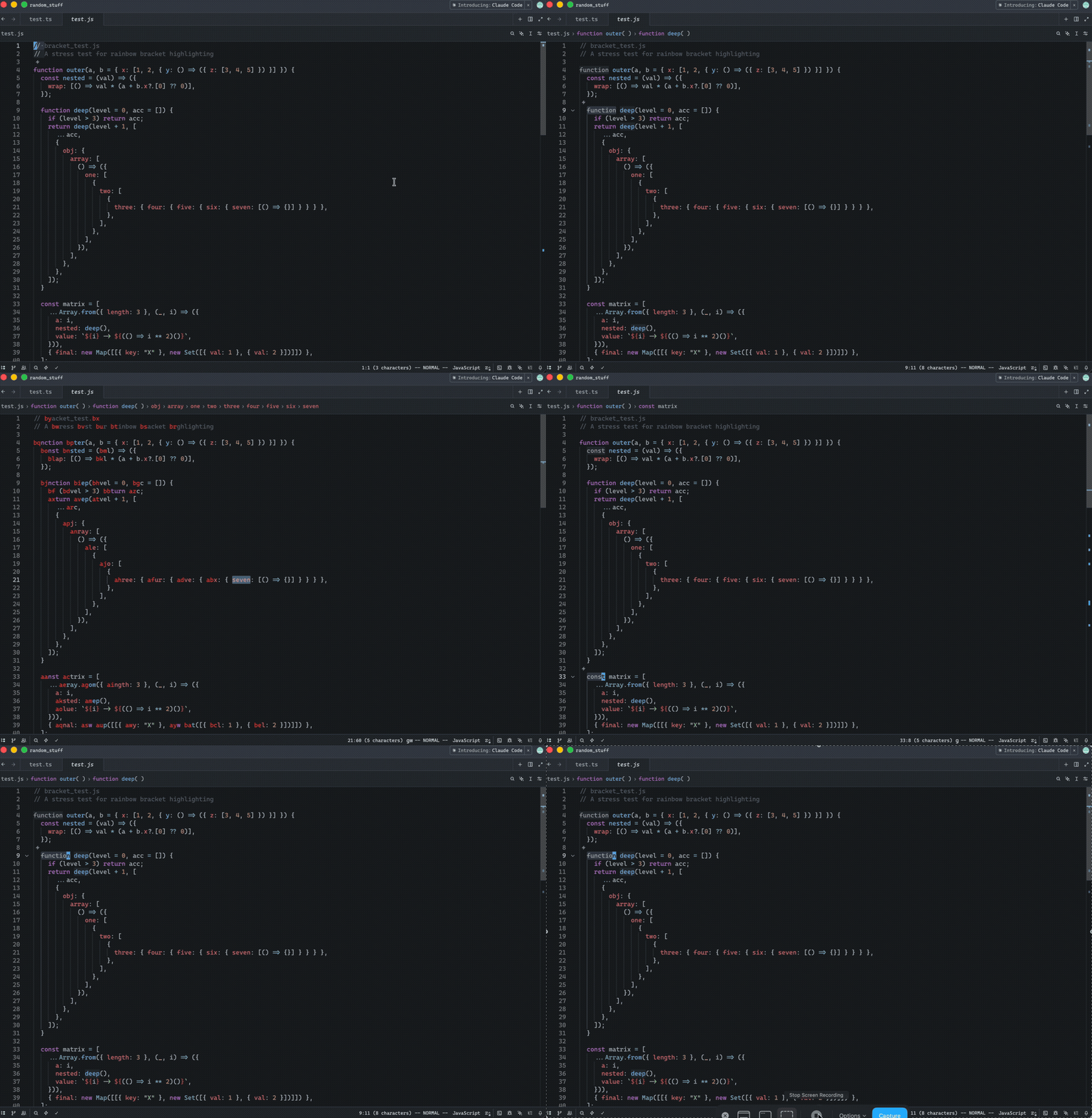
Release Notes:
- Added in Helix mode the "amp jump" navigation (`g w`) that displays
two-character labels on words for quick cursor navigation. Labels
alternate between forward and backward directions from the cursor,
prioritizing closer targets with easier-to-type labels. The color of the
labels can be controlled via a new `helix.jump_label_accent` setting
---------
Co-authored-by: Jakub Konka <kubkon@jakubkonka.com>
- Don't render the tooltip while the menu is open to avoid collision
- Try to maintain the trigger element visible while the menu is open
- Tweak bookmarks icon and tooltip description copy
Release Notes:
- N/A
---------
Co-authored-by: Yara 🏳️⚧️ <git@yara.blue>
Co-authored-by: Joseph T. Lyons <JosephTLyons@gmail.com>
Closes#48394
Moves the data collection preference for Zed's Edit Predictions out of
the internal KV store and into `settings.json` as a proper
`allow_data_collection` setting under `edit_predictions`.
**Migration:** Existing users' choices are preserved. When
`allow_data_collection` is absent from `settings.json`, the resolved
value falls back to the legacy KV entry
(`zed_predict_data_collection_choice`). Once the user toggles the
setting or sets it explicitly, the new setting takes precedence and the
KV entry is ignored.
**Bug fixed:** The original implementation of `toggle_data_collection`
read the raw (unresolved) settings content to determine the current
state. When `allow_data_collection` was absent from `settings.json` but
the KV store held `"true"`, the raw read returned `None → false`,
causing the first toggle click to write `Some(true)` (re-enabling)
instead of `Some(false)` (disabling). The fix reads the resolved
`is_data_collection_enabled()` value before entering the
`update_settings_file` closure.
## Manual testing
**Setting takes effect:**
1. Open settings (`cmd+,`) and add `"allow_data_collection": true` under
`edit_predictions`. Save.
2. Open a file — the data collection indicator in the editor should
reflect the enabled state.
3. Flip to `false` and confirm it updates.
**Toggle correctly disables from KV-enabled state (migration bug fix):**
1. Remove `allow_data_collection` from `settings.json`.
2. Write the legacy KV entry directly:
```
sqlite3 ~/Library/Application\ Support/Zed/db/0-dev/db.sqlite \
"INSERT OR REPLACE INTO kv_store(key,value)
VALUES('zed_predict_data_collection_choice','true');"
```
3. Restart Zed. The data collection toggle should show as **enabled**
(reading from KV store).
4. Click the toggle once to disable. `allow_data_collection` should
appear as `false` in `settings.json` — not `true`, which was the pre-fix
behaviour.
**Upsell modal still appears for new users:**
1. Clear both KV keys and restart:
```
sqlite3 ~/Library/Application\ Support/Zed/db/0-dev/db.sqlite \
"DELETE FROM kv_store WHERE key IN
('zed_predict_data_collection_choice','dismissed-edit-predict-upsell');"
```
2. Open any file so the status bar is visible.
3. Click the edit prediction button (bottom-right status bar) — it
should have a muted dot indicator.
4. The upsell modal should appear. Dismissing it should prevent it from
reappearing.
## Release Notes:
- `allow_data_collection` for Zed's Edit Predictions can now be set
explicitly in `settings.json` under `edit_predictions`. Existing
preferences stored in the internal database are preserved as a fallback.
---------
Co-authored-by: Ben Kunkle <ben.kunkle@gmail.com>
Self-Review Checklist:
- [x] I've reviewed my own diff for quality, security, and reliability
- [x] ~Unsafe blocks (if any) have justifying comments~
- [x] The content is consistent with the [UI/UX
checklist](https://github.com/zed-industries/zed/blob/main/CONTRIBUTING.md#uiux-checklist)
- [x] Tests cover the new/changed behavior
- [x] Performance impact has been considered and is acceptable
Followup to #47531 to use the gpui feature in Zed. This just plumbs the
"system bell" feature into the terminal, behind a new setting (enabled
by default, like most other terminal applications).
Closes#5303
Relates to
https://github.com/zed-industries/zed/issues/40826#issuecomment-3684556858
Release Notes:
- Added audible BEL to Terminal; can be enabled by setting
`terminal.bell` to `"system"`.
---------
Co-authored-by: Matt Van Horn <455140+mvanhorn@users.noreply.github.com>
Co-authored-by: Ben Kunkle <Ben.kunkle@gmail.com>
Release Notes:

- Fixed an issue where pressing `Escape` in the search bar did not dismiss it when using the Helix keymap, while it worked correctly in Vim mode.

Co-authored-by: buildingvibes <buildingvibes@users.noreply.github.com>
Co-authored-by: Jakub Konka <kubkon@jakubkonka.com>
Release Notes:

- helix: Fix some commands that you might want use when you have no
panes open, like project or symbol search.

---------

Co-authored-by: Jakub Konka <kubkon@jakubkonka.com>
Closes#49581
Adds a `line_ending` language setting that controls how line endings are
handled for new files and during format/save:
- `detect` (default) — detects existing line endings; new files use the
platform default
- `prefer_lf` / `prefer_crlf` — sets LF or CRLF for new files and files
with no existing convention, while preserving existing files
- `enforce_lf` / `enforce_crlf` — normalizes all line endings to LF or
CRLF on every format/save
The setting can be configured globally, per-language, or via
`.editorconfig`'s `end_of_line` property (which maps to `enforce_lf` /
`enforce_crlf`).
Release Notes:
- Added `line_ending` setting to control how line endings are handled
for new files and normalized on save.
- Added support for `.editorconfig` `end_of_line` property to enforce
line endings.
---------
Co-authored-by: Smit Barmase <heysmitbarmase@gmail.com>
The `project_name` worktree setting was added in #36713 to let users
override the name shown in the window title. Its description ("The
displayed name of this project. If left empty, the root directory name
will be displayed.") suggests broader coverage, and #46440 reports the
reasonable expectation that it should also apply in the project
switcher. In practice the setting has only ever affected
`Workspace::update_window_title`, so everywhere else (recent projects,
the multi-worktree pane, ...) keeps falling back to the worktree root
name.
Rather than plumb the setting through each of those surfaces, I'm
removing it. Having a project-level setting control how your editor
displays the project has downsides. For example it means a checkout can
dictate UI in someone else's Zed. The natural home for a custom display
name is the workspace DB, set from the UI, which is what we should do if
we want this feature back.
If you want this back, the path forward is to store the display name in
`WorkspaceDb`, expose a UI affordance to edit it, and read it from
`update_window_title`, `recent_projects::get_recent_projects` /
`get_open_folders`, and any other places that currently derive a display
name from the worktree root.
Closes#46440
Release Notes:
- Removed the `project_name` project setting. It only ever affected the
OS window title, and the expectation that it would show up in the
project switcher and elsewhere is better served by a future UI-driven,
per-workspace setting stored locally.
`SendKeystroke` seems to work for all ctrl keybinds. Prefer it over
`SendText` for readability.

showkey reports the same key sequences if I apply these keybinds to my
user keymap.

Before you mark this PR as ready for review, make sure that you have:
- [ ] Added a solid test coverage and/or screenshots from doing manual
testing
- [ ] Done a self-review taking into account security and performance
aspects
- [ ] Aligned any UI changes with the [UI
checklist](https://github.com/zed-industries/zed/blob/main/CONTRIBUTING.md#uiux-checklist)

Release Notes:

- N/A

Co-authored-by: Jakub Konka <kubkon@jakubkonka.com>
showkey in Ghostty, iTerm2, and Terminal.app reports ctrl-delete as
`<ESC>[3;5~`.
I tested this keybind on macOS, where fish_key_reader correctly
interprets it as ctrl-delete.
Closes#51725
Before you mark this PR as ready for review, make sure that you have:
- [ ] Added a solid test coverage and/or screenshots from doing manual
testing
- [ ] Done a self-review taking into account security and performance
aspects
- [ ] Aligned any UI changes with the [UI
checklist](https://github.com/zed-industries/zed/blob/main/CONTRIBUTING.md#uiux-checklist)
Release Notes:
- Fixed ctrl-delete keybind in the terminal
---------
Co-authored-by: Jakub Konka <kubkon@jakubkonka.com>


