 83da7233a8
* docs(channels): design DingTalk multi-image delivery * docs(channels): plan DingTalk multi-image delivery * fix(channels): retain all DingTalk rich-text images * feat(channels): carry ordered prompt images * feat(channels): send all prompt images over ACP * feat(channels): persist all channel images in daemon sessions * fix(channels): clean up failed daemon image uploads * fix(channels): deliver channel images on older daemons and unknown MIME types * fix(channels): harden channel image delivery against malformed and rejected turns - Drop image entries missing data/mimeType in resolvePromptImages so one malformed attachment degrades to a prompt without the image instead of throwing a TypeError that kills the whole turn (restores the pre-diff legacy-guard behavior for out-of-contract extension adapters). - Require the image/ MIME prefix in channelImageName so non-image types whose tail spells a known extension (audio/png) are skipped with a warning instead of tripping the daemon store's name/content-type check and failing the turn. - Roll uploaded images back when the daemon definitively rejects prompt admission (DaemonHttpError on the admission request, local prompt-queue limit), matching the webui client; admitted-turn errors and transport failures keep the uploads because the daemon may already reference them. - Upload prompt images concurrently like the webui path, preserving input order and the existing rollback contract. - Log failed attachment removals during rollback via sanitizeLogText. - Point CHANNEL_IMAGE_EXTENSIONS at the daemon store's set as source of truth; document the ordered images contract in the README. * fix(channels): skip oversized channel images and pin review gaps (#9922) * fix(channels): keep channel image delivery within daemon admission limits (#9922) - Skip channel images whose base64 decodes to zero bytes before uploading: the daemon store rejects empty images with 400, which failed the whole turn instead of degrading by omission. - Bound the inline fallback for daemons without session_attachments: apply the same per-item admission gate and keep the aggregate base64 payload under the daemon's 10mb prompt-body limit, so multi-image turns against older daemons degrade by omission instead of failing with 413. - Reject oversized images from the base64 length before allocating the decoded buffer, so several oversized images no longer allocate their full decoded payloads concurrently before being discarded. - Tag the skip log lines with the session id so operators can correlate a skipped image to its channel session. * fix(channels): close channel image size-gate padding undercount (#9922) The pre-decode size estimate subtracted trailing '=' padding even when the input length does not complete a quantum; Node's lenient base64 decoder ignores such stray padding, so malformed input decoding to the 8 MiB limit plus one byte slipped past the gate and the daemon's 413 then failed the whole turn. Subtract padding only for multiple-of-4 input so the estimate is a strict upper bound. Also give the skip reason a caller-supplied label so the inline fallback for daemons without session_attachments names the inline budget instead of an attachment-store limit those daemons do not have. * fix(channels): roll back uploads on pre-admission cancel * fix(channels): roll back channel images when cancelled before prompt admission (#9922) Co-authored-by: Qwen-Coder <qwen-coder@alibabacloud.com> * fix(channels): preserve daemon session client compatibility --------- Co-authored-by: qwen-code-ci-bot <qwen-code-ci-bot@users.noreply.github.com> Co-authored-by: Qwen-Coder <qwen-coder@alibabacloud.com> Co-authored-by: qwen-code-dev-bot <qwen-code-dev-bot@users.noreply.github.com> |
||
|---|---|---|
| .github | ||
| .husky | ||
| .qwen | ||
| .vscode | ||
| docs | ||
| docs-site | ||
| eslint-rules | ||
| integration-tests | ||
| integrations/external-context | ||
| packages | ||
| patches | ||
| scripts | ||
| .dockerignore | ||
| .editorconfig | ||
| .gitattributes | ||
| .gitignore | ||
| .npmrc | ||
| .nvmrc | ||
| .prettierignore | ||
| .prettierrc.json | ||
| .yamllint.yml | ||
| AGENTS.md | ||
| CHANGELOG.md | ||
| CLAUDE.md | ||
| CONTRIBUTING.md | ||
| Dockerfile | ||
| esbuild.config.js | ||
| eslint.config.js | ||
| eslint.legacy-filenames.mjs | ||
| LICENSE | ||
| Makefile | ||
| package-lock.json | ||
| package.json | ||
| README.md | ||
| SECURITY.md | ||
| tsconfig.json | ||
| vitest.config.ts | ||




The open-source AI coding agent that lives in your terminal.
中文 | Deutsch | français | 日本語 | Русский | Português (Brasil) | 한국어
Why Qwen Code?
- Agentic out of the box — Auto-Memory, Auto-Skills, SubAgents, Agent Teams, and MCP. Dynamic workflows, zero setup.
- Open-source, inside and out — The framework and the Qwen models are open-source. They evolve together. No vendor lock-in.
- Multi-protocol — Supports OpenAI, Anthropic, Gemini, and Qwen APIs. Any third-party provider or local model (Ollama / vLLM). Switch at runtime.
- Beyond the terminal — IDE plugins, Desktop app, daemon mode, SDKs, and IM bots (Telegram / DingTalk / WeChat / Feishu).
Tip
Qwen Code is actively iterating on itself — using its own agent and models to file issues, submit PRs, review code, and run tests. Powered by the community, driven by AI.
Installation
Linux / macOS:
curl -fsSL https://qwen-code-assets.oss-cn-hangzhou.aliyuncs.com/installation/install-qwen-standalone.sh | bash
Windows:
irm https://qwen-code-assets.oss-cn-hangzhou.aliyuncs.com/installation/install-qwen-standalone.ps1 | iex
Restart your terminal after installation to ensure environment variables take effect.
NPM / Homebrew
NPM (requires Node.js 22+):
npm install -g @qwen-code/qwen-code@latest
Homebrew (macOS / Linux):
brew install qwen-code
Quick Start
qwen          # Launch interactive terminal UI
# Inside the session:
/auth         # Configure your provider and API key
See the Authentication Guide and Settings Reference for detailed setup.
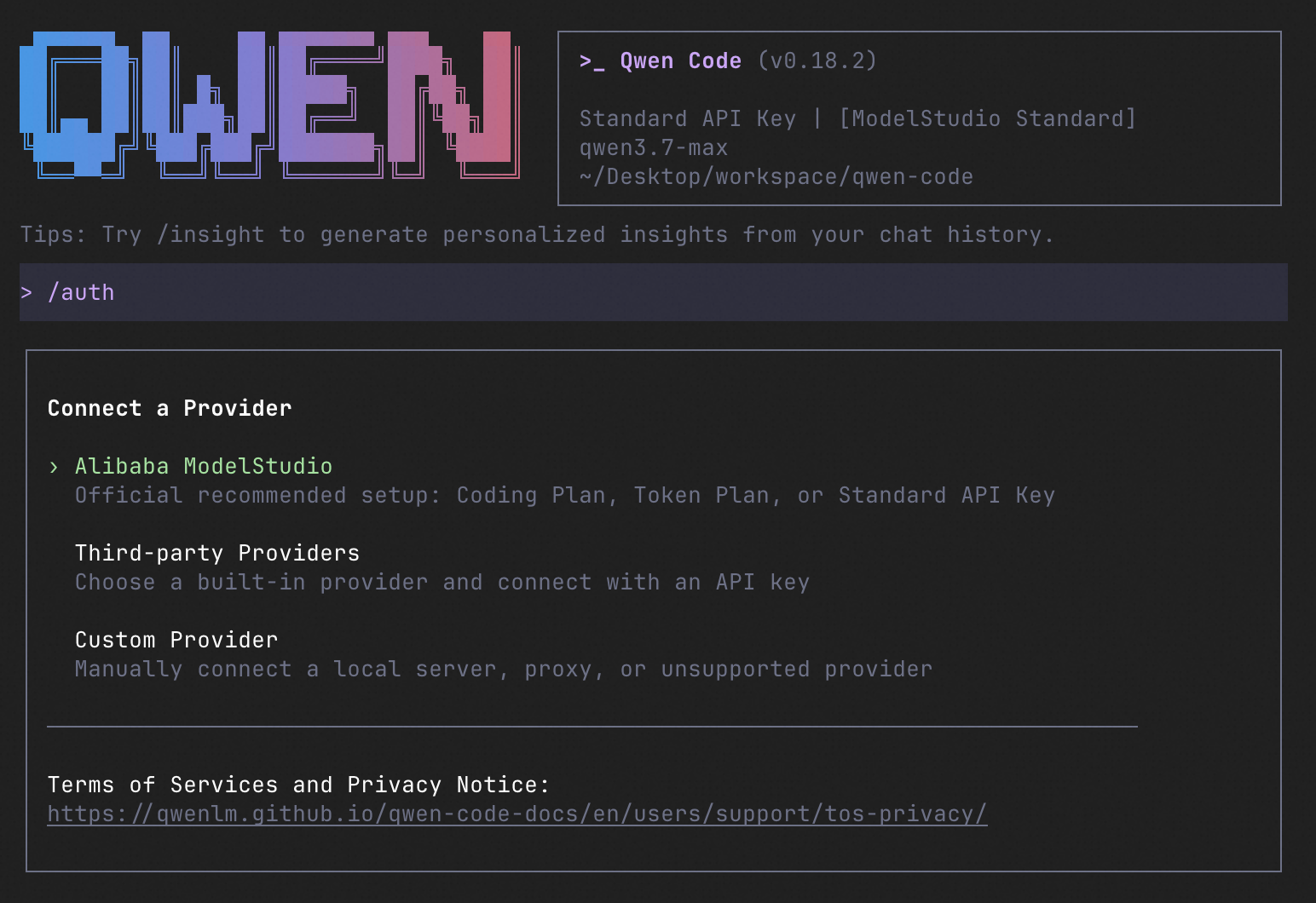
How to Use Qwen Code
| Mode | Command | Use Case |
|---|---|---|
| Interactive | qwen |
Terminal UI with rich rendering, @file references, slash commands |
| Headless | qwen -p "..." |
Scripts, CI/CD, batch processing — no UI |
| IDE | — | VS Code, Zed, JetBrains |
| Desktop | — | Qwen Code Desktop — GUI for macOS, Windows, Linux |
| Daemon | qwen serve |
Shared agent session over HTTP+SSE (ACP). Multiple clients, one agent. (experimental) Docs |
| SDK | — | TypeScript, Python, Java |
| IM Bot | qwen channel |
Connect to Telegram, DingTalk, WeChat, or Feishu |
SDK example (Python)
import asyncio

from qwen_code_sdk import is_sdk_result_message, query


async def main() -> None:
    result = query(
        "Summarize the repository layout.",
        {
            "cwd": "/path/to/project",
            "path_to_qwen_executable": "qwen",
        },
    )

    async for message in result:
        if is_sdk_result_message(message):
            print(message["result"])


asyncio.run(main())
Capabilities
If you know Claude Code, you already know Qwen Code — and then some. We've put significant effort into bringing Qwen Code to feature parity with Claude Code, improving both breadth and reliability across the board.
| Feature | Qwen Code | Claude Code |
|---|---|---|
| SubAgents, Agent Teams, Dynamic Workflows | ✓ | ✓ |
| Auto-Memory, Auto-Skills, Hooks | ✓ | ✓ |
| Built-in Skills (/review, /batch, /loop, /bugfix…) | ✓ | ✓ |
| MCP, Plan Mode, LSP Integration | ✓ | ✓ |
| Auto Mode, Sandbox, Git Worktrees | ✓ | ✓ |
| Computer Use (desktop automation) | ✓ | ✓ |
| IDE Plugins (VS Code / JetBrains / Zed) | ✓ | ✓ |
| SDK | ✓ | ✓ |
| Headless Mode, Session Management | ✓ | ✓ |
| Open-source — model and framework | ✓ | — |
| Multi-protocol (OpenAI / Anthropic / Gemini / Qwen + any provider) | ✓ | — |
| Agent Arena (multi-model head-to-head on same task) | ✓ | — |
Daemon Mode — qwen serve (multi-client shared agent) |
✓ | — |
| IM Channels (Telegram / DingTalk / WeChat / Feishu) | ✓ | — |
Ecosystem
-
Qwen Code Desktop — Official desktop app for macOS, Windows, and Linux
-
AionUi — A modern GUI for command-line AI tools including Qwen Code
-
Gemini CLI Desktop — A cross-platform desktop/web/mobile UI for Qwen Code
-
🦞 Qwen Code Claw — Let other agents (Claude, Codex, etc.) delegate coding tasks to Qwen Code via ACP. Paste this prompt into your agent:
Use Qwen Code as a coding agent. First, fetch and read this skill reference:
https://raw.githubusercontent.com/QwenLM/qwen-code/refs/heads/main/.qwen/skills/qwen-code-claw/SKILL.md
Then follow the instructions inside to install, authenticate, and use Qwen Code via acpx for all coding tasks.
- Aliyun Model Studio CLI — Official CLI for Aliyun's AI platform (
bailian-cli). Extends Qwen Code with image/video generation, knowledge retrieval, app orchestration, and model deployment
Contributing
Contributions are welcome! See CONTRIBUTING.md for guidelines.
Acknowledgments
This project was originally based on Google Gemini CLI v0.8.2. We gratefully acknowledge the Gemini CLI team's excellent work. Starting from Qwen Code v0.1, we stopped syncing with upstream and began independent development as a multi-protocol, multi-platform agent framework with deep integrations for Qwen models and beyond.