 170ce7917d
* feat(web-shell): show Settings and Daemon Status as an in-place panel

The Settings and Daemon Status buttons opened centered modal overlays that
dimmed the whole app. Render them as a full-height panel that replaces the
chat surface instead — a Back button or Escape returns to the chat — with the
content left-aligned and filling the chat pane width rather than centered in a
narrow column. On the Daemon Status page, give the time-series charts a taller
plot and the overview cards a wider track so a wide window is actually used;
the tab grouping (overview / metrics / diagnostics) is kept.

* fix(web-shell): preserve composer draft and refine panel focus/escape

Address review feedback on the in-place Settings / Daemon Status panel:

- Keep the chat view (message list + composer) mounted and just hidden while a
  panel is shown, so typing a prompt, opening Settings/Status, then going Back
  no longer discards the unsent draft and attachments (the composer subtree was
  being unmounted and remounted empty).
- Focus the Back button when a panel opens and restore focus to the composer
  when it closes, replacing the focus management DialogShell used to provide.
- Reload workspace settings after the fast-model command resolves so the still-
  mounted Settings panel doesn't keep showing the previous value.
- Don't close the panel when Escape is handled inside the sidebar (its search
  input clears on Escape without stopping the event).
- Guard the overview card grid with min(100%, 340px) so a 340px track can't
  overflow a narrow panel.

* fix(web-shell): reset panel scroll when switching Settings/Status

Add key={activePanel} on the panel body so switching directly between Settings
and Daemon Status (activePanel goes 'settings' -> 'status' without passing
through null) remounts the scroll container and opens at the top instead of
inheriting the previous panel's scrollTop.

* fix(web-shell): restore new-chat vertical centering

The chatViewWrap added to keep the composer mounted while a panel is shown was
filling the pane, which cancelled the empty (new-chat) state's vertical
centering (welcome header + composer stuck to the top instead of centered).
Shrink the wrapper to its content in the empty state so
`.appChatEmpty .chatPane { justify-content: center }` centers it again, matching
how `.content` behaves there.

* fix(web-shell): restore session-org test destructuring dropped in merge

My earlier merge of origin/main 3-way-combined WebShellSidebar.test.tsx
incorrectly, dropping the `{ }` destructuring from the 7 session-organization
tests. renderSidebar returns `{ container, rerender }` (not the element), so
`const container = renderSidebar(...)` made `container.querySelector` throw.
Restore the file to origin/main so the tests pass again.

* fix(web-shell): surface pending approvals over Settings/Status panel

The in-place Settings/Daemon Status panel hides the chat footer with
display:none, and the ToolApproval / AskUserQuestion overlays live in
that footer. A gated tool call that arrived while a panel was open
rendered the approval into a hidden container, so the turn hung with no
visible prompt (reported [Critical]).

Close the panel when an actionable approval is pending so it surfaces.
Only actionable approvals count (pendingToolApproval / pendingAskUserApproval
already gate on canActOnPendingApproval), so a non-owner in a shared
session isn't yanked out of Settings by someone else's prompt. Leave
focus for the overlay rather than the composer on this path: ToolApproval
uses a window-level key handler that ignores editable targets, so
focusing the composer would swallow its shortcuts.

Also refocus the Back button on panel->panel switches (not just on open),
so focus no longer relies on the Back button being the same DOM node
across the keyed panel body, and expose SvgLineChart's plot height as
--chart-height (fallback 140px) so a constrained caller can shrink it.

Adds App-level tests: the panel auto-closes on a pending tool approval,
and stays open when the only block is a resolved (non-actionable) one.

* test(web-shell): cover AskUserQuestion auto-close; robust panel selector

Follow-up to the approval auto-close fix, addressing review suggestions:

- Add data-testid="inline-panel" to the panel <section> and query by it in
  App.test instead of querySelector('section'), which would false-positive if
  any future component renders a <section>.
- Add a companion test for the pendingAskUserApproval branch of the auto-close
  effect. The ask-user block carries toolCall.input.questions so
  isAskUserPermission() classifies it as an AskUserQuestion; mutation-checked
  (restricting the effect to pendingToolApproval fails only this test).
- Document why handleFastModelSelect's post-sendPrompt reload is not racy:
  sendPrompt awaits waitForAcceptedPromptCompletion, so the /model --fast turn
  has already applied when reloadWorkspaceSettings() runs. Also note why the
  command path needs the explicit reload that the setWorkspaceSetting pickers
  (vision/voice) get for free via the settingsVersion signal.

* fix(web-shell): close inline panel when resuming a session

The /resume <id> command and the ResumeDialog onSelect both call
loadSession() without closePanel(), unlike createNewSession and
loadSidebarSession. Loading a session means the user wants that chat, so
leaving a Settings/Daemon Status panel open would hide it. Add closePanel()
to both paths for consistency (a no-op when no panel is open).

Currently reachable only in theory — the composer that submits /resume is
display:none while a panel is shown — but the guard keeps the invariant if
a non-composer entry point (sidebar/shortcut) is ever added.

Adds a mutation-checked test (removing closePanel from the /resume handler
fails it) and gives the ChatEditor test mock a focus() method, since the
panel-close focus effect now runs editorRef.focus() on this no-approval path.

* fix(web-shell): keep composer dormant while an approval overlay is up

Follow-up to the approval auto-close fix. When an approval arrives while a
Settings/Status panel is open, the auto-close clears activePanel, so
interactionBlocked flips false and useComposerCore's dialogOpen effect
refocuses the still-mounted composer. ToolApproval ignores approval
shortcuts from editable targets, so the now-visible approval stops
responding to Enter/Escape/number keys until focus moves away.

Key the ChatEditor dialogOpen prop off the pending approval too, so the
composer stays blurred while an approval owns the keyboard. Consolidate the
"an approval overlay is active" condition — previously duplicated in the
auto-close effect and the panel focus guard — into a single
approvalOverlayActive value so the three consumers can't drift.

Uses the actionable-approval condition (pendingToolApproval /
pendingAskUserApproval) rather than raw pendingApproval, matching the
auto-close gating and avoiding a blurred composer when a non-actionable
approval renders no overlay.

Adds a mutation-checked test asserting dialogOpen is true while an approval
is pending with no panel open.

* test(web-shell): cover the Daemon Status panel branch

A review note observed that all five panel tests open via /settings, so the
activePanel === 'status' branch (DaemonStatusDialog) had no coverage — a
regression in the 'status' literal would go undetected. Add a test that
opens Daemon Status through the sidebar and asserts the panel opens and
auto-closes on a pending approval, exercising that branch and confirming the
auto-close is panel-type-agnostic.

Gives the WebShellSidebar test mock an onOpenDaemonStatus button, since
there is no slash command to open the status panel. Mutation-checked:
neutering setActivePanel('status') fails only this test.

* fix(web-shell): dismiss stacked dialogs on approval, focus overlay, a11y

Addresses a review round on the inline Settings/Status panel.

[Critical] When an approval arrives while a DialogShell sub-dialog (model
picker / approval-mode picker) is open over the panel, the auto-close
removed the panel but left the sub-dialog backdrop covering the footer
approval overlay, so the turn hung. Worse, the approval-mode picker stayed
usable — selecting "yolo" auto-approved (handleSetMode) a tool call the
user never saw. Dismiss the panel AND both sub-dialogs when an actionable
approval is pending.

[Critical] After the panel closes for an approval, focus fell to <body>
(the Back button unmounted; ToolApproval has no autofocus). Move focus onto
the ToolApproval overlay wrapper (tabindex=-1, so its window-listener
shortcuts keep working and Enter doesn't confirm early) once it is visible.
AskUserQuestion keeps managing its own focus.

Suggestions:
- Guard reloadWorkspaceSettings() rejection (was unhandled).
- aria-hidden the display:none chat view so AT can't wander into it.
- Close the panel before /model --fast so its response shows in the chat
  in context instead of piling up behind the hidden panel.
- Remove the dead .panelBodyInner wrapper (redundant width:100%).
- Rename data-mobile-drawer -> data-sidebar-shell (it wraps the desktop
  sidebar for all viewports) across App.tsx + standalone.css.

Tests (+5, mutation-checked): sub-dialog dismissal on approval, overlay
focus, Escape closes panel / sidebar-Escape does not, dialogOpen while a
panel replaces the chat. Adds an observable DialogShell test mock.

* fix(web-shell): restore composer focus after approval resolves; cleanups

[Critical] The panel focus effect consumed prevActivePanelRef to null on the
approval auto-close (correctly skipping editor focus then). When the approval
later resolved with no panel to return to, neither branch fired and focus was
left on <body> — the visible composer took no keyboard input. Track the
approvalOverlayActive transition too and restore composer focus on
approval-resolve-after-panel-close. (useComposerCore's dialogOpen effect also
covers this; the extra branch makes the panel effect self-contained.)

Suggestions:
- Log the reloadWorkspaceSettings() rejection instead of swallowing it.
- Remove the dead :global([data-dialog-fullscreen]) .grid rule (the
  allowFullscreen source was removed when Daemon Status became a panel).

Tests (+4, focus-restore mutation-checked): focus restored after an approval
resolves post-auto-close; Back-button closes the panel and restores focus;
fast-model pick closes the panel, sends /model --fast, and reloads settings;
chat view is aria-hidden while a panel is shown. Adds interactive
SettingsMessage / ModelDialog mocks and stable editor-focus / settings-reload
spies.

* fix(web-shell): make Settings/Status panel and Scheduled Tasks mutually exclusive

Opening Scheduled Tasks (mainView — a position:absolute z-index overlay) and
then Daemon Status (activePanel) rendered the Daemon Status panel *behind* the
Scheduled Tasks overlay, so the button looked like it did nothing. These are
mutually-exclusive full-pane views, so opening one must close the other.

Centralize into openPanel() / openScheduledTasks() helpers (last-opened wins)
and route all six open sites (the /settings and /schedule commands, the three
sidebar handlers, and the StatusBar) through them.

Mutation-checked tests: opening Daemon Status closes the Scheduled Tasks page
(the reported repro), and opening Scheduled Tasks closes an open panel.
|
||
|---|---|---|
| .github | ||
| .husky | ||
| .qwen | ||
| .vscode | ||
| docs | ||
| docs-site | ||
| eslint-rules | ||
| integration-tests | ||
| packages | ||
| patches | ||
| scripts | ||
| .dockerignore | ||
| .editorconfig | ||
| .gitattributes | ||
| .gitignore | ||
| .npmrc | ||
| .nvmrc | ||
| .prettierignore | ||
| .prettierrc.json | ||
| .yamllint.yml | ||
| AGENTS.md | ||
| CHANGELOG.md | ||
| CLAUDE.md | ||
| CONTRIBUTING.md | ||
| Dockerfile | ||
| esbuild.config.js | ||
| eslint.config.js | ||
| eslint.legacy-filenames.mjs | ||
| LICENSE | ||
| Makefile | ||
| package-lock.json | ||
| package.json | ||
| README.md | ||
| SECURITY.md | ||
| tsconfig.json | ||
| vitest.config.ts | ||




The open-source AI coding agent that lives in your terminal.
中文 | Deutsch | français | 日本語 | Русский | Português (Brasil)
Why Qwen Code?
- Agentic out of the box — Auto-Memory, Auto-Skills, SubAgents, Agent Teams, and MCP. Dynamic workflows, zero setup.
- Open-source, inside and out — The framework and the Qwen models are open-source. They evolve together. No vendor lock-in.
- Multi-protocol — Supports OpenAI, Anthropic, Gemini, and Qwen APIs. Any third-party provider or local model (Ollama / vLLM). Switch at runtime.
- Beyond the terminal — IDE plugins, Desktop app, daemon mode, SDKs, and IM bots (Telegram / DingTalk / WeChat / Feishu).
Tip
Qwen Code is actively iterating on itself — using its own agent and models to file issues, submit PRs, review code, and run tests. Powered by the community, driven by AI.
Installation
Linux / macOS:
curl -fsSL https://qwen-code-assets.oss-cn-hangzhou.aliyuncs.com/installation/install-qwen-standalone.sh | bash
Windows:
irm https://qwen-code-assets.oss-cn-hangzhou.aliyuncs.com/installation/install-qwen-standalone.ps1 | iex
Restart your terminal after installation to ensure environment variables take effect.
NPM / Homebrew
NPM (requires Node.js 22+):
npm install -g @qwen-code/qwen-code@latest
Homebrew (macOS / Linux):
brew install qwen-code
Quick Start
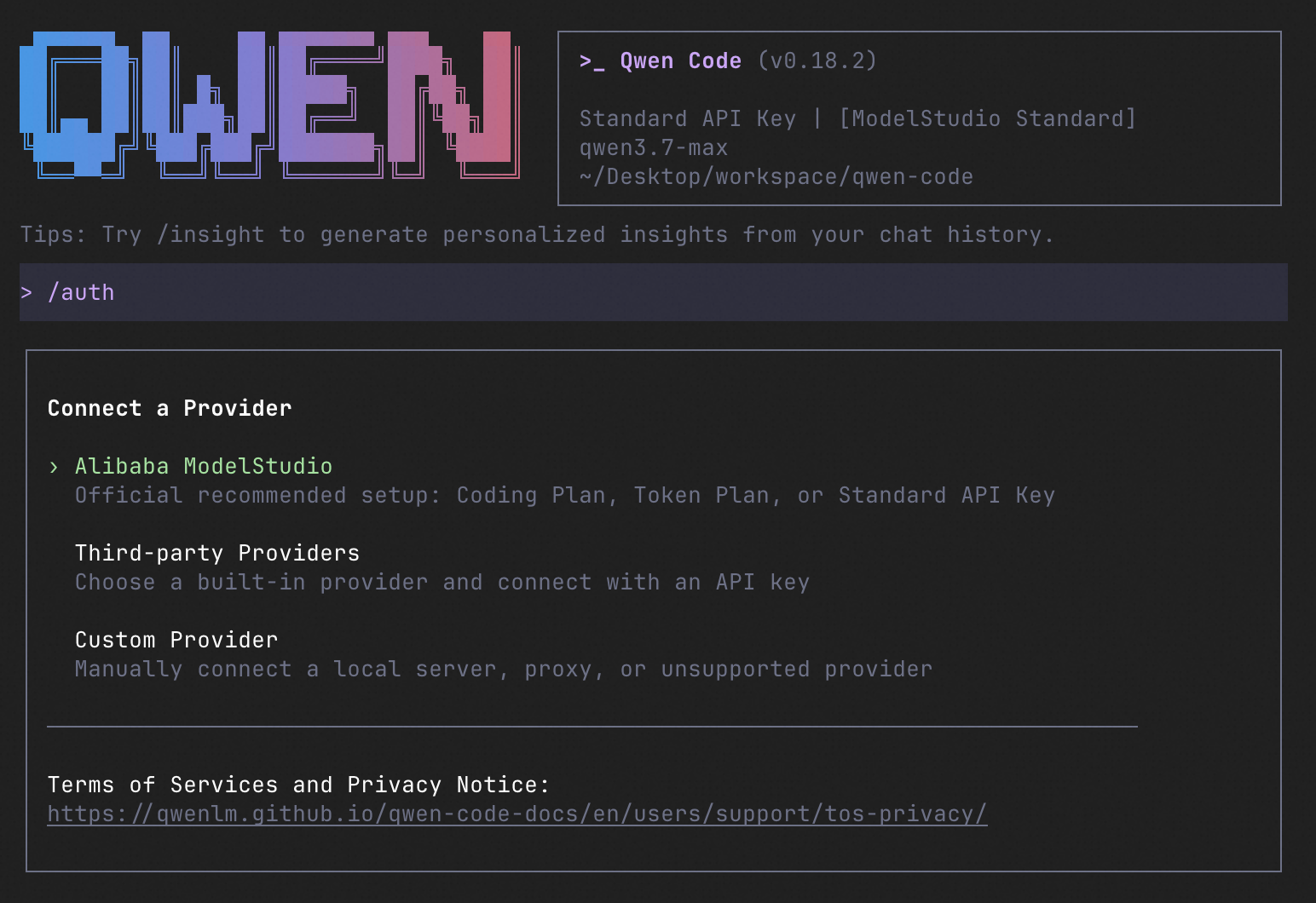
qwen          # Launch interactive terminal UI
# Inside the session:
/auth         # Configure your provider and API key
See the Authentication Guide and Settings Reference for detailed setup.
How to Use Qwen Code
| Mode | Command | Use Case |
|---|---|---|
| Interactive | qwen |
Terminal UI with rich rendering, @file references, slash commands |
| Headless | qwen -p "..." |
Scripts, CI/CD, batch processing — no UI |
| IDE | — | VS Code, Zed, JetBrains |
| Desktop | — | Qwen Code Desktop — GUI for macOS, Windows, Linux |
| Daemon | qwen serve |
Shared agent session over HTTP+SSE (ACP). Multiple clients, one agent. (experimental) Docs |
| SDK | — | TypeScript, Python, Java |
| IM Bot | qwen channel |
Connect to Telegram, DingTalk, WeChat, or Feishu |
SDK example (Python)
import asyncio

from qwen_code_sdk import is_sdk_result_message, query


async def main() -> None:
    result = query(
        "Summarize the repository layout.",
        {
            "cwd": "/path/to/project",
            "path_to_qwen_executable": "qwen",
        },
    )

    async for message in result:
        if is_sdk_result_message(message):
            print(message["result"])


asyncio.run(main())
Capabilities
If you know Claude Code, you already know Qwen Code — and then some. We've put significant effort into bringing Qwen Code to feature parity with Claude Code, improving both breadth and reliability across the board.
| Feature | Qwen Code | Claude Code |
|---|---|---|
| SubAgents, Agent Teams, Dynamic Workflows | ✓ | ✓ |
| Auto-Memory, Auto-Skills, Hooks | ✓ | ✓ |
| Built-in Skills (/review, /batch, /loop, /bugfix…) | ✓ | ✓ |
| MCP, Plan Mode, LSP Integration | ✓ | ✓ |
| Auto Mode, Sandbox, Git Worktrees | ✓ | ✓ |
| Computer Use (desktop automation) | ✓ | ✓ |
| IDE Plugins (VS Code / JetBrains / Zed) | ✓ | ✓ |
| SDK | ✓ | ✓ |
| Headless Mode, Session Management | ✓ | ✓ |
| Open-source — model and framework | ✓ | — |
| Multi-protocol (OpenAI / Anthropic / Gemini / Qwen + any provider) | ✓ | — |
| Agent Arena (multi-model head-to-head on same task) | ✓ | — |
Daemon Mode — qwen serve (multi-client shared agent) |
✓ | — |
| IM Channels (Telegram / DingTalk / WeChat / Feishu) | ✓ | — |
Ecosystem
-
Qwen Code Desktop — Official desktop app for macOS, Windows, and Linux
-
AionUi — A modern GUI for command-line AI tools including Qwen Code
-
Gemini CLI Desktop — A cross-platform desktop/web/mobile UI for Qwen Code
-
🦞 Qwen Code Claw — Let other agents (Claude, Codex, etc.) delegate coding tasks to Qwen Code via ACP. Paste this prompt into your agent:
Use Qwen Code as a coding agent. First, fetch and read this skill reference:
https://raw.githubusercontent.com/QwenLM/qwen-code/refs/heads/main/.qwen/skills/qwen-code-claw/SKILL.md
Then follow the instructions inside to install, authenticate, and use Qwen Code via acpx for all coding tasks.
Contributing
Contributions are welcome! See CONTRIBUTING.md for guidelines.
Acknowledgments
This project was originally based on Google Gemini CLI v0.8.2. We gratefully acknowledge the Gemini CLI team's excellent work. Starting from Qwen Code v0.1, we stopped syncing with upstream and began independent development as a multi-protocol, multi-platform agent framework with deep integrations for Qwen models and beyond.