Compare commits
No commits in common. "master" and "1.6.0" have entirely different histories.
1
.gitattributes
vendored
|
|
@ -1 +0,0 @@
|
|||
*.gif filter=lfs diff=lfs merge=lfs -text
|
||||
47
.github/ISSUE_TEMPLATE/bug_report.yml
vendored
|
|
@ -1,47 +0,0 @@
|
|||
name: Bug report
|
||||
description: Create a report to help us improve
|
||||
labels: ["bug"]
|
||||
body:
|
||||
|
||||
- type: textarea
|
||||
id: issue
|
||||
attributes:
|
||||
label: What happened?
|
||||
description: A clear and concise description of what the bug is.
|
||||
validations:
|
||||
required: true
|
||||
|
||||
- type: textarea
|
||||
id: logs
|
||||
attributes:
|
||||
label: Relevant log output or stack trace
|
||||
description: |
|
||||
Please copy and paste any relevant log output.
|
||||
Add the full stack trace if available.
|
||||
If possible, run the failing task with `--stacktrace` flag.
|
||||
|
||||
*This will be automatically formatted into code, so there is no need for backticks.*
|
||||
render: shell
|
||||
|
||||
- type: textarea
|
||||
id: steps
|
||||
attributes:
|
||||
label: Steps to reproduce
|
||||
description: Steps to reproduce the behavior
|
||||
|
||||
- type: input
|
||||
id: version
|
||||
attributes:
|
||||
label: CodeGPT version
|
||||
placeholder: 1.16.0
|
||||
validations:
|
||||
required: true
|
||||
|
||||
- type: dropdown
|
||||
id: os
|
||||
attributes:
|
||||
label: Operating System
|
||||
options:
|
||||
- macOS
|
||||
- Linux
|
||||
- Windows
|
||||
1
.github/ISSUE_TEMPLATE/config.yml
vendored
|
|
@ -1 +0,0 @@
|
|||
blank_issues_enabled: true
|
||||
22
.github/ISSUE_TEMPLATE/feature_request.yml
vendored
|
|
@ -1,22 +0,0 @@
|
|||
name: Feature request
|
||||
description: Suggest an idea for this project
|
||||
labels: ["enhancement"]
|
||||
body:
|
||||
|
||||
- type: textarea
|
||||
id: cause
|
||||
attributes:
|
||||
label: Describe the need of your request
|
||||
description: A clear and concise description of what the need or problem is.
|
||||
|
||||
- type: textarea
|
||||
id: solution
|
||||
attributes:
|
||||
label: Proposed solution
|
||||
description: A clear and concise description of what you want to happen.
|
||||
|
||||
- type: textarea
|
||||
id: context
|
||||
attributes:
|
||||
label: Additional context
|
||||
description: Add any other context or screenshots about the feature request here.
|
||||
23
.github/dependabot.yml
vendored
|
|
@ -1,23 +0,0 @@
|
|||
version: 2
|
||||
updates:
|
||||
- package-ecosystem: "github-actions"
|
||||
directory: "/"
|
||||
schedule:
|
||||
interval: "daily"
|
||||
|
||||
- package-ecosystem: "gradle"
|
||||
directory: "/"
|
||||
schedule:
|
||||
interval: "daily"
|
||||
|
||||
- package-ecosystem: "gradle"
|
||||
directory: "/buildSrc/src/main/kotlin" # /buildSrc and /codegpt-telemetry use only references
|
||||
schedule:
|
||||
interval: "daily"
|
||||
|
||||
- package-ecosystem: "gradle"
|
||||
directory: "/codegpt-treesitter"
|
||||
schedule:
|
||||
interval: "daily"
|
||||
ignore:
|
||||
- dependency-name: "*"
|
||||
63
.github/workflows/build.yml
vendored
|
|
@ -1,63 +0,0 @@
|
|||
name: Build
|
||||
|
||||
on:
|
||||
push:
|
||||
branches: [ master ]
|
||||
pull_request:
|
||||
branches: [ '**' ]
|
||||
|
||||
jobs:
|
||||
build:
|
||||
name: Build
|
||||
runs-on: ubuntu-latest
|
||||
|
||||
steps:
|
||||
- name: Fetch Sources
|
||||
uses: actions/checkout@v5
|
||||
|
||||
- name: Set up JDK 17
|
||||
uses: actions/setup-java@v5
|
||||
with:
|
||||
java-version: '17'
|
||||
distribution: 'temurin'
|
||||
|
||||
- name: Run Tests
|
||||
run: ./gradlew check
|
||||
|
||||
- name: Collect Tests Result
|
||||
if: ${{ failure() }}
|
||||
uses: actions/upload-artifact@v4
|
||||
with:
|
||||
name: tests-result
|
||||
path: ${{ github.workspace }}/build/reports/tests
|
||||
|
||||
verify:
|
||||
name: Verify Plugin
|
||||
needs: [ build ]
|
||||
runs-on: ubuntu-latest
|
||||
if: ${{ false }} # Disable temporarily
|
||||
steps:
|
||||
- name: Maximize Build Space
|
||||
uses: jlumbroso/free-disk-space@main
|
||||
with:
|
||||
tool-cache: false
|
||||
large-packages: false
|
||||
|
||||
- name: Fetch Sources
|
||||
uses: actions/checkout@v5
|
||||
|
||||
- name: Set up JDK 17
|
||||
uses: actions/setup-java@v5
|
||||
with:
|
||||
java-version: '17'
|
||||
distribution: 'temurin'
|
||||
|
||||
- name: Run Plugin Verification tasks
|
||||
run: ./gradlew runPluginVerifier
|
||||
|
||||
- name: Collect Plugin Verifier Result
|
||||
if: ${{ always() }}
|
||||
uses: actions/upload-artifact@v4
|
||||
with:
|
||||
name: pluginVerifier-result
|
||||
path: ${{ github.workspace }}/build/reports/pluginVerifier
|
||||
17
.gitignore
vendored
|
|
@ -1,21 +1,14 @@
|
|||
codegpt-core/src/main/java/grammar/*
|
||||
!codegpt-core/src/main/java/grammar/PythonLexerBase.java
|
||||
!codegpt-core/src/main/java/grammar/PythonParserBase.java
|
||||
!codegpt-core/src/main/java/grammar/PythonVersion.java
|
||||
!codegpt-core/src/main/java/grammar/TypeScriptLexerBase.java
|
||||
!codegpt-core/src/main/java/grammar/TypeScriptParserBase.java
|
||||
|
||||
.gradle
|
||||
.kotlin
|
||||
build/
|
||||
!gradle/wrapper/gradle-wrapper.jar
|
||||
!**/src/main/**/build/
|
||||
!**/src/test/**/build/
|
||||
local.properties
|
||||
|
||||
### IntelliJ IDEA ###
|
||||
.idea/*
|
||||
.intellijPlatform/*
|
||||
.idea/modules.xml
|
||||
.idea/jarRepositories.xml
|
||||
.idea/compiler.xml
|
||||
.idea/libraries/
|
||||
*.iws
|
||||
*.iml
|
||||
*.ipr
|
||||
|
|
@ -46,4 +39,4 @@ bin/
|
|||
.vscode/
|
||||
|
||||
### Mac OS ###
|
||||
.DS_Store
|
||||
.DS_Store
|
||||
3
.gitmodules
vendored
|
|
@ -1,3 +0,0 @@
|
|||
[submodule "llama.cpp"]
|
||||
path = src/main/cpp/llama.cpp
|
||||
url = https://github.com/ggerganov/llama.cpp
|
||||
8
.idea/.gitignore
generated
vendored
Normal file
|
|
@ -0,0 +1,8 @@
|
|||
# Default ignored files
|
||||
/shelf/
|
||||
/workspace.xml
|
||||
# Editor-based HTTP Client requests
|
||||
/httpRequests/
|
||||
# Datasource local storage ignored files
|
||||
/dataSources/
|
||||
/dataSources.local.xml
|
||||
1
.idea/.name
generated
Normal file
|
|
@ -0,0 +1 @@
|
|||
ChatGPT
|
||||
17
.idea/gradle.xml
generated
Normal file
|
|
@ -0,0 +1,17 @@
|
|||
<?xml version="1.0" encoding="UTF-8"?>
|
||||
<project version="4">
|
||||
<component name="GradleMigrationSettings" migrationVersion="1" />
|
||||
<component name="GradleSettings">
|
||||
<option name="linkedExternalProjectsSettings">
|
||||
<GradleProjectSettings>
|
||||
<option name="distributionType" value="DEFAULT_WRAPPED" />
|
||||
<option name="externalProjectPath" value="$PROJECT_DIR$" />
|
||||
<option name="modules">
|
||||
<set>
|
||||
<option value="$PROJECT_DIR$" />
|
||||
</set>
|
||||
</option>
|
||||
</GradleProjectSettings>
|
||||
</option>
|
||||
</component>
|
||||
</project>
|
||||
8
.idea/inspectionProfiles/Project_Default.xml
generated
Normal file
|
|
@ -0,0 +1,8 @@
|
|||
<component name="InspectionProjectProfileManager">
|
||||
<profile version="1.0">
|
||||
<option name="myName" value="Project Default" />
|
||||
<inspection_tool class="AutoCloseableResource" enabled="true" level="WARNING" enabled_by_default="true">
|
||||
<option name="METHOD_MATCHER_CONFIG" value="java.util.Formatter,format,java.io.Writer,append,com.google.common.base.Preconditions,checkNotNull,org.hibernate.Session,close,java.io.PrintWriter,printf,java.io.PrintStream,printf,java.util.concurrent.Executors,newSingleThreadExecutor,org.asynchttpclient.Dsl,asyncHttpClient,okhttp3.Call,execute" />
|
||||
</inspection_tool>
|
||||
</profile>
|
||||
</component>
|
||||
13
.idea/misc.xml
generated
Normal file
|
|
@ -0,0 +1,13 @@
|
|||
<?xml version="1.0" encoding="UTF-8"?>
|
||||
<project version="4">
|
||||
<component name="ExternalStorageConfigurationManager" enabled="true" />
|
||||
<component name="FrameworkDetectionExcludesConfiguration">
|
||||
<file type="web" url="file://$PROJECT_DIR$" />
|
||||
</component>
|
||||
<component name="ProjectRootManager" version="2" languageLevel="JDK_11" default="true" project-jdk-name="11" project-jdk-type="JavaSDK">
|
||||
<output url="file://$PROJECT_DIR$/out" />
|
||||
</component>
|
||||
<component name="ProjectType">
|
||||
<option name="id" value="jpab" />
|
||||
</component>
|
||||
</project>
|
||||
127
.idea/uiDesigner.xml
generated
Normal file
|
|
@ -0,0 +1,127 @@
|
|||
<?xml version="1.0" encoding="UTF-8"?>
|
||||
<project version="4">
|
||||
<component name="Palette2">
|
||||
<group name="Swing">
|
||||
<item class="com.intellij.uiDesigner.HSpacer" tooltip-text="Horizontal Spacer" icon="/com/intellij/uiDesigner/icons/hspacer.svg" removable="false" auto-create-binding="false" can-attach-label="false">
|
||||
<default-constraints vsize-policy="1" hsize-policy="6" anchor="0" fill="1" />
|
||||
</item>
|
||||
<item class="com.intellij.uiDesigner.VSpacer" tooltip-text="Vertical Spacer" icon="/com/intellij/uiDesigner/icons/vspacer.svg" removable="false" auto-create-binding="false" can-attach-label="false">
|
||||
<default-constraints vsize-policy="6" hsize-policy="1" anchor="0" fill="2" />
|
||||
</item>
|
||||
<item class="javax.swing.JPanel" icon="/com/intellij/uiDesigner/icons/panel.svg" removable="false" auto-create-binding="false" can-attach-label="false">
|
||||
<default-constraints vsize-policy="3" hsize-policy="3" anchor="0" fill="3" />
|
||||
</item>
|
||||
<item class="javax.swing.JScrollPane" icon="/com/intellij/uiDesigner/icons/scrollPane.svg" removable="false" auto-create-binding="false" can-attach-label="true">
|
||||
<default-constraints vsize-policy="7" hsize-policy="7" anchor="0" fill="3" />
|
||||
</item>
|
||||
<item class="javax.swing.JButton" icon="/com/intellij/uiDesigner/icons/button.svg" removable="false" auto-create-binding="true" can-attach-label="false">
|
||||
<default-constraints vsize-policy="0" hsize-policy="3" anchor="0" fill="1" />
|
||||
<initial-values>
|
||||
<property name="text" value="Button" />
|
||||
</initial-values>
|
||||
</item>
|
||||
<item class="javax.swing.JRadioButton" icon="/com/intellij/uiDesigner/icons/radioButton.svg" removable="false" auto-create-binding="true" can-attach-label="false">
|
||||
<default-constraints vsize-policy="0" hsize-policy="3" anchor="8" fill="0" />
|
||||
<initial-values>
|
||||
<property name="text" value="RadioButton" />
|
||||
</initial-values>
|
||||
</item>
|
||||
<item class="javax.swing.JCheckBox" icon="/com/intellij/uiDesigner/icons/checkBox.svg" removable="false" auto-create-binding="true" can-attach-label="false">
|
||||
<default-constraints vsize-policy="0" hsize-policy="3" anchor="8" fill="0" />
|
||||
<initial-values>
|
||||
<property name="text" value="CheckBox" />
|
||||
</initial-values>
|
||||
</item>
|
||||
<item class="javax.swing.JLabel" icon="/com/intellij/uiDesigner/icons/label.svg" removable="false" auto-create-binding="false" can-attach-label="false">
|
||||
<default-constraints vsize-policy="0" hsize-policy="0" anchor="8" fill="0" />
|
||||
<initial-values>
|
||||
<property name="text" value="Label" />
|
||||
</initial-values>
|
||||
</item>
|
||||
<item class="javax.swing.JTextField" icon="/com/intellij/uiDesigner/icons/textField.svg" removable="false" auto-create-binding="true" can-attach-label="true">
|
||||
<default-constraints vsize-policy="0" hsize-policy="6" anchor="8" fill="1">
|
||||
<preferred-size width="150" height="-1" />
|
||||
</default-constraints>
|
||||
</item>
|
||||
<item class="javax.swing.JPasswordField" icon="/com/intellij/uiDesigner/icons/passwordField.svg" removable="false" auto-create-binding="true" can-attach-label="true">
|
||||
<default-constraints vsize-policy="0" hsize-policy="6" anchor="8" fill="1">
|
||||
<preferred-size width="150" height="-1" />
|
||||
</default-constraints>
|
||||
</item>
|
||||
<item class="javax.swing.JFormattedTextField" icon="/com/intellij/uiDesigner/icons/formattedTextField.svg" removable="false" auto-create-binding="true" can-attach-label="true">
|
||||
<default-constraints vsize-policy="0" hsize-policy="6" anchor="8" fill="1">
|
||||
<preferred-size width="150" height="-1" />
|
||||
</default-constraints>
|
||||
</item>
|
||||
<item class="javax.swing.JTextArea" icon="/com/intellij/uiDesigner/icons/textArea.svg" removable="false" auto-create-binding="true" can-attach-label="true">
|
||||
<default-constraints vsize-policy="6" hsize-policy="6" anchor="0" fill="3">
|
||||
<preferred-size width="150" height="50" />
|
||||
</default-constraints>
|
||||
</item>
|
||||
<item class="javax.swing.JTextPane" icon="/com/intellij/uiDesigner/icons/textPane.svg" removable="false" auto-create-binding="true" can-attach-label="true">
|
||||
<default-constraints vsize-policy="6" hsize-policy="6" anchor="0" fill="3">
|
||||
<preferred-size width="150" height="50" />
|
||||
</default-constraints>
|
||||
</item>
|
||||
<item class="javax.swing.JEditorPane" icon="/com/intellij/uiDesigner/icons/editorPane.svg" removable="false" auto-create-binding="true" can-attach-label="true">
|
||||
<default-constraints vsize-policy="6" hsize-policy="6" anchor="0" fill="3">
|
||||
<preferred-size width="150" height="50" />
|
||||
</default-constraints>
|
||||
</item>
|
||||
<item class="javax.swing.JComboBox" icon="/com/intellij/uiDesigner/icons/comboBox.svg" removable="false" auto-create-binding="true" can-attach-label="true">
|
||||
<default-constraints vsize-policy="0" hsize-policy="2" anchor="8" fill="1" />
|
||||
</item>
|
||||
<item class="javax.swing.JTable" icon="/com/intellij/uiDesigner/icons/table.svg" removable="false" auto-create-binding="true" can-attach-label="false">
|
||||
<default-constraints vsize-policy="6" hsize-policy="6" anchor="0" fill="3">
|
||||
<preferred-size width="150" height="50" />
|
||||
</default-constraints>
|
||||
</item>
|
||||
<item class="javax.swing.JList" icon="/com/intellij/uiDesigner/icons/list.svg" removable="false" auto-create-binding="true" can-attach-label="false">
|
||||
<default-constraints vsize-policy="6" hsize-policy="2" anchor="0" fill="3">
|
||||
<preferred-size width="150" height="50" />
|
||||
</default-constraints>
|
||||
</item>
|
||||
<item class="javax.swing.JTree" icon="/com/intellij/uiDesigner/icons/tree.svg" removable="false" auto-create-binding="true" can-attach-label="false">
|
||||
<default-constraints vsize-policy="6" hsize-policy="6" anchor="0" fill="3">
|
||||
<preferred-size width="150" height="50" />
|
||||
</default-constraints>
|
||||
</item>
|
||||
<item class="javax.swing.JTabbedPane" icon="/com/intellij/uiDesigner/icons/tabbedPane.svg" removable="false" auto-create-binding="true" can-attach-label="false">
|
||||
<default-constraints vsize-policy="3" hsize-policy="3" anchor="0" fill="3">
|
||||
<preferred-size width="200" height="200" />
|
||||
</default-constraints>
|
||||
</item>
|
||||
<item class="javax.swing.JSplitPane" icon="/com/intellij/uiDesigner/icons/splitPane.svg" removable="false" auto-create-binding="false" can-attach-label="false">
|
||||
<default-constraints vsize-policy="3" hsize-policy="3" anchor="0" fill="3">
|
||||
<preferred-size width="200" height="200" />
|
||||
</default-constraints>
|
||||
</item>
|
||||
<item class="javax.swing.JSpinner" icon="/com/intellij/uiDesigner/icons/spinner.svg" removable="false" auto-create-binding="true" can-attach-label="true">
|
||||
<default-constraints vsize-policy="0" hsize-policy="6" anchor="8" fill="1" />
|
||||
</item>
|
||||
<item class="javax.swing.JSlider" icon="/com/intellij/uiDesigner/icons/slider.svg" removable="false" auto-create-binding="true" can-attach-label="false">
|
||||
<default-constraints vsize-policy="0" hsize-policy="6" anchor="8" fill="1" />
|
||||
</item>
|
||||
<item class="javax.swing.JSeparator" icon="/com/intellij/uiDesigner/icons/separator.svg" removable="false" auto-create-binding="false" can-attach-label="false">
|
||||
<default-constraints vsize-policy="6" hsize-policy="6" anchor="0" fill="3" />
|
||||
</item>
|
||||
<item class="javax.swing.JProgressBar" icon="/com/intellij/uiDesigner/icons/progressbar.svg" removable="false" auto-create-binding="true" can-attach-label="false">
|
||||
<default-constraints vsize-policy="0" hsize-policy="6" anchor="0" fill="1" />
|
||||
</item>
|
||||
<item class="javax.swing.JToolBar" icon="/com/intellij/uiDesigner/icons/toolbar.svg" removable="false" auto-create-binding="false" can-attach-label="false">
|
||||
<default-constraints vsize-policy="0" hsize-policy="6" anchor="0" fill="1">
|
||||
<preferred-size width="-1" height="20" />
|
||||
</default-constraints>
|
||||
</item>
|
||||
<item class="javax.swing.JToolBar$Separator" icon="/com/intellij/uiDesigner/icons/toolbarSeparator.svg" removable="false" auto-create-binding="false" can-attach-label="false">
|
||||
<default-constraints vsize-policy="0" hsize-policy="0" anchor="0" fill="1" />
|
||||
</item>
|
||||
<item class="javax.swing.JScrollBar" icon="/com/intellij/uiDesigner/icons/scrollbar.svg" removable="false" auto-create-binding="true" can-attach-label="false">
|
||||
<default-constraints vsize-policy="6" hsize-policy="0" anchor="0" fill="2" />
|
||||
</item>
|
||||
</group>
|
||||
</component>
|
||||
<component name="uidesigner-configuration">
|
||||
<option name="INSTRUMENT_CLASSES" value="false" />
|
||||
</component>
|
||||
</project>
|
||||
6
.idea/vcs.xml
generated
Normal file
|
|
@ -0,0 +1,6 @@
|
|||
<?xml version="1.0" encoding="UTF-8"?>
|
||||
<project version="4">
|
||||
<component name="VcsDirectoryMappings">
|
||||
<mapping directory="$PROJECT_DIR$" vcs="Git" />
|
||||
</component>
|
||||
</project>
|
||||
24
.run/Run IDE with Plugin.run.xml
Normal file
|
|
@ -0,0 +1,24 @@
|
|||
<component name="ProjectRunConfigurationManager">
|
||||
<configuration default="false" name="Run Plugin" type="GradleRunConfiguration" factoryName="Gradle">
|
||||
<log_file alias="idea.log" path="$PROJECT_DIR$/build/idea-sandbox/system/log/idea.log"/>
|
||||
<ExternalSystemSettings>
|
||||
<option name="executionName"/>
|
||||
<option name="externalProjectPath" value="$PROJECT_DIR$"/>
|
||||
<option name="externalSystemIdString" value="GRADLE"/>
|
||||
<option name="scriptParameters" value=""/>
|
||||
<option name="taskDescriptions">
|
||||
<list/>
|
||||
</option>
|
||||
<option name="taskNames">
|
||||
<list>
|
||||
<option value="runIde"/>
|
||||
</list>
|
||||
</option>
|
||||
<option name="vmOptions" value=""/>
|
||||
</ExternalSystemSettings>
|
||||
<ExternalSystemDebugServerProcess>true</ExternalSystemDebugServerProcess>
|
||||
<ExternalSystemReattachDebugProcess>true</ExternalSystemReattachDebugProcess>
|
||||
<DebugAllEnabled>false</DebugAllEnabled>
|
||||
<method v="2"/>
|
||||
</configuration>
|
||||
</component>
|
||||
1446
CHANGELOG.md
126
DESCRIPTION.md
|
|
@ -1,126 +0,0 @@
|
|||
<!-- Plugin description -->
|
||||
|
||||
ProxyAI is an AI-powered code assistant designed to help you with various programming activities.
|
||||
It's a powerful alternative to Cursor, Windsurf, GitHub Copilot, AI Assistant, and other JetBrains plugins.
|
||||
|
||||
## Highly Configurable
|
||||
|
||||
Access top-tier language models (LLMs) with your own API key or use privately hosted models within your corporate network.
|
||||
|
||||
- **Cloud Providers & Custom Setups:** Integrate top-tier models from OpenAI, Anthropic, Azure, Mistral, or use self-hosted models for offline use.
|
||||
- **Bring Your Own Key:** Connect with your preferred provider using your API key.
|
||||
- **Custom Setup:** Integrate privately hosted models with OpenAI API-compatible configuration.
|
||||
|
||||
## Build Your Own Local AI Assistant
|
||||
|
||||
ProxyAI is the leading open-source extension for connecting your locally running LLM with JetBrains IDEs. Enjoy full AI assistance without sending data externally or needing an internet connection.
|
||||
|
||||
- **Ollama Integration:** Automatically detect and utilize Ollama-managed models.
|
||||
- **GGUF Support:** Easily connect custom models.
|
||||
- **LLaMA C/C++ Integration:** Run various open-source LLMs without third-party software.
|
||||
|
||||
## Core Features
|
||||
|
||||
ProxyAI offers a wide range of features to enhance your development experience:
|
||||
|
||||
### Chat
|
||||
|
||||
Get instant coding advice through a ChatGPT-like interface that accepts image input. Ask questions, share screenshots, seek explanations, or get guidance on your projects without leaving your IDE.
|
||||
|
||||
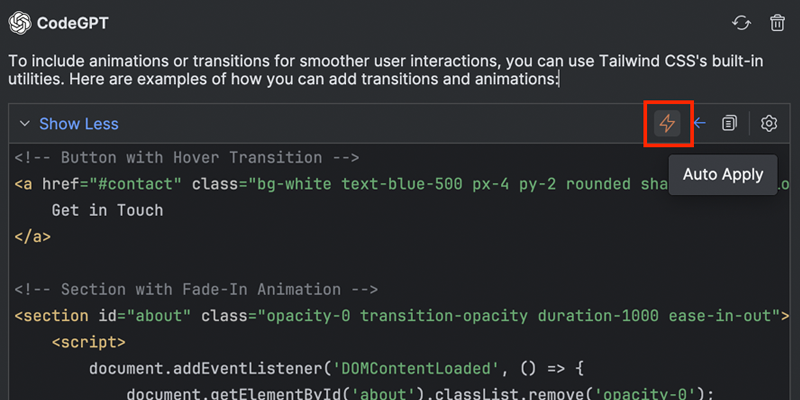
**Auto Apply**
|
||||
|
||||
Stream AI-suggested code changes directly into your editor. Preview modifications in diff view and
|
||||
approve or reject them with a single click.
|
||||
|
||||
|
||||
|
||||
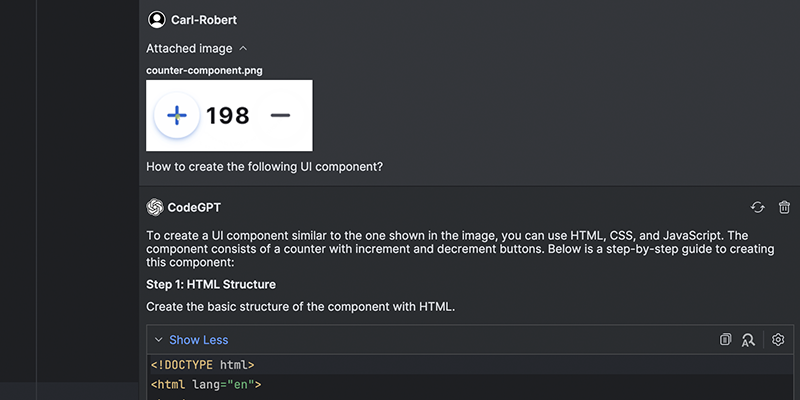
**Use images**
|
||||
|
||||
Chat with your images. Upload manually or let ProxyAI auto-detect your screenshots.
|
||||
|
||||
|
||||
|
||||
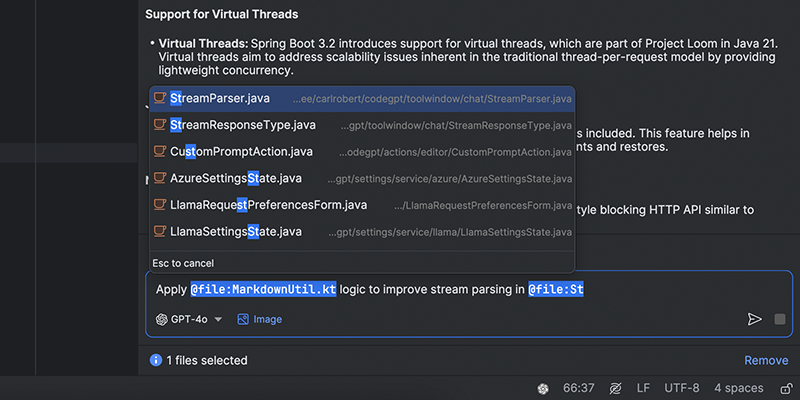
**Reference your files and folders**
|
||||
|
||||
Quickly access and reference your project files and folders for context-aware coding assistance.
|
||||
|
||||
|
||||
|
||||
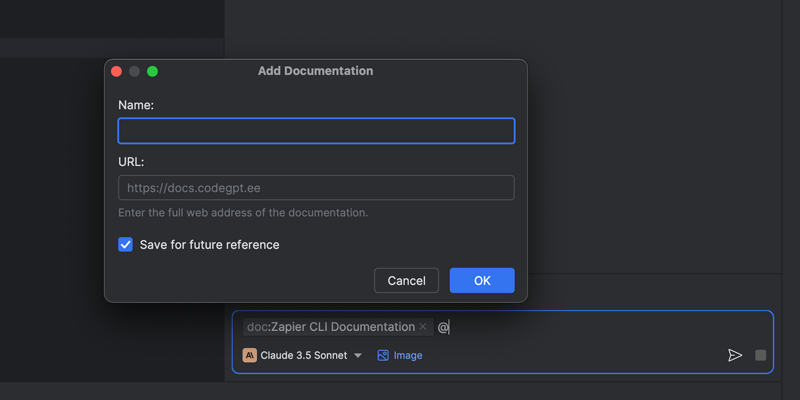
**Reference web documentations**
|
||||
|
||||
Easily pull in relevant web documentation into your chat for quick reference—whether it’s API docs, library guides, framework manuals, or something else.
|
||||
|
||||
|
||||
|
||||
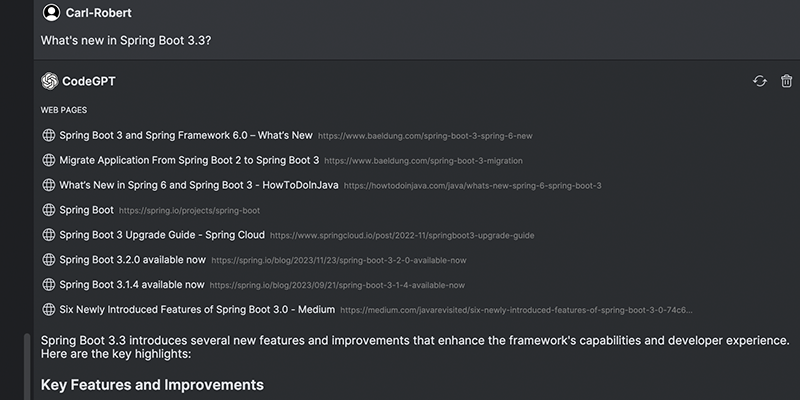
**Search the web**
|
||||
|
||||
Connect your favourite LLM to the web. ProxyAI will search for the most relevant information to answer your questions.
|
||||
|
||||
|
||||
|
||||
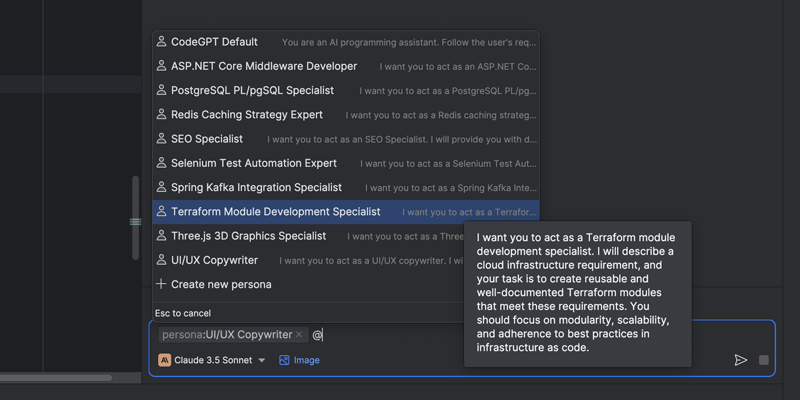
**Customize your assistant**
|
||||
|
||||
Choose between multiple different personas for your specific needs, whether you're looking to learn, write or proofread.
|
||||
|
||||
|
||||
|
||||
### Code
|
||||
|
||||
Get helpful code completions as you type, edit your code using natural language, create clear and
|
||||
concise commit messages automatically, and more. ProxyAI equips you with cutting-edge tools to
|
||||
streamline your workflow.
|
||||
|
||||
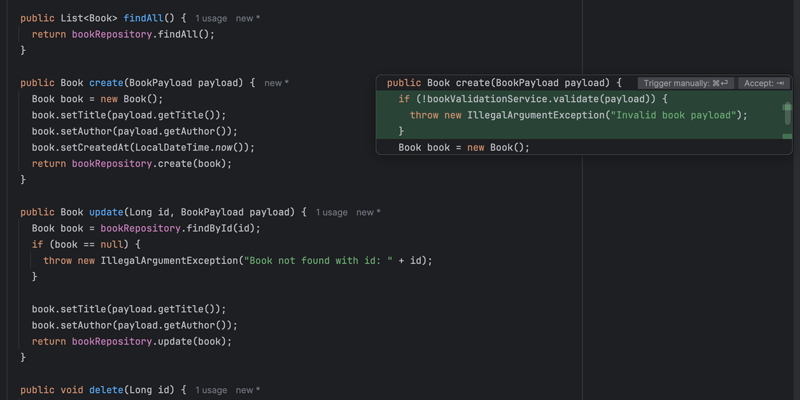
**Next edits**
|
||||
|
||||
Get multi-line edits based on your recent activity as you type.
|
||||
|
||||
|
||||
|
||||
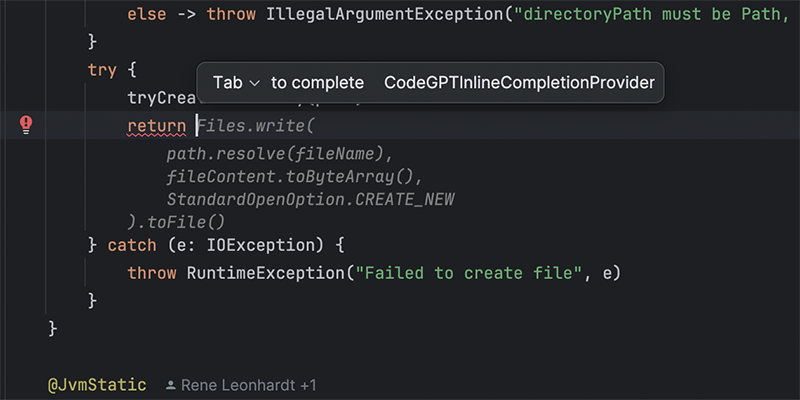
**Autocomplete your code**
|
||||
|
||||
Receive single-line or whole-function autocomplete suggestions as you type.
|
||||
|
||||
|
||||
|
||||
**Edit code in natural language**
|
||||
|
||||
Highlight the code you want to modify, describe the desired changes, and watch ProxyAI work its magic.
|
||||
|
||||
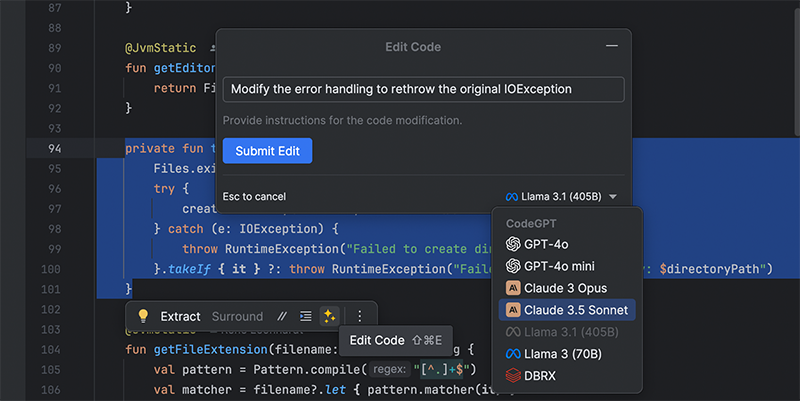
|
||||
|
||||
**Get name suggestions**
|
||||
|
||||
Get context-aware naming suggestions for methods, variables, and more.
|
||||
|
||||
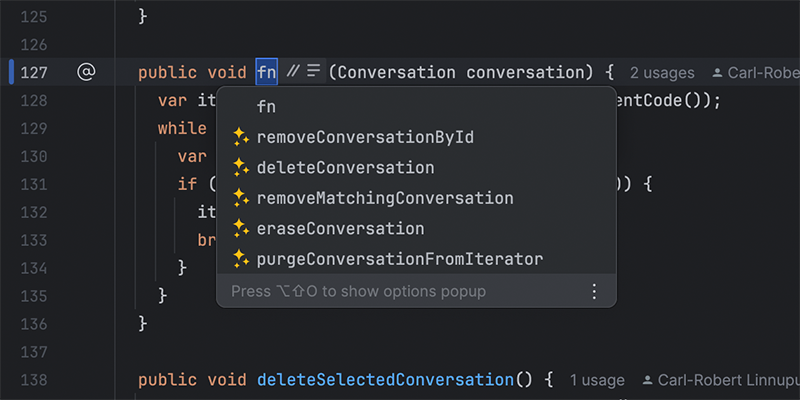
|
||||
|
||||
**Generate commit messages**
|
||||
|
||||
Generate concise and descriptive commit messages based on the changes made in your codebase.
|
||||
|
||||
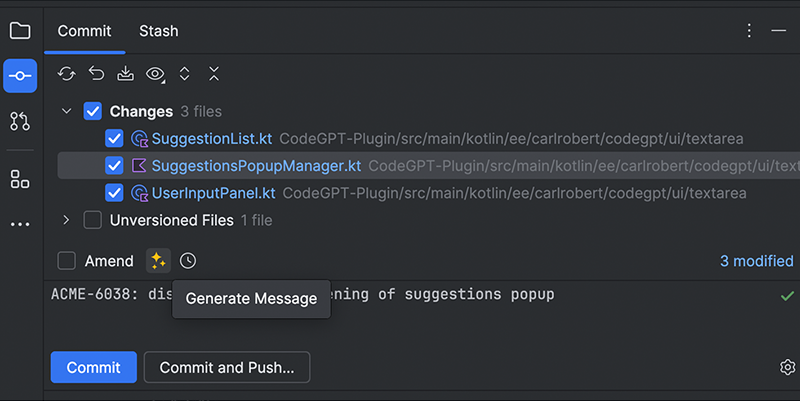
|
||||
|
||||
**Offline Development Support (llama.cpp and Ollama)**
|
||||
|
||||
Integrate local open-source language models into your coding environment and enjoy a full experience without sending your data anywhere or needing an internet connection.
|
||||
|
||||

|
||||
|
||||
## Privacy
|
||||
|
||||
**Your data stays yours.** ProxyAI **does not** collect or store any sensitive information. With users' consent, we collect anonymous usage data to understand how users interact with the extension, including the most-used features and preferred providers.
|
||||
|
||||
## License
|
||||
|
||||
ProxyAI's code is open source under the Apache License 2.0.
|
||||
|
||||
## Feedback
|
||||
|
||||
Your input helps us grow. Reach out through:
|
||||
|
||||
- [Homepage](https://proxyai.ee)
|
||||
- [Issue Tracker](https://github.com/carlrobertoh/ProxyAI/issues)
|
||||
- [Discord](https://discord.gg/8dTGGrwcnR)
|
||||
- [Email](mailto:carlrobertoh@gmail.com)
|
||||
|
||||
<!-- Plugin description end -->
|
||||
|
|
@ -1,86 +0,0 @@
|
|||
## Getting Started
|
||||
|
||||
1. **Download the Plugin**
|
||||
|
||||
2. **Choose Your Preferred Service**:
|
||||
|
||||
a) **OpenAI** - Requires authentication via OpenAI API key.
|
||||
|
||||
b) **Azure** - Requires authentication via Active Directory or API key.
|
||||
|
||||
c) **Custom OpenAI-compatible service** - Choose between multiple different providers, such as Together, Anyscale,
|
||||
Groq, Ollama and many more.
|
||||
|
||||
d) **Anthropic** - Requires authentication via API key.
|
||||
|
||||
e) **You.com** - A free, web-connected service with an optional upgrade to You⚡Pro for enhanced features.
|
||||
|
||||
f) **LLaMA C/C++ Port** - Recommended to have a decent computer to handle the computational requirements of running
|
||||
inference.
|
||||
> **Note**: Currently supported only on Linux and MacOS.
|
||||
|
||||
3. **Start Using the Features**
|
||||
|
||||
### Installation
|
||||
|
||||
The plugin is available from [JetBrains Marketplace][plugin-repo].
|
||||
You can install it directly from your IDE via the `File | Settings/Preferences | Plugins` screen.
|
||||
On the `Marketplace` tab simply search for `codegpt` and select the `CodeGPT` suggestion:
|
||||
|
||||
![marketplace][marketplace-img]
|
||||
|
||||
### OpenAI
|
||||
|
||||
After successful installation, configure your API key. Navigate to the plugin's settings via **File |
|
||||
Settings/Preferences | Tools | CodeGPT**. Paste your OpenAI API key into the field and click `Apply/OK`.
|
||||
|
||||
### Azure OpenAI
|
||||
|
||||
For Azure OpenAI services, you'll need to input three additional fields:
|
||||
|
||||
- **Resource name**: The name of your Azure OpenAI Cognitive Services. It's the first part of the url you're provided to
|
||||
use the service: "https://**my-resource-name**.openai.azure.com/". You can find it in your Azure Cognitive Services
|
||||
page, under `Resource Management` → `Resource Management` → `Keys and Endpoints`.
|
||||
- **Deployment ID**: The name of your Deployment. You can find it in the Azure AI Studio,
|
||||
under `Management` → `Deployment` → `Deployment Name` column in the table.
|
||||
- **API version**: The most recent non-preview version.
|
||||
|
||||
In addition to these, you need to input one of the two API Keys provided, found along with the `Resource Name`.
|
||||
|
||||
### You.com (Free)
|
||||
|
||||
**You.com** is a search engine that summarizes the best parts of the internet for **you**, with private ads and with
|
||||
privacy options.
|
||||
|
||||
**You⚡Pro**
|
||||
|
||||
Use the **CodeGPT** coupon for a free month of unlimited GPT-4 usage.
|
||||
|
||||
Check out the full [feature list](https://about.you.com/hc/youpro/what-features-are-included-in-youpro/) for more
|
||||
details.
|
||||
|
||||
### LLaMA C/C++ Port (Free, Local)
|
||||
|
||||
> **Note**: Currently supported only on Linux and MacOS.
|
||||
|
||||
The main goal of `llama.cpp` is to run the LLaMA model using 4-bit integer quantization on a MacBook.
|
||||
|
||||
#### Getting Started
|
||||
|
||||
1. **Select the Model**: Depending on your hardware capabilities, choose the appropriate model from the provided list.
|
||||
Once selected, click on the `Download Model` link. A progress bar will appear, indicating the download process.
|
||||
|
||||
2. **Start the Server**: After successfully downloading the model, initiate the server by clicking on the `Start Server`
|
||||
button. A status message will be displayed, indicating that the server is starting up.
|
||||
|
||||
3. **Apply Settings**: With the server running, you can now apply the settings to start using the features. Click on
|
||||
the `Apply/OK` button to save your settings and start using the application.
|
||||
|
||||
<img alt="animated" style="max-width: 100%; width: 600px;" src="https://github.com/carlrobertoh/CodeGPT-docs/blob/main/images/llama-settings.png?raw=true" />
|
||||
|
||||
> **Note**: If you're already running a server and wish to configure the plugin against that, then simply select the
|
||||
> port and click `Apply/OK`.
|
||||
|
||||
[marketplace-img]: https://github.com/carlrobertoh/CodeGPT-docs/blob/main/images/marketplace.png?raw=true
|
||||
|
||||
[plugin-repo]: https://plugins.jetbrains.com/plugin/21056-codegpt
|
||||
214
LICENSE
|
|
@ -1,201 +1,21 @@
|
|||
Apache License
|
||||
Version 2.0, January 2004
|
||||
http://www.apache.org/licenses/
|
||||
MIT License
|
||||
|
||||
TERMS AND CONDITIONS FOR USE, REPRODUCTION, AND DISTRIBUTION
|
||||
Copyright (c) 2023 Carl-Robert Linnupuu
|
||||
|
||||
1. Definitions.
|
||||
Permission is hereby granted, free of charge, to any person obtaining a copy
|
||||
of this software and associated documentation files (the "Software"), to deal
|
||||
in the Software without restriction, including without limitation the rights
|
||||
to use, copy, modify, merge, publish, distribute, sublicense, and/or sell
|
||||
copies of the Software, and to permit persons to whom the Software is
|
||||
furnished to do so, subject to the following conditions:
|
||||
|
||||
"License" shall mean the terms and conditions for use, reproduction,
|
||||
and distribution as defined by Sections 1 through 9 of this document.
|
||||
The above copyright notice and this permission notice shall be included in all
|
||||
copies or substantial portions of the Software.
|
||||
|
||||
"Licensor" shall mean the copyright owner or entity authorized by
|
||||
the copyright owner that is granting the License.
|
||||
|
||||
"Legal Entity" shall mean the union of the acting entity and all
|
||||
other entities that control, are controlled by, or are under common
|
||||
control with that entity. For the purposes of this definition,
|
||||
"control" means (i) the power, direct or indirect, to cause the
|
||||
direction or management of such entity, whether by contract or
|
||||
otherwise, or (ii) ownership of fifty percent (50%) or more of the
|
||||
outstanding shares, or (iii) beneficial ownership of such entity.
|
||||
|
||||
"You" (or "Your") shall mean an individual or Legal Entity
|
||||
exercising permissions granted by this License.
|
||||
|
||||
"Source" form shall mean the preferred form for making modifications,
|
||||
including but not limited to software source code, documentation
|
||||
source, and configuration files.
|
||||
|
||||
"Object" form shall mean any form resulting from mechanical
|
||||
transformation or translation of a Source form, including but
|
||||
not limited to compiled object code, generated documentation,
|
||||
and conversions to other media types.
|
||||
|
||||
"Work" shall mean the work of authorship, whether in Source or
|
||||
Object form, made available under the License, as indicated by a
|
||||
copyright notice that is included in or attached to the work
|
||||
(an example is provided in the Appendix below).
|
||||
|
||||
"Derivative Works" shall mean any work, whether in Source or Object
|
||||
form, that is based on (or derived from) the Work and for which the
|
||||
editorial revisions, annotations, elaborations, or other modifications
|
||||
represent, as a whole, an original work of authorship. For the purposes
|
||||
of this License, Derivative Works shall not include works that remain
|
||||
separable from, or merely link (or bind by name) to the interfaces of,
|
||||
the Work and Derivative Works thereof.
|
||||
|
||||
"Contribution" shall mean any work of authorship, including
|
||||
the original version of the Work and any modifications or additions
|
||||
to that Work or Derivative Works thereof, that is intentionally
|
||||
submitted to Licensor for inclusion in the Work by the copyright owner
|
||||
or by an individual or Legal Entity authorized to submit on behalf of
|
||||
the copyright owner. For the purposes of this definition, "submitted"
|
||||
means any form of electronic, verbal, or written communication sent
|
||||
to the Licensor or its representatives, including but not limited to
|
||||
communication on electronic mailing lists, source code control systems,
|
||||
and issue tracking systems that are managed by, or on behalf of, the
|
||||
Licensor for the purpose of discussing and improving the Work, but
|
||||
excluding communication that is conspicuously marked or otherwise
|
||||
designated in writing by the copyright owner as "Not a Contribution."
|
||||
|
||||
"Contributor" shall mean Licensor and any individual or Legal Entity
|
||||
on behalf of whom a Contribution has been received by Licensor and
|
||||
subsequently incorporated within the Work.
|
||||
|
||||
2. Grant of Copyright License. Subject to the terms and conditions of
|
||||
this License, each Contributor hereby grants to You a perpetual,
|
||||
worldwide, non-exclusive, no-charge, royalty-free, irrevocable
|
||||
copyright license to reproduce, prepare Derivative Works of,
|
||||
publicly display, publicly perform, sublicense, and distribute the
|
||||
Work and such Derivative Works in Source or Object form.
|
||||
|
||||
3. Grant of Patent License. Subject to the terms and conditions of
|
||||
this License, each Contributor hereby grants to You a perpetual,
|
||||
worldwide, non-exclusive, no-charge, royalty-free, irrevocable
|
||||
(except as stated in this section) patent license to make, have made,
|
||||
use, offer to sell, sell, import, and otherwise transfer the Work,
|
||||
where such license applies only to those patent claims licensable
|
||||
by such Contributor that are necessarily infringed by their
|
||||
Contribution(s) alone or by combination of their Contribution(s)
|
||||
with the Work to which such Contribution(s) was submitted. If You
|
||||
institute patent litigation against any entity (including a
|
||||
cross-claim or counterclaim in a lawsuit) alleging that the Work
|
||||
or a Contribution incorporated within the Work constitutes direct
|
||||
or contributory patent infringement, then any patent licenses
|
||||
granted to You under this License for that Work shall terminate
|
||||
as of the date such litigation is filed.
|
||||
|
||||
4. Redistribution. You may reproduce and distribute copies of the
|
||||
Work or Derivative Works thereof in any medium, with or without
|
||||
modifications, and in Source or Object form, provided that You
|
||||
meet the following conditions:
|
||||
|
||||
(a) You must give any other recipients of the Work or
|
||||
Derivative Works a copy of this License; and
|
||||
|
||||
(b) You must cause any modified files to carry prominent notices
|
||||
stating that You changed the files; and
|
||||
|
||||
(c) You must retain, in the Source form of any Derivative Works
|
||||
that You distribute, all copyright, patent, trademark, and
|
||||
attribution notices from the Source form of the Work,
|
||||
excluding those notices that do not pertain to any part of
|
||||
the Derivative Works; and
|
||||
|
||||
(d) If the Work includes a "NOTICE" text file as part of its
|
||||
distribution, then any Derivative Works that You distribute must
|
||||
include a readable copy of the attribution notices contained
|
||||
within such NOTICE file, excluding those notices that do not
|
||||
pertain to any part of the Derivative Works, in at least one
|
||||
of the following places: within a NOTICE text file distributed
|
||||
as part of the Derivative Works; within the Source form or
|
||||
documentation, if provided along with the Derivative Works; or,
|
||||
within a display generated by the Derivative Works, if and
|
||||
wherever such third-party notices normally appear. The contents
|
||||
of the NOTICE file are for informational purposes only and
|
||||
do not modify the License. You may add Your own attribution
|
||||
notices within Derivative Works that You distribute, alongside
|
||||
or as an addendum to the NOTICE text from the Work, provided
|
||||
that such additional attribution notices cannot be construed
|
||||
as modifying the License.
|
||||
|
||||
You may add Your own copyright statement to Your modifications and
|
||||
may provide additional or different license terms and conditions
|
||||
for use, reproduction, or distribution of Your modifications, or
|
||||
for any such Derivative Works as a whole, provided Your use,
|
||||
reproduction, and distribution of the Work otherwise complies with
|
||||
the conditions stated in this License.
|
||||
|
||||
5. Submission of Contributions. Unless You explicitly state otherwise,
|
||||
any Contribution intentionally submitted for inclusion in the Work
|
||||
by You to the Licensor shall be under the terms and conditions of
|
||||
this License, without any additional terms or conditions.
|
||||
Notwithstanding the above, nothing herein shall supersede or modify
|
||||
the terms of any separate license agreement you may have executed
|
||||
with Licensor regarding such Contributions.
|
||||
|
||||
6. Trademarks. This License does not grant permission to use the trade
|
||||
names, trademarks, service marks, or product names of the Licensor,
|
||||
except as required for reasonable and customary use in describing the
|
||||
origin of the Work and reproducing the content of the NOTICE file.
|
||||
|
||||
7. Disclaimer of Warranty. Unless required by applicable law or
|
||||
agreed to in writing, Licensor provides the Work (and each
|
||||
Contributor provides its Contributions) on an "AS IS" BASIS,
|
||||
WITHOUT WARRANTIES OR CONDITIONS OF ANY KIND, either express or
|
||||
implied, including, without limitation, any warranties or conditions
|
||||
of TITLE, NON-INFRINGEMENT, MERCHANTABILITY, or FITNESS FOR A
|
||||
PARTICULAR PURPOSE. You are solely responsible for determining the
|
||||
appropriateness of using or redistributing the Work and assume any
|
||||
risks associated with Your exercise of permissions under this License.
|
||||
|
||||
8. Limitation of Liability. In no event and under no legal theory,
|
||||
whether in tort (including negligence), contract, or otherwise,
|
||||
unless required by applicable law (such as deliberate and grossly
|
||||
negligent acts) or agreed to in writing, shall any Contributor be
|
||||
liable to You for damages, including any direct, indirect, special,
|
||||
incidental, or consequential damages of any character arising as a
|
||||
result of this License or out of the use or inability to use the
|
||||
Work (including but not limited to damages for loss of goodwill,
|
||||
work stoppage, computer failure or malfunction, or any and all
|
||||
other commercial damages or losses), even if such Contributor
|
||||
has been advised of the possibility of such damages.
|
||||
|
||||
9. Accepting Warranty or Additional Liability. While redistributing
|
||||
the Work or Derivative Works thereof, You may choose to offer,
|
||||
and charge a fee for, acceptance of support, warranty, indemnity,
|
||||
or other liability obligations and/or rights consistent with this
|
||||
License. However, in accepting such obligations, You may act only
|
||||
on Your own behalf and on Your sole responsibility, not on behalf
|
||||
of any other Contributor, and only if You agree to indemnify,
|
||||
defend, and hold each Contributor harmless for any liability
|
||||
incurred by, or claims asserted against, such Contributor by reason
|
||||
of your accepting any such warranty or additional liability.
|
||||
|
||||
END OF TERMS AND CONDITIONS
|
||||
|
||||
APPENDIX: How to apply the Apache License to your work.
|
||||
|
||||
To apply the Apache License to your work, attach the following
|
||||
boilerplate notice, with the fields enclosed by brackets "[]"
|
||||
replaced with your own identifying information. (Don't include
|
||||
the brackets!) The text should be enclosed in the appropriate
|
||||
comment syntax for the file format. We also recommend that a
|
||||
file or class name and description of purpose be included on the
|
||||
same "printed page" as the copyright notice for easier
|
||||
identification within third-party archives.
|
||||
|
||||
Copyright 2023 Carl-Robert Linnupuu
|
||||
|
||||
Licensed under the Apache License, Version 2.0 (the "License");
|
||||
you may not use this file except in compliance with the License.
|
||||
You may obtain a copy of the License at
|
||||
|
||||
http://www.apache.org/licenses/LICENSE-2.0
|
||||
|
||||
Unless required by applicable law or agreed to in writing, software
|
||||
distributed under the License is distributed on an "AS IS" BASIS,
|
||||
WITHOUT WARRANTIES OR CONDITIONS OF ANY KIND, either express or implied.
|
||||
See the License for the specific language governing permissions and
|
||||
limitations under the License.
|
||||
THE SOFTWARE IS PROVIDED "AS IS", WITHOUT WARRANTY OF ANY KIND, EXPRESS OR
|
||||
IMPLIED, INCLUDING BUT NOT LIMITED TO THE WARRANTIES OF MERCHANTABILITY,
|
||||
FITNESS FOR A PARTICULAR PURPOSE AND NONINFRINGEMENT. IN NO EVENT SHALL THE
|
||||
AUTHORS OR COPYRIGHT HOLDERS BE LIABLE FOR ANY CLAIM, DAMAGES OR OTHER
|
||||
LIABILITY, WHETHER IN AN ACTION OF CONTRACT, TORT OR OTHERWISE, ARISING FROM,
|
||||
OUT OF OR IN CONNECTION WITH THE SOFTWARE OR THE USE OR OTHER DEALINGS IN THE
|
||||
SOFTWARE.
|
||||
|
|
|
|||
157
README.md
|
|
@ -2,21 +2,18 @@
|
|||
|
||||
<br />
|
||||
<div align="center">
|
||||
<a href="https://github.com/carlrobertoh/ProxyAI">
|
||||
<picture>
|
||||
<source media="(prefers-color-scheme: dark)" srcset="/src/main/resources/icons/proxyRounded_dark.svg">
|
||||
<img alt="ProxyAI Logo" src="/src/main/resources/icons/proxyRounded.svg">
|
||||
</picture>
|
||||
<a href="https://github.com/carlrobertoh/CodeGPT">
|
||||
<img alt="plugin-icon" src="docs/assets/icon.png">
|
||||
</a>
|
||||
<h1 style="margin: 0;" align="center">ProxyAI</h1>
|
||||
<p style="width: 640px">
|
||||
The leading open-source AI copilot for <a target="_blank" href="https://plugins.jetbrains.com/plugin/21056-proxy-ai">JetBrains</a>. Connect to any model in any environment, and customize your coding experience in any way you like.
|
||||
<h1 style="margin: 0;" align="center">CodeGPT</h1>
|
||||
<p>
|
||||
A JetBrains extension that allows you to use ChatGPT inside your favourite IDE
|
||||
</p>
|
||||
</div>
|
||||
|
||||
[![Contributions welcome][contributions-welcome-svg]][contributions-welcome]
|
||||
[![Downloads][downloads-shield]][plugin-repo]
|
||||
[![Rating][rating-shield]][plugin-repo]
|
||||
[![Discord][discord-shield]][invite-link]
|
||||
[![Rating][Rating-shield]][plugin-repo]
|
||||
[![Version][version-shield]][plugin-repo]
|
||||
|
||||
<!-- TABLE OF CONTENTS -->
|
||||
|
|
@ -24,110 +21,132 @@
|
|||
<summary>Table of Contents</summary>
|
||||
<ol>
|
||||
<li><a href="#about-the-project">About The Project</a></li>
|
||||
<li><a href="#core-features">Core Features</a></li>
|
||||
<li><a href="#running-locally">Running Locally</a></li>
|
||||
<li><a href="#privacy">Privacy</a></li>
|
||||
<li><a href="#feedback">Feedback</a></li>
|
||||
<li>
|
||||
<a href="#getting-started">Getting Started</a>
|
||||
<ul>
|
||||
<li><a href="#prerequisites">Prerequisites</a></li>
|
||||
<li><a href="#installation">Installation</a></li>
|
||||
<li><a href="#api-key-configuration">API Key Configuration</a></li>
|
||||
</ul>
|
||||
</li>
|
||||
<li><a href="#features">Features</a></li>
|
||||
<li><a href="#roadmap">Roadmap</a></li>
|
||||
<li><a href="#contributing">Contributing</a></li>
|
||||
<li><a href="#license">License</a></li>
|
||||
</ol>
|
||||
</details>
|
||||
|
||||
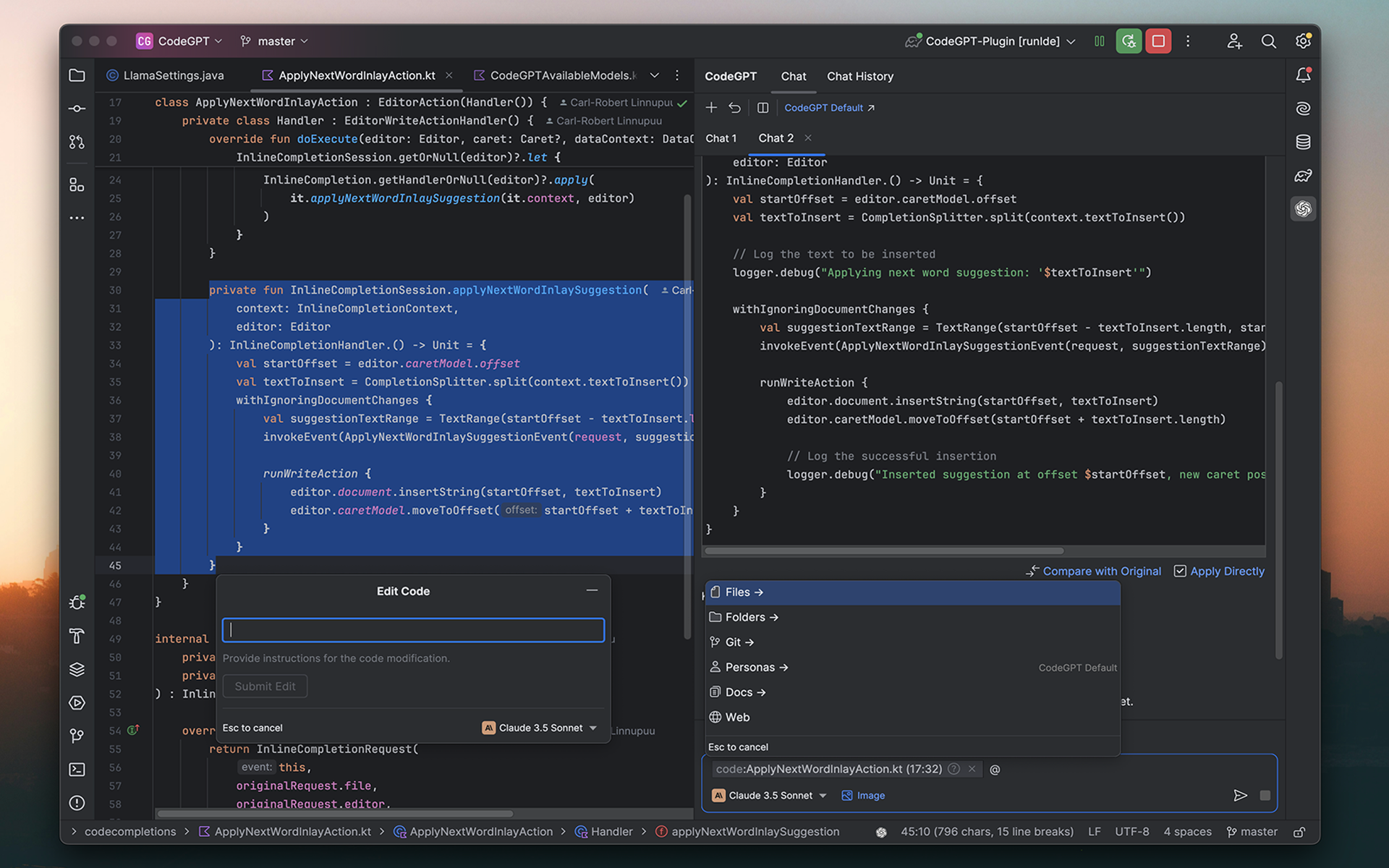
|
||||
|
||||
## About The Project
|
||||
|
||||
ProxyAI is an AI-powered code assistant designed to help you with various programming activities. It is a great alternative to GitHub Copilot, AI Assistant, Codiumate, or any other extension on the JetBrains marketplace.
|
||||
This is an extension for JetBrains IDEs that integrates ChatGPT into your coding environment.
|
||||
By leveraging the power of GPT-3, this makes it an invaluable tool for developers looking to streamline their workflow and gain a deeper understanding of the code they're working on.
|
||||
|
||||
We equip you with the latest models, advanced tools, and on-premise solutions that are designed to significantly enhance your developer experience.
|
||||
## Getting Started
|
||||
|
||||
Access top-tier language models from OpenAI, Anthropic, Azure, Mistral, and others, or opt for a self-hosted model for a full offline experience.
|
||||
To get started, follow these simple steps:
|
||||
|
||||
## Core Features
|
||||
### Prerequisites
|
||||
|
||||
ProxyAI offers a wide range of features to enhance your development experience:
|
||||
In order to use the extension, you need to have a JetBrains IDE installed and the API key configured.
|
||||
You can find the API key in your [User settings][api-key-url].
|
||||
|
||||
### Chat
|
||||
### Installation
|
||||
|
||||
- **Auto Apply:** Stream AI-suggested code changes directly into your editor. Preview modifications in diff view and approve or reject them with a single click.
|
||||
The plugin is available from [JetBrains Marketplace][plugin-repo].
|
||||
You can install it directly from your IDE via the `File | Settings/Preferences | Plugins` screen.
|
||||
On the `Marketplace` tab simply search for `codegpt` and select the `CodeGPT` suggestion:
|
||||
|
||||
- **Use images:** Chat with your images. Upload manually or let ProxyAI auto-detect your screenshots.
|
||||
![marketplace][marketplace-img]
|
||||
|
||||
- **Reference your files and folders:** Quickly access and reference your project files and folders for context-aware coding assistance.
|
||||
### API Key Configuration
|
||||
|
||||
- **Reference web docs:** Quickly reference web docs in your chat session, such as API guides, library manuals, and more.
|
||||
After the plugin has been successfully installed, the API key needs to be configured.
|
||||
|
||||
- **Reference git history:** Quickly reference commit logs and changes in your chat session
|
||||
You can configure the key by going to the plugin's settings via the `File | Settings/Preferences | Tools | CodeGPT`.
|
||||
On the settings panel simply click on the `API key` field, paste the key obtained from the OpenAI website and click `Apply/OK`:
|
||||
|
||||
- **Search the web:** Connect your favourite LLM to the web. ProxyAI will search for the most relevant information to answer your questions.
|
||||
![plugin-settings][plugin-settings]
|
||||
|
||||
- **Customize your assistant:** Choose between multiple different personas for your specific needs, whether you're looking to learn, write or proofread.
|
||||
## Features
|
||||
|
||||
### Code
|
||||
The plugin provides several key features, such as:
|
||||
|
||||
### Ask ChatGPT
|
||||
|
||||
- **Next edits:** Get multi-line edits based on your recent activity as you type.
|
||||
Ask anything you'd like.
|
||||
|
||||
- **Autocomplete your code:** Receive single-line or whole-function autocomplete suggestions as you type.
|
||||
<p align="center">
|
||||
<img src="docs/assets/gif/ask-anything.gif" alt="animated" />
|
||||
</p>
|
||||
|
||||
- **Edit code in natural language:** Highlight the code you want to modify, describe the desired changes, and watch ProxyAI work its magic.
|
||||
### Conversation History
|
||||
|
||||
- **Get name suggestions:** Get context-aware naming suggestions for methods, variables, and more.
|
||||
View conversation history and restore previous sessions, making it easy to pick up where you left off.
|
||||
|
||||
- **Generate commit messages:** Generate concise and descriptive commit messages based on the changes made in your codebase.
|
||||
<p align="center">
|
||||
<img src="docs/assets/gif/conversation-history.gif" />
|
||||
</p>
|
||||
|
||||
For a full list of features and detailed descriptions, visit our [official documentation](https://docs.tryproxy.io/features).
|
||||
### Custom Prompt
|
||||
|
||||
## Running locally
|
||||
Create a custom prompt for your selected code. The previous prompt will be remembered for subsequent questions.
|
||||
|
||||
**Linux or macOS**
|
||||
```shell
|
||||
git clone https://github.com/carlrobertoh/ProxyAI.git
|
||||
cd ProxyAI
|
||||
git submodule update
|
||||
./gradlew runIde
|
||||
```
|
||||
<p align="center">
|
||||
<img src="docs/assets/gif/custom-prompt.gif" />
|
||||
</p>
|
||||
|
||||
**Windows ARM64**
|
||||
```shell
|
||||
./gradlew runIde -Penv=win-arm64
|
||||
```
|
||||
### Stop/Regenerate Response
|
||||
|
||||
**Tailing logs**
|
||||
```shell
|
||||
tail -f build/idea-sandbox/IU-2026.1/log/idea.log
|
||||
```
|
||||
Stop the response generation or re-generate a new response from the existing query.
|
||||
|
||||
## Privacy
|
||||
<p align="center">
|
||||
<img src="docs/assets/gif/stop-reload.gif" />
|
||||
</p>
|
||||
|
||||
**Your data stays yours.** ProxyAI **does not** collect or store any kind of sensitive information.
|
||||
## Roadmap
|
||||
|
||||
However, with users' consent, we do collect anonymous usage data, which we use to understand how users interact with the extension, including the most-used features and preferred providers.
|
||||
- [x] Add proxy support
|
||||
- [ ] Add conversation history
|
||||
- [x] Ability to start/restore sessions
|
||||
- [ ] Ability to export conversations in Markdown/JSON format
|
||||
- [ ] Add codex and user's fine-tuned models
|
||||
- [ ] Add support for overriding prompts and request params
|
||||
- [ ] Add support for custom fonts, colors and sizes
|
||||
- [ ] Add support for model fine-tuning
|
||||
|
||||
## Feedback
|
||||
See the [open issues][open-issues] for a full list of proposed features (and known issues).
|
||||
|
||||
Your input helps us grow. Reach out through:
|
||||
## Contributing
|
||||
|
||||
- [Issue Tracker](https://github.com/carlrobertoh/ProxyAI/issues)
|
||||
- [Discord](https://discord.gg/8dTGGrwcnR)
|
||||
- [Email](mailto:carlrobertoh@gmail.com)
|
||||
Contributions are what make the open source community such an amazing place to learn, inspire, and create. Any contributions you make are **greatly appreciated**.
|
||||
|
||||
If you have a suggestion that would make this better, please fork the repo and create a pull request. You can also simply open an issue with the tag "enhancement".
|
||||
|
||||
1. Fork the Project
|
||||
2. Create your Feature Branch (`git checkout -b feature/AmazingFeature`)
|
||||
3. Commit your Changes (`git commit -m 'Add some AmazingFeature'`)
|
||||
4. Push to the Branch (`git push origin feature/AmazingFeature`)
|
||||
5. Open a Pull Request
|
||||
|
||||
## License
|
||||
|
||||
Apache 2.0 © [Carl-Robert Linnupuu][portfolio]
|
||||
MIT © [Carl-Robert Linnupuu][portfolio]
|
||||
|
||||
If you found this project interesting, kindly rate it on the marketplace and don't forget to give it a star. Thanks again!
|
||||
<p align="right">(<a href="#readme-top">back to top</a>)</p>
|
||||
|
||||
|
||||
<!-- MARKDOWN LINKS & IMAGES -->
|
||||
<!-- https://www.markdownguide.org/basic-syntax/#reference-style-links -->
|
||||
|
||||
[downloads-shield]: https://img.shields.io/jetbrains/plugin/d/21056-proxy-ai
|
||||
[discord-shield]: https://img.shields.io/discord/1118629761049182238?style=flat&logo=discord&label=Discord
|
||||
[version-shield]: https://img.shields.io/jetbrains/plugin/v/21056-proxy-ai?label=version
|
||||
[rating-shield]: https://img.shields.io/jetbrains/plugin/r/rating/21056-proxy-ai
|
||||
[marketplace-img]: https://github.com/carlrobertoh/CodeGPT-docs/blob/main/images/marketplace.png?raw=true
|
||||
[plugin-repo]: https://plugins.jetbrains.com/plugin/21056-proxy-ai
|
||||
[invite-link]: https://discord.gg/8dTGGrwcnR
|
||||
[open-issues]: https://github.com/carlrobertoh/ProxyAI/issues
|
||||
[downloads-shield]: https://img.shields.io/jetbrains/plugin/d/21056-codegpt
|
||||
[version-shield]: https://img.shields.io/jetbrains/plugin/v/21056-codegpt?label=version
|
||||
[rating-shield]: https://img.shields.io/jetbrains/plugin/r/rating/21056-codegpt
|
||||
[contributions-welcome-svg]: http://img.shields.io/badge/contributions-welcome-brightgreen
|
||||
[contributions-welcome]: https://github.com/JetBrains/ideavim/blob/master/CONTRIBUTING.md
|
||||
[marketplace-img]: docs/assets/marketplace.png
|
||||
[plugin-repo]: https://plugins.jetbrains.com/plugin/21056-codegpt
|
||||
[plugin-settings]: docs/assets/plugin-settings.png
|
||||
[open-issues]: https://github.com/carlrobertoh/CodeGPT/issues
|
||||
[api-key-url]: https://platform.openai.com/account/api-keys
|
||||
[portfolio]: https://carlrobert.ee
|
||||
|
|
|
|||
262
build.gradle.kts
|
|
@ -1,251 +1,47 @@
|
|||
import org.gradle.api.tasks.testing.logging.TestExceptionFormat
|
||||
import org.jetbrains.changelog.Changelog
|
||||
import org.jetbrains.changelog.markdownToHTML
|
||||
import org.jetbrains.intellij.platform.gradle.TestFrameworkType
|
||||
import org.jetbrains.intellij.platform.gradle.tasks.RunIdeTask
|
||||
import java.io.FileInputStream
|
||||
import java.util.*
|
||||
|
||||
val localPropertiesFile = file("local.properties")
|
||||
val env = environment("env").getOrNull()
|
||||
|
||||
fun loadProperties(filename: String): Properties = Properties().apply {
|
||||
load(FileInputStream(filename))
|
||||
}
|
||||
|
||||
val localProperties: Properties? = if (localPropertiesFile.exists()) {
|
||||
loadProperties("local.properties")
|
||||
} else {
|
||||
null
|
||||
}
|
||||
|
||||
val customIdePath: String? = localProperties?.getProperty("customIdePath")
|
||||
|
||||
fun properties(key: String): Provider<String> {
|
||||
if ("win-arm64" == env) {
|
||||
val property = loadProperties("gradle-win-arm64.properties").getProperty(key)
|
||||
?: return providers.gradleProperty(key)
|
||||
return providers.provider { property }
|
||||
}
|
||||
return providers.gradleProperty(key)
|
||||
}
|
||||
|
||||
fun environment(key: String) = providers.environmentVariable(key)
|
||||
|
||||
plugins {
|
||||
id("proxyai.java-conventions")
|
||||
id("org.jetbrains.intellij.platform")
|
||||
alias(libs.plugins.changelog)
|
||||
alias(libs.plugins.protobuf)
|
||||
alias(libs.plugins.kotlin.serialization)
|
||||
id("java")
|
||||
id("org.jetbrains.intellij") version "1.13.1"
|
||||
}
|
||||
|
||||
group = properties("pluginGroup").get()
|
||||
version = properties("pluginVersion").get() + "-" + properties("pluginSinceBuild").get()
|
||||
group = "ee.carlrobert"
|
||||
version = "1.6.0"
|
||||
|
||||
repositories {
|
||||
mavenCentral()
|
||||
gradlePluginPortal()
|
||||
|
||||
intellijPlatform {
|
||||
defaultRepositories()
|
||||
}
|
||||
mavenCentral()
|
||||
}
|
||||
|
||||
changelog {
|
||||
groups.empty()
|
||||
repositoryUrl.set(properties("pluginRepositoryUrl"))
|
||||
intellij {
|
||||
version.set("2021.1")
|
||||
type.set("IC")
|
||||
plugins.set(listOf())
|
||||
}
|
||||
|
||||
dependencies {
|
||||
intellijPlatform {
|
||||
intellijIdea(properties("platformVersion"))
|
||||
|
||||
bundledPlugin("com.intellij.java")
|
||||
bundledPlugin("org.jetbrains.kotlin")
|
||||
bundledPlugin("Git4Idea")
|
||||
|
||||
testFramework(TestFrameworkType.Platform)
|
||||
testFramework(TestFrameworkType.JUnit5)
|
||||
}
|
||||
|
||||
implementation(project(":proxyai-telemetry"))
|
||||
implementation(project(":proxyai-treesitter"))
|
||||
|
||||
implementation(platform(libs.slf4j.bom))
|
||||
implementation(platform(libs.jackson.bom))
|
||||
implementation(platform(libs.mcp.sdk.bom))
|
||||
|
||||
implementation(libs.jackson.datatype.jdk8)
|
||||
implementation(libs.jackson.datatype.jsr310)
|
||||
implementation(libs.jackson.module.kotlin)
|
||||
implementation(libs.kotlin.stdlib)
|
||||
implementation(libs.acp.sdk) {
|
||||
exclude(group = "org.jetbrains.kotlinx", module = "kotlinx-coroutines-core")
|
||||
exclude(group = "org.jetbrains.kotlinx", module = "kotlinx-coroutines-core-jvm")
|
||||
}
|
||||
|
||||
implementation(libs.flexmark.all) {
|
||||
// vulnerable transitive dependency
|
||||
exclude(group = "org.jsoup", module = "jsoup")
|
||||
}
|
||||
implementation(libs.koog.agents) {
|
||||
exclude(group = "org.jetbrains.kotlin", module = "kotlin-stdlib")
|
||||
exclude(group = "org.jetbrains.kotlin", module = "kotlin-stdlib-common")
|
||||
exclude(group = "org.jetbrains.kotlin", module = "kotlin-stdlib-jdk7")
|
||||
exclude(group = "org.jetbrains.kotlin", module = "kotlin-stdlib-jdk8")
|
||||
exclude(group = "org.jetbrains.kotlin", module = "kotlin-reflect")
|
||||
exclude(group = "org.jetbrains.kotlinx", module = "kotlinx-coroutines-core")
|
||||
exclude(group = "org.jetbrains.kotlinx", module = "kotlinx-coroutines-jdk8")
|
||||
}
|
||||
implementation(libs.koog.serialization.jackson)
|
||||
implementation(libs.jsoup)
|
||||
implementation(libs.commons.text)
|
||||
implementation(libs.jtokkit)
|
||||
|
||||
implementation(libs.grpc.protobuf)
|
||||
implementation(libs.grpc.stub)
|
||||
implementation(libs.grpc.netty.shaded)
|
||||
implementation(libs.protobuf.runtime)
|
||||
|
||||
implementation(libs.mcp.sdk)
|
||||
|
||||
testImplementation(libs.junit4)
|
||||
testImplementation(kotlin("test"))
|
||||
implementation("com.fasterxml.jackson.datatype:jackson-datatype-jdk8:2.14.2")
|
||||
implementation("com.fasterxml.jackson.datatype:jackson-datatype-jsr310:2.14.2")
|
||||
implementation("com.fifesoft:rsyntaxtextarea:3.3.2")
|
||||
implementation("com.squareup.okhttp3:okhttp:4.10.0")
|
||||
implementation("com.squareup.okhttp3:okhttp-sse:4.10.0")
|
||||
}
|
||||
|
||||
tasks.register<Exec>("updateSubmodules") {
|
||||
workingDir(rootDir)
|
||||
commandLine("git", "submodule", "update", "--init", "--recursive")
|
||||
}
|
||||
|
||||
intellijPlatform {
|
||||
pluginConfiguration {
|
||||
name = properties("pluginName")
|
||||
version = properties("pluginVersion").get() + "-" + properties("pluginSinceBuild").get()
|
||||
|
||||
description =
|
||||
providers.fileContents(layout.projectDirectory.file("DESCRIPTION.md")).asText.map {
|
||||
val start = "<!-- Plugin description -->"
|
||||
val end = "<!-- Plugin description end -->"
|
||||
|
||||
with(it.lines()) {
|
||||
if (!containsAll(listOf(start, end))) {
|
||||
throw GradleException("Plugin description section not found in DESCRIPTION.md:\n$start ... $end")
|
||||
}
|
||||
subList(indexOf(start) + 1, indexOf(end)).joinToString("\n")
|
||||
.let(::markdownToHTML)
|
||||
}
|
||||
}
|
||||
|
||||
val changelog = project.changelog // local variable for configuration cache compatibility
|
||||
// Get the latest available change notes from the changelog file
|
||||
changeNotes = properties("pluginVersion").map { pluginVersion ->
|
||||
with(changelog) {
|
||||
renderItem(
|
||||
(getOrNull(pluginVersion) ?: getUnreleased())
|
||||
.withHeader(false)
|
||||
.withEmptySections(false),
|
||||
Changelog.OutputType.HTML,
|
||||
)
|
||||
}
|
||||
}
|
||||
|
||||
ideaVersion {
|
||||
sinceBuild = properties("pluginSinceBuild")
|
||||
untilBuild = properties("pluginUntilBuild")
|
||||
}
|
||||
}
|
||||
|
||||
pluginVerification {
|
||||
ides {
|
||||
recommended()
|
||||
}
|
||||
}
|
||||
|
||||
signing {
|
||||
certificateChain = System.getenv("CERTIFICATE_CHAIN")
|
||||
privateKey = System.getenv("PRIVATE_KEY")
|
||||
password = System.getenv("PRIVATE_KEY_PASSWORD")
|
||||
}
|
||||
|
||||
publishing {
|
||||
token = System.getenv("PUBLISH_TOKEN")
|
||||
channels = listOf("stable")
|
||||
}
|
||||
}
|
||||
|
||||
/**
|
||||
- * Task to run a custom IntelliJ IDEA sandbox.
|
||||
- *
|
||||
- * This task launches a custom IntelliJ IDEA installation using the path specified in the
|
||||
- * 'customIdePath' property from local.properties.
|
||||
- *
|
||||
- * IMPORTANT:
|
||||
- * - On macOS, the path must include the 'Contents' directory (e.g., /Applications/IntelliJ IDEA.app/Contents).
|
||||
- * - For Windows or Linux, specify the appropriate path to the IntelliJ IDEA installation.
|
||||
- *
|
||||
- * Usage:
|
||||
- * ./gradlew runCustomIde
|
||||
- */
|
||||
if (customIdePath != null) {
|
||||
tasks.register<RunIdeTask>("runCustomIde") {
|
||||
group = "intellij"
|
||||
description = "Start custom idea sandbox"
|
||||
sandboxDirectory = file(customIdePath)
|
||||
environment("ENVIRONMENT", "LOCAL")
|
||||
}
|
||||
java {
|
||||
sourceCompatibility = JavaVersion.VERSION_11
|
||||
targetCompatibility = JavaVersion.VERSION_11
|
||||
}
|
||||
|
||||
tasks {
|
||||
wrapper {
|
||||
gradleVersion = properties("gradleVersion").get()
|
||||
}
|
||||
patchPluginXml {
|
||||
sinceBuild.set("211")
|
||||
untilBuild.set("231.*")
|
||||
}
|
||||
|
||||
prepareSandbox {
|
||||
dependsOn("updateSubmodules")
|
||||
from(layout.projectDirectory.dir("src/main/cpp/llama.cpp")) {
|
||||
into("ProxyAI/llama.cpp")
|
||||
}
|
||||
}
|
||||
signPlugin {
|
||||
certificateChain.set(System.getenv("CERTIFICATE_CHAIN"))
|
||||
privateKey.set(System.getenv("PRIVATE_KEY"))
|
||||
password.set(System.getenv("PRIVATE_KEY_PASSWORD"))
|
||||
}
|
||||
|
||||
runIde {
|
||||
environment("ENVIRONMENT", "LOCAL")
|
||||
}
|
||||
|
||||
buildPlugin {
|
||||
dependsOn("prepareSandbox")
|
||||
}
|
||||
|
||||
publishPlugin {
|
||||
dependsOn("patchChangelog")
|
||||
}
|
||||
|
||||
test {
|
||||
exclude("**/testsupport/*")
|
||||
testLogging {
|
||||
events("started", "passed", "skipped", "failed")
|
||||
exceptionFormat = TestExceptionFormat.FULL
|
||||
showStandardStreams = true
|
||||
}
|
||||
}
|
||||
}
|
||||
|
||||
protobuf {
|
||||
protoc {
|
||||
artifact = libs.protobuf.protoc.get().toString()
|
||||
}
|
||||
plugins {
|
||||
create("grpc") {
|
||||
artifact = "io.grpc:protoc-gen-grpc-java:${libs.versions.grpc.get()}"
|
||||
}
|
||||
}
|
||||
generateProtoTasks {
|
||||
all()
|
||||
.forEach {
|
||||
it.plugins {
|
||||
create("grpc")
|
||||
}
|
||||
}
|
||||
}
|
||||
publishPlugin {
|
||||
token.set(System.getenv("PUBLISH_TOKEN"))
|
||||
}
|
||||
}
|
||||
|
|
|
|||
|
|
@ -1,13 +0,0 @@
|
|||
plugins {
|
||||
`kotlin-dsl`
|
||||
}
|
||||
|
||||
repositories {
|
||||
mavenCentral()
|
||||
gradlePluginPortal()
|
||||
}
|
||||
|
||||
dependencies {
|
||||
implementation(libs.gradle.intellij.plugin)
|
||||
implementation(libs.kotlin.gradle.plugin)
|
||||
}
|
||||
|
|
@ -1,7 +0,0 @@
|
|||
dependencyResolutionManagement {
|
||||
versionCatalogs {
|
||||
create("libs") {
|
||||
from(files("../gradle/libs.versions.toml")) // Allow references
|
||||
}
|
||||
}
|
||||
}
|
||||
|
|
@ -1,72 +0,0 @@
|
|||
import org.jetbrains.intellij.platform.gradle.TestFrameworkType
|
||||
import org.jetbrains.kotlin.gradle.dsl.JvmTarget
|
||||
import org.jetbrains.kotlin.gradle.dsl.KotlinJvmProjectExtension
|
||||
import org.jetbrains.kotlin.gradle.tasks.KotlinCompile
|
||||
|
||||
val libs = versionCatalogs.named("libs")
|
||||
fun lib(reference: String) = libs.findLibrary(reference).get()
|
||||
fun properties(key: String) = project.findProperty(key).toString()
|
||||
|
||||
plugins {
|
||||
id("java")
|
||||
id("idea")
|
||||
id("org.jetbrains.intellij.platform.module")
|
||||
id("org.jetbrains.kotlin.jvm")
|
||||
}
|
||||
|
||||
version = properties("pluginVersion")
|
||||
|
||||
repositories {
|
||||
mavenCentral()
|
||||
|
||||
intellijPlatform {
|
||||
defaultRepositories()
|
||||
}
|
||||
}
|
||||
|
||||
dependencies {
|
||||
if (project.name != rootProject.name) {
|
||||
intellijPlatform {
|
||||
val type = providers.gradleProperty("platformType").get()
|
||||
val version = providers.gradleProperty("platformVersion")
|
||||
if (type == "IC") {
|
||||
intellijIdea(version)
|
||||
} else {
|
||||
create(type, version)
|
||||
}
|
||||
|
||||
testFramework(TestFrameworkType.Platform)
|
||||
}
|
||||
}
|
||||
|
||||
implementation(lib("kotlinx.serialization.json"))
|
||||
|
||||
testImplementation("junit:junit:4.13.2")
|
||||
testImplementation(platform(lib("junit.bom")))
|
||||
testImplementation(lib("assertj.core"))
|
||||
testImplementation("org.junit.jupiter:junit-jupiter-params")
|
||||
testRuntimeOnly("org.junit.platform:junit-platform-launcher")
|
||||
testRuntimeOnly("org.junit.jupiter:junit-jupiter-engine")
|
||||
testRuntimeOnly("org.junit.vintage:junit-vintage-engine")
|
||||
}
|
||||
|
||||
tasks {
|
||||
properties("javaVersion").let {
|
||||
java {
|
||||
toolchain {
|
||||
languageVersion.set(JavaLanguageVersion.of(it.toInt()))
|
||||
}
|
||||
}
|
||||
extensions.configure<KotlinJvmProjectExtension>("kotlin") {
|
||||
jvmToolchain(it.toInt())
|
||||
}
|
||||
withType<JavaCompile> {
|
||||
sourceCompatibility = it
|
||||
targetCompatibility = it
|
||||
}
|
||||
withType<KotlinCompile> {
|
||||
compilerOptions.jvmTarget.set(JvmTarget.fromTarget(it))
|
||||
compilerOptions.freeCompilerArgs.add("-opt-in=kotlin.time.ExperimentalTime")
|
||||
}
|
||||
}
|
||||
}
|
||||
598
codestyle.xml
|
|
@ -1,598 +0,0 @@
|
|||
<?xml version="1.0" encoding="UTF-8"?>
|
||||
<code_scheme name="GoogleStyle">
|
||||
<option name="OTHER_INDENT_OPTIONS">
|
||||
<value>
|
||||
<option name="INDENT_SIZE" value="2" />
|
||||
<option name="CONTINUATION_INDENT_SIZE" value="4" />
|
||||
<option name="TAB_SIZE" value="2" />
|
||||
<option name="USE_TAB_CHARACTER" value="false" />
|
||||
<option name="SMART_TABS" value="false" />
|
||||
<option name="LABEL_INDENT_SIZE" value="0" />
|
||||
<option name="LABEL_INDENT_ABSOLUTE" value="false" />
|
||||
<option name="USE_RELATIVE_INDENTS" value="false" />
|
||||
</value>
|
||||
</option>
|
||||
<option name="INSERT_INNER_CLASS_IMPORTS" value="true" />
|
||||
<option name="CLASS_COUNT_TO_USE_IMPORT_ON_DEMAND" value="999" />
|
||||
<option name="NAMES_COUNT_TO_USE_IMPORT_ON_DEMAND" value="999" />
|
||||
<option name="PACKAGES_TO_USE_IMPORT_ON_DEMAND">
|
||||
<value />
|
||||
</option>
|
||||
<option name="IMPORT_LAYOUT_TABLE">
|
||||
<value>
|
||||
<package name="" withSubpackages="true" static="true" />
|
||||
<emptyLine />
|
||||
<package name="" withSubpackages="true" static="false" />
|
||||
</value>
|
||||
</option>
|
||||
<option name="RIGHT_MARGIN" value="100" />
|
||||
<option name="JD_ALIGN_PARAM_COMMENTS" value="false" />
|
||||
<option name="JD_ALIGN_EXCEPTION_COMMENTS" value="false" />
|
||||
<option name="JD_P_AT_EMPTY_LINES" value="false" />
|
||||
<option name="JD_KEEP_EMPTY_PARAMETER" value="false" />
|
||||
<option name="JD_KEEP_EMPTY_EXCEPTION" value="false" />
|
||||
<option name="JD_KEEP_EMPTY_RETURN" value="false" />
|
||||
<option name="KEEP_CONTROL_STATEMENT_IN_ONE_LINE" value="false" />
|
||||
<option name="KEEP_BLANK_LINES_BEFORE_RBRACE" value="0" />
|
||||
<option name="KEEP_BLANK_LINES_IN_CODE" value="1" />
|
||||
<option name="BLANK_LINES_AFTER_CLASS_HEADER" value="0" />
|
||||
<option name="ALIGN_MULTILINE_PARAMETERS" value="false" />
|
||||
<option name="ALIGN_MULTILINE_FOR" value="false" />
|
||||
<option name="CALL_PARAMETERS_WRAP" value="1" />
|
||||
<option name="METHOD_PARAMETERS_WRAP" value="1" />
|
||||
<option name="EXTENDS_LIST_WRAP" value="1" />
|
||||
<option name="THROWS_KEYWORD_WRAP" value="1" />
|
||||
<option name="METHOD_CALL_CHAIN_WRAP" value="1" />
|
||||
<option name="BINARY_OPERATION_WRAP" value="1" />
|
||||
<option name="BINARY_OPERATION_SIGN_ON_NEXT_LINE" value="true" />
|
||||
<option name="TERNARY_OPERATION_WRAP" value="1" />
|
||||
<option name="TERNARY_OPERATION_SIGNS_ON_NEXT_LINE" value="true" />
|
||||
<option name="FOR_STATEMENT_WRAP" value="1" />
|
||||
<option name="ARRAY_INITIALIZER_WRAP" value="1" />
|
||||
<option name="WRAP_COMMENTS" value="true" />
|
||||
<option name="IF_BRACE_FORCE" value="3" />
|
||||
<option name="DOWHILE_BRACE_FORCE" value="3" />
|
||||
<option name="WHILE_BRACE_FORCE" value="3" />
|
||||
<option name="FOR_BRACE_FORCE" value="3" />
|
||||
<option name="SPACE_BEFORE_ARRAY_INITIALIZER_LBRACE" value="true" />
|
||||
<AndroidXmlCodeStyleSettings>
|
||||
<option name="USE_CUSTOM_SETTINGS" value="true" />
|
||||
<option name="LAYOUT_SETTINGS">
|
||||
<value>
|
||||
<option name="INSERT_BLANK_LINE_BEFORE_TAG" value="false" />
|
||||
</value>
|
||||
</option>
|
||||
</AndroidXmlCodeStyleSettings>
|
||||
<JSCodeStyleSettings>
|
||||
<option name="INDENT_CHAINED_CALLS" value="false" />
|
||||
</JSCodeStyleSettings>
|
||||
<Python>
|
||||
<option name="USE_CONTINUATION_INDENT_FOR_ARGUMENTS" value="true" />
|
||||
</Python>
|
||||
<TypeScriptCodeStyleSettings>
|
||||
<option name="INDENT_CHAINED_CALLS" value="false" />
|
||||
</TypeScriptCodeStyleSettings>
|
||||
<XML>
|
||||
<option name="XML_ALIGN_ATTRIBUTES" value="false" />
|
||||
<option name="XML_LEGACY_SETTINGS_IMPORTED" value="true" />
|
||||
</XML>
|
||||
<codeStyleSettings language="CSS">
|
||||
<indentOptions>
|
||||
<option name="INDENT_SIZE" value="2" />
|
||||
<option name="CONTINUATION_INDENT_SIZE" value="4" />
|
||||
<option name="TAB_SIZE" value="2" />
|
||||
</indentOptions>
|
||||
</codeStyleSettings>
|
||||
<codeStyleSettings language="ECMA Script Level 4">
|
||||
<option name="KEEP_BLANK_LINES_IN_CODE" value="1" />
|
||||
<option name="ALIGN_MULTILINE_PARAMETERS" value="false" />
|
||||
<option name="ALIGN_MULTILINE_FOR" value="false" />
|
||||
<option name="CALL_PARAMETERS_WRAP" value="1" />
|
||||
<option name="METHOD_PARAMETERS_WRAP" value="1" />
|
||||
<option name="EXTENDS_LIST_WRAP" value="1" />
|
||||
<option name="BINARY_OPERATION_WRAP" value="1" />
|
||||
<option name="BINARY_OPERATION_SIGN_ON_NEXT_LINE" value="true" />
|
||||
<option name="TERNARY_OPERATION_WRAP" value="1" />
|
||||
<option name="TERNARY_OPERATION_SIGNS_ON_NEXT_LINE" value="true" />
|
||||
<option name="FOR_STATEMENT_WRAP" value="1" />
|
||||
<option name="ARRAY_INITIALIZER_WRAP" value="1" />
|
||||
<option name="IF_BRACE_FORCE" value="3" />
|
||||
<option name="DOWHILE_BRACE_FORCE" value="3" />
|
||||
<option name="WHILE_BRACE_FORCE" value="3" />
|
||||
<option name="FOR_BRACE_FORCE" value="3" />
|
||||
<option name="PARENT_SETTINGS_INSTALLED" value="true" />
|
||||
</codeStyleSettings>
|
||||
<codeStyleSettings language="HTML">
|
||||
<indentOptions>
|
||||
<option name="INDENT_SIZE" value="2" />
|
||||
<option name="CONTINUATION_INDENT_SIZE" value="4" />
|
||||
<option name="TAB_SIZE" value="2" />
|
||||
</indentOptions>
|
||||
</codeStyleSettings>
|
||||
<codeStyleSettings language="JAVA">
|
||||
<option name="KEEP_CONTROL_STATEMENT_IN_ONE_LINE" value="false" />
|
||||
<option name="KEEP_BLANK_LINES_IN_CODE" value="1" />
|
||||
<option name="BLANK_LINES_AFTER_CLASS_HEADER" value="1" />
|
||||
<option name="ALIGN_MULTILINE_PARAMETERS" value="false" />
|
||||
<option name="ALIGN_MULTILINE_RESOURCES" value="false" />
|
||||
<option name="ALIGN_MULTILINE_FOR" value="false" />
|
||||
<option name="CALL_PARAMETERS_WRAP" value="1" />
|
||||
<option name="METHOD_PARAMETERS_WRAP" value="1" />
|
||||
<option name="EXTENDS_LIST_WRAP" value="1" />
|
||||
<option name="THROWS_KEYWORD_WRAP" value="1" />
|
||||
<option name="METHOD_CALL_CHAIN_WRAP" value="1" />
|
||||
<option name="BINARY_OPERATION_WRAP" value="1" />
|
||||
<option name="BINARY_OPERATION_SIGN_ON_NEXT_LINE" value="true" />
|
||||
<option name="TERNARY_OPERATION_WRAP" value="1" />
|
||||
<option name="TERNARY_OPERATION_SIGNS_ON_NEXT_LINE" value="true" />
|
||||
<option name="FOR_STATEMENT_WRAP" value="1" />
|
||||
<option name="ARRAY_INITIALIZER_WRAP" value="1" />
|
||||
<option name="WRAP_COMMENTS" value="true" />
|
||||
<option name="IF_BRACE_FORCE" value="3" />
|
||||
<option name="DOWHILE_BRACE_FORCE" value="3" />
|
||||
<option name="WHILE_BRACE_FORCE" value="3" />
|
||||
<option name="FOR_BRACE_FORCE" value="3" />
|
||||
<option name="PARENT_SETTINGS_INSTALLED" value="true" />
|
||||
<indentOptions>
|
||||
<option name="INDENT_SIZE" value="2" />
|
||||
<option name="CONTINUATION_INDENT_SIZE" value="4" />
|
||||
<option name="TAB_SIZE" value="2" />
|
||||
</indentOptions>
|
||||
</codeStyleSettings>
|
||||
<codeStyleSettings language="JSON">
|
||||
<indentOptions>
|
||||
<option name="CONTINUATION_INDENT_SIZE" value="4" />
|
||||
<option name="TAB_SIZE" value="2" />
|
||||
</indentOptions>
|
||||
</codeStyleSettings>
|
||||
<codeStyleSettings language="JavaScript">
|
||||
<option name="RIGHT_MARGIN" value="80" />
|
||||
<option name="KEEP_BLANK_LINES_IN_CODE" value="1" />
|
||||
<option name="ALIGN_MULTILINE_PARAMETERS" value="false" />
|
||||
<option name="ALIGN_MULTILINE_FOR" value="false" />
|
||||
<option name="CALL_PARAMETERS_WRAP" value="1" />
|
||||
<option name="METHOD_PARAMETERS_WRAP" value="1" />
|
||||
<option name="BINARY_OPERATION_WRAP" value="1" />
|
||||
<option name="BINARY_OPERATION_SIGN_ON_NEXT_LINE" value="true" />
|
||||
<option name="TERNARY_OPERATION_WRAP" value="1" />
|
||||
<option name="TERNARY_OPERATION_SIGNS_ON_NEXT_LINE" value="true" />
|
||||
<option name="FOR_STATEMENT_WRAP" value="1" />
|
||||
<option name="ARRAY_INITIALIZER_WRAP" value="1" />
|
||||
<option name="IF_BRACE_FORCE" value="3" />
|
||||
<option name="DOWHILE_BRACE_FORCE" value="3" />
|
||||
<option name="WHILE_BRACE_FORCE" value="3" />
|
||||
<option name="FOR_BRACE_FORCE" value="3" />
|
||||
<option name="PARENT_SETTINGS_INSTALLED" value="true" />
|
||||
<indentOptions>
|
||||
<option name="INDENT_SIZE" value="2" />
|
||||
<option name="TAB_SIZE" value="2" />
|
||||
</indentOptions>
|
||||
</codeStyleSettings>
|
||||
<codeStyleSettings language="PROTO">
|
||||
<option name="RIGHT_MARGIN" value="80" />
|
||||
<indentOptions>
|
||||
<option name="INDENT_SIZE" value="2" />
|
||||
<option name="CONTINUATION_INDENT_SIZE" value="2" />
|
||||
<option name="TAB_SIZE" value="2" />
|
||||
</indentOptions>
|
||||
</codeStyleSettings>
|
||||
<codeStyleSettings language="protobuf">
|
||||
<option name="RIGHT_MARGIN" value="80" />
|
||||
<indentOptions>
|
||||
<option name="INDENT_SIZE" value="2" />
|
||||
<option name="CONTINUATION_INDENT_SIZE" value="2" />
|
||||
<option name="TAB_SIZE" value="2" />
|
||||
</indentOptions>
|
||||
</codeStyleSettings>
|
||||
<codeStyleSettings language="Python">
|
||||
<option name="KEEP_BLANK_LINES_IN_CODE" value="1" />
|
||||
<option name="RIGHT_MARGIN" value="80" />
|
||||
<option name="ALIGN_MULTILINE_PARAMETERS" value="false" />
|
||||
<option name="PARENT_SETTINGS_INSTALLED" value="true" />
|
||||
<indentOptions>
|
||||
<option name="INDENT_SIZE" value="2" />
|
||||
<option name="CONTINUATION_INDENT_SIZE" value="4" />
|
||||
<option name="TAB_SIZE" value="2" />
|
||||
</indentOptions>
|
||||
</codeStyleSettings>
|
||||
<codeStyleSettings language="SASS">
|
||||
<indentOptions>
|
||||
<option name="CONTINUATION_INDENT_SIZE" value="4" />
|
||||
<option name="TAB_SIZE" value="2" />
|
||||
</indentOptions>
|
||||
</codeStyleSettings>
|
||||
<codeStyleSettings language="SCSS">
|
||||
<indentOptions>
|
||||
<option name="CONTINUATION_INDENT_SIZE" value="4" />
|
||||
<option name="TAB_SIZE" value="2" />
|
||||
</indentOptions>
|
||||
</codeStyleSettings>
|
||||
<codeStyleSettings language="TypeScript">
|
||||
<indentOptions>
|
||||
<option name="INDENT_SIZE" value="2" />
|
||||
<option name="TAB_SIZE" value="2" />
|
||||
</indentOptions>
|
||||
</codeStyleSettings>
|
||||
<codeStyleSettings language="XML">
|
||||
<indentOptions>
|
||||
<option name="INDENT_SIZE" value="2" />
|
||||
<option name="CONTINUATION_INDENT_SIZE" value="2" />
|
||||
<option name="TAB_SIZE" value="2" />
|
||||
</indentOptions>
|
||||
<arrangement>
|
||||
<rules>
|
||||
<section>
|
||||
<rule>
|
||||
<match>
|
||||
<AND>
|
||||
<NAME>xmlns:android</NAME>
|
||||
<XML_ATTRIBUTE />
|
||||
<XML_NAMESPACE>^$</XML_NAMESPACE>
|
||||
</AND>
|
||||
</match>
|
||||
</rule>
|
||||
</section>
|
||||
<section>
|
||||
<rule>
|
||||
<match>
|
||||
<AND>
|
||||
<NAME>xmlns:.*</NAME>
|
||||
<XML_ATTRIBUTE />
|
||||
<XML_NAMESPACE>^$</XML_NAMESPACE>
|
||||
</AND>
|
||||
</match>
|
||||
<order>BY_NAME</order>
|
||||
</rule>
|
||||
</section>
|
||||
<section>
|
||||
<rule>
|
||||
<match>
|
||||
<AND>
|
||||
<NAME>.*:id</NAME>
|
||||
<XML_ATTRIBUTE />
|
||||
<XML_NAMESPACE>http://schemas.android.com/apk/res/android</XML_NAMESPACE>
|
||||
</AND>
|
||||
</match>
|
||||
</rule>
|
||||
</section>
|
||||
<section>
|
||||
<rule>
|
||||
<match>
|
||||
<AND>
|
||||
<NAME>style</NAME>
|
||||
<XML_ATTRIBUTE />
|
||||
<XML_NAMESPACE>^$</XML_NAMESPACE>
|
||||
</AND>
|
||||
</match>
|
||||
</rule>
|
||||
</section>
|
||||
<section>
|
||||
<rule>
|
||||
<match>
|
||||
<AND>
|
||||
<NAME>.*</NAME>
|
||||
<XML_ATTRIBUTE />
|
||||
<XML_NAMESPACE>^$</XML_NAMESPACE>
|
||||
</AND>
|
||||
</match>
|
||||
<order>BY_NAME</order>
|
||||
</rule>
|
||||
</section>
|
||||
<section>
|
||||
<rule>
|
||||
<match>
|
||||
<AND>
|
||||
<NAME>.*:.*Style</NAME>
|
||||
<XML_ATTRIBUTE />
|
||||
<XML_NAMESPACE>http://schemas.android.com/apk/res/android</XML_NAMESPACE>
|
||||
</AND>
|
||||
</match>
|
||||
<order>BY_NAME</order>
|
||||
</rule>
|
||||
</section>
|
||||
<section>
|
||||
<rule>
|
||||
<match>
|
||||
<AND>
|
||||
<NAME>.*:layout_width</NAME>
|
||||
<XML_ATTRIBUTE />
|
||||
<XML_NAMESPACE>http://schemas.android.com/apk/res/android</XML_NAMESPACE>
|
||||
</AND>
|
||||
</match>
|
||||
</rule>
|
||||
</section>
|
||||
<section>
|
||||
<rule>
|
||||
<match>
|
||||
<AND>
|
||||
<NAME>.*:layout_height</NAME>
|
||||
<XML_ATTRIBUTE />
|
||||
<XML_NAMESPACE>http://schemas.android.com/apk/res/android</XML_NAMESPACE>
|
||||
</AND>
|
||||
</match>
|
||||
</rule>
|
||||
</section>
|
||||
<section>
|
||||
<rule>
|
||||
<match>
|
||||
<AND>
|
||||
<NAME>.*:layout_weight</NAME>
|
||||
<XML_ATTRIBUTE />
|
||||
<XML_NAMESPACE>http://schemas.android.com/apk/res/android</XML_NAMESPACE>
|
||||
</AND>
|
||||
</match>
|
||||
</rule>
|
||||
</section>
|
||||
<section>
|
||||
<rule>
|
||||
<match>
|
||||
<AND>
|
||||
<NAME>.*:layout_margin</NAME>
|
||||
<XML_ATTRIBUTE />
|
||||
<XML_NAMESPACE>http://schemas.android.com/apk/res/android</XML_NAMESPACE>
|
||||
</AND>
|
||||
</match>
|
||||
</rule>
|
||||
</section>
|
||||
<section>
|
||||
<rule>
|
||||
<match>
|
||||
<AND>
|
||||
<NAME>.*:layout_marginTop</NAME>
|
||||
<XML_ATTRIBUTE />
|
||||
<XML_NAMESPACE>http://schemas.android.com/apk/res/android</XML_NAMESPACE>
|
||||
</AND>
|
||||
</match>
|
||||
</rule>
|
||||
</section>
|
||||
<section>
|
||||
<rule>
|
||||
<match>
|
||||
<AND>
|
||||
<NAME>.*:layout_marginBottom</NAME>
|
||||
<XML_ATTRIBUTE />
|
||||
<XML_NAMESPACE>http://schemas.android.com/apk/res/android</XML_NAMESPACE>
|
||||
</AND>
|
||||
</match>
|
||||
</rule>
|
||||
</section>
|
||||
<section>
|
||||
<rule>
|
||||
<match>
|
||||
<AND>
|
||||
<NAME>.*:layout_marginStart</NAME>
|
||||
<XML_ATTRIBUTE />
|
||||
<XML_NAMESPACE>http://schemas.android.com/apk/res/android</XML_NAMESPACE>
|
||||
</AND>
|
||||
</match>
|
||||
</rule>
|
||||
</section>
|
||||
<section>
|
||||
<rule>
|
||||
<match>
|
||||
<AND>
|
||||
<NAME>.*:layout_marginEnd</NAME>
|
||||
<XML_ATTRIBUTE />
|
||||
<XML_NAMESPACE>http://schemas.android.com/apk/res/android</XML_NAMESPACE>
|
||||
</AND>
|
||||
</match>
|
||||
</rule>
|
||||
</section>
|
||||
<section>
|
||||
<rule>
|
||||
<match>
|
||||
<AND>
|
||||
<NAME>.*:layout_marginLeft</NAME>
|
||||
<XML_ATTRIBUTE />
|
||||
<XML_NAMESPACE>http://schemas.android.com/apk/res/android</XML_NAMESPACE>
|
||||
</AND>
|
||||
</match>
|
||||
</rule>
|
||||
</section>
|
||||
<section>
|
||||
<rule>
|
||||
<match>
|
||||
<AND>
|
||||
<NAME>.*:layout_marginRight</NAME>
|
||||
<XML_ATTRIBUTE />
|
||||
<XML_NAMESPACE>http://schemas.android.com/apk/res/android</XML_NAMESPACE>
|
||||
</AND>
|
||||
</match>
|
||||
</rule>
|
||||
</section>
|
||||
<section>
|
||||
<rule>
|
||||
<match>
|
||||
<AND>
|
||||
<NAME>.*:layout_.*</NAME>
|
||||
<XML_ATTRIBUTE />
|
||||
<XML_NAMESPACE>http://schemas.android.com/apk/res/android</XML_NAMESPACE>
|
||||
</AND>
|
||||
</match>
|
||||
<order>BY_NAME</order>
|
||||
</rule>
|
||||
</section>
|
||||
<section>
|
||||
<rule>
|
||||
<match>
|
||||
<AND>
|
||||
<NAME>.*:padding</NAME>
|
||||
<XML_ATTRIBUTE />
|
||||
<XML_NAMESPACE>http://schemas.android.com/apk/res/android</XML_NAMESPACE>
|
||||
</AND>
|
||||
</match>
|
||||
</rule>
|
||||
</section>
|
||||
<section>
|
||||
<rule>
|
||||
<match>
|
||||
<AND>
|
||||
<NAME>.*:paddingTop</NAME>
|
||||
<XML_ATTRIBUTE />
|
||||
<XML_NAMESPACE>http://schemas.android.com/apk/res/android</XML_NAMESPACE>
|
||||
</AND>
|
||||
</match>
|
||||
</rule>
|
||||
</section>
|
||||
<section>
|
||||
<rule>
|
||||
<match>
|
||||
<AND>
|
||||
<NAME>.*:paddingBottom</NAME>
|
||||
<XML_ATTRIBUTE />
|
||||
<XML_NAMESPACE>http://schemas.android.com/apk/res/android</XML_NAMESPACE>
|
||||
</AND>
|
||||
</match>
|
||||
</rule>
|
||||
</section>
|
||||
<section>
|
||||
<rule>
|
||||
<match>
|
||||
<AND>
|
||||
<NAME>.*:paddingStart</NAME>
|
||||
<XML_ATTRIBUTE />
|
||||
<XML_NAMESPACE>http://schemas.android.com/apk/res/android</XML_NAMESPACE>
|
||||
</AND>
|
||||
</match>
|
||||
</rule>
|
||||
</section>
|
||||
<section>
|
||||
<rule>
|
||||
<match>
|
||||
<AND>
|
||||
<NAME>.*:paddingEnd</NAME>
|
||||
<XML_ATTRIBUTE />
|
||||
<XML_NAMESPACE>http://schemas.android.com/apk/res/android</XML_NAMESPACE>
|
||||
</AND>
|
||||
</match>
|
||||
</rule>
|
||||
</section>
|
||||
<section>
|
||||
<rule>
|
||||
<match>
|
||||
<AND>
|
||||
<NAME>.*:paddingLeft</NAME>
|
||||
<XML_ATTRIBUTE />
|
||||
<XML_NAMESPACE>http://schemas.android.com/apk/res/android</XML_NAMESPACE>
|
||||
</AND>
|
||||
</match>
|
||||
</rule>
|
||||
</section>
|
||||
<section>
|
||||
<rule>
|
||||
<match>
|
||||
<AND>
|
||||
<NAME>.*:paddingRight</NAME>
|
||||
<XML_ATTRIBUTE />
|
||||
<XML_NAMESPACE>http://schemas.android.com/apk/res/android</XML_NAMESPACE>
|
||||
</AND>
|
||||
</match>
|
||||
</rule>
|
||||
</section>
|
||||
<section>
|
||||
<rule>
|
||||
<match>
|
||||
<AND>
|
||||
<NAME>.*</NAME>
|
||||
<XML_NAMESPACE>http://schemas.android.com/apk/res/android</XML_NAMESPACE>
|
||||
</AND>
|
||||
</match>
|
||||
<order>BY_NAME</order>
|
||||
</rule>
|
||||
</section>
|
||||
<section>
|
||||
<rule>
|
||||
<match>
|
||||
<AND>
|
||||
<NAME>.*</NAME>
|
||||
<XML_NAMESPACE>http://schemas.android.com/apk/res-auto</XML_NAMESPACE>
|
||||
</AND>
|
||||
</match>
|
||||
<order>BY_NAME</order>
|
||||
</rule>
|
||||
</section>
|
||||
<section>
|
||||
<rule>
|
||||
<match>
|
||||
<AND>
|
||||
<NAME>.*</NAME>
|
||||
<XML_NAMESPACE>http://schemas.android.com/tools</XML_NAMESPACE>
|
||||
</AND>
|
||||
</match>
|
||||
<order>BY_NAME</order>
|
||||
</rule>
|
||||
</section>
|
||||
<section>
|
||||
<rule>
|
||||
<match>
|
||||
<AND>
|
||||
<NAME>.*</NAME>
|
||||
<XML_NAMESPACE>.*</XML_NAMESPACE>
|
||||
</AND>
|
||||
</match>
|
||||
<order>BY_NAME</order>
|
||||
</rule>
|
||||
</section>
|
||||
</rules>
|
||||
</arrangement>
|
||||
</codeStyleSettings>
|
||||
<Objective-C>
|
||||
<option name="INDENT_NAMESPACE_MEMBERS" value="0" />
|
||||
<option name="INDENT_C_STRUCT_MEMBERS" value="2" />
|
||||
<option name="INDENT_CLASS_MEMBERS" value="2" />
|
||||
<option name="INDENT_VISIBILITY_KEYWORDS" value="1" />
|
||||
<option name="INDENT_INSIDE_CODE_BLOCK" value="2" />
|
||||
<option name="KEEP_STRUCTURES_IN_ONE_LINE" value="true" />
|
||||
<option name="FUNCTION_PARAMETERS_WRAP" value="5" />
|
||||
<option name="FUNCTION_CALL_ARGUMENTS_WRAP" value="5" />
|
||||
<option name="TEMPLATE_CALL_ARGUMENTS_WRAP" value="5" />
|
||||
<option name="TEMPLATE_CALL_ARGUMENTS_ALIGN_MULTILINE" value="true" />
|
||||
<option name="ALIGN_INIT_LIST_IN_COLUMNS" value="false" />
|
||||
<option name="SPACE_BEFORE_SUPERCLASS_COLON" value="false" />
|
||||
</Objective-C>
|
||||
<Objective-C-extensions>
|
||||
<option name="GENERATE_INSTANCE_VARIABLES_FOR_PROPERTIES" value="ASK" />
|
||||
<option name="RELEASE_STYLE" value="IVAR" />
|
||||
<option name="TYPE_QUALIFIERS_PLACEMENT" value="BEFORE" />
|
||||
<file>
|
||||
<option name="com.jetbrains.cidr.lang.util.OCDeclarationKind" value="Import" />
|
||||
<option name="com.jetbrains.cidr.lang.util.OCDeclarationKind" value="Macro" />
|
||||
<option name="com.jetbrains.cidr.lang.util.OCDeclarationKind" value="Typedef" />
|
||||
<option name="com.jetbrains.cidr.lang.util.OCDeclarationKind" value="Enum" />
|
||||
<option name="com.jetbrains.cidr.lang.util.OCDeclarationKind" value="Constant" />
|
||||
<option name="com.jetbrains.cidr.lang.util.OCDeclarationKind" value="Global" />
|
||||
<option name="com.jetbrains.cidr.lang.util.OCDeclarationKind" value="Struct" />
|
||||
<option name="com.jetbrains.cidr.lang.util.OCDeclarationKind" value="FunctionPredecl" />
|
||||
<option name="com.jetbrains.cidr.lang.util.OCDeclarationKind" value="Function" />
|
||||
</file>
|
||||
<class>
|
||||
<option name="com.jetbrains.cidr.lang.util.OCDeclarationKind" value="Property" />
|
||||
<option name="com.jetbrains.cidr.lang.util.OCDeclarationKind" value="Synthesize" />
|
||||
<option name="com.jetbrains.cidr.lang.util.OCDeclarationKind" value="InitMethod" />
|
||||
<option name="com.jetbrains.cidr.lang.util.OCDeclarationKind" value="StaticMethod" />
|
||||
<option name="com.jetbrains.cidr.lang.util.OCDeclarationKind" value="InstanceMethod" />
|
||||
<option name="com.jetbrains.cidr.lang.util.OCDeclarationKind" value="DeallocMethod" />
|
||||
</class>
|
||||
<extensions>
|
||||
<pair source="cc" header="h" />
|
||||
<pair source="c" header="h" />
|
||||
</extensions>
|
||||
</Objective-C-extensions>
|
||||
<codeStyleSettings language="ObjectiveC">
|
||||
<option name="RIGHT_MARGIN" value="80" />
|
||||
<option name="KEEP_BLANK_LINES_BEFORE_RBRACE" value="1" />
|
||||
<option name="BLANK_LINES_BEFORE_IMPORTS" value="0" />
|
||||
<option name="BLANK_LINES_AFTER_IMPORTS" value="0" />
|
||||
<option name="BLANK_LINES_AROUND_CLASS" value="0" />
|
||||
<option name="BLANK_LINES_AROUND_METHOD" value="0" />
|
||||
<option name="BLANK_LINES_AROUND_METHOD_IN_INTERFACE" value="0" />
|
||||
<option name="ALIGN_MULTILINE_BINARY_OPERATION" value="false" />
|
||||
<option name="BINARY_OPERATION_SIGN_ON_NEXT_LINE" value="true" />
|
||||
<option name="FOR_STATEMENT_WRAP" value="1" />
|
||||
<option name="ASSIGNMENT_WRAP" value="1" />
|
||||
<indentOptions>
|
||||
<option name="INDENT_SIZE" value="2" />
|
||||
<option name="CONTINUATION_INDENT_SIZE" value="4" />
|
||||
</indentOptions>
|
||||
</codeStyleSettings>
|
||||
</code_scheme>
|
||||
|
|
@ -1,366 +0,0 @@
|
|||
<?xml version="1.0"?>
|
||||
<!DOCTYPE module PUBLIC
|
||||
"-//Checkstyle//DTD Checkstyle Configuration 1.3//EN"
|
||||
"https://checkstyle.org/dtds/configuration_1_3.dtd">
|
||||
|
||||
<!--
|
||||
Checkstyle configuration that checks the Google coding conventions from Google Java Style
|
||||
that can be found at https://google.github.io/styleguide/javaguide.html
|
||||
|
||||
Checkstyle is very configurable. Be sure to read the documentation at
|
||||
http://checkstyle.org (or in your downloaded distribution).
|
||||
|
||||
To completely disable a check, just comment it out or delete it from the file.
|
||||
To suppress certain violations please review suppression filters.
|
||||
|
||||
Authors: Max Vetrenko, Ruslan Diachenko, Roman Ivanov.
|
||||
-->
|
||||
|
||||
<module name="Checker">
|
||||
<module name="SuppressWarningsFilter"/>
|
||||
|
||||
<property name="charset" value="UTF-8"/>
|
||||
|
||||
<property name="severity" value="error"/>
|
||||
|
||||
<property name="fileExtensions" value="java, properties, xml"/>
|
||||
<!-- Excludes all 'module-info.java' files -->
|
||||
<!-- See https://checkstyle.org/filefilters/index.html -->
|
||||
<module name="BeforeExecutionExclusionFileFilter">
|
||||
<property name="fileNamePattern" value="module\-info\.java$"/>
|
||||
</module>
|
||||
<!-- https://checkstyle.org/filters/suppressionfilter.html -->
|
||||
<module name="SuppressionFilter">
|
||||
<property name="file" value="${config_loc}/suppressions.xml"/>
|
||||
</module>
|
||||
|
||||
<!-- Checks for whitespace -->
|
||||
<!-- See http://checkstyle.org/checks/whitespace/index.html -->
|
||||
<module name="FileTabCharacter">
|
||||
<property name="eachLine" value="true"/>
|
||||
</module>
|
||||
|
||||
<module name="LineLength">
|
||||
<property name="fileExtensions" value="java"/>
|
||||
<property name="max" value="100"/>
|
||||
<property name="ignorePattern" value="^package.*|^import.*|a href|href|http://|https://|ftp://"/>
|
||||
</module>
|
||||
|
||||
<module name="TreeWalker">
|
||||
<module name="OuterTypeFilename"/>
|
||||
<module name="IllegalTokenText">
|
||||
<property name="tokens" value="STRING_LITERAL, CHAR_LITERAL"/>
|
||||
<property name="format"
|
||||
value="\\u00(09|0(a|A)|0(c|C)|0(d|D)|22|27|5(C|c))|\\(0(10|11|12|14|15|42|47)|134)"/>
|
||||
<property name="message"
|
||||
value="Consider using special escape sequence instead of octal value or Unicode escaped value."/>
|
||||
</module>
|
||||
<module name="AvoidEscapedUnicodeCharacters">
|
||||
<property name="allowEscapesForControlCharacters" value="true"/>
|
||||
<property name="allowByTailComment" value="true"/>
|
||||
<property name="allowNonPrintableEscapes" value="true"/>
|
||||
</module>
|
||||
<module name="AvoidStarImport"/>
|
||||
<module name="OneTopLevelClass"/>
|
||||
<module name="NoLineWrap">
|
||||
<property name="tokens" value="PACKAGE_DEF, IMPORT, STATIC_IMPORT"/>
|
||||
</module>
|
||||
<module name="EmptyBlock">
|
||||
<property name="option" value="TEXT"/>
|
||||
<property name="tokens"
|
||||
value="LITERAL_TRY, LITERAL_FINALLY, LITERAL_IF, LITERAL_ELSE"/>
|
||||
</module>
|
||||
<module name="NeedBraces">
|
||||
<property name="tokens"
|
||||
value="LITERAL_DO, LITERAL_ELSE, LITERAL_FOR, LITERAL_IF, LITERAL_WHILE"/>
|
||||
</module>
|
||||
<module name="LeftCurly">
|
||||
<property name="tokens"
|
||||
value="ANNOTATION_DEF, CLASS_DEF, CTOR_DEF, ENUM_CONSTANT_DEF, ENUM_DEF,
|
||||
INTERFACE_DEF, LAMBDA, LITERAL_CASE, LITERAL_CATCH, LITERAL_DEFAULT,
|
||||
LITERAL_DO, LITERAL_ELSE, LITERAL_FINALLY, LITERAL_FOR, LITERAL_IF,
|
||||
LITERAL_SWITCH, LITERAL_SYNCHRONIZED, LITERAL_TRY, LITERAL_WHILE, METHOD_DEF,
|
||||
OBJBLOCK, STATIC_INIT, RECORD_DEF, COMPACT_CTOR_DEF"/>
|
||||
</module>
|
||||
<module name="RightCurly">
|
||||
<property name="id" value="RightCurlySame"/>
|
||||
<property name="tokens"
|
||||
value="LITERAL_TRY, LITERAL_CATCH, LITERAL_FINALLY, LITERAL_IF, LITERAL_ELSE,
|
||||
LITERAL_DO"/>
|
||||
</module>
|
||||
<module name="RightCurly">
|
||||
<property name="id" value="RightCurlyAlone"/>
|
||||
<property name="option" value="alone"/>
|
||||
<property name="tokens"
|
||||
value="CLASS_DEF, METHOD_DEF, CTOR_DEF, LITERAL_FOR, LITERAL_WHILE, STATIC_INIT,
|
||||
INSTANCE_INIT, ANNOTATION_DEF, ENUM_DEF, INTERFACE_DEF, RECORD_DEF,
|
||||
COMPACT_CTOR_DEF"/>
|
||||
</module>
|
||||
<module name="SuppressionXpathSingleFilter">
|
||||
<!-- suppresion is required till https://github.com/checkstyle/checkstyle/issues/7541 -->
|
||||
<property name="id" value="RightCurlyAlone"/>
|
||||
<property name="query" value="//RCURLY[parent::SLIST[count(./*)=1]
|
||||
or preceding-sibling::*[last()][self::LCURLY]]"/>
|
||||
</module>
|
||||
<module name="WhitespaceAfter">
|
||||
<property name="tokens"
|
||||
value="COMMA, SEMI, TYPECAST, LITERAL_IF, LITERAL_ELSE, LITERAL_RETURN,
|
||||
LITERAL_WHILE, LITERAL_DO, LITERAL_FOR, LITERAL_FINALLY, DO_WHILE, ELLIPSIS,
|
||||
LITERAL_SWITCH, LITERAL_SYNCHRONIZED, LITERAL_TRY, LITERAL_CATCH, LAMBDA,
|
||||
LITERAL_YIELD, LITERAL_CASE"/>
|
||||
</module>
|
||||
<module name="WhitespaceAround">
|
||||
<property name="allowEmptyConstructors" value="true"/>
|
||||
<property name="allowEmptyLambdas" value="true"/>
|
||||
<property name="allowEmptyMethods" value="true"/>
|
||||
<property name="allowEmptyTypes" value="true"/>
|
||||
<property name="allowEmptyLoops" value="true"/>
|
||||
<property name="ignoreEnhancedForColon" value="false"/>
|
||||
<property name="tokens"
|
||||
value="ASSIGN, BAND, BAND_ASSIGN, BOR, BOR_ASSIGN, BSR, BSR_ASSIGN, BXOR,
|
||||
BXOR_ASSIGN, COLON, DIV, DIV_ASSIGN, DO_WHILE, EQUAL, GE, GT, LAMBDA, LAND,
|
||||
LCURLY, LE, LITERAL_CATCH, LITERAL_DO, LITERAL_ELSE, LITERAL_FINALLY,
|
||||
LITERAL_FOR, LITERAL_IF, LITERAL_RETURN, LITERAL_SYNCHRONIZED,
|
||||
LITERAL_TRY, LITERAL_WHILE, LOR, LT, MINUS, MINUS_ASSIGN, MOD, MOD_ASSIGN,
|
||||
NOT_EQUAL, PLUS, PLUS_ASSIGN, QUESTION, RCURLY, SL, SLIST, SL_ASSIGN, SR,
|
||||
SR_ASSIGN, STAR, STAR_ASSIGN, LITERAL_ASSERT, TYPE_EXTENSION_AND"/>
|
||||
<message key="ws.notFollowed"
|
||||
value="WhitespaceAround: ''{0}'' is not followed by whitespace. Empty blocks
|
||||
may only be represented as '{}' when not part of a multi-block statement (4.1.3)"/>
|
||||
<message key="ws.notPreceded"
|
||||
value="WhitespaceAround: ''{0}'' is not preceded with whitespace."/>
|
||||
</module>
|
||||
<module name="OneStatementPerLine"/>
|
||||
<module name="MultipleVariableDeclarations"/>
|
||||
<module name="ArrayTypeStyle"/>
|
||||
<module name="MissingSwitchDefault"/>
|
||||
<module name="FallThrough"/>
|
||||
<module name="UpperEll"/>
|
||||
<module name="ModifierOrder"/>
|
||||
<module name="EmptyLineSeparator">
|
||||
<property name="tokens"
|
||||
value="PACKAGE_DEF, IMPORT, STATIC_IMPORT, CLASS_DEF, INTERFACE_DEF, ENUM_DEF,
|
||||
STATIC_INIT, INSTANCE_INIT, METHOD_DEF, CTOR_DEF, VARIABLE_DEF, RECORD_DEF,
|
||||
COMPACT_CTOR_DEF"/>
|
||||
<property name="allowNoEmptyLineBetweenFields" value="true"/>
|
||||
</module>
|
||||
<module name="SeparatorWrap">
|
||||
<property name="id" value="SeparatorWrapDot"/>
|
||||
<property name="tokens" value="DOT"/>
|
||||
<property name="option" value="nl"/>
|
||||
</module>
|
||||
<module name="SeparatorWrap">
|
||||
<property name="id" value="SeparatorWrapComma"/>
|
||||
<property name="tokens" value="COMMA"/>
|
||||
<property name="option" value="EOL"/>
|
||||
</module>
|
||||
<module name="SeparatorWrap">
|
||||
<!-- ELLIPSIS is EOL until https://github.com/google/styleguide/issues/259 -->
|
||||
<property name="id" value="SeparatorWrapEllipsis"/>
|
||||
<property name="tokens" value="ELLIPSIS"/>
|
||||
<property name="option" value="EOL"/>
|
||||
</module>
|
||||
<module name="SeparatorWrap">
|
||||
<!-- ARRAY_DECLARATOR is EOL until https://github.com/google/styleguide/issues/258 -->
|
||||
<property name="id" value="SeparatorWrapArrayDeclarator"/>
|
||||
<property name="tokens" value="ARRAY_DECLARATOR"/>
|
||||
<property name="option" value="EOL"/>
|
||||
</module>
|
||||
<module name="SeparatorWrap">
|
||||
<property name="id" value="SeparatorWrapMethodRef"/>
|
||||
<property name="tokens" value="METHOD_REF"/>
|
||||
<property name="option" value="nl"/>
|
||||
</module>
|
||||
<module name="PackageName">
|
||||
<property name="format" value="^[a-z]+(\.[a-z][a-z0-9]*)*$"/>
|
||||
<message key="name.invalidPattern"
|
||||
value="Package name ''{0}'' must match pattern ''{1}''."/>
|
||||
</module>
|
||||
<module name="TypeName">
|
||||
<property name="tokens" value="CLASS_DEF, INTERFACE_DEF, ENUM_DEF,
|
||||
ANNOTATION_DEF, RECORD_DEF"/>
|
||||
<message key="name.invalidPattern"
|
||||
value="Type name ''{0}'' must match pattern ''{1}''."/>
|
||||
</module>
|
||||
<module name="MemberName">
|
||||
<property name="format" value="^[a-z][a-z0-9][a-zA-Z0-9]*$"/>
|
||||
<message key="name.invalidPattern"
|
||||
value="Member name ''{0}'' must match pattern ''{1}''."/>
|
||||
</module>
|
||||
<module name="ParameterName">
|
||||
<property name="format" value="^[a-z]([a-z0-9][a-zA-Z0-9]*)?$"/>
|
||||
<message key="name.invalidPattern"
|
||||
value="Parameter name ''{0}'' must match pattern ''{1}''."/>
|
||||
</module>
|
||||
<module name="LambdaParameterName">
|
||||
<property name="format" value="^[a-z]([a-z0-9][a-zA-Z0-9]*)?$"/>
|
||||
<message key="name.invalidPattern"
|
||||
value="Lambda parameter name ''{0}'' must match pattern ''{1}''."/>
|
||||
</module>
|
||||
<module name="CatchParameterName">
|
||||
<property name="format" value="^[a-z]([a-z0-9][a-zA-Z0-9]*)?$"/>
|
||||
<message key="name.invalidPattern"
|
||||
value="Catch parameter name ''{0}'' must match pattern ''{1}''."/>
|
||||
</module>
|
||||
<module name="LocalVariableName">
|
||||
<property name="format" value="^[a-z]([a-z0-9][a-zA-Z0-9]*)?$"/>
|
||||
<message key="name.invalidPattern"
|
||||
value="Local variable name ''{0}'' must match pattern ''{1}''."/>
|
||||
</module>
|
||||
<module name="PatternVariableName">
|
||||
<property name="format" value="^[a-z]([a-z0-9][a-zA-Z0-9]*)?$"/>
|
||||
<message key="name.invalidPattern"
|
||||
value="Pattern variable name ''{0}'' must match pattern ''{1}''."/>
|
||||
</module>
|
||||
<module name="ClassTypeParameterName">
|
||||
<property name="format" value="(^[A-Z][0-9]?)$|([A-Z][a-zA-Z0-9]*[T]$)"/>
|
||||
<message key="name.invalidPattern"
|
||||
value="Class type name ''{0}'' must match pattern ''{1}''."/>
|
||||
</module>
|
||||
<module name="RecordComponentName">
|
||||
<property name="format" value="^[a-z]([a-z0-9][a-zA-Z0-9]*)?$"/>
|
||||
<message key="name.invalidPattern"
|
||||
value="Record component name ''{0}'' must match pattern ''{1}''."/>
|
||||
</module>
|
||||
<module name="RecordTypeParameterName">
|
||||
<property name="format" value="(^[A-Z][0-9]?)$|([A-Z][a-zA-Z0-9]*[T]$)"/>
|
||||
<message key="name.invalidPattern"
|
||||
value="Record type name ''{0}'' must match pattern ''{1}''."/>
|
||||
</module>
|
||||
<module name="MethodTypeParameterName">
|
||||
<property name="format" value="(^[A-Z][0-9]?)$|([A-Z][a-zA-Z0-9]*[T]$)"/>
|
||||
<message key="name.invalidPattern"
|
||||
value="Method type name ''{0}'' must match pattern ''{1}''."/>
|
||||
</module>
|
||||
<module name="InterfaceTypeParameterName">
|
||||
<property name="format" value="(^[A-Z][0-9]?)$|([A-Z][a-zA-Z0-9]*[T]$)"/>
|
||||
<message key="name.invalidPattern"
|
||||
value="Interface type name ''{0}'' must match pattern ''{1}''."/>
|
||||
</module>
|
||||
<module name="NoFinalizer"/>
|
||||
<module name="GenericWhitespace">
|
||||
<message key="ws.followed"
|
||||
value="GenericWhitespace ''{0}'' is followed by whitespace."/>
|
||||
<message key="ws.preceded"
|
||||
value="GenericWhitespace ''{0}'' is preceded with whitespace."/>
|
||||
<message key="ws.illegalFollow"
|
||||
value="GenericWhitespace ''{0}'' should followed by whitespace."/>
|
||||
<message key="ws.notPreceded"
|
||||
value="GenericWhitespace ''{0}'' is not preceded with whitespace."/>
|
||||
</module>
|
||||
<module name="Indentation">
|
||||
<property name="basicOffset" value="2"/>
|
||||
<property name="braceAdjustment" value="2"/>
|
||||
<property name="caseIndent" value="2"/>
|
||||
<property name="throwsIndent" value="4"/>
|
||||
<property name="lineWrappingIndentation" value="4"/>
|
||||
<property name="arrayInitIndent" value="2"/>
|
||||
</module>
|
||||
<module name="AbbreviationAsWordInName">
|
||||
<property name="ignoreFinal" value="false"/>
|
||||
<!--<property name="allowedAbbreviationLength" value="0"/>-->
|
||||
<property name="allowedAbbreviationLength" value="3"/>
|
||||
<property name="tokens"
|
||||
value="CLASS_DEF, INTERFACE_DEF, ENUM_DEF, ANNOTATION_DEF, ANNOTATION_FIELD_DEF,
|
||||
PARAMETER_DEF, VARIABLE_DEF, METHOD_DEF, PATTERN_VARIABLE_DEF, RECORD_DEF,
|
||||
RECORD_COMPONENT_DEF"/>
|
||||
</module>
|
||||
<module name="NoWhitespaceBeforeCaseDefaultColon"/>
|
||||
<module name="OverloadMethodsDeclarationOrder"/>
|
||||
<module name="VariableDeclarationUsageDistance"/>
|
||||
<module name="CustomImportOrder">
|
||||
<property name="sortImportsInGroupAlphabetically" value="true"/>
|
||||
<property name="separateLineBetweenGroups" value="true"/>
|
||||
<property name="customImportOrderRules" value="STATIC###THIRD_PARTY_PACKAGE"/>
|
||||
<property name="tokens" value="IMPORT, STATIC_IMPORT, PACKAGE_DEF"/>
|
||||
</module>
|
||||
<module name="MethodParamPad">
|
||||
<property name="tokens"
|
||||
value="CTOR_DEF, LITERAL_NEW, METHOD_CALL, METHOD_DEF,
|
||||
SUPER_CTOR_CALL, ENUM_CONSTANT_DEF, RECORD_DEF"/>
|
||||
</module>
|
||||
<module name="NoWhitespaceBefore">
|
||||
<property name="tokens"
|
||||
value="COMMA, SEMI, POST_INC, POST_DEC, DOT,
|
||||
LABELED_STAT, METHOD_REF"/>
|
||||
<property name="allowLineBreaks" value="true"/>
|
||||
</module>
|
||||
<module name="ParenPad">
|
||||
<property name="tokens"
|
||||
value="ANNOTATION, ANNOTATION_FIELD_DEF, CTOR_CALL, CTOR_DEF, DOT, ENUM_CONSTANT_DEF,
|
||||
EXPR, LITERAL_CATCH, LITERAL_DO, LITERAL_FOR, LITERAL_IF, LITERAL_NEW,
|
||||
LITERAL_SWITCH, LITERAL_SYNCHRONIZED, LITERAL_WHILE, METHOD_CALL,
|
||||
METHOD_DEF, QUESTION, RESOURCE_SPECIFICATION, SUPER_CTOR_CALL, LAMBDA,
|
||||
RECORD_DEF"/>
|
||||
</module>
|
||||
<module name="OperatorWrap">
|
||||
<property name="option" value="NL"/>
|
||||
<property name="tokens"
|
||||
value="BAND, BOR, BSR, BXOR, DIV, EQUAL, GE, GT, LAND, LE, LITERAL_INSTANCEOF, LOR,
|
||||
LT, MINUS, MOD, NOT_EQUAL, PLUS, QUESTION, SL, SR, STAR, METHOD_REF,
|
||||
TYPE_EXTENSION_AND "/>
|
||||
</module>
|
||||
<module name="AnnotationLocation">
|
||||
<property name="id" value="AnnotationLocationMostCases"/>
|
||||
<property name="tokens"
|
||||
value="CLASS_DEF, INTERFACE_DEF, ENUM_DEF, METHOD_DEF, CTOR_DEF,
|
||||
RECORD_DEF, COMPACT_CTOR_DEF"/>
|
||||
</module>
|
||||
<module name="AnnotationLocation">
|
||||
<property name="id" value="AnnotationLocationVariables"/>
|
||||
<property name="tokens" value="VARIABLE_DEF"/>
|
||||
<property name="allowSamelineMultipleAnnotations" value="true"/>
|
||||
</module>
|
||||
<module name="NonEmptyAtclauseDescription"/>
|
||||
<module name="InvalidJavadocPosition"/>
|
||||
<module name="SummaryJavadoc">
|
||||
<property name="forbiddenSummaryFragments"
|
||||
value="^@return the *|^This method returns |^A [{]@code [a-zA-Z0-9]+[}]( is a )"/>
|
||||
</module>
|
||||
<module name="JavadocParagraph"/>
|
||||
<module name="RequireEmptyLineBeforeBlockTagGroup"/>
|
||||
<module name="AtclauseOrder">
|
||||
<property name="tagOrder" value="@param, @return, @throws, @deprecated"/>
|
||||
<property name="target"
|
||||
value="CLASS_DEF, INTERFACE_DEF, ENUM_DEF, METHOD_DEF, CTOR_DEF, VARIABLE_DEF"/>
|
||||
</module>
|
||||
<module name="JavadocMethod">
|
||||
<property name="accessModifiers" value="public"/>
|
||||
<property name="allowMissingParamTags" value="true"/>
|
||||
<property name="allowMissingReturnTag" value="true"/>
|
||||
<property name="allowedAnnotations" value="Override, Test"/>
|
||||
<property name="tokens" value="METHOD_DEF, CTOR_DEF, ANNOTATION_FIELD_DEF, COMPACT_CTOR_DEF"/>
|
||||
</module>
|
||||
<module name="MethodName">
|
||||
<property name="format" value="^[a-z][a-z0-9]\w*$"/>
|
||||
<message key="name.invalidPattern"
|
||||
value="Method name ''{0}'' must match pattern ''{1}''."/>
|
||||
</module>
|
||||
<module name="SingleLineJavadoc"/>
|
||||
<module name="EmptyCatchBlock">
|
||||
<property name="exceptionVariableName" value="expected"/>
|
||||
</module>
|
||||
<module name="CommentsIndentation">
|
||||
<property name="tokens" value="SINGLE_LINE_COMMENT, BLOCK_COMMENT_BEGIN"/>
|
||||
</module>
|
||||
<!-- https://checkstyle.org/filters/suppressionxpathfilter.html -->
|
||||
<module name="SuppressionXpathFilter">
|
||||
<property name="file" value="${org.checkstyle.google.suppressionxpathfilter.config}"
|
||||
default="checkstyle-xpath-suppressions.xml" />
|
||||
<property name="optional" value="true"/>
|
||||
</module>
|
||||
<module name="SuppressWarningsHolder" />
|
||||
<module name="SuppressionCommentFilter">
|
||||
<property name="offCommentFormat" value="CHECKSTYLE.OFF\: ([\w\|]+)" />
|
||||
<property name="onCommentFormat" value="CHECKSTYLE.ON\: ([\w\|]+)" />
|
||||
<property name="checkFormat" value="$1" />
|
||||
</module>
|
||||
<module name="SuppressWithNearbyCommentFilter">
|
||||
<property name="commentFormat" value="CHECKSTYLE.SUPPRESS\: ([\w\|]+)"/>
|
||||
<!-- $1 refers to the first match group in the regex defined in commentFormat -->
|
||||
<property name="checkFormat" value="$1"/>
|
||||
<!-- The check is suppressed in the next line of code after the comment -->
|
||||
<property name="influenceFormat" value="1"/>
|
||||
</module>
|
||||
</module>
|
||||
</module>
|
||||
|
|
@ -1,16 +0,0 @@
|
|||
<?xml version="1.0"?>
|
||||
|
||||
<!DOCTYPE suppressions PUBLIC
|
||||
"-//Checkstyle//DTD SuppressionFilter Configuration 1.2//EN"
|
||||
"https://checkstyle.org/dtds/suppressions_1_2.dtd">
|
||||
|
||||
<suppressions>
|
||||
<suppress
|
||||
files="[\\/]src[\\/]main[\\/]java[\\/]ee[\\/]carlrobert[\\/]codegpt[\\/]telemetry"
|
||||
checks="."/>
|
||||
<suppress files="[\\/]src[\\/]main[\\/]java[\\/]grammar" checks="."/>
|
||||
<suppress
|
||||
files="[\\/]build[\\/]generated[\\/]source[\\/]proto[\\/]main"
|
||||
checks="."/>
|
||||
|
||||
</suppressions>
|
||||
4
docs/.gitignore
vendored
|
|
@ -1,4 +0,0 @@
|
|||
node_modules
|
||||
.next/
|
||||
.idea/
|
||||
.DS_Store
|
||||
21
docs/LICENSE
|
|
@ -1,21 +0,0 @@
|
|||
MIT License
|
||||
|
||||
Copyright (c) 2022 Carl-Robert Linnupuu
|
||||
|
||||
Permission is hereby granted, free of charge, to any person obtaining a copy
|
||||
of this software and associated documentation files (the "Software"), to deal
|
||||
in the Software without restriction, including without limitation the rights
|
||||
to use, copy, modify, merge, publish, distribute, sublicense, and/or sell
|
||||
copies of the Software, and to permit persons to whom the Software is
|
||||
furnished to do so, subject to the following conditions:
|
||||
|
||||
The above copyright notice and this permission notice shall be included in all
|
||||
copies or substantial portions of the Software.
|
||||
|
||||
THE SOFTWARE IS PROVIDED "AS IS", WITHOUT WARRANTY OF ANY KIND, EXPRESS OR
|
||||
IMPLIED, INCLUDING BUT NOT LIMITED TO THE WARRANTIES OF MERCHANTABILITY,
|
||||
FITNESS FOR A PARTICULAR PURPOSE AND NONINFRINGEMENT. IN NO EVENT SHALL THE
|
||||
AUTHORS OR COPYRIGHT HOLDERS BE LIABLE FOR ANY CLAIM, DAMAGES OR OTHER
|
||||
LIABILITY, WHETHER IN AN ACTION OF CONTRACT, TORT OR OTHERWISE, ARISING FROM,
|
||||
OUT OF OR IN CONNECTION WITH THE SOFTWARE OR THE USE OR OTHER DEALINGS IN THE
|
||||
SOFTWARE.
|
||||
BIN
docs/assets/gif/ask-anything.gif
Normal file

|
After Width: | Height: | Size: 619 KiB |
BIN
docs/assets/gif/conversation-history.gif
Normal file

|
After Width: | Height: | Size: 679 KiB |
BIN
docs/assets/gif/custom-prompt.gif
Normal file

|
After Width: | Height: | Size: 545 KiB |
BIN
docs/assets/gif/stop-reload.gif
Normal file

|
After Width: | Height: | Size: 386 KiB |
BIN
docs/assets/icon.png
Normal file

|
After Width: | Height: | Size: 13 KiB |
BIN
docs/assets/marketplace.png
Normal file

|
After Width: | Height: | Size: 318 KiB |
BIN
docs/assets/plugin-settings.png
Normal file

|
After Width: | Height: | Size: 55 KiB |
5
docs/next-env.d.ts
vendored
|
|
@ -1,5 +0,0 @@
|
|||
/// <reference types="next" />
|
||||
/// <reference types="next/image-types/global" />
|
||||
|
||||
// NOTE: This file should not be edited
|
||||
// see https://nextjs.org/docs/basic-features/typescript for more information.
|
||||
|
|
@ -1,10 +0,0 @@
|
|||
const withNextra = require('nextra')({
|
||||
theme: 'nextra-theme-docs',
|
||||
themeConfig: './theme.config.tsx',
|
||||
})
|
||||
|
||||
module.exports = withNextra({
|
||||
images: {
|
||||
domains: ['www.tryproxy.io'],
|
||||
},
|
||||
})
|
||||
|
|
@ -1,32 +0,0 @@
|
|||
{
|
||||
"name": "proxyai-docs",
|
||||
"version": "0.0.1",
|
||||
"description": "ProxyAI Documentation",
|
||||
"scripts": {
|
||||
"dev": "next dev",
|
||||
"build": "next build",
|
||||
"start": "next start"
|
||||
},
|
||||
"repository": {
|
||||
"type": "git",
|
||||
"url": "git+hhttps://github.com/carlrobertoh/ProxyAI.git"
|
||||
},
|
||||
"author": "Carl-Robert Linnupuu <carlrobertoh@gmail.com>",
|
||||
"license": "MIT",
|
||||
"bugs": {
|
||||
"url": "https://github.com/carlrobertoh/ProxyAI/issues"
|
||||
},
|
||||
"homepage": "https://github.com/carlrobertoh/ProxyAI/issues#readme",
|
||||
"dependencies": {
|
||||
"@vercel/analytics": "^1.5.0",
|
||||
"next": "^14.2.3",
|
||||
"nextra": "^2.13.4",
|
||||
"nextra-theme-docs": "^2.13.4",
|
||||
"react": "^18.2.0",
|
||||
"react-dom": "^18.2.0"
|
||||
},
|
||||
"devDependencies": {
|
||||
"@types/node": "18.11.10",
|
||||
"typescript": "^4.9.3"
|
||||
}
|
||||
}
|
||||
|
|
@ -1,11 +0,0 @@
|
|||
import type { AppProps } from 'next/app'
|
||||
import { Analytics } from '@vercel/analytics/react'
|
||||
|
||||
export default function App({ Component, pageProps }: AppProps) {
|
||||
return (
|
||||
<>
|
||||
<Component {...pageProps} />
|
||||
<Analytics />
|
||||
</>
|
||||
)
|
||||
}
|
||||
|
|
@ -1,23 +0,0 @@
|
|||
{
|
||||
"index": "Introduction",
|
||||
"getting-started": "Getting Started",
|
||||
"agent": "Agent",
|
||||
"features": "Features",
|
||||
"context": "Context",
|
||||
"providers": "Providers",
|
||||
"configuration": "Configuration",
|
||||
"enterprise": "Enterprise",
|
||||
"privacy": "Privacy & Security",
|
||||
"tutorials": "Tutorials",
|
||||
"about": {
|
||||
"title": "About",
|
||||
"type": "page",
|
||||
"href": "https://tryproxy.io"
|
||||
},
|
||||
"contact": {
|
||||
"title": "Contact ↗",
|
||||
"type": "page",
|
||||
"href": "mailto:contact@codegpt.ee",
|
||||
"newWindow": true
|
||||
}
|
||||
}
|
||||
|
|
@ -1,8 +0,0 @@
|
|||
{
|
||||
"index": "Overview",
|
||||
"subagents": "Subagents",
|
||||
"skills": "Skills",
|
||||
"hooks": "Hooks",
|
||||
"tools": "Tools",
|
||||
"timeline": "Timeline"
|
||||
}
|
||||
|
|
@ -1,736 +0,0 @@
|
|||
---
|
||||
title: Hooks
|
||||
description: Observe, control, and extend the agent loop with custom scripts.
|
||||
---
|
||||
|
||||
# Hooks
|
||||
|
||||
Hooks are small programs that run alongside ProxyAI's agent loop. They let you plug in checks and automation at well-defined points.
|
||||
|
||||
A hook runs as its own process. ProxyAI sends it a JSON payload on stdin and reads JSON back from stdout (if you print any).
|
||||
|
||||
What hooks are good for:
|
||||
|
||||
- Run a formatter or linter after edits
|
||||
- Record tool usage for debugging or analytics
|
||||
- Scan content for secrets
|
||||
- Block high-risk operations
|
||||
- Inject additional context at any point of time
|
||||
|
||||
## Where hooks run
|
||||
|
||||
Hooks are grouped by when they fire:
|
||||
|
||||
Agent-level hooks (every tool call):
|
||||
- `beforeToolUse` (runs before a tool executes)
|
||||
- `afterToolUse` (runs after a tool completes)
|
||||
|
||||
Tool-level hooks (only for certain tools):
|
||||
- Bash: `beforeShellExecution`, `afterShellExecution`
|
||||
- Read: `beforeReadFile`
|
||||
- Edit: `afterFileEdit`
|
||||
- Task: `subagentStart`, `subagentStop`
|
||||
|
||||
Lifecycle:
|
||||
- `stop` (runs when the agent finishes or errors)
|
||||
|
||||
## Quickstart
|
||||
|
||||
This example logs every tool call to a file. It's useful when you're debugging an agent, trying to understand why it made a decision, or just want a paper trail.
|
||||
|
||||
Add a hooks config to `.proxyai/settings.json`:
|
||||
|
||||
```json
|
||||
{
|
||||
"ignore": [],
|
||||
"permissions": { "allow": [] },
|
||||
"hooks": {
|
||||
"afterToolUse": [
|
||||
{
|
||||
"command": ".proxyai/hooks/tool-audit.sh",
|
||||
"timeout": 10
|
||||
}
|
||||
]
|
||||
}
|
||||
}
|
||||
```
|
||||
|
||||
Create the hook script:
|
||||
|
||||
```bash
|
||||
#!/usr/bin/env bash
|
||||
set -euo pipefail
|
||||
# .proxyai/hooks/tool-audit.sh
|
||||
|
||||
# Read the JSON payload ProxyAI sends on stdin.
|
||||
payload=$(cat)
|
||||
|
||||
# Append one JSON object per line.
|
||||
# (If you prefer pretty logs, pipe through jq in your own version.)
|
||||
printf '%s\n' "$payload" >> "$PROXYAI_PROJECT_DIR/.proxyai/hooks/tool-audit.log"
|
||||
```
|
||||
|
||||
Make it executable:
|
||||
|
||||
```bash
|
||||
chmod +x .proxyai/hooks/tool-audit.sh
|
||||
```
|
||||
|
||||
Once the settings file is saved, ProxyAI picks up the hook configuration automatically.
|
||||
|
||||
## Hook types
|
||||
|
||||
ProxyAI hooks are command-based.
|
||||
|
||||
You provide a `command` to run (typically a shell script). ProxyAI feeds the hook a JSON payload on stdin and captures JSON output on stdout (if you produce any).
|
||||
|
||||
```json
|
||||
{
|
||||
"hooks": {
|
||||
"beforeShellExecution": [
|
||||
{
|
||||
"command": ".proxyai/hooks/approve-network.sh",
|
||||
"timeout": 30,
|
||||
"matcher": "curl|wget|nc"
|
||||
}
|
||||
]
|
||||
}
|
||||
}
|
||||
```
|
||||
|
||||
## Configuration
|
||||
|
||||
Configure hooks in your project's `.proxyai/settings.json`. Each hook event (for example `afterFileEdit`) maps to an array of hook entries.
|
||||
|
||||
### Working directory
|
||||
|
||||
Hooks run from the project root.
|
||||
|
||||
- Relative paths in `command` resolve from the project root
|
||||
- Child processes inherit the project root as their working directory
|
||||
- `PROXYAI_PROJECT_DIR` contains the absolute project path
|
||||
|
||||
### Hook settings format
|
||||
|
||||
```json
|
||||
{
|
||||
"ignore": [],
|
||||
"permissions": { "allow": [] },
|
||||
"hooks": {
|
||||
"preToolUse": [
|
||||
{
|
||||
"command": ".proxyai/hooks/validate-shell.sh",
|
||||
"matcher": "Shell"
|
||||
}
|
||||
],
|
||||
"subagentStart": [
|
||||
{
|
||||
"command": ".proxyai/hooks/validate-explore.sh",
|
||||
"matcher": "explore|shell"
|
||||
}
|
||||
],
|
||||
"beforeShellExecution": [
|
||||
{
|
||||
"command": ".proxyai/hooks/approve-network.sh",
|
||||
"matcher": "curl|wget|nc "
|
||||
}
|
||||
]
|
||||
}
|
||||
}
|
||||
```
|
||||
|
||||
### Hook fields
|
||||
|
||||
| Field | Type | Default | Description |
|
||||
| --- | --- | --- | --- |
|
||||
| `command` | string | required | Executable path to a hook script (for example `.proxyai/hooks/tool-audit.sh`). |
|
||||
| `timeout` | number | `30` | Optional timeout value in seconds (defaults to 30 if not set). |
|
||||
| `matcher` | string | `null` | Optional matcher string (used to filter when hook runs). |
|
||||
| `enabled` | boolean | `true` | Whether the hook is active. |
|
||||
|
||||
### Matcher behavior
|
||||
|
||||
If `matcher` is provided, it is evaluated against a target string that depends on the event:
|
||||
|
||||
- `preToolUse`, `afterToolUse`: tool name (for example `Bash`).
|
||||
- `beforeShellExecution`, `afterShellExecution`: full command string.
|
||||
- `beforeReadFile`, `afterFileEdit`: file path.
|
||||
- `subagentStart`, `subagentStop`: subagent type.
|
||||
- `stop`: status or reason.
|
||||
|
||||
Matcher uses regex if valid; otherwise it falls back to substring matching.
|
||||
|
||||
### Timeout behavior
|
||||
|
||||
Hooks that exceed their timeout are forcibly terminated and treated as failures. This prevents hung hook scripts from blocking the agent indefinitely. The default timeout is 30 seconds.
|
||||
|
||||
### Hook execution order
|
||||
|
||||
When multiple hooks are configured for the same event:
|
||||
1. All matching hooks (based on `enabled` flag and `matcher`) execute in order
|
||||
2. Each hook runs independently; failure of one doesn't stop others
|
||||
3. Any hook returning a deny decision prevents the action
|
||||
4. Hooks are executed sequentially, not in parallel
|
||||
|
||||
## Hook generation
|
||||
|
||||
If you prefer not to write hooks by hand, you can generate a hook from natural language in the UI.
|
||||
|
||||
### Steps
|
||||
|
||||
1. Open settings and go to Hooks.
|
||||
2. Click **Generate**.
|
||||
3. Describe what you want (for example: "Log every tool execution to a file for auditing").
|
||||
4. Review the preview:
|
||||
- Event (you can change which event triggers the hook)
|
||||
- Command, matcher, and timeout
|
||||
- Generated script content
|
||||
5. Click **Add Hook** to save:
|
||||
- Scripts are written to `.proxyai/hooks/` in your project.
|
||||
- The hook entry is added to `.proxyai/settings.json`.
|
||||
|
||||
### Notes
|
||||
|
||||
- Generated scripts are marked executable on macOS/Linux. On Windows, you may need to adjust how the script is invoked.
|
||||
- Generation uses the configured agent model and can take a few seconds.
|
||||
|
||||
## How hooks work
|
||||
|
||||
When a hook runs, ProxyAI launches your command and sends it a JSON payload on stdin.
|
||||
|
||||
Your hook can:
|
||||
|
||||
- Do nothing and exit (for logging-only hooks)
|
||||
- Print JSON on stdout to allow/deny the action
|
||||
- Print JSON on stdout to rewrite the tool input or output
|
||||
|
||||
### Runtime details
|
||||
|
||||
| Item | Description |
|
||||
| --- | --- |
|
||||
| Input | JSON payload on stdin. |
|
||||
| Common field | `hook_event_name` is included in every payload. |
|
||||
| Working directory | Project root directory (`{projectRoot}/.proxyai/`). |
|
||||
| Visibility | Hook runs appear in the tool output panel (event, hook name, status, details). |
|
||||
|
||||
### Environment variables
|
||||
|
||||
Hooks receive these environment variables:
|
||||
|
||||
| Variable | Description | Always Present |
|
||||
| --- | --- | --- |
|
||||
| `PROXYAI_PROJECT_DIR` | Project root directory (absolute path) | Yes |
|
||||
| `PROXYAI_HOOK_EVENT` | The hook event name (for example `beforeShellExecution`) | Yes |
|
||||
|
||||
### Exit codes
|
||||
|
||||
ProxyAI treats the hook's exit code as the hook status:
|
||||
|
||||
- `0`: success
|
||||
- `2`: deny (include JSON with a `reason` on stdout)
|
||||
- any other code: failure (hook failures do not block the tool)
|
||||
|
||||
### Output JSON fields (stdout)
|
||||
|
||||
If you print JSON, you can return any of the fields below.
|
||||
|
||||
- `decision`: `"allow"` or `"deny"`
|
||||
- `reason`: shown when the hook denies
|
||||
- `user_message`: shown in the UI tool output
|
||||
- `agent_message`: shown to the agent
|
||||
- `updated_input`: replaces the tool input
|
||||
- `updated_output`: replaces the tool output
|
||||
|
||||
## Examples
|
||||
|
||||
### Audit every tool call
|
||||
|
||||
```bash
|
||||
#!/usr/bin/env bash
|
||||
set -euo pipefail
|
||||
|
||||
# Log all tool calls to a file.
|
||||
payload=$(cat)
|
||||
printf '%s\n' "$payload" >> .proxyai/hooks/tool-audit.log
|
||||
exit 0
|
||||
```
|
||||
|
||||
### Return a deny decision
|
||||
|
||||
```json
|
||||
{"reason":"Blocked by policy"}
|
||||
```
|
||||
|
||||
Exit with code `2` when emitting the JSON above.
|
||||
|
||||
### Block network commands
|
||||
|
||||
```bash
|
||||
#!/usr/bin/env bash
|
||||
set -euo pipefail
|
||||
|
||||
# Read JSON payload
|
||||
payload=$(cat)
|
||||
command=$(echo "$payload" | grep -o '"command":"[^"]*"' | cut -d'"' -f4)
|
||||
|
||||
# Block network commands that aren't explicitly whitelisted
|
||||
if echo "$command" | grep -qE 'curl|wget|nc|ssh' 2>/dev/null; then
|
||||
echo '{"reason":"Network commands require approval"}'
|
||||
exit 2
|
||||
fi
|
||||
|
||||
exit 0
|
||||
```
|
||||
|
||||
Configuration:
|
||||
|
||||
```json
|
||||
{
|
||||
"hooks": {
|
||||
"beforeShellExecution": [
|
||||
{
|
||||
"command": ".proxyai/hooks/network-deny.sh",
|
||||
"matcher": "curl|wget|nc"
|
||||
}
|
||||
]
|
||||
}
|
||||
}
|
||||
```
|
||||
|
||||
### Block Bash tool commands (generic)
|
||||
|
||||
Use `beforeShellExecution` to deny high-risk command patterns.
|
||||
|
||||
```bash
|
||||
#!/usr/bin/env sh
|
||||
set -eu
|
||||
|
||||
# Consume JSON payload from stdin.
|
||||
cat >/dev/null
|
||||
|
||||
# Exit code 2 means "deny".
|
||||
printf '{"reason":"Blocked by project policy: this command is not allowed."}\n'
|
||||
exit 2
|
||||
```
|
||||
|
||||
Configuration:
|
||||
|
||||
```json
|
||||
{
|
||||
"hooks": {
|
||||
"beforeShellExecution": [
|
||||
{
|
||||
"command": ".proxyai/hooks/block-command.sh",
|
||||
"matcher": "rm -rf|terraform apply|docker system prune"
|
||||
}
|
||||
]
|
||||
}
|
||||
}
|
||||
```
|
||||
|
||||
### Prefer settings.json for path restrictions
|
||||
|
||||
If your goal is to protect files or folders, prefer `.proxyai/settings.json` `ignore` patterns over hooks. Ignore patterns are simpler and apply consistently across tools.
|
||||
|
||||
- Use `ignore` for path-level protection (for example `.env`, `.git/`, `node_modules/`)
|
||||
- Use hooks when you need command-level policy checks
|
||||
- See [Ignore Rules](/agent/security/ignore-rules) and [Permissions](/agent/security/permissions) for baseline guardrails
|
||||
|
||||
## Event reference
|
||||
|
||||
### preToolUse
|
||||
|
||||
Called before any tool execution. This is a generic hook that fires for all tool types.
|
||||
|
||||
#### Input Payload
|
||||
|
||||
```json
|
||||
{
|
||||
"tool_name": "Bash",
|
||||
"tool_input": { "command": "pnpm install", "working_directory": "/project" },
|
||||
"tool_use_id": "abc123",
|
||||
"cwd": "/project",
|
||||
"hook_event_name": "beforeToolUse"
|
||||
}
|
||||
```
|
||||
|
||||
**Input Fields:**
|
||||
|
||||
| Field | Type | Required | Description |
|
||||
| ----- | ---- | -------- | ----------- |
|
||||
| `tool_name` | string | Yes | Name of the tool being executed (e.g., `Bash`, `Read`, `Edit`) |
|
||||
| `tool_input` | object | Yes | Input parameters passed to the tool (structure varies by tool type) |
|
||||
| `tool_use_id` | string | Yes | Unique identifier for this tool invocation |
|
||||
| `cwd` | string | Yes | Current working directory for the operation |
|
||||
| `hook_event_name` | string | Yes | Always `"beforeToolUse"` for this event |
|
||||
|
||||
#### Output Payload (Optional)
|
||||
|
||||
```json
|
||||
{
|
||||
"decision": "allow",
|
||||
"reason": "Reason if denied",
|
||||
"updated_input": { "command": "npm ci" }
|
||||
}
|
||||
```
|
||||
|
||||
**Output Fields:**
|
||||
|
||||
| Field | Type | Description |
|
||||
| ----- | ---- | ----------- |
|
||||
| `decision` | string | `"deny"` to block, `"allow"` to proceed |
|
||||
| `reason` | string | *(Optional)* Explanation shown to the agent/user when denied |
|
||||
| `updated_input` | object | *(Optional)* Modified tool input to use instead |
|
||||
|
||||
### afterToolUse
|
||||
|
||||
Called after successful tool execution.
|
||||
|
||||
**Input:**
|
||||
```json
|
||||
{
|
||||
"tool_name": "Bash",
|
||||
"tool_input": { "command": "pnpm test" },
|
||||
"tool_output": "All tests passed",
|
||||
"tool_use_id": "abc123",
|
||||
"cwd": "/project",
|
||||
"hook_event_name": "afterToolUse"
|
||||
}
|
||||
```
|
||||
|
||||
**Input parameters:**
|
||||
|
||||
| Field | Type | Description |
|
||||
| --- | --- | --- |
|
||||
| `tool_name` | string | The name of the tool that was executed |
|
||||
| `tool_input` | object | Input parameters passed to the tool |
|
||||
| `tool_output` | string | Full output from the tool |
|
||||
| `tool_use_id` | string | Unique identifier for this tool use |
|
||||
| `cwd` | string | Current working directory |
|
||||
| `hook_event_name` | string | The hook event name ("afterToolUse") |
|
||||
|
||||
**Output (optional):**
|
||||
```json
|
||||
{
|
||||
"updated_output": { "modified": "tool output" }
|
||||
}
|
||||
```
|
||||
|
||||
**Output parameters:**
|
||||
|
||||
| Field | Type | Description |
|
||||
| --- | --- | --- |
|
||||
| `updated_output` | object (optional) | Modified tool output to use instead |
|
||||
|
||||
### subagentStart
|
||||
|
||||
Called before spawning a subagent (Task tool). Can allow or deny subagent creation.
|
||||
|
||||
**Input:**
|
||||
```json
|
||||
{
|
||||
"subagent_type": "generalPurpose",
|
||||
"description": "Explore auth flow",
|
||||
"prompt": "Explore the authentication flow",
|
||||
"hook_event_name": "subagentStart"
|
||||
}
|
||||
```
|
||||
|
||||
**Input parameters:**
|
||||
|
||||
| Field | Type | Description |
|
||||
| --- | --- | --- |
|
||||
| `subagent_type` | string | Type of subagent: "generalPurpose", "explore", "shell", etc. |
|
||||
| `description` | string | Short description of the subagent task |
|
||||
| `prompt` | string | Full prompt given to the subagent |
|
||||
| `hook_event_name` | string | The hook event name ("subagentStart") |
|
||||
|
||||
**Output (optional):**
|
||||
```json
|
||||
{
|
||||
"decision": "allow",
|
||||
"reason": "Reason if denied"
|
||||
}
|
||||
```
|
||||
|
||||
**Output parameters:**
|
||||
|
||||
| Field | Type | Description |
|
||||
| --- | --- | --- |
|
||||
| `decision` | string | "deny" to block, "allow" to proceed |
|
||||
| `reason` | string (optional) | Explanation shown if denied |
|
||||
|
||||
### subagentStop
|
||||
|
||||
Called when a subagent completes or errors.
|
||||
|
||||
**Input:**
|
||||
```json
|
||||
{
|
||||
"subagent_type": "generalPurpose",
|
||||
"status": "completed",
|
||||
"result": "<subagent output>",
|
||||
"duration": 45000,
|
||||
"hook_event_name": "subagentStop"
|
||||
}
|
||||
```
|
||||
|
||||
**Input parameters:**
|
||||
|
||||
| Field | Type | Description |
|
||||
| --- | --- | --- |
|
||||
| `subagent_type` | string | Type of subagent that ran: "generalPurpose", "explore", "shell", etc. |
|
||||
| `status` | string | "completed" or "error" |
|
||||
| `result` | string | Output/result from the subagent |
|
||||
| `duration` | number | Execution time in milliseconds |
|
||||
| `hook_event_name` | string | The hook event name ("subagentStop") |
|
||||
|
||||
**Output (optional):**
|
||||
```json
|
||||
{
|
||||
"followup_message": "Continue with this message"
|
||||
}
|
||||
```
|
||||
|
||||
**Output parameters:**
|
||||
|
||||
| Field | Type | Description |
|
||||
| --- | --- | --- |
|
||||
| `followup_message` | string | Optional follow-up message to auto-submit |
|
||||
|
||||
### beforeShellExecution
|
||||
|
||||
Called immediately before a Bash command runs.
|
||||
|
||||
**Input:**
|
||||
```json
|
||||
{
|
||||
"command": "pnpm lint",
|
||||
"cwd": "/project",
|
||||
"timeout": 30,
|
||||
"hook_event_name": "beforeShellExecution"
|
||||
}
|
||||
```
|
||||
|
||||
**Input parameters:**
|
||||
|
||||
| Field | Type | Description |
|
||||
| --- | --- | --- |
|
||||
| `command` | string | The full terminal command to execute |
|
||||
| `cwd` | string | Current working directory |
|
||||
| `timeout` | number | Execution timeout in seconds |
|
||||
| `hook_event_name` | string | The hook event name ("beforeShellExecution") |
|
||||
|
||||
**Output (optional):**
|
||||
```json
|
||||
{
|
||||
"decision": "allow",
|
||||
"user_message": "Message shown in client",
|
||||
"agent_message": "Message sent to agent"
|
||||
}
|
||||
```
|
||||
|
||||
**Output parameters:**
|
||||
|
||||
| Field | Type | Description |
|
||||
| --- | --- | --- |
|
||||
| `decision` | string | "deny" to block, "allow" to (default) proceed |
|
||||
| `user_message` | string (optional) | Message shown to the user |
|
||||
| `agent_message` | string (optional) | Message sent to the agent |
|
||||
|
||||
**Fail-closed behavior:** If the hook script fails (crashes, times out, or returns invalid JSON), the shell command is blocked for security.
|
||||
|
||||
### afterShellExecution
|
||||
|
||||
Called after a Bash command executes.
|
||||
|
||||
**Input:**
|
||||
```json
|
||||
{
|
||||
"command": "pnpm lint",
|
||||
"output": "...",
|
||||
"exit_code": 0,
|
||||
"hook_event_name": "afterShellExecution"
|
||||
}
|
||||
```
|
||||
|
||||
**Input parameters:**
|
||||
|
||||
| Field | Type | Description |
|
||||
| --- | --- | --- |
|
||||
| `command` | string | The full terminal command that was executed |
|
||||
| `output` | string | Full output captured from the terminal |
|
||||
| `exit_code` | number | Exit code from the command execution |
|
||||
| `hook_event_name` | string | The hook event name ("afterShellExecution") |
|
||||
|
||||
**Note:** When a command fails with an exception, the payload uses `error` instead of `output`:
|
||||
```json
|
||||
{
|
||||
"command": "pnpm lint",
|
||||
"error": "Command failed",
|
||||
"exit_code": "null",
|
||||
"hook_event_name": "afterShellExecution"
|
||||
}
|
||||
```
|
||||
|
||||
**Output:** No output fields currently supported (observable only).
|
||||
|
||||
### beforeReadFile
|
||||
|
||||
Called before a file is read, after content is loaded but before returned to the tool. Can inspect content and deny access.
|
||||
|
||||
**Input:**
|
||||
```json
|
||||
{
|
||||
"file_path": "/project/README.md",
|
||||
"content": "<file contents>",
|
||||
"attachments": [],
|
||||
"hook_event_name": "beforeReadFile"
|
||||
}
|
||||
```
|
||||
|
||||
**Input parameters:**
|
||||
|
||||
| Field | Type | Description |
|
||||
| --- | --- | --- |
|
||||
| `file_path` | string | Absolute path to the file being read |
|
||||
| `content` | string | Full contents of the file |
|
||||
| `attachments` | array | Context attachments associated with the prompt |
|
||||
| `hook_event_name` | string | The hook event name ("beforeReadFile") |
|
||||
|
||||
**Output (optional):**
|
||||
```json
|
||||
{
|
||||
"decision": "allow",
|
||||
"user_message": "Message shown when denied"
|
||||
}
|
||||
```
|
||||
|
||||
**Output parameters:**
|
||||
|
||||
| Field | Type | Description |
|
||||
| --- | --- | --- |
|
||||
| `decision` | string | "deny" to block, "allow" to (default) proceed |
|
||||
| `user_message` | string (optional) | Message shown to the user when denied |
|
||||
|
||||
**Fail-closed behavior:** If the hook script fails, the file read is blocked for security.
|
||||
|
||||
### afterFileEdit
|
||||
|
||||
Called after a file edit is applied. Can deny the edit even after it was applied.
|
||||
|
||||
**Input:**
|
||||
```json
|
||||
{
|
||||
"file_path": "/project/README.md",
|
||||
"replacements_made": 2,
|
||||
"edit_locations": [{ "line": 10, "column": 4 }],
|
||||
"hook_event_name": "afterFileEdit"
|
||||
}
|
||||
```
|
||||
|
||||
**Input parameters:**
|
||||
|
||||
| Field | Type | Description |
|
||||
| --- | --- | --- |
|
||||
| `file_path` | string | Absolute path to the edited file |
|
||||
| `replacements_made` | number | Number of string replacements applied |
|
||||
| `edit_locations` | array | Array of edit location objects with line/column info |
|
||||
| `hook_event_name` | string | The hook event name ("afterFileEdit") |
|
||||
|
||||
**Output (optional):**
|
||||
```json
|
||||
{
|
||||
"reason": "Denial reason"
|
||||
}
|
||||
```
|
||||
|
||||
**Output parameters:**
|
||||
|
||||
| Field | Type | Description |
|
||||
| --- | --- | --- |
|
||||
| `reason` | string (optional) | Reason for denying the edit |
|
||||
|
||||
### stop
|
||||
|
||||
Called when the agent loop ends.
|
||||
|
||||
**Input:**
|
||||
```json
|
||||
{
|
||||
"status": "completed",
|
||||
"agent_id": "agent-123",
|
||||
"hook_event_name": "stop"
|
||||
}
|
||||
```
|
||||
|
||||
Or when an error occurs:
|
||||
```json
|
||||
{
|
||||
"status": "error",
|
||||
"agent_id": "agent-123",
|
||||
"error": "Error message",
|
||||
"hook_event_name": "stop"
|
||||
}
|
||||
```
|
||||
|
||||
**Input parameters:**
|
||||
|
||||
| Field | Type | Description |
|
||||
| --- | --- | --- |
|
||||
| `status` | string | "completed" or "error" |
|
||||
| `agent_id` | string | Identifier for the agent instance |
|
||||
| `error` | string (optional) | Error message when status is "error" |
|
||||
| `hook_event_name` | string | The hook event name ("stop") |
|
||||
|
||||
**Output (optional):**
|
||||
```json
|
||||
{
|
||||
"followup_message": "Auto-continue with this message"
|
||||
}
|
||||
```
|
||||
|
||||
**Output parameters:**
|
||||
|
||||
| Field | Type | Description |
|
||||
| --- | --- | --- |
|
||||
| `followup_message` | string | Optional follow-up message to auto-submit |
|
||||
|
||||
## Troubleshooting
|
||||
|
||||
### Hooks not executing
|
||||
|
||||
1. Verify the hook command path is correct relative to the project root
|
||||
2. Ensure the hook file is executable (`chmod +x path/to/hook.sh`)
|
||||
3. Check that the hook is in `.proxyai/settings.json` under the correct event key
|
||||
4. Verify the hook returns valid JSON if it produces output
|
||||
|
||||
### Hook timeout issues
|
||||
|
||||
- Increase the `timeout` value in the hook configuration
|
||||
- Profile your hook script to identify slow operations
|
||||
- Consider moving expensive operations to background jobs or caching
|
||||
|
||||
### Access denied errors
|
||||
|
||||
- Verify `.proxyai/settings.json` file permissions are readable
|
||||
- Ensure the hook file has execute permissions
|
||||
- Check that the working directory is correct (use `PROXYAI_PROJECT_DIR` env var)
|
||||
|
||||
### Debug hook execution
|
||||
|
||||
1. Enable debug logging in ProxyAI settings
|
||||
2. Check the tool output panel for hook execution details
|
||||
3. The `hook_event_name` field in payloads confirms which event triggered the hook
|
||||
4. Add `printf` or `echo` statements to your hook script with stderr redirect
|
||||
|
||||
### Exit code blocking
|
||||
|
||||
- Exit code 2 from command hooks blocks the action (equivalent to returning a deny decision)
|
||||
- Exit code 0 allows the action to proceed
|
||||
- Other exit codes are treated as failures but do not block the action (fail-open)
|
||||
|
||||
## See also
|
||||
|
||||
- [Subagents](/agent/subagents) for Task inputs and subagent setup.
|
||||
- [Tools](/agent/tools) for which tools require approval.
|
||||
|
|
@ -1,30 +0,0 @@
|
|||
---
|
||||
title: Agent
|
||||
description: How the ProxyAI agent works, what it can do, and how it runs tasks.
|
||||
---
|
||||
|
||||
# Agent
|
||||
|
||||
The Agent is ProxyAI's autonomous mode for multi-step work. It plans and executes tasks, calls tools on your behalf, and can delegate specific work to subagents when it needs focused help.
|
||||
|
||||
## What it can do
|
||||
|
||||
- Plan and execute multi-step work with approvals for risky actions
|
||||
- Support multi-turn conversations by asking clarifying questions when needed
|
||||
- Read, search, edit, and run commands across your project
|
||||
- Inspect prior runs, roll back changes, and continue from checkpoints with [Timeline](/agent/timeline)
|
||||
- Delegate focused work to [Subagents](/agent/subagents)
|
||||
- Load reusable instruction packs with [Skills](/agent/skills)
|
||||
- Extend and control runs with [Hooks](/agent/hooks) (for example: block risky operations, log tool usage, build usage dashboards)
|
||||
- Follow project-specific instructions from a `PROXYAI.md` file at the repo root
|
||||
- Run with many different models and providers (see [Providers](/providers/overview))
|
||||
- Automatically compress long-running context to stay within model limits
|
||||
|
||||
## Where to go next
|
||||
|
||||
- Learn how specialized agents work in [Subagents](/agent/subagents)
|
||||
- Work with checkpoints and rollback using [Timeline](/agent/timeline)
|
||||
- Define reusable instruction packs in [Skills](/agent/skills)
|
||||
- Configure guardrails in [Security](/agent/security)
|
||||
- Customize automation with [Hooks](/agent/hooks)
|
||||
- See the available tools in [Tools](/agent/tools)
|
||||
|
|
@ -1,78 +0,0 @@
|
|||
---
|
||||
title: Skills
|
||||
description: Reusable instruction packs that the agent can load on demand.
|
||||
---
|
||||
|
||||
# Skills
|
||||
|
||||
Skills are reusable instruction packs stored as markdown files in your project under `.proxyai/skills`.
|
||||
They help the agent follow consistent workflows without stuffing every run's prompt with long instructions.
|
||||
|
||||
## How Skills work
|
||||
|
||||
1. You create skill folders in `.proxyai/skills/<skill-folder>/`.
|
||||
2. Each folder contains a `SKILL.md` file.
|
||||
3. ProxyAI scans `SKILL.md` files and reads metadata from markdown frontmatter.
|
||||
4. ProxyAI includes each discovered skill in the system prompt (name + title + description).
|
||||
5. When needed, the agent calls `LoadSkill` with the skill name (or title).
|
||||
4. ProxyAI injects the full skill content back into the conversation as a **new user message**.
|
||||
5. The agent continues with that new context.
|
||||
|
||||
This keeps the default system prompt compact while still allowing deep, task-specific guidance when needed.
|
||||
|
||||
## Skill file interface (common format)
|
||||
|
||||
Each skill must define metadata in frontmatter:
|
||||
|
||||
- `name` (required): stable identifier for tool lookup.
|
||||
- `description` (required): short purpose statement shown in system prompt.
|
||||
- `title` (optional): display title. If omitted, ProxyAI uses the first `# Heading` in the file, then falls back to `name`.
|
||||
|
||||
Example `.proxyai/skills/kotlin-test-writer/SKILL.md`:
|
||||
|
||||
```md
|
||||
---
|
||||
name: kotlin-test-writer
|
||||
title: Kotlin Test Writer
|
||||
description: Write focused unit tests for Kotlin services and tools.
|
||||
---
|
||||
|
||||
# Kotlin Test Writer
|
||||
|
||||
When writing tests:
|
||||
- Prefer existing `IntegrationTest` patterns in this repo.
|
||||
- Cover behavior + edge cases.
|
||||
- Keep assertions explicit and deterministic.
|
||||
```
|
||||
|
||||
## `LoadSkill` tool
|
||||
|
||||
Use the `LoadSkill` tool when the system prompt indicates a relevant skill.
|
||||
For the exact schema and behavior, see [LoadSkill reference](/agent/tools#loadskill).
|
||||
|
||||
### Input
|
||||
|
||||
| Field | Type | Required | Description |
|
||||
| --- | --- | --- | --- |
|
||||
| `skill_name` | string | Yes | Exact skill name (or title) from the available list. |
|
||||
|
||||
### Behavior
|
||||
|
||||
- If found, the skill is queued as a user message.
|
||||
- If not found, the tool returns an error with available discovered skills.
|
||||
- The agent asks for approval before loading the skill into context.
|
||||
- The tool does not directly edit files; it only injects context.
|
||||
|
||||
## Best practices
|
||||
|
||||
- Keep skill descriptions specific so the model can choose correctly.
|
||||
- Keep content procedural and actionable (checklists, constraints, style rules).
|
||||
- Split broad guidance into multiple focused skills rather than one giant skill.
|
||||
- Put volatile facts (versions, dates) in normal conversation, not in long-lived skills.
|
||||
|
||||
## See also
|
||||
|
||||
- [LoadSkill reference](/agent/tools#loadskill) for exact input/output details.
|
||||
- [Subagents](/agent/subagents) for delegated agent runs.
|
||||
- [Hooks](/agent/hooks) for execution-time policy and automation.
|
||||
- [Agent Skills](https://agentskills.io/) for the broader skills concept and ecosystem.
|
||||
|
|
@ -1,114 +0,0 @@
|
|||
---
|
||||
title: Subagents
|
||||
description: Delegate focused tasks to specialized agents with controlled tool access.
|
||||
---
|
||||
|
||||
# Subagents
|
||||
|
||||
Subagents are specialized agents launched by the main Agent through the `Task` tool. They let the main agent delegate focused work (like exploration or implementation) while keeping tool access and behavior scoped.
|
||||
|
||||
## Custom subagents
|
||||
|
||||
Custom subagents are user-defined agent profiles. You can create them either in the UI or by editing your config file.
|
||||
|
||||
Each custom subagent has:
|
||||
|
||||
- A **title** (this is the value you pass in `subagent_type`)
|
||||
- An **objective/behavior** description
|
||||
- An optional **runtime override**
|
||||
- A **tool allowlist** that controls what it can do
|
||||
|
||||
### Create in the UI
|
||||
|
||||
1. Open settings and go to Subagents.
|
||||
2. Click **Add** (or **Generate** if you want ProxyAI to draft it from a prompt).
|
||||
3. Set the title, objective, runtime, and allowed tools.
|
||||
4. Save.
|
||||
|
||||
### Create via settings.json
|
||||
|
||||
You can also add subagents directly in your project's `.proxyai/settings.json`.
|
||||
|
||||
**Subagent definition fields**
|
||||
|
||||
| Field | Type | Required | Description |
|
||||
| --- | --- | --- | --- |
|
||||
| `id` | number | Yes | Unique numeric ID for this subagent. |
|
||||
| `title` | string | Yes | Display name and the value you pass as `subagent_type`. |
|
||||
| `objective` | string | Yes | Instructions that shape how the subagent behaves. |
|
||||
| `tools` | string[] | Yes | Allowed tools, stored as lowercase tool IDs (for example `read`, `intellijsearch`, `edit`). |
|
||||
| `provider` | string | No | Native provider override. Must be paired with `model`. |
|
||||
| `model` | string | No | Native model override. Must be paired with `provider`. |
|
||||
| `external_agent_id` | string | No | External ACP runtime preset ID (for example `codex`). |
|
||||
|
||||
If you omit `provider`, `model`, and `external_agent_id`, the subagent inherits the parent Agent runtime.
|
||||
|
||||
Example:
|
||||
|
||||
```json
|
||||
{
|
||||
"subagents": [
|
||||
{
|
||||
"id": 200,
|
||||
"title": "Dependency Researcher",
|
||||
"objective": "Help choose the best dependency for the user's topic (e.g., auth, logging, HTTP, testing). Compare 2-4 realistic options, call out licensing, maintenance signals, and ecosystem fit. Prefer reading existing repo usage first, then use Context7 for API details, and WebSearch only for release notes/security/official docs. Provide a short recommendation with sources.",
|
||||
"provider": "OPENAI",
|
||||
"model": "gpt-5-mini",
|
||||
"tools": [
|
||||
"read",
|
||||
"intellijsearch",
|
||||
"resolvelibraryid",
|
||||
"getlibrarydocs",
|
||||
"websearch",
|
||||
"todowrite",
|
||||
"exit"
|
||||
]
|
||||
}
|
||||
]
|
||||
}
|
||||
```
|
||||
|
||||
## Generate subagents
|
||||
|
||||
If you don't want to hand-write subagent definitions, you can generate one from natural language in the UI.
|
||||
|
||||
### Steps
|
||||
|
||||
1. Open settings and go to Subagents.
|
||||
2. Click **Generate**.
|
||||
3. Describe what you want (for example: "Review Kotlin code for style and complexity").
|
||||
4. Review the generated title and objective.
|
||||
5. Adjust the tool allowlist if needed, then save.
|
||||
|
||||
### Notes
|
||||
|
||||
- Generation creates the title and objective text. Tool access is suggested based on your prompt, but it's still your call.
|
||||
- If your prompt includes words like "edit", "implement", or "modify", ProxyAI will usually suggest write-capable tools.
|
||||
|
||||
## Task input reference
|
||||
|
||||
When the agent spawns a subagent, it calls the `Task` tool with the inputs below.
|
||||
|
||||
| Field | Type | Required | Description |
|
||||
| --- | --- | --- | --- |
|
||||
| `description` | string | Yes | Short label for the run. |
|
||||
| `prompt` | string | Yes | Full instruction for the subagent. |
|
||||
| `subagent_type` | string | Yes | Which subagent to run (built-in type or a custom title). |
|
||||
| `model` | string | No | Optional native-model override for that subagent run. ProxyAI rejects this when the resolved runtime is external. |
|
||||
| `project_path` | string | No | Optional working directory override. |
|
||||
|
||||
## How subagents are surfaced
|
||||
|
||||
Subagent tool calls are bridged back to the parent agent run so the UI can display them and approval prompts still work as expected.
|
||||
|
||||
The task row also shows the resolved runtime as soon as the subagent starts, for example:
|
||||
|
||||
- `OpenAI · GPT-5`
|
||||
- `Anthropic · Claude 4.5 Sonnet`
|
||||
- `Codex`
|
||||
|
||||
## See also
|
||||
|
||||
- [Tools](/agent/tools) for the tool registry and schemas.
|
||||
- [Skills](/agent/skills) for on-demand reusable instructions.
|
||||
- [Hooks](/agent/hooks) for `subagentStart` and `subagentStop`.
|
||||
|
|
@ -1,59 +0,0 @@
|
|||
---
|
||||
title: Agent Timeline
|
||||
description: Inspect past agent runs, roll back changes, and branch into a new session from any checkpoint.
|
||||
---
|
||||
|
||||
|
||||
# Agent Timeline
|
||||
|
||||
Agent Timeline lets you move through a session's history as a sequence of runs and checkpoints. You can inspect what happened, copy outputs, roll back file changes, and continue from an earlier point.
|
||||
|
||||
## Open the timeline
|
||||
|
||||
1. Open an **Agent** tab that already has at least one completed run.
|
||||
2. In the input toolbar, click the **Timeline** (history) icon.
|
||||
3. Select a run/checkpoint from the timeline tree.
|
||||
|
||||
If a run is still active, stop it first. Timeline context editing is blocked while the session is running.
|
||||
|
||||
## How the timeline is organized
|
||||
|
||||
- The dialog groups history by **Run 1, Run 2, ...**.
|
||||
- Each run contains checkpoints for user messages, assistant responses, reasoning messages, and tool calls.
|
||||
- Thinking blocks (`<think>...</think>`) are stripped from visible assistant text.
|
||||
|
||||
## Right-click actions
|
||||
|
||||
Right-click any checkpoint row to open actions:
|
||||
|
||||
- **Rollback**: Rewinds file changes and syncs the current session view back to that point.
|
||||
- **Continue From New Session**: Creates a new Agent tab starting from the selected checkpoint.
|
||||
- **Copy Output**: Copies output for assistant/reasoning/tool-call entries.
|
||||
|
||||
You can also double-click a checkpoint (or press `Enter`) to continue from that point in a new session.
|
||||
|
||||
## Edit session context
|
||||
|
||||
Click **Edit** to enter context selection mode:
|
||||
|
||||
- Check or uncheck full runs or individual checkpoints to decide what stays in context.
|
||||
- Watch the context stats label (`messages` and estimated `tokens`) update as you select.
|
||||
- Click **Apply** to rewrite the current tab's session context.
|
||||
- Click **New Session** to create a fresh tab from the selected context.
|
||||
|
||||
When you select assistant/tool checkpoints, ProxyAI keeps required linked messages (for example the matching user prompt or tool result) so the history stays coherent.
|
||||
|
||||
## Rollback behavior
|
||||
|
||||
Rollback is run-aware:
|
||||
|
||||
- For the current run, ProxyAI uses tracked run snapshots and shows a confirmation list of changed files.
|
||||
- For older checkpoints, ProxyAI reconstructs reversible `Edit`/`Write` operations from checkpoint history and applies them in reverse order.
|
||||
|
||||
If a file has diverged too far from expected content, rollback can be partial and ProxyAI will show which operations failed.
|
||||
|
||||
## Related pages
|
||||
|
||||
- [Agent overview](/agent)
|
||||
- [Tools reference](/agent/tools)
|
||||
- [Hooks](/agent/hooks)
|
||||
|
|
@ -1,412 +0,0 @@
|
|||
---
|
||||
title: Tools
|
||||
description: "Tool reference: inputs, outputs, and approval behavior."
|
||||
---
|
||||
|
||||
# Tools
|
||||
|
||||
This is the reference for ProxyAI's built-in tools: what each tool does, what inputs it accepts, and what it returns. Tools are the contract between the model and your machine. If something feels "magical", it usually maps to one of these tools.
|
||||
|
||||
## Quick map
|
||||
|
||||
- Need to inspect a file? Use **Read**.
|
||||
- Need to find a file/symbol name-first? Use **IntelliJSearch**.
|
||||
- Need to change files? Use **Edit** (precise replace) or **Write** (create/overwrite).
|
||||
- Need to run commands? Use **Bash**, and monitor with **BashOutput**.
|
||||
- Need content from a specific URL? Use **WebFetch**.
|
||||
- Need to delegate? Use **Task**.
|
||||
- Need reusable workflow instructions? Use **LoadSkill**.
|
||||
|
||||
## Approvals
|
||||
|
||||
The UI asks for approval for:
|
||||
|
||||
- **Edit** and **Write**
|
||||
- **Bash**
|
||||
|
||||
For path-level restrictions, see [Ignore Rules](/agent/security/ignore-rules). For tool allow rules (`Bash`, `Read`), see [Permissions](/agent/security/permissions).
|
||||
|
||||
## Tool reference
|
||||
|
||||
### Read
|
||||
|
||||
Reads a file from disk and returns it in numbered `cat -n` format.
|
||||
|
||||
**Input**
|
||||
|
||||
| Field | Type | Required | Notes |
|
||||
| --- | --- | --- | --- |
|
||||
| `file_path` | string | Yes | Must be an absolute path. |
|
||||
| `offset` | number | No | 1-indexed line offset. |
|
||||
| `limit` | number | No | Number of lines to read. |
|
||||
|
||||
**Output**
|
||||
|
||||
| Field | Type | Notes |
|
||||
| --- | --- | --- |
|
||||
| `filePath` | string | Echoes the path requested. |
|
||||
| `content` | string | Numbered content (lines truncated to 2000 chars each). |
|
||||
| `lineCount` | number | Lines returned (not total lines). |
|
||||
| `truncated` | boolean | True when the file/selection exceeds the read limit. |
|
||||
| `fileType` | string \| null | IntelliJ file type name. |
|
||||
| `startLine` | number \| null | First line returned (when offset is used). |
|
||||
| `endLine` | number \| null | Last line returned (when limit truncates). |
|
||||
|
||||
### IntelliJSearch
|
||||
|
||||
Name-oriented search (files/classes/symbols). Use it when you don't know the exact path yet.
|
||||
|
||||
**Input**
|
||||
|
||||
| Field | Type | Required | Notes |
|
||||
| --- | --- | --- | --- |
|
||||
| `pattern` | string | Yes | Search query. |
|
||||
| `scope` | string | No | `project`, `module`, `directory`, `file`, `custom`. |
|
||||
| `path` | string | No | Used with `directory` or `file` scope. |
|
||||
| `fileType` | string | No | Filter by language/file type. |
|
||||
| `context` | string | No | Search context selector. |
|
||||
| `caseSensitive` | boolean | No | Defaults to false. |
|
||||
| `regex` | boolean | No | Defaults to false. |
|
||||
| `wholeWords` | boolean | No | Defaults to false. |
|
||||
| `outputMode` | string | No | `content`, `files_with_matches`, `count`. |
|
||||
| `limit` | number | No | Max results. |
|
||||
|
||||
**Output**
|
||||
|
||||
| Field | Type | Notes |
|
||||
| --- | --- | --- |
|
||||
| `pattern` | string | Echoes the query. |
|
||||
| `scope` | string | Effective scope. |
|
||||
| `totalMatches` | number | Number of matches included. |
|
||||
| `matches` | array | Structured matches (file, line, column, text, context). |
|
||||
| `output` | string | Human-readable summary. |
|
||||
|
||||
### Edit
|
||||
|
||||
Exact string replacement in a file.
|
||||
|
||||
**Approval required.**
|
||||
|
||||
**Input**
|
||||
|
||||
| Field | Type | Required | Notes |
|
||||
| --- | --- | --- | --- |
|
||||
| `file_path` | string | Yes | Must be an absolute path. |
|
||||
| `old_string` | string | Yes | Must match exactly (including whitespace). |
|
||||
| `new_string` | string | Yes | Replacement text; can be empty. |
|
||||
| `short_description` | string | Yes | Shown in UI/logs. |
|
||||
| `replace_all` | boolean | No | Defaults to false. |
|
||||
|
||||
**Output (success)**
|
||||
|
||||
| Field | Type | Notes |
|
||||
| --- | --- | --- |
|
||||
| `filePath` | string | Edited file path. |
|
||||
| `replacementsMade` | number | Count of replacements. |
|
||||
| `message` | string | Human-readable message. |
|
||||
| `oldStringPreview` | string \| null | Preview (up to ~200 chars). |
|
||||
| `newStringPreview` | string \| null | Preview (up to ~200 chars). |
|
||||
| `editLocations` | array | Line/column + small context for each replacement. |
|
||||
|
||||
**Output (error)**
|
||||
|
||||
| Field | Type | Notes |
|
||||
| --- | --- | --- |
|
||||
| `filePath` | string | Requested file path. |
|
||||
| `error` | string | Error message. |
|
||||
|
||||
### Write
|
||||
|
||||
Creates a file or overwrites an existing file.
|
||||
|
||||
**Approval required.**
|
||||
|
||||
**Input**
|
||||
|
||||
| Field | Type | Required | Notes |
|
||||
| --- | --- | --- | --- |
|
||||
| `file_path` | string | Yes | Absolute path to the file. |
|
||||
| `content` | string | Yes | Full file contents. |
|
||||
|
||||
**Output (success)**
|
||||
|
||||
| Field | Type | Notes |
|
||||
| --- | --- | --- |
|
||||
| `filePath` | string | Written file path. |
|
||||
| `bytesWritten` | number | UTF-8 byte count. |
|
||||
| `isNewFile` | boolean | Whether the file was created. |
|
||||
| `message` | string | Human-readable message. |
|
||||
|
||||
**Output (error)**
|
||||
|
||||
| Field | Type | Notes |
|
||||
| --- | --- | --- |
|
||||
| `filePath` | string | Requested file path. |
|
||||
| `error` | string | Error message. |
|
||||
|
||||
### Bash
|
||||
|
||||
Runs a shell command.
|
||||
|
||||
**Approval required.**
|
||||
|
||||
**Input**
|
||||
|
||||
| Field | Type | Required | Notes |
|
||||
| --- | --- | --- | --- |
|
||||
| `command` | string | Yes | Shell command to execute. |
|
||||
| `timeout` | number | No | Timeout in ms (defaults to 60000 in the tool implementation). |
|
||||
| `description` | string \| null | No | Short description of what the command does. |
|
||||
| `run_in_background` | boolean \| null | No | Start in background; use BashOutput to monitor. |
|
||||
|
||||
**Output**
|
||||
|
||||
| Field | Type | Notes |
|
||||
| --- | --- | --- |
|
||||
| `command` | string | Echoes the command. |
|
||||
| `exitCode` | number \| null | Null when running in background or timed out. |
|
||||
| `output` | string | Combined stdout/stderr and status messages. |
|
||||
| `bash_id` | string \| null | Present when started in background. |
|
||||
|
||||
### BashOutput
|
||||
|
||||
Reads incremental output from a background Bash process.
|
||||
|
||||
**Input**
|
||||
|
||||
| Field | Type | Required | Notes |
|
||||
| --- | --- | --- | --- |
|
||||
| `bash_id` | string | Yes | ID returned by Bash. |
|
||||
| `filter` | string \| null | No | Regex filter to include matching lines only. |
|
||||
|
||||
**Output**
|
||||
|
||||
| Field | Type | Notes |
|
||||
| --- | --- | --- |
|
||||
| `bash_id` | string | Echoes the ID. |
|
||||
| `stdout` | string | New stdout since last check. |
|
||||
| `stderr` | string | New stderr since last check. |
|
||||
| `status` | string | `running`, `completed`, `terminated`, `not_found`, `denied`. |
|
||||
| `exit_code` | number \| null | Exit code when available. |
|
||||
|
||||
### KillShell
|
||||
|
||||
Stops a background Bash process.
|
||||
|
||||
**Input**
|
||||
|
||||
| Field | Type | Required | Notes |
|
||||
| --- | --- | --- | --- |
|
||||
| `bash_id` | string | Yes | ID returned by Bash. |
|
||||
|
||||
**Output**
|
||||
|
||||
| Field | Type | Notes |
|
||||
| --- | --- | --- |
|
||||
| `bash_id` | string | Echoes the ID. |
|
||||
| `success` | boolean | Whether the process was terminated. |
|
||||
| `message` | string | Human-readable status message. |
|
||||
|
||||
### WebSearch
|
||||
|
||||
Web search tool. Use it for general web content; for library/API docs use Context7 tools.
|
||||
|
||||
**Input**
|
||||
|
||||
| Field | Type | Required | Notes |
|
||||
| --- | --- | --- | --- |
|
||||
| `query` | string | Yes | Search query. |
|
||||
| `allowed_domains` | string[] \| null | No | Domain allowlist. |
|
||||
| `blocked_domains` | string[] \| null | No | Domain blocklist. |
|
||||
|
||||
**Output**
|
||||
|
||||
| Field | Type | Notes |
|
||||
| --- | --- | --- |
|
||||
| `query` | string | Echoes query. |
|
||||
| `results` | array | `title`, `url`, `content`. |
|
||||
| `sources` | string[] | Markdown links to sources. |
|
||||
|
||||
### WebFetch
|
||||
|
||||
Fetches a specific URL and converts HTML content to Markdown.
|
||||
|
||||
**Input**
|
||||
|
||||
| Field | Type | Required | Notes |
|
||||
| --- | --- | --- | --- |
|
||||
| `url` | string | Yes | Full `http://` or `https://` URL. |
|
||||
| `selector` | string \| null | No | Optional CSS selector to scope extraction (for example `main`, `article`). |
|
||||
| `timeout_ms` | number | No | Request timeout in milliseconds (default `10000`). |
|
||||
|
||||
**Output**
|
||||
|
||||
| Field | Type | Notes |
|
||||
| --- | --- | --- |
|
||||
| `url` | string | Source URL requested. |
|
||||
| `final_url` | string \| null | Final URL after redirects. |
|
||||
| `title` | string \| null | Page title, when available. |
|
||||
| `markdown` | string | Converted Markdown content. |
|
||||
| `content_type` | string \| null | Response content type. |
|
||||
| `status_code` | number \| null | HTTP status code. |
|
||||
| `used_selector` | string \| null | Echoes selector if provided. |
|
||||
| `error` | string \| null | Error message on failure. |
|
||||
|
||||
### ResolveLibraryId
|
||||
|
||||
Resolves a library name into a Context7-compatible ID.
|
||||
|
||||
**Input**
|
||||
|
||||
| Field | Type | Required | Notes |
|
||||
| --- | --- | --- | --- |
|
||||
| `library_name` | string | Yes | Name to search for (e.g. "nextjs", "mongodb"). |
|
||||
|
||||
**Output (success)**
|
||||
|
||||
| Field | Type | Notes |
|
||||
| --- | --- | --- |
|
||||
| `libraryName` | string | Echoes the search query. |
|
||||
| `libraries` | array | Candidate libraries; includes `id` you pass to GetLibraryDocs. |
|
||||
|
||||
**Output (error)**
|
||||
|
||||
| Field | Type | Notes |
|
||||
| --- | --- | --- |
|
||||
| `error` | string | Error message. |
|
||||
|
||||
### GetLibraryDocs
|
||||
|
||||
Fetches docs from Context7 for a specific library ID.
|
||||
|
||||
**Input**
|
||||
|
||||
| Field | Type | Required | Notes |
|
||||
| --- | --- | --- | --- |
|
||||
| `context7CompatibleLibraryID` | string | Yes | `/org/project[/version]`. |
|
||||
| `mode` | string | No | `code` (default) or `info`. |
|
||||
| `topic` | string \| null | No | Topic filter. |
|
||||
| `page` | number | No | Page number (1-10). |
|
||||
|
||||
**Output (success)**
|
||||
|
||||
| Field | Type | Notes |
|
||||
| --- | --- | --- |
|
||||
| `libraryId` | string | Echoes the library id. |
|
||||
| `documentation` | string | Plain text docs (truncated). |
|
||||
| `docMode` | string | `code` or `info`. |
|
||||
| `page` | number | Page number returned. |
|
||||
|
||||
**Output (error)**
|
||||
|
||||
| Field | Type | Notes |
|
||||
| --- | --- | --- |
|
||||
| `error` | string | Error message. |
|
||||
|
||||
### LoadSkill
|
||||
|
||||
Loads a configured skill and injects it back into the run as a new user message.
|
||||
Skills are discovered from `.proxyai/skills/**/SKILL.md`.
|
||||
|
||||
**Approval required** (generic ask/approve flow).
|
||||
|
||||
**Input**
|
||||
|
||||
| Field | Type | Required | Notes |
|
||||
| --- | --- | --- | --- |
|
||||
| `skill_name` | string | Yes | Exact skill title from the available skills list in the system prompt. |
|
||||
|
||||
**Output (success)**
|
||||
|
||||
| Field | Type | Notes |
|
||||
| --- | --- | --- |
|
||||
| `title` | string | Loaded skill title. |
|
||||
| `description` | string | Loaded skill description. |
|
||||
| `queued` | boolean | Whether the user-message injection was queued. |
|
||||
|
||||
**Output (error)**
|
||||
|
||||
| Field | Type | Notes |
|
||||
| --- | --- | --- |
|
||||
| `message` | string | Error message with available skills when possible. |
|
||||
|
||||
### AskUserQuestion
|
||||
|
||||
Asks the user a structured question in the UI.
|
||||
|
||||
**Input**
|
||||
|
||||
| Field | Type | Required | Notes |
|
||||
| --- | --- | --- | --- |
|
||||
| `questions` | array | Yes | Max 1-4 questions. Each question includes `header`, `question`, `options`, and `multiSelect`. |
|
||||
| `answers` | object \| null | No | Prefill answers (rare). |
|
||||
|
||||
**Output (success)**
|
||||
|
||||
| Field | Type | Notes |
|
||||
| --- | --- | --- |
|
||||
| `answers` | object | Map of header -> selected value(s). |
|
||||
|
||||
**Output (error)**
|
||||
|
||||
| Field | Type | Notes |
|
||||
| --- | --- | --- |
|
||||
| `message` | string | Error message. |
|
||||
|
||||
### TodoWrite
|
||||
|
||||
Creates/updates a todo list rendered in the UI.
|
||||
|
||||
**Input**
|
||||
|
||||
| Field | Type | Required | Notes |
|
||||
| --- | --- | --- | --- |
|
||||
| `title` | string | Yes | Short title (max 4 words). |
|
||||
| `todos` | array | Yes | Todo items: `content`, `status`, `activeForm`. |
|
||||
|
||||
**Output**
|
||||
|
||||
Returns a formatted string summary (used to render the UI todo widget).
|
||||
|
||||
### Task
|
||||
|
||||
Launches a subagent.
|
||||
|
||||
**Input**
|
||||
|
||||
| Field | Type | Required | Notes |
|
||||
| --- | --- | --- | --- |
|
||||
| `description` | string | Yes | Short label. |
|
||||
| `prompt` | string | Yes | Full instruction for the subagent. |
|
||||
| `subagent_type` | string | Yes | Built-in type or custom subagent title. |
|
||||
| `model` | string \| null | No | Optional model override. |
|
||||
| `project_path` | string \| null | No | Optional working directory override. |
|
||||
|
||||
**Output**
|
||||
|
||||
| Field | Type | Notes |
|
||||
| --- | --- | --- |
|
||||
| `agentType` | string | The subagent type used. |
|
||||
| `description` | string | Echoes description. |
|
||||
| `prompt` | string | Echoes prompt. |
|
||||
| `output` | string | Subagent output text. |
|
||||
| `executionTime` | number | Duration in ms. |
|
||||
| `totalTokens` | number | Token usage (when available). |
|
||||
|
||||
### Exit
|
||||
|
||||
Ends the current agent run.
|
||||
|
||||
**Input**
|
||||
|
||||
No input.
|
||||
|
||||
**Output**
|
||||
|
||||
No output.
|
||||
|
||||
## See also
|
||||
|
||||
- [Timeline](/agent/timeline)
|
||||
- [Subagents](/agent/subagents)
|
||||
- [Hooks](/agent/hooks)
|
||||
|
|
@ -1,4 +0,0 @@
|
|||
{
|
||||
"ignore-rules": "Ignore Rules",
|
||||
"permissions": "Permissions"
|
||||
}
|
||||
|
|
@ -1,77 +0,0 @@
|
|||
---
|
||||
title: Ignore Rules
|
||||
description: Configure path-level visibility filtering in .proxyai/settings.json.
|
||||
---
|
||||
|
||||
# Ignore Rules
|
||||
|
||||
Use `.proxyai/settings.json` `ignore` rules to make files and folders invisible to AI-facing features.
|
||||
|
||||
This is a visibility filter, not just an access denial.
|
||||
|
||||
## Settings shape
|
||||
|
||||
```json
|
||||
{
|
||||
"ignore": [
|
||||
".env",
|
||||
".env.*",
|
||||
".git/",
|
||||
"node_modules/",
|
||||
"build/",
|
||||
"dist/",
|
||||
"*.pem",
|
||||
"secrets/**",
|
||||
"app/src/main/"
|
||||
]
|
||||
}
|
||||
```
|
||||
|
||||
## What gets filtered
|
||||
|
||||
Ignored paths should be removed from:
|
||||
|
||||
- file and folder suggestions in `@` search
|
||||
- attach-file and folder pickers
|
||||
- MCP browse/listing responses
|
||||
- agent/chat file discovery outputs
|
||||
|
||||
For direct tool calls, ignored paths should appear as non-existent.
|
||||
|
||||
## Pattern behavior
|
||||
|
||||
Ignore entries are path globs:
|
||||
|
||||
| Pattern | Meaning | Example match |
|
||||
| --- | --- | --- |
|
||||
| `.env` | exact file name | `.env` |
|
||||
| `.env.*` | same segment wildcard | `.env.local` |
|
||||
| `*.pem` | extension in one segment | `cert.pem` |
|
||||
| `secrets/**` | directory subtree | `secrets/prod/key.txt` |
|
||||
| `build/` | directory and children | `build/`, `build/out/a.txt` |
|
||||
| `app/src/main/` | exact directory path | `app/src/main/` |
|
||||
| `**/*Outdated*/` | any nested matching directory | `src/fooOutdatedBar/a.kt` |
|
||||
|
||||
Paths are normalized before matching, and both relative and absolute forms are considered.
|
||||
|
||||
## Recommended folder rules
|
||||
|
||||
When you want to hide a folder completely, define both the folder and its subtree:
|
||||
|
||||
```json
|
||||
{
|
||||
"ignore": [
|
||||
"app/src/main/",
|
||||
"app/src/main/**"
|
||||
]
|
||||
}
|
||||
```
|
||||
|
||||
This avoids edge cases where descendants are matched but the directory entry itself is still visible.
|
||||
|
||||
## Current notes
|
||||
|
||||
- Bash handling can still show deny-style behavior in some flows and is being aligned with full visibility filtering.
|
||||
- If you update ignore rules during a running session, ensure settings are reloaded before validating behavior.
|
||||
|
||||
For tool allow/ask/deny policy rules, see [Permissions](/configuration/permissions).
|
||||
|
|
@ -1,105 +0,0 @@
|
|||
---
|
||||
title: Permissions
|
||||
description: Configure allow, ask, and deny permission rules for Bash and Read.
|
||||
---
|
||||
|
||||
# Permissions
|
||||
|
||||
Permissions define how tool calls are handled before execution.
|
||||
|
||||
In the current implementation phase, permission enforcement is applied to:
|
||||
|
||||
- `Bash` (specifier matches the command string)
|
||||
- `Read` (specifier matches file path and file name)
|
||||
|
||||
## Permission settings
|
||||
|
||||
| Key | Description | Example |
|
||||
| --- | --- | --- |
|
||||
| `allow` | Rules that allow tool use. | `[ "Bash(git diff *)" ]` |
|
||||
| `ask` | Rules that require confirmation before tool use. | `[ "Bash(git push *)" ]` |
|
||||
| `deny` | Rules that block tool use. | `[ "Bash(curl *)", "Read(./.env)", "Read(./secrets/**)" ]` |
|
||||
|
||||
## Permission rule syntax
|
||||
|
||||
Rules follow this format:
|
||||
|
||||
- `Tool`
|
||||
- `Tool(specifier)`
|
||||
|
||||
Use this syntax to match as broadly or as narrowly as needed.
|
||||
|
||||
## Rule evaluation order
|
||||
|
||||
When multiple rules match, they are evaluated in this order:
|
||||
|
||||
1. `deny`
|
||||
2. `ask`
|
||||
3. `allow`
|
||||
|
||||
The first matching tier determines behavior.
|
||||
This means a deny rule takes precedence even if an allow rule also matches.
|
||||
|
||||
## Matching all uses of a tool
|
||||
|
||||
Use the bare tool name to match all uses:
|
||||
|
||||
| Rule | Effect |
|
||||
| --- | --- |
|
||||
| `Bash` | Matches all Bash commands |
|
||||
| `Read` | Matches all Read calls |
|
||||
|
||||
`Tool(*)` is equivalent to `Tool`.
|
||||
|
||||
## Using specifiers for fine-grained control
|
||||
|
||||
Add a specifier in parentheses for exact or pattern-based matching:
|
||||
|
||||
| Rule | Effect |
|
||||
| --- | --- |
|
||||
| `Bash(npm run build)` | Matches the exact command `npm run build` |
|
||||
| `Read(./.env)` | Matches reading `./.env` |
|
||||
| `Read(./secrets/**)` | Matches files under `./secrets/` |
|
||||
| `Read(config.json)` | Matches reads by filename target `config.json` |
|
||||
|
||||
## Wildcard patterns
|
||||
|
||||
Wildcard `*` is supported inside specifiers and may appear at the beginning, middle, or end.
|
||||
|
||||
```json
|
||||
{
|
||||
"permissions": {
|
||||
"allow": [
|
||||
"Bash(npm run *)",
|
||||
"Bash(git commit *)",
|
||||
"Bash(git * main)",
|
||||
"Bash(* --version)",
|
||||
"Read(./src/**)"
|
||||
],
|
||||
"deny": [
|
||||
"Bash(git push *)",
|
||||
"Read(./.env)"
|
||||
]
|
||||
}
|
||||
}
|
||||
```
|
||||
|
||||
The space before `*` matters:
|
||||
|
||||
- `Bash(ls *)` matches `ls -la`, but not `lsof`
|
||||
- `Bash(ls*)` matches both `ls -la` and `lsof`
|
||||
|
||||
## Bash pattern limitations
|
||||
|
||||
Bash argument-constraining patterns are useful but not a security boundary.
|
||||
|
||||
For example, `Bash(curl http://github.com/ *)` may miss variants such as:
|
||||
|
||||
- flags before URL (`curl -X GET http://github.com/...`)
|
||||
- different protocol (`curl https://github.com/...`)
|
||||
- shell-variable forms
|
||||
|
||||
Use deny rules and path-level ignore rules together for stronger protection.
|
||||
|
||||
- For path-level protections, see [Ignore Rules](/configuration/ignore-rules)
|
||||
- For maximum-level of control, see [Hooks](/agent/hooks)
|
||||
|
|
@ -1,6 +0,0 @@
|
|||
{
|
||||
"overview": "Overview",
|
||||
"symbols": "@ Symbols",
|
||||
"personas": "Personas",
|
||||
"images": "Images"
|
||||
}
|
||||
|
|
@ -1,49 +0,0 @@
|
|||
---
|
||||
title: Image Context
|
||||
description: Using images as context within ProxyAI chat.
|
||||
---
|
||||
|
||||
import Image from 'next/image'
|
||||
|
||||
# Image Context
|
||||
|
||||
Chat with your images directly within ProxyAI. Upload screenshots, diagrams, or error messages and let the AI analyze them for you.
|
||||
|
||||
## How it Works
|
||||
|
||||
When you share an image with ProxyAI, the AI analyzes what it sees. This works especially well with:
|
||||
|
||||
- Screenshots of error messages
|
||||
- UI mockups or interfaces
|
||||
- Diagrams and flowcharts
|
||||
- Code snippets captured as images
|
||||
|
||||
The AI can describe what it sees, explain diagrams, help with UI elements, extract text, or troubleshoot errors shown in your images.
|
||||
|
||||
## Adding Images
|
||||
|
||||
You can add images to your chat in two ways:
|
||||
|
||||
- **Manual Upload:** Click the upload button in the chat interface or simply drag and drop an image.
|
||||
|
||||
- **Auto-detect Screenshots:** Enable this feature in settings to have ProxyAI monitor for new screenshots. When you take a screenshot, ProxyAI will offer to add it to your current conversation.
|
||||
|
||||
<video
|
||||
src="https://proxyai-assets.s3.eu-central-1.amazonaws.com/videos/images.mp4"
|
||||
alt="Use Images"
|
||||
width="1200"
|
||||
height="800"
|
||||
className="nx-rounded-lg nx-my-4"
|
||||
autoPlay
|
||||
muted
|
||||
loop
|
||||
/>
|
||||
|
||||
## Screenshot Detection
|
||||
|
||||
When auto-detect is enabled, you'll see a notification like this whenever you take a new screenshot:
|
||||
|
||||
<Image src="/images/features/images-upload.png" alt="Screenshot detection notification" width={960} height={400}
|
||||
className="nx-rounded-lg nx-my-4"/>
|
||||
|
||||
You can turn screenshot detection on or off from: **Settings/Preferences > Tools > ProxyAI > Configuration > Check for new screenshots automatically**.
|
||||
|
|
@ -1,27 +0,0 @@
|
|||
---
|
||||
title: Chat Overview
|
||||
description: Overview of ProxyAI chat capabilities within the IDE.
|
||||
---
|
||||
|
||||
# Context Overview
|
||||
|
||||
Context is what helps ProxyAI understand your specific situation. Without context, the AI can only provide generic responses. With context, it can deliver precise, relevant assistance.
|
||||
|
||||
## @ Symbols
|
||||
|
||||
Use @ symbols to quickly add context to your conversations:
|
||||
|
||||
* **Code:** Include code snippets from your project
|
||||
* **Files & Folders:** Reference specific project files and directories
|
||||
* **Git:** Use commit history and recent changes as context
|
||||
* **Web:** Allow the AI to perform web searches for up-to-date information
|
||||
* **Documentation:** Fetch content from external documentation URLs
|
||||
* **Images:** Analyze images like screenshots and diagrams
|
||||
|
||||
## Personas
|
||||
|
||||
Switch between different AI personalities based on your current task. Choose specialized personas for code writing, explaining concepts, proofreading, or create custom ones.
|
||||
|
||||
## Images
|
||||
|
||||
Share screenshots, diagrams, or error messages directly in chat. ProxyAI can analyze visual content to troubleshoot problems or explain what it sees.
|
||||
|
|
@ -1,48 +0,0 @@
|
|||
---
|
||||
title: Personas
|
||||
description: Customize AI behavior with different personas in ProxyAI chat.
|
||||
---
|
||||
|
||||
import Image from 'next/image'
|
||||
|
||||
# Personas
|
||||
|
||||
Use personas to change how ProxyAI responds to you. You can adjust the AI's tone, style, and focus. This helps you get better results for specific tasks, like learning new concepts, writing code, or proofreading text.
|
||||
|
||||
## Create a Persona
|
||||
|
||||
You create and manage your personas in the plugin settings.
|
||||
|
||||
1. Go to **Settings/Preferences > Tools > ProxyAI > Prompts**.
|
||||
2. Find the section for managing personas. Add your new persona instructions there.
|
||||
|
||||
<video
|
||||
src="https://proxyai-assets.s3.eu-central-1.amazonaws.com/videos/create-persona.mp4"
|
||||
alt="Creating a persona in ProxyAI settings"
|
||||
width="1200"
|
||||
height="800"
|
||||
className="nx-rounded-lg nx-my-4"
|
||||
autoPlay
|
||||
muted
|
||||
loop
|
||||
/>
|
||||
|
||||
## Select a Persona
|
||||
|
||||
You can select a persona in two ways:
|
||||
|
||||
### Set a Default Persona
|
||||
|
||||
Choose your default persona in the settings (**Settings/Preferences > Tools > ProxyAI > Prompts**). ProxyAI uses this persona for all your chat conversations automatically, unless you override it for a specific session.
|
||||
|
||||
### Use a Persona for One Session
|
||||
|
||||
Need a different persona just for the current chat? Use the `@Personas` symbol.
|
||||
|
||||
1. Type `@` in the chat input.
|
||||
2. Select `Personas` from the list that appears.
|
||||
3. Choose the specific persona you want to use.
|
||||
|
||||
This selection applies only to the current chat session. It temporarily overrides your default persona.
|
||||
|
||||
Learn more about using context symbols like `@Personas` in the [@ Symbols Overview](/context/symbols/overview).
|
||||
|
|
@ -1,7 +0,0 @@
|
|||
{
|
||||
"overview": "Overview",
|
||||
"files": "Files & Folders",
|
||||
"docs": "Documentations",
|
||||
"git": "Git",
|
||||
"web": "Web"
|
||||
}
|
||||
|
|
@ -1,27 +0,0 @@
|
|||
---
|
||||
title: Documentation Context
|
||||
description: Integrating external documentation directly into the chat.
|
||||
---
|
||||
|
||||
# Documentation Context
|
||||
|
||||
Easily pull relevant web documentation into your chat for quick reference and AI analysis. Whether it’s API documentation, library guides, framework manuals, or technical articles, ProxyAI can fetch and utilize this content.
|
||||
|
||||
<video
|
||||
src="https://proxyai-assets.s3.eu-central-1.amazonaws.com/videos/docs.mp4"
|
||||
alt="Docs Demo"
|
||||
width="1200"
|
||||
height="800"
|
||||
className="nx-rounded-lg nx-my-4"
|
||||
autoPlay
|
||||
muted
|
||||
loop
|
||||
/>
|
||||
|
||||
## How it Works
|
||||
|
||||
Using a dedicated command, you can instruct ProxyAI to fetch content from a specific URL. The AI can then use this documentation to:
|
||||
|
||||
* Answer questions about a library or API based on its official docs.
|
||||
* Explain concepts using provided guides or manuals.
|
||||
* Help you implement features according to framework documentation.
|
||||
|
|
@ -1,12 +0,0 @@
|
|||
---
|
||||
title: Files & Folders Context
|
||||
description: Referencing project files and folders within ProxyAI chat.
|
||||
---
|
||||
|
||||
import Image from 'next/image'
|
||||
|
||||
# Files & Folders Context
|
||||
|
||||
Quickly access and reference your project files and folders within the chat, enabling ProxyAI to provide context-aware coding assistance based on your project structure and content.
|
||||
|
||||
<Image src="https://www.tryproxy.io/images/features/reference-files-w800.png" alt="Reference files and folders" width={500} height={500} className="nx-rounded-lg nx-my-4" />
|
||||
|
|
@ -1,25 +0,0 @@
|
|||
---
|
||||
title: Git Context
|
||||
description: Using Git history as context in ProxyAI chat.
|
||||
---
|
||||
|
||||
# Git Context
|
||||
|
||||
Integrate your project's Git history directly into your ProxyAI chat sessions. This allows the AI to understand changes over time, specific commits, and recent development activity.
|
||||
|
||||
## Referencing Commits
|
||||
|
||||
You can include one or more specific Git commits in your chat message. This is useful for:
|
||||
|
||||
* **Code Review:** Ask the AI to review the changes introduced in a specific commit.
|
||||
* **Understanding Changes:** Request an explanation of the modifications made in a commit.
|
||||
* **Debugging:** Provide context about when a potential issue might have been introduced.
|
||||
* **Generating Summaries:** Ask the AI to summarize the purpose of a commit based on its changes.
|
||||
|
||||
## Referencing Recent Changes
|
||||
|
||||
Besides specific commits, you can also provide the AI with the context of all recent, uncommitted changes in your working directory or staged changes. This is useful for:
|
||||
|
||||
* **Pre-commit Reviews:** Get feedback on your current changes before committing them.
|
||||
* **Generating Commit Messages:** Ask the AI to suggest a commit message based on the staged changes (See also: [AI Commit Message feature](/editor/commit-message)).
|
||||
* **Explaining Current Work:** Summarize the ongoing modifications for documentation or handover.
|
||||
|
|
@ -1,32 +0,0 @@
|
|||
---
|
||||
title: Overview
|
||||
description: Overview of @ Symbols
|
||||
---
|
||||
|
||||
import Image from 'next/image'
|
||||
|
||||
# Symbols Overview
|
||||
|
||||
Overview of all @ symbols available in ProxyAI for context and commands
|
||||
|
||||
When using the chat input box, you can use @ symbols by typing `@`. A popup menu will appear with a list of suggestions, and it will automatically filter to only show the most relevant suggestions based on your input.
|
||||
|
||||
<Image src="/images/features/symbols.png" alt="@ Symbols" width={360} height={240} className="nx-rounded-lg nx-my-4"/>
|
||||
|
||||
## Keyboard Shortcuts
|
||||
|
||||
You can navigate through the list of suggestions using the up/down arrow keys. You can hit Tab to select a suggestion. If the suggestion is a category, such as Files, the suggestions will be filtered to only show the most relevant items within that category.
|
||||
|
||||
Here's the list of all @ symbols available:
|
||||
|
||||
- **@Files** - Reference specific files in your project
|
||||
|
||||
- **@Folders** - Reference entire folders for broader context
|
||||
|
||||
- **@Docs** - Access documentation and guides
|
||||
|
||||
- **@Git** - Access git history and changes
|
||||
|
||||
- **@Personas** - Reference personas for context and commands
|
||||
|
||||
- **@Web** - Reference external web resources and documentation
|
||||
|
|
@ -1,30 +0,0 @@
|
|||
---
|
||||
title: Web Context
|
||||
description: Enable ProxyAI to access and utilize live web search results.
|
||||
---
|
||||
|
||||
# Web Context
|
||||
|
||||
Connect ProxyAI to the internet to enhance its knowledge with up-to-date information. When enabled, ProxyAI can perform web searches to find the most relevant context for answering your questions.
|
||||
|
||||
<video
|
||||
src="https://proxyai-assets.s3.eu-central-1.amazonaws.com/videos/web.mp4"
|
||||
alt="Web demo"
|
||||
width="1200"
|
||||
height="800"
|
||||
className="nx-rounded-lg nx-my-4"
|
||||
autoPlay
|
||||
muted
|
||||
loop
|
||||
/>
|
||||
|
||||
## How it Works
|
||||
|
||||
When you ask a question that might benefit from current information (e.g., latest library versions, recent news, troubleshooting errors not in its training data), ProxyAI can:
|
||||
|
||||
1. Identify the need for external information.
|
||||
2. Perform a web search based on your query.
|
||||
3. Analyze and synthesize the search results.
|
||||
4. Incorporate the relevant findings into its answer.
|
||||
|
||||
This allows the AI to provide answers based on the latest documentation, articles, and discussions available online.
|
||||
|
|
@ -1,6 +0,0 @@
|
|||
{
|
||||
"overview": "Overview",
|
||||
"cloud": "Cloud",
|
||||
"custom-extension": "Custom Extension",
|
||||
"remote-settings": "Remote Settings"
|
||||
}
|
||||
|
|
@ -1,22 +0,0 @@
|
|||
---
|
||||
title: ProxyAI Cloud for Enterprise
|
||||
description: Manage ProxyAI access for your team with centralized administration and predictable per-seat pricing.
|
||||
---
|
||||
|
||||
# ProxyAI Cloud for Enterprise
|
||||
|
||||
ProxyAI Cloud for Enterprise offers the same core AI capabilities as the individual Pro plan but is designed specifically for teams and organizations requiring centralized administration and predictable budgeting.
|
||||
|
||||
## Benefits over Pro
|
||||
|
||||
* **Centralized Seat Management:** Team leaders or administrators can purchase and assign licenses to developers within their organization through a single dashboard
|
||||
* **Predictable Pricing:** Simplify budget management with a clear, fixed cost per developer per month. This avoids the complexity and potential variability of managing individual subscriptions or direct API usage costs across a team
|
||||
* **Consolidated Billing:** Simplify accounting with one subscription and invoice covering all team members
|
||||
|
||||
This structure is ideal for organizations needing to provide ProxyAI access to multiple developers while maintaining administrative control, streamlined billing, and predictable expenses for AI tooling.
|
||||
|
||||
## Pricing
|
||||
|
||||
ProxyAI Cloud for Enterprise is priced per user:
|
||||
|
||||
* **Standard Rate:** $20 per developer, per month.
|
||||
|
|
@ -1,32 +0,0 @@
|
|||
---
|
||||
title: ProxyAI Custom Extension
|
||||
description: A private version of ProxyAI for specific enterprise needs.
|
||||
---
|
||||
|
||||
# ProxyAI Custom Extension
|
||||
|
||||
For organizations with specific security, compliance, or customization requirements, we offer a private, custom version of the ProxyAI extension. This version allows for deep integration with your internal infrastructure and workflows, particularly for teams working with sensitive data or using self-hosted AI models.
|
||||
|
||||
## Core Features & Benefits
|
||||
|
||||
* **In-House Model Integration:** Configure the extension to connect exclusively to your own self-hosted or private cloud AI models (OpenAI API compatible or other custom integrations), without the additional 3rd party providers included as in the public version.
|
||||
* **Remote Settings Synchronization:** Centrally manage and enforce plugin settings across your entire organization. Learn more about [remote settings sync](/enterprise/remote-settings)
|
||||
* **Automatic Updates:** The custom extension stays up-to-date with features and improvements from the public ProxyAI version. You can distribute updates through your own [custom plugin repository](https://plugins.jetbrains.com/docs/intellij/custom-plugin-repository.html), giving you complete control over version management while ensuring your team benefits from the latest advancements.
|
||||
* **Self-Hosted Next Edits:** Option to self-host the model powering the [Next Edits](/editor/tab#next-edits) and configure it against your custom extension, keeping the data entirely within your infrastructure.
|
||||
* **Other Customization:** Possibility for further customization, such as custom branding or specific feature adjustments to meet unique organizational needs.
|
||||
|
||||
## Use Cases
|
||||
|
||||
The Custom Extension is designed for enterprises that:
|
||||
|
||||
* Operate in regulated industries with strict data privacy and security mandates.
|
||||
* Work with highly sensitive or proprietary codebases.
|
||||
* Have invested in self-hosting large language models.
|
||||
* Require centralized control and standardization of developer tools across large teams.
|
||||
* Need specific customizations not available in the public version.
|
||||
|
||||
## Pricing
|
||||
|
||||
Pricing for the private custom extension is determined by your specific needs and scale of your organization.
|
||||
|
||||
To discuss your requirements and receive a quote, please contact us at [contact@codegpt.ee](mailto:contact@codegpt.ee).
|
||||
|
|
@ -1,40 +0,0 @@
|
|||
---
|
||||
title: Enterprise Overview
|
||||
description: Choose the ProxyAI enterprise solution that best fits your organization's needs for AI integration, security, and management.
|
||||
---
|
||||
|
||||
import Image from 'next/image'
|
||||
|
||||
# Enterprise Overview
|
||||
|
||||
ProxyAI provides two enterprise solutions designed to integrate AI capabilities into development workflows while addressing specific organizational requirements for security, control, and infrastructure.
|
||||
|
||||
1. **ProxyAI Cloud:** A managed service providing access to a diverse set of AI models and features with predictable pricing.
|
||||
2. **ProxyAI Custom Extension:** A private, configurable version of the ProxyAI plugin for organizations requiring integration with self-hosted AI models and centralized configuration management.
|
||||
|
||||
## ProxyAI Cloud
|
||||
|
||||
ProxyAI Cloud gives your team simple, managed access to a variety of AI models and features.
|
||||
|
||||
**Key Highlights:**
|
||||
|
||||
* Access premium proprietary and open-source coding-optimized models
|
||||
* Predictable seat-based pricing
|
||||
* Access features like Next Edits and Auto Apply that aren't available through other providers
|
||||
|
||||
## ProxyAI Custom Extension
|
||||
|
||||
For organizations with strict security, compliance, or specific integration needs, the Custom Extension offers a private, configurable version of ProxyAI.
|
||||
|
||||
<Image src="/images/enterprise/enterprise.png" alt="ProxyAI Custom Extension" width={600} height={600}
|
||||
className="nx-rounded-lg nx-my-4"/>
|
||||
|
||||
**Key Highlights:**
|
||||
|
||||
* Connect exclusively with your **in-house or private cloud AI models** (OpenAI API compatible)
|
||||
* Control plugin settings across your organization through **[Remote Settings](/enterprise/remote-settings)**
|
||||
* Optionally **self-host the Next Edits feature** for complete data control
|
||||
* Receive automatic updates while keeping your custom configuration
|
||||
* Potential for further customization (branding, features)
|
||||
|
||||
Designed for organizations operating in regulated environments, handling sensitive data, using self-hosted models, or requiring extensive customization and control.
|
||||
|
|
@ -1,317 +0,0 @@
|
|||
---
|
||||
title: Remote Settings
|
||||
description: Centrally manage and synchronize ProxyAI configurations across your organization.
|
||||
---
|
||||
|
||||
import { Callout, Tabs, Tab } from 'nextra/components'
|
||||
|
||||
# Remote Settings
|
||||
|
||||
Remote Settings provide administrators with the ability to centrally define and distribute ProxyAI configurations to all users within their organization.
|
||||
|
||||
### Benefits
|
||||
|
||||
* **Consistency:** Ensure all developers use the same AI models, prompts, and configurations.
|
||||
* **Compliance & Security:** Enforce the use of approved, secure AI endpoints and disable non-compliant features.
|
||||
* **Simplified Management:** Update configurations centrally without manual changes on each developer's machine.
|
||||
* **Easier Onboarding:** New team members automatically receive the standard configuration.
|
||||
|
||||
This feature is available as part of the **[Custom Extension](/enterprise/custom-extension)**.
|
||||
|
||||
## Prerequisites
|
||||
|
||||
Before configuring Remote Settings:
|
||||
1. Identify the AI providers, models, and custom prompts your organization needs.
|
||||
2. Prepare a secure internal web server or location to host the configuration JSON file.
|
||||
3. Ensure the hosting URL is accessible from your developers' workstations where ProxyAI is installed.
|
||||
4. Plan how to distribute the URL to the ProxyAI instances (e.g., via the Custom Extension or direct communication).
|
||||
|
||||
## How it Works
|
||||
|
||||
Administrators define a standard configuration profile within a JSON file. This configuration file is hosted at a secure internal URL accessible to developers within the organization.
|
||||
|
||||
The ProxyAI plugin is configured (either manually by the user or automatically via the Custom Extension) with this URL. ProxyAI then fetches the file and applies the settings defined within it to the user's instance. This synchronization ensures that the user's ProxyAI setup aligns with the centrally managed configuration.
|
||||
|
||||
<Callout type="warning">
|
||||
**Security:** Ensure the URL hosting your configuration JSON is secure and only accessible within your organization's network or via appropriate authentication mechanisms. Avoid exposing sensitive information like API keys directly in this file; use placeholders like `$CUSTOM_SERVICE_API_KEY`.
|
||||
</Callout>
|
||||
|
||||
## Configuration Overview
|
||||
|
||||
Remote settings are defined in a single JSON file. The root object can contain `prompts` and `providers` keys. You only need to include the sections you wish to manage centrally.
|
||||
|
||||
<Callout type="info" title="Placeholders">
|
||||
Configuration values can use placeholders that ProxyAI replaces at runtime:
|
||||
* `$CUSTOM_SERVICE_API_KEY`: User's API key entered in ProxyAI settings (used in `providers` headers).
|
||||
* `$OPENAI_MESSAGES`: Formatted chat history array (used in `chatCompletionSettings.body`).
|
||||
* `$PREFIX`: Code before the cursor (used in `codeCompletionSettings.body`).
|
||||
* `$SUFFIX`: Code after the cursor (used in `codeCompletionSettings.body` for infill).
|
||||
* `{SELECTION}`: Selected code in the editor (used in `chatActions` prompts).
|
||||
* `{BRANCH_NAME}`, `{DATE_ISO_8601}`: Git context (used in `coreActions` prompts).
|
||||
</Callout>
|
||||
|
||||
<Tabs items={['Prompts Configuration', 'Providers Configuration']}>
|
||||
<Tab>
|
||||
### `prompts`
|
||||
|
||||
Override default prompts or add custom chat actions and personas.
|
||||
|
||||
```json
|
||||
// Structure example for prompts
|
||||
{
|
||||
"prompts": {
|
||||
"coreActions": {
|
||||
"generateCommitMessages": "Branch: {BRANCH_NAME}..."
|
||||
},
|
||||
"chatActions": [
|
||||
{
|
||||
"name": "Explain Selection",
|
||||
"instructions": "Explain: {SELECTION}"
|
||||
}
|
||||
],
|
||||
"personas": [
|
||||
{
|
||||
"name": "Code Reviewer",
|
||||
"instructions": "Review the code..."
|
||||
}
|
||||
]
|
||||
}
|
||||
}
|
||||
```
|
||||
|
||||
* **`coreActions`**: (Object) Map action IDs (e.g., `editCode`, `generateCommitMessages`, `reviewChanges`) to custom prompt strings. Use placeholders like `{BRANCH_NAME}`, `{DATE_ISO_8601}` as needed.
|
||||
* **`chatActions`**: (Array) Define custom actions for the chat panel. Each object needs:
|
||||
* `name`: (String) Display name (e.g., "Find Bugs", "Write Tests").
|
||||
* `prompt`: (String) Prompt template. Use `{SELECTION}` for selected code.
|
||||
* **`personas`**: (Array) Define chat personas to modify base AI instructions. Each object needs:
|
||||
* `name`: (String) Display name (e.g., "CodeGPT Default", "Rubber Duck").
|
||||
* `instructions`: (String) Detailed instructions defining the persona.
|
||||
|
||||
*(See the full example JSON below for detailed prompt examples)*
|
||||
</Tab>
|
||||
<Tab>
|
||||
### `providers`
|
||||
|
||||
Define connections to custom AI providers (like self-hosted models or specific cloud endpoints).
|
||||
|
||||
```json
|
||||
// Structure example for providers
|
||||
{
|
||||
"providers": {
|
||||
"customOpenAI": [
|
||||
{
|
||||
"name": "Internal Llama 3",
|
||||
"chatCompletionSettings": {
|
||||
"url": "https://your-internal-llm-service.example.com/v1/chat/completions",
|
||||
"headers": {},
|
||||
"body": {
|
||||
"stream": true,
|
||||
"model": "llama-4-maverick-17b",
|
||||
"messages": "$OPENAI_MESSAGES",
|
||||
"temperature": 0.0,
|
||||
"max_tokens": 8192
|
||||
}
|
||||
},
|
||||
"codeCompletionSettings": { /* ... */ }
|
||||
}
|
||||
]
|
||||
}
|
||||
}
|
||||
```
|
||||
|
||||
* **`customOpenAI`**: (Array) A list of provider configurations. Each object defines a selectable service endpoint compatible with the OpenAI API format.
|
||||
|
||||
#### Provider Object Fields:
|
||||
* `name`: (String, Required) Display name for the provider in ProxyAI settings (e.g., "Internal Llama 3").
|
||||
* `template`: (String, Required) API format template.
|
||||
* `chatCompletionSettings`: (Object, Optional) Settings for chat completions. See details below.
|
||||
* `codeCompletionSettings`: (Object, Optional) Settings for code completions. See details below.
|
||||
|
||||
---
|
||||
|
||||
#### `chatCompletionSettings` Fields
|
||||
Configure the chat API endpoint:
|
||||
|
||||
| Field | Type | Required | Description | Example/Placeholder |
|
||||
| :-------- | :------ | :------- | :--------------------------------------------------------------------------------------------------------- | :----------------------- |
|
||||
| `url` | String | Yes | The full URL of the chat completion API endpoint. | `"https://.../chat/completions"` |
|
||||
| `headers` | Object | Yes | Key-value pairs for HTTP headers. Use `$CUSTOM_SERVICE_API_KEY` for the user's API key. | `{ "Authorization": "Bearer $CUSTOM_SERVICE_API_KEY", ... }` |
|
||||
| `body` | Object | Yes | The JSON body structure for the API request. See notes below. | `{ "model": "...", "messages": "$OPENAI_MESSAGES", ... }` |
|
||||
| `model` | String | Yes (in `body`) | The specific model identifier to use. | `"llama-4-maverick-17b"` |
|
||||
| `messages`| String | Yes (in `body`) | Placeholder `$OPENAI_MESSAGES`; replaced by the plugin with formatted conversation history. | `"$OPENAI_MESSAGES"` |
|
||||
| `stream` | Boolean | Yes (in `body`) | Typically `true` to enable streaming responses. | `true` |
|
||||
| *...other body params* | *Type* | *Optional* | Other parameters supported by your endpoint (e.g., `temperature`, `max_tokens`). | `0.0`, `8192` |
|
||||
|
||||
<Callout type="info" title="Note on `chatCompletionSettings.body`">
|
||||
This object defines the API request payload. It **must** include `model`, `messages` (using the `$OPENAI_MESSAGES` placeholder), and `stream`. Add other parameters like `temperature`, `max_tokens`, `top_p` as needed by your specific endpoint. The `$CUSTOM_SERVICE_API_KEY` placeholder in `headers` is replaced by the API key entered by the user in the plugin settings.
|
||||
</Callout>
|
||||
|
||||
---
|
||||
|
||||
#### `codeCompletionSettings` Fields
|
||||
Configure the code completion API endpoint (optional):
|
||||
|
||||
| Field | Type | Required | Description | Example/Placeholder |
|
||||
| :-------------------------------- | :------ | :------- | :--------------------------------------------------------------------------------------------------------- | :----------------------- |
|
||||
| `codeCompletionsEnabled` | Boolean | No | Set to `true` to enable code completions for this provider. Defaults to `false`. | `true` |
|
||||
| `infillTemplate` | String | No | Specifies how infill requests (prefix/suffix) should be formatted. "OpenAI" is common. Defaults `null`. | `"OpenAI"` |
|
||||
| `url` | String | If Enabled | The full URL of the code completion API endpoint. | `"https://.../completions"` |
|
||||
| `headers` | Object | If Enabled | Key-value pairs for HTTP headers. Use `$CUSTOM_SERVICE_API_KEY`. | `{ "Authorization": "...", ... }` |
|
||||
| `body` | Object | If Enabled | The JSON body structure for the API request. See notes below. | `{ "model": "...", "prompt": "$PREFIX", ... }` |
|
||||
| `model` | String | Yes (in `body`) | The model identifier for code completion. | `"gpt-3.5-turbo-instruct"` |
|
||||
| `prompt` | String | Yes (in `body`) | Placeholder `$PREFIX`; replaced by the plugin with code before the cursor. | `"$PREFIX"` |
|
||||
| `suffix` | String | Yes (in `body`, if infill) | Placeholder `$SUFFIX`; replaced by the plugin with code after the cursor (for infill). | `"$SUFFIX"` |
|
||||
| `stream` | Boolean | Yes (in `body`) | Typically `true` to enable streaming responses. | `true` |
|
||||
| *...other body params* | *Type* | *Optional* | Other parameters supported by your endpoint (e.g., `temperature`, `max_tokens`). | `0.2`, `24` |
|
||||
|
||||
<Callout type="info" title="Note on `codeCompletionSettings.body`">
|
||||
The `body` object defines the API request payload. It **must** include `model`, `prompt` (using `$PREFIX`), and `stream`. If using infill (`infillTemplate` is set), it **must** also include `suffix` (using `$SUFFIX`). Add other parameters like `temperature`, `max_tokens` as needed by your endpoint.
|
||||
</Callout>
|
||||
<Callout type="info" title="Placeholders for Code Completion">
|
||||
* `$PREFIX`: Code before the cursor.
|
||||
* `$SUFFIX`: Code after the cursor (used when `infillTemplate` is active).
|
||||
* `$CUSTOM_SERVICE_API_KEY`: User's API key (used in `headers`).
|
||||
</Callout>
|
||||
|
||||
</Tab>
|
||||
</Tabs>
|
||||
|
||||
## Applying Remote Settings in ProxyAI
|
||||
|
||||
Once your administrator has set up the remote configuration file and provided you with the URL, you can sync these settings within your ProxyAI plugin.
|
||||
|
||||
### Manual Sync via Settings
|
||||
|
||||
You can manually fetch and apply the latest remote settings at any time:
|
||||
|
||||
<video
|
||||
src="https://proxyai-assets.s3.eu-central-1.amazonaws.com/videos/remote-settings-configurable.mp4"
|
||||
alt="Manual Sync via Settings"
|
||||
width="1200"
|
||||
height="800"
|
||||
className="nx-rounded-lg nx-my-4"
|
||||
autoPlay
|
||||
muted
|
||||
loop
|
||||
/>
|
||||
|
||||
1. Open your IDE and go to **Settings / Preferences > Tools > ProxyAI Enterprise > Remote Settings**.
|
||||
2. Find the **Remote settings URL** field.
|
||||
3. Enter the URL provided by your administrator.
|
||||
4. Click **Sync Settings**.
|
||||
5. ProxyAI will fetch the latest configuration and compare it with your current settings.
|
||||
6. If changes are found, a dialog will show what's different (such as new providers or updated prompts).
|
||||
7. Review these changes.
|
||||
8. Click **Apply Changes** to activate the new configuration.
|
||||
|
||||
### Automatic Check on Startup
|
||||
|
||||
ProxyAI checks for updates to your remote settings **once when your IDE starts up**:
|
||||
|
||||
<video
|
||||
src="https://proxyai-assets.s3.eu-central-1.amazonaws.com/videos/remote-settings-notification.mp4"
|
||||
alt="Notification for applying remote settings updates"
|
||||
width="1200"
|
||||
height="800"
|
||||
className="nx-rounded-lg nx-my-4"
|
||||
autoPlay
|
||||
muted
|
||||
loop
|
||||
/>
|
||||
|
||||
Remember, you can always use the **Manual Sync** option described above if you need to fetch updates without restarting the IDE.
|
||||
|
||||
## Example Full Configuration JSON
|
||||
|
||||
Below is an example demonstrating how to structure the JSON file with both `prompts` and `providers` defined. Host this file at a secure internal URL accessible by your developers' IDEs.
|
||||
|
||||
```json
|
||||
{
|
||||
"prompts": {
|
||||
"coreActions": {
|
||||
"editCode": "You are a code modification assistant. Your task is to modify the provided code based on the user's instructions.\n\nRules:\n1. Return only the modified code, with no additional text or explanations.\n2. The first character of your response must be the first character of the code.\n3. The last character of your response must be the last character of the code.\n4. NEVER use triple backticks (```) or any other markdown formatting in your response.\n5. Do not use any code block indicators, syntax highlighting markers, or any other formatting characters.\n6. Present the code exactly as it would appear in a plain text editor, preserving all whitespace, indentation, and line breaks.\n7. Maintain the original code structure and only make changes as specified by the user's instructions.\n8. Ensure that the modified code is syntactically and semantically correct for the given programming language.\n9. Use consistent indentation and follow language-specific style guidelines.\n10. If the user's request cannot be translated into code changes, respond only with the word NULL (without quotes or any formatting).\n11. Do not include any comments or explanations within the code unless specifically requested.\n12. Assume that any necessary dependencies or libraries are already imported or available.\n\nIMPORTANT: Your response must NEVER begin or end with triple backticks, single backticks, or any other formatting characters.",
|
||||
"fixCompileErrors": "I will provide you with a snippet of code that is causing a compilation error.\nYour task is to identify the potential causes of the compilation error(s) and propose code solutions to fix them.\nPlease approach this step by step, explaining your reasoning as you go.",
|
||||
"generateCommitMessages": "Branch: {BRANCH_NAME}\nDate: {DATE_ISO_8601}\n\nWrite a short and descriptive git commit message for the following git diff.\nUse imperative mood, present tense, active voice and verbs.\nYour entire response will be passed directly into git commit.",
|
||||
"generateNameLookups": "Provide five alternative names for a given function or method body. Your response should be a list of names, separated by commas, without any extra information.\n",
|
||||
"reviewChanges": "You are an experienced software developer tasked with reviewing code changes and providing concise, valuable feedback. Your goal is to analyze the provided git diff and open files, then suggest logical and meaningful improvements if needed, focusing on brevity and specific code examples.\n\nFollow these steps to complete your review:\n\n1. Analyze the git diff and open files:\n Be concise and focus on the most important points. Include:\n - For each modified file:\n * Specific line numbers of changes\n * Brief description of changes, quoting specific lines of modified code\n * Change category (e.g., bug fix, feature addition, refactoring)\n * Purpose and potential impact\n * Any potential issues, risks, or bugs\n * Impact on code readability and maintainability\n * Potential impact on performance and scalability\n - Identification of any code smells or anti-patterns in the changes\n - Key relationships between changes in different files\n - Overall coherence and consistency of the changes\n - Any potential security concerns\n - For each change, consider and note its impact on the overall codebase\n\n2. Determine if improvements are needed:\n Based on your analysis, decide if any improvements are necessary. If so, provide your suggestions using the following format:\n\n ```{lang}\n // Your code suggestion here.\n ```\n\n Ensure your suggestions are:\n - Specific and actionable\n - Relevant to the changes in the git diff and the context of open files\n - Aligned with best practices in software development\n - Accompanied by brief explanations of their importance\n\n If no improvements are needed, briefly explain why the current changes are sufficient.\n\n3. Provide a short summary:\n - A brief overview of the changes reviewed\n - Main findings from your analysis\n - A concise list of key suggestions (if any), ordered by importance\n - Your overall assessment of the code changes\n\nRemember to keep your analysis, suggestions, and summary concise and to the point. Focus on providing specific code examples in your suggestions rather than verbose explanations."
|
||||
},
|
||||
"chatActions": [
|
||||
{
|
||||
"name": "Explain",
|
||||
"instructions": "Your task is to provide a clear, concise explanation of what this code does. Focus on the main functionality and purpose of the code, avoiding unnecessary details. Explain any complex logic or algorithms if present.\n\nProvide your explanation in a few sentences, using simple language that a junior programmer could understand. If there are any notable best practices or potential improvements, briefly mention them at the end.\n\nHere's the code to analyze:\n{SELECTION}"
|
||||
},
|
||||
{
|
||||
"name": "Refactor",
|
||||
"instructions": "Your task is to improve the code's readability, efficiency, and maintainability without changing its functionality. Follow these steps:\n\n1. Analyze the following selected code:\n\n2. Identify areas for improvement, such as:\n - Simplifying complex logic\n - Removing redundant code\n - Improving naming conventions\n - Enhancing code structure\n\n3. Refactor the code, keeping these guidelines in mind:\n - Maintain the original functionality\n - Follow best practices for the programming language used\n - Prioritize readability and maintainability\n\nBe concise in your explanation, focusing on the most important improvements made.\n\nHere's the code to refactor:\n{SELECTION}"
|
||||
}
|
||||
],
|
||||
"personas": [
|
||||
{
|
||||
"name": "CodeGPT Default",
|
||||
"instructions": "You are an AI programming assistant.\nFollow the user's requirements carefully & to the letter.\nYour responses should be informative and logical.\nYou should always adhere to technical information.\nIf the user asks for code or technical questions, you must provide code suggestions and adhere to technical information.\nIf the question is related to a developer, you must respond with content related to a developer.\nFirst think step-by-step - describe your plan for what to build in pseudocode, written out in great detail.\nThen output the code in a single code block.\nMinimize any other prose.\nKeep your answers short and impersonal.\nUse Markdown formatting in your answers.\nAlways format code using Markdown code blocks, with the programming language specified at the start.\nAvoid wrapping the whole response in triple backticks.\nThe user works in an IDE built by JetBrains which has a concept for editors with open files, integrated unit test support, and output pane that shows the output of running the code as well as an integrated terminal.\nYou can only give one reply for each conversation turn."
|
||||
}
|
||||
]
|
||||
},
|
||||
"providers": {
|
||||
"customOpenAI": [
|
||||
{
|
||||
"name": "Default Self-Hosted",
|
||||
"chatCompletionSettings": {
|
||||
"url": "https://your-internal-llm-service.example.com/v1/chat/completions",
|
||||
"headers": {
|
||||
"Authorization": "Bearer $CUSTOM_SERVICE_API_KEY",
|
||||
"X-LLM-Application-Tag": "proxyai",
|
||||
"Content-Type": "application/json"
|
||||
},
|
||||
"body": {
|
||||
"stream": true,
|
||||
"model": "llama-4-maverick-17b",
|
||||
"messages": "$OPENAI_MESSAGES",
|
||||
"temperature": 0.0,
|
||||
"max_tokens": 8192
|
||||
}
|
||||
},
|
||||
"codeCompletionSettings": {
|
||||
"codeCompletionsEnabled": true,
|
||||
"infillTemplate": "OPENAI",
|
||||
"url": "https://your-internal-llm-service.example.com/v1/completions",
|
||||
"headers": {
|
||||
"Authorization": "Bearer $CUSTOM_SERVICE_API_KEY",
|
||||
"X-LLM-Application-Tag": "proxyai",
|
||||
"Content-Type": "application/json"
|
||||
},
|
||||
"body": {
|
||||
"suffix": "$SUFFIX",
|
||||
"stream": true,
|
||||
"model": "gpt-3.5-turbo-instruct",
|
||||
"temperature": 0.2,
|
||||
"prompt": "$PREFIX",
|
||||
"max_tokens": 24
|
||||
}
|
||||
}
|
||||
},
|
||||
{
|
||||
"name": "Azure OpenAI East US",
|
||||
"chatCompletionSettings": {
|
||||
"url": "https://your-azure-endpoint.openai.azure.com/openai/deployments/YOUR_DEPLOYMENT_NAME/chat/completions?api-version=2023-05-15",
|
||||
"headers": {
|
||||
"api-key": "$CUSTOM_SERVICE_API_KEY",
|
||||
"X-LLM-Application-Tag": "proxyai",
|
||||
"Content-Type": "application/json"
|
||||
},
|
||||
"body": {
|
||||
"stream": true,
|
||||
"model": "gpt-4",
|
||||
"messages": "$OPENAI_MESSAGES",
|
||||
"temperature": 0.1,
|
||||
"max_tokens": 4096
|
||||
}
|
||||
},
|
||||
"codeCompletionSettings": {
|
||||
"codeCompletionsEnabled": false
|
||||
}
|
||||
}
|
||||
]
|
||||
}
|
||||
}
|
||||
```
|
||||
|
|
@ -1,7 +0,0 @@
|
|||
{
|
||||
"tab": "Tab",
|
||||
"chat": "Chat",
|
||||
"commit-message": "AI Commit Message",
|
||||
"inline-edit": "Inline Edit",
|
||||
"name-lookups": "Name Lookups"
|
||||
}
|
||||
|
|
@ -1,4 +0,0 @@
|
|||
{
|
||||
"overview": "Overview",
|
||||
"auto-apply": "Auto Apply"
|
||||
}
|
||||
|
|
@ -1,53 +0,0 @@
|
|||
---
|
||||
title: Auto Apply
|
||||
description: Overview of Auto Apply feature
|
||||
---
|
||||
|
||||
|
||||
|
||||
import Image from 'next/image'
|
||||
import {Steps} from 'nextra/components'
|
||||
|
||||
# Auto Apply
|
||||
|
||||
Apply AI-suggested code directly into your codebase. Preview modifications in diff view and approve or reject them with a single click.
|
||||
|
||||
<video
|
||||
src="https://proxyai-assets.s3.eu-central-1.amazonaws.com/videos/auto-apply.mp4"
|
||||
alt="Auto Apply"
|
||||
width="1200"
|
||||
height="800"
|
||||
className="nx-rounded-lg nx-my-4"
|
||||
autoPlay
|
||||
muted
|
||||
loop
|
||||
/>
|
||||
|
||||
## How it Works
|
||||
|
||||
<Steps>
|
||||
### Start chatting
|
||||
|
||||
Tell ProxyAI what you want to change in your code. It could be a bug fix, a new feature, or any
|
||||
other code modification.
|
||||
|
||||
### Click the Auto Apply icon
|
||||
|
||||
For each block of code ProxyAI generates, you'll see the lightning icon (⚡) appear on top of the
|
||||
code block. Click this icon to have ProxyAI analyze and implement the changes.
|
||||
|
||||
<Image
|
||||
src="https://www.tryproxy.io/_next/image?url=%2Fimages%2Fblog%2Fauto-apply-1.png&w=1920&q=75"
|
||||
alt="Auto Apply" width={1200} height={800}
|
||||
className="nx-rounded-lg nx-my-4"/>
|
||||
|
||||
### Accept or Reject the changes
|
||||
|
||||
Review the proposed changes in the diff view. You can choose to accept all changes, applying them
|
||||
directly to your file, or reject them to maintain the current version.
|
||||
|
||||
<Image
|
||||
src="https://www.tryproxy.io/_next/image?url=%2Fimages%2Fblog%2Fauto-apply-2.png&w=3840&q=75"
|
||||
alt="Auto Apply" width={1200} height={800}
|
||||
className="nx-rounded-lg nx-my-4"/>
|
||||
</Steps>
|
||||
|
|
@ -1,44 +0,0 @@
|
|||
---
|
||||
title: Chat Overview
|
||||
description: Learn how to use ProxyAI chat for questions, actions, and code edits in your JetBrains IDE.
|
||||
---
|
||||
|
||||
import Image from 'next/image'
|
||||
|
||||
# Chat Overview
|
||||
|
||||
Use the ProxyAI Chat to ask questions, run actions, and edit your code, from small tweaks to larger changes.
|
||||
|
||||
<video
|
||||
src="https://proxyai-assets.s3.eu-central-1.amazonaws.com/videos/chat.mp4"
|
||||
alt="Chat Demo"
|
||||
width="1200"
|
||||
height="800"
|
||||
className="nx-rounded-lg nx-my-4"
|
||||
autoPlay
|
||||
muted
|
||||
loop
|
||||
/>
|
||||
|
||||
## Using Codebase Context
|
||||
|
||||
Providing context enhances the AI's understanding and improves the relevance of its responses. ProxyAI enables the integration of context from various sources into chat prompts.
|
||||
|
||||
Use the `@` symbol to reference specific context, including files, directories, Git history, documentation, and web resources.
|
||||
|
||||
Refer to the [@ Symbols documentation](/context/symbols/overview) for detailed usage instructions.
|
||||
|
||||
## Chat Actions
|
||||
|
||||
ProxyAI includes built-in actions to help you with common coding tasks. Access them directly from the chat:
|
||||
|
||||
- **Find Bugs**: Let the AI scan your code for potential bugs and suggest fixes.
|
||||
|
||||
- **Write Tests**: Generate unit tests for your functions and classes quickly.
|
||||
|
||||
- **Explain**: Get clear explanations for selected code snippets or complex concepts.
|
||||
|
||||
- **Refactor**: Ask the AI to restructure your code for better readability or maintainability without changing what it does.
|
||||
|
||||
<Image src="/images/features/prompts.png" alt="Prompts" width={1200} height={800}
|
||||
className="nx-rounded-lg nx-my-4"/>
|
||||
|
|
@ -1,100 +0,0 @@
|
|||
---
|
||||
title: AI Commit Features
|
||||
description: Use ProxyAI to generate Git commit messages or review staged changes in your JetBrains IDE.
|
||||
---
|
||||
|
||||
import Image from 'next/image'
|
||||
|
||||
# AI Commit Message
|
||||
|
||||
Use ProxyAI to write clear Git commit messages and review code changes directly in your JetBrains IDE.
|
||||
|
||||
## Generate Message
|
||||
|
||||
ProxyAI analyzes your staged changes and suggests a consistent commit message for you.
|
||||
|
||||
<video
|
||||
src="https://proxyai-assets.s3.eu-central-1.amazonaws.com/videos/generate-message.mp4"
|
||||
alt="Generating a commit message from staged changes"
|
||||
width="1200"
|
||||
height="800"
|
||||
className="nx-rounded-lg nx-my-4"
|
||||
autoPlay
|
||||
muted
|
||||
loop
|
||||
/>
|
||||
|
||||
To generate a commit message:
|
||||
|
||||
- Open the Commit tool window (`Cmd+K` / `Ctrl+K`)
|
||||
- Stage the files you want to include in the commit
|
||||
- Select the **Generate message** option from the dropdown above the text input field
|
||||
|
||||
## Generate Message with Additional Input
|
||||
|
||||
You can provide extra instructions for the commit message when you need specific details or want to follow a style guide.
|
||||
|
||||
<video
|
||||
src="https://proxyai-assets.s3.eu-central-1.amazonaws.com/videos/generate-message-additional-input.mp4"
|
||||
alt="Generating a commit message with additional input"
|
||||
width="1200"
|
||||
height="800"
|
||||
className="nx-rounded-lg nx-my-4"
|
||||
autoPlay
|
||||
muted
|
||||
loop
|
||||
/>
|
||||
|
||||
## Review Changes
|
||||
|
||||
Send your staged changes to ProxyAI for quick analysis and feedback before committing.
|
||||
|
||||
<video
|
||||
src="https://proxyai-assets.s3.eu-central-1.amazonaws.com/videos/review-changes.mp4"
|
||||
alt="Reviewing staged changes using the AI Chat panel"
|
||||
width="1200"
|
||||
height="800"
|
||||
className="nx-rounded-lg nx-my-4"
|
||||
autoPlay
|
||||
muted
|
||||
loop
|
||||
/>
|
||||
|
||||
## Review Past Commits
|
||||
|
||||
Analyze and understand previous commits to codebase.
|
||||
|
||||
To review past commits:
|
||||
|
||||
- Open the Git tool window (`View > Tool Windows > Git` or `Cmd+9`/`Alt+9`)
|
||||
- In the Log tab, right-click the commit you want explained
|
||||
- Select **ProxyAI > Explain Commit with ProxyAI**
|
||||
|
||||
<video
|
||||
src="https://proxyai-assets.s3.eu-central-1.amazonaws.com/videos/review-past-commits.mp4"
|
||||
alt="Explaining a past commit using ProxyAI from the Git log"
|
||||
width="1200"
|
||||
height="800"
|
||||
className="nx-rounded-lg nx-my-4"
|
||||
autoPlay
|
||||
muted
|
||||
loop
|
||||
/>
|
||||
|
||||
## Customize the Commit Message Prompt
|
||||
|
||||
Change the instructions ProxyAI uses to generate commit messages:
|
||||
|
||||
- Go to **Settings/Preferences > Tools > ProxyAI > Prompts > Generate Commit Message**
|
||||
- Find the **Commit Message Prompt Template** field
|
||||
- Change the template text to fit your needs. Click Apply
|
||||
|
||||
<Image src="/images/features/commit-message-prompt.png" alt="Configure the prompt used when generating a commit message" width={1200} height={800}
|
||||
className="nx-rounded-lg nx-my-4"/>
|
||||
|
||||
### Available Placeholders
|
||||
|
||||
When customizing your commit message template, you can use these dynamic placeholders:
|
||||
|
||||
- **BRANCH_NAME**: Automatically inserts the name of the current branch (e.g., `feature/user-auth`)
|
||||
- **DATE_ISO_8601**: Inserts the current date in ISO 8601 format (e.g., `2023-05-15`)
|
||||
|
|
@ -1,32 +0,0 @@
|
|||
---
|
||||
title: Inline Edit
|
||||
description: Modify code directly within the editor using natural language instructions.
|
||||
---
|
||||
|
||||
# Inline Edit
|
||||
|
||||
Modify code segments directly in the editor using natural language instructions. ProxyAI applies your requested changes live without leaving your coding environment.
|
||||
|
||||
<video
|
||||
src="https://proxyai-assets.s3.eu-central-1.amazonaws.com/videos/inline-edit.mp4"
|
||||
alt="Inline Edit process: Highlighting code, clicking the Edit Code icon, entering 'improve logging', submitting, and observing live code modification in the editor."
|
||||
width="1200"
|
||||
height="800"
|
||||
className="nx-rounded-lg nx-my-4"
|
||||
autoPlay
|
||||
muted
|
||||
loop
|
||||
/>
|
||||
|
||||
To use Inline Edit:
|
||||
|
||||
* Select the code block you want to modify
|
||||
* Click the **Edit Code** icon in the hover panel that appears
|
||||
* Enter your instruction (e.g., "refactor to use async/await" or "add error handling")
|
||||
* Press Enter to apply the changes directly to your code
|
||||
|
||||
### Keyboard Shortcuts
|
||||
|
||||
* **Initiate Inline Edit**: `Cmd+Shift+K` (macOS) or `Ctrl+Shift+K` (Windows/Linux)
|
||||
* **Submit Instruction**: `Enter`
|
||||
* **Cancel Edit**: `Esc`
|
||||
|
|
@ -1,26 +0,0 @@
|
|||
---
|
||||
title: Name Lookups
|
||||
description: Getting AI-powered suggestions for variable, function, and class names.
|
||||
---
|
||||
|
||||
# Name Lookups
|
||||
|
||||
ProxyAI analyzes the purpose and scope of variables, functions, classes, and more to propose clear and descriptive names.
|
||||
|
||||
<video
|
||||
src="https://proxyai-assets.s3.eu-central-1.amazonaws.com/videos/name-lookups.mp4"
|
||||
alt="Name Lookups"
|
||||
width="1200"
|
||||
height="800"
|
||||
className="nx-rounded-lg nx-my-4"
|
||||
autoPlay
|
||||
muted
|
||||
loop
|
||||
/>
|
||||
|
||||
To use Name Lookups:
|
||||
|
||||
- Position your cursor on the variable, method, or class you want to rename
|
||||
- Press `Shift+F6` (Windows/Linux) or `Cmd+F6` (macOS) to initiate the refactoring
|
||||
- ProxyAI automatically adds contextually relevant name suggestions to the standard lookup list
|
||||
- Select any of the AI-suggested names from the dropdown to apply it
|
||||
|
|
@ -1,60 +0,0 @@
|
|||
---
|
||||
title: Tab
|
||||
description: Tab page description
|
||||
---
|
||||
|
||||
# Tab
|
||||
|
||||
ProxyAI helps you write code faster and more accurately. Get smart code suggestions and edits directly in your editor as you type.
|
||||
|
||||
## Autocomplete
|
||||
|
||||
Autocomplete feature focuses on providing real-time code completion suggestions as you type. It predicts and suggests code snippets near your cursor, offering single-line completions or generating entire functions or blocks of code based on the immediate context.
|
||||
|
||||
<video
|
||||
src="https://proxyai-assets.s3.eu-central-1.amazonaws.com/videos/autocomplete.mp4"
|
||||
alt="Demonstration of code autocomplete suggestions"
|
||||
width="1200"
|
||||
height="800"
|
||||
className="nx-rounded-lg nx-my-4"
|
||||
autoPlay
|
||||
muted
|
||||
loop
|
||||
/>
|
||||
|
||||
### Keyboard Shortcuts
|
||||
|
||||
- **Accept suggestion**: `Tab`
|
||||
- **Accept suggestion word-by-word**: `Option`/`Ctrl` + `→`
|
||||
- **Accept suggestion line-by-line**: `Cmd`/`Alt` + `→`
|
||||
- **Cancel suggestion**: `Esc`
|
||||
|
||||
## Next Edits
|
||||
|
||||
Next Edits feature reshapes the traditional autocomplete experience. It predicts your coding intentions across the entire file, offering context-aware suggestions and multi-line changes based on your recent modifications.
|
||||
|
||||
<video
|
||||
src="https://proxyai-assets.s3.eu-central-1.amazonaws.com/videos/next-edit.mp4"
|
||||
alt="Next Edit Demo"
|
||||
width="1200"
|
||||
height="800"
|
||||
className="nx-rounded-lg nx-my-4"
|
||||
autoPlay
|
||||
muted
|
||||
loop
|
||||
/>
|
||||
|
||||
### Keyboard Shortcuts
|
||||
|
||||
- **Accept edit**: `Tab`
|
||||
- **Open all edits**: `Cmd` + `o`
|
||||
- **Trigger manually**: `Cmd` + `Enter`
|
||||
- **Cancel suggestion**: `Esc`
|
||||
|
||||
### Compatibility and Provider Support
|
||||
|
||||
This feature is available only with ProxyAI Cloud and is not currently supported by any other provider. We are actively working to expand this functionality for a broader community.
|
||||
|
||||
### Enterprise Self-Hosting
|
||||
|
||||
For enterprises seeking advanced control and customization, a self-hosted version of Next Edits is available. Please [contact us](mailto:contact@codegpt.ee) for more information.
|
||||
|
|
@ -1,114 +0,0 @@
|
|||
---
|
||||
title: Getting Started
|
||||
description: Install ProxyAI and start using AI in your IDE, whether using the public plugin or a private enterprise extension.
|
||||
---
|
||||
|
||||
import { Steps, Tabs, Tab } from 'nextra/components'
|
||||
import { Callout } from 'nextra/components'
|
||||
|
||||
# Getting Started
|
||||
|
||||
This guide explains how to install ProxyAI and begin using AI coding assistance inside your JetBrains IDE. The steps differ slightly depending on whether you are using the publicly available plugin or a private one provided by your organization.
|
||||
|
||||
<Tabs items={['Public Plugin (Marketplace)', 'Private Plugin (Enterprise)']}>
|
||||
<Tab>
|
||||
Follow these steps if you are installing the standard ProxyAI plugin available to everyone.
|
||||
|
||||
<Steps>
|
||||
### Install the Plugin from Marketplace
|
||||
|
||||
1. Open **Settings / Preferences → Plugins** in your JetBrains IDE.
|
||||
2. Search for `ProxyAI` in the Marketplace tab.
|
||||
3. Click **Install** and restart your IDE when prompted.
|
||||
|
||||
<img alt="Install ProxyAI from JetBrains Marketplace" src="/images/getting_started/marketplace.png"
|
||||
style={{margin: '8px 0', borderRadius: '6px', overflow: 'hidden'}}/>
|
||||
|
||||
### Launch ProxyAI
|
||||
|
||||
Once installed, find the **ProxyAI Chat** tool window (usually on the right-hand side) or activate it via **Find Action** (`⌘/Ctrl + Shift + A` → search "ProxyAI Chat").
|
||||
|
||||
<img alt="ProxyAI Tool Window location" src="/images/getting_started/toolwindow.png"
|
||||
style={{margin: '8px 0', borderRadius: '6px', overflow: 'hidden'}}/>
|
||||
|
||||
### Ask Your First Question
|
||||
|
||||
Open the chat window and ask anything!
|
||||
|
||||
<img alt="Asking a question in ProxyAI Chat" src="/images/getting_started/ask_questions.gif"
|
||||
style={{margin: '8px 0', borderRadius: '6px', overflow: 'hidden'}}/>
|
||||
</Steps>
|
||||
|
||||
**Initial Configuration:**
|
||||
|
||||
Upon first use, the public ProxyAI plugin defaults to using its own cloud service (ProxyAI Cloud) with basic model access. To unlock more powerful models or use different AI providers:
|
||||
|
||||
* Upgrade your ProxyAI Cloud plan ([see pricing](https://tryproxy.io/#pricing)).
|
||||
* Configure the plugin to use an external provider (like OpenAI, Anthropic) with your own API key ([See Providers](/providers/overview)).
|
||||
* Set up a connection to a local model using Ollama or Llama.cpp ([See Local Providers](/providers/local)).
|
||||
|
||||
</Tab>
|
||||
<Tab>
|
||||
Follow these instructions if your organization provides a private, customized version of ProxyAI (Custom Extension).
|
||||
|
||||
<Steps>
|
||||
### Obtain the Plugin
|
||||
|
||||
The ProxyAI Custom Extension is **not available** on the public JetBrains Marketplace. Your organization (e.g., your IT department or development tools team) will provide you with the plugin (usually a `.zip`) and specific installation instructions.
|
||||
|
||||
### Install the Plugin from Disk
|
||||
|
||||
Typically, installation involves:
|
||||
1. Open **Settings / Preferences → Plugins** in your JetBrains IDE.
|
||||
2. Click the gear icon ⚙️ and select **Install Plugin from Disk...**.
|
||||
3. Locate and select the `.zip` file provided by your organization.
|
||||
4. Click **OK** or **Install**.
|
||||
5. Restart your IDE when prompted to complete the installation.
|
||||
|
||||
<img alt="Install ProxyAI Manually" src="/images/getting_started/install-manually.png"
|
||||
style={{margin: '8px 0', borderRadius: '6px', overflow: 'hidden'}}/>
|
||||
|
||||
*(Always consult your organization's internal documentation for precise installation steps, as they may differ slightly.)*
|
||||
|
||||
### Launch ProxyAI & Verify Configuration
|
||||
|
||||
After restarting, find the **ProxyAI Chat** tool window (usually on the right sidebar) or activate it via **Find Action** (`⌘/Ctrl + Shift + A` → search "ProxyAI Chat").
|
||||
|
||||
<img alt="Open ProxyAI Tool Window" src="/images/getting_started/toolwindow-enterprise.png"
|
||||
style={{margin: '8px 0', borderRadius: '6px', overflow: 'hidden'}}/>
|
||||
|
||||
The Custom Extension is typically pre-configured by your administrator to connect to approved internal or private AI models using **[Remote Settings](/enterprise/remote-settings)**. It should connect automatically.
|
||||
|
||||
<Callout type="info">
|
||||
**What are Remote Settings?** Your administrator defines standard configurations (like approved AI providers, models, and custom prompts) in a central file. The ProxyAI plugin fetches this file to ensure your setup aligns with organizational standards.
|
||||
</Callout>
|
||||
|
||||
### Configure Remote Settings URL
|
||||
|
||||
In most cases, the Remote Settings URL will be pre-filled in your Custom Extension. However, if the plugin doesn't connect automatically or if instructed by your administrator:
|
||||
|
||||
1. Go to **Settings / Preferences → Tools → ProxyAI Enterprise → Remote Settings**.
|
||||
2. Enter the **Remote settings URL** provided by your administrator into the field.
|
||||
3. Click **Sync Settings**.
|
||||
4. Review the detected configuration changes (if any) and click **Apply Changes**.
|
||||
|
||||
<Callout type="warning">
|
||||
If you don't have the Remote Settings URL or encounter issues, contact your organization's internal support or the team that provided the plugin file.
|
||||
</Callout>
|
||||
|
||||
*(For a detailed guide on how Remote Settings work and how to sync them, see [Applying Remote Settings in ProxyAI](/enterprise/remote-settings#applying-remote-settings-in-proxyai).)*
|
||||
|
||||
### Start Using AI Features
|
||||
|
||||
Once configured (either automatically or manually via Remote Settings sync), you can begin interacting with the chat or using features like autocomplete and AI commit messages. Your available models and features are determined by the central configuration managed by your administrator.
|
||||
|
||||
</Steps>
|
||||
|
||||
**Key Points for Custom Extension Users:**
|
||||
|
||||
* **Pre-configured:** Your extension is usually set up by your administrator to connect to specific, approved AI endpoints. You typically **do not** need to manually configure providers or API keys like users of the public plugin.
|
||||
* **Remote Settings:** Your configuration is likely managed centrally via [Remote Settings](/enterprise/remote-settings). Changes made by your administrator may be automatically detected, prompting you to apply updates.
|
||||
* **Internal Support:** For any issues related to installation, configuration, available models, or usage of the Custom Extension, please refer to your organization's internal support channels or documentation first.
|
||||
|
||||
</Tab>
|
||||
</Tabs>
|
||||
|
|
@ -1,23 +0,0 @@
|
|||
---
|
||||
title: Welcome to ProxyAI
|
||||
description: An AI coding assistant for JetBrains IDEs, available as a public plugin or a private enterprise extension.
|
||||
---
|
||||
|
||||
# Welcome to ProxyAI
|
||||
|
||||
ProxyAI is an intelligent coding assistant that seamlessly integrates with JetBrains IDEs including IntelliJ, PyCharm, and WebStorm. By providing context-aware code suggestions, automating routine tasks, and offering AI-powered assistance directly in your development environment, ProxyAI helps you code faster and more efficiently.
|
||||
|
||||
Choose between two flexible options:
|
||||
|
||||
1. **ProxyAI Public Plugin:** Available on the JetBrains Marketplace, this version is ideal for individual developers and teams. It offers flexibility by connecting to various cloud AI providers or local models.
|
||||
2. **ProxyAI Private Plugin:** Designed for enterprises with specific security, compliance, or integration needs. This version is distributed privately, connects to organization-approved AI models (often self-hosted), and allows for centralized configuration management. [Learn more about Enterprise options](/enterprise/overview).
|
||||
|
||||
**Key Features**:
|
||||
|
||||
- Connects to **OpenAI, Anthropic, Google, Mistral, Inception**, and many other providers
|
||||
- Supports next-edit suggestions, autocompletions, in-editor chat, fast apply, and much more
|
||||
- First class citizen for offline/local development
|
||||
- Deep integration with IDE stack (native look and feel)
|
||||
- Bring your own API key or use ProxyAI Cloud (free tier included)
|
||||
|
||||
> Formerly known as CodeGPT
|
||||
|
|
@ -1,34 +0,0 @@
|
|||
---
|
||||
title: Privacy & Security
|
||||
description: How ProxyAI handles your data and code.
|
||||
---
|
||||
|
||||
# Privacy & Security
|
||||
|
||||
Your privacy and the security of your code are important to us. This page explains how ProxyAI handles your data.
|
||||
|
||||
**Your Code and Data Ownership**
|
||||
|
||||
Your code always belongs to you. We operate with Zero Data Retention for proprietary code by default, meaning we do not store it on our servers unless you explicitly opt in to specific improvement programs. By default, we do not use your code to train our AI models.
|
||||
|
||||
**How We Process Your Data**
|
||||
|
||||
Data handling varies depending on the feature you use:
|
||||
|
||||
* **Chat & Autocomplete:** When you use Chat or Autocomplete, we first route your input (messages or relevant code context) through our secure backend systems. Then, we send it to the AI model provider you selected (like OpenAI, Anthropic, or the default ProxyAI Cloud service). Responses are routed back through our system to you.
|
||||
* **Next Edits:** For the Next Edits feature, we send relevant code snippets from your editor directly to an AI model that we host ourselves. These snippets are processed solely to generate suggestions.
|
||||
|
||||
**Third-Party Provider Policies**
|
||||
|
||||
When you configure ProxyAI to use third-party AI providers (like OpenAI or Anthropic directly with your own API key), their specific data handling policies apply to the data sent to them (including Chat and Autocomplete data). You should review their terms:
|
||||
|
||||
* **OpenAI:** May retain prompts for up to 30 days for trust and safety monitoring. Review [OpenAI’s enterprise privacy policy](https://openai.com/enterprise-privacy).
|
||||
* **Anthropic:** May retain prompts if flagged during trust and safety reviews. Consult [Anthropic’s privacy policy](https://www.anthropic.com/legal/privacy).
|
||||
|
||||
**Usage Information and Product Improvement**
|
||||
|
||||
To improve ProxyAI, we collect basic, non-identifying telemetry data, such as the number of requests made for different features. We analyze this usage data to enhance the product and prioritize new features.
|
||||
|
||||
Separately, you have the option to help us improve our code assistance features. If you choose to opt-in to the setting "Help ProxyAI improve its products by sharing your code inputs and completions," we will collect code snippets you provide to **Next Edits**, along with the suggestions generated. We use this data solely to improve the quality and relevance of these specific features.
|
||||
|
||||
**Important:** This opt-in data sharing setting **is disabled by default** and **only applies to Next Edits**. We **never** collect your chat messages for product improvement purposes, regardless of your opt-in preference for code assistance features.
|
||||
|
|
@ -1,6 +0,0 @@
|
|||
{
|
||||
"overview": "Overview",
|
||||
"models": "Models",
|
||||
"cloud": "Cloud",
|
||||
"local": "Local"
|
||||
}
|
||||
|
|
@ -1,10 +0,0 @@
|
|||
{
|
||||
"proxyai": "ProxyAI",
|
||||
"openai": "OpenAI",
|
||||
"custom": "Custom OpenAI",
|
||||
"anthropic": "Anthropic",
|
||||
"google": "Google",
|
||||
"mistral": "Mistral",
|
||||
"inception": "Inception",
|
||||
"azure": { "title": "Azure OpenAI", "display": "hidden" }
|
||||
}
|
||||
|
|
@ -1,41 +0,0 @@
|
|||
# Anthropic
|
||||
|
||||
Website: https://anthropic.com
|
||||
|
||||
## Getting Started
|
||||
|
||||
Follow these steps to get started:
|
||||
|
||||
import { Steps } from 'nextra/components'
|
||||
|
||||
<Steps>
|
||||
### Create Your Account
|
||||
|
||||
First, you'll need an Anthropic account. If you don't have one, [sign up here](https://console.anthropic.com/login).
|
||||
|
||||
### Get Your API Key
|
||||
|
||||
After signing up, create your API key on the [API Keys page](https://console.anthropic.com/settings/keys). This key is essential for authenticating your requests against the Anthropic API. If you already have a key, simply copy it to your clipboard.
|
||||
|
||||
### Configure the Plugin
|
||||
|
||||
Next, you'll need to configure the plugin to use the API key, version, and model:
|
||||
|
||||
- Navigate to the plugin's settings via **File > Settings/Preferences > Tools > ProxyAI > Providers > Anthropic**.
|
||||
- Paste your API key into the designated field.
|
||||
- The plugin automatically sets the `anthropic-version` value. If you want to use older versions, find more information [here](https://docs.anthropic.com/en/api/versioning).
|
||||
- Select a model for messages and commands from the list below:
|
||||
|
||||
| Model | Latest 1P API model name |
|
||||
| :----- | :----: |
|
||||
| Claude 3 Opus | claude-3-opus-20240229
|
||||
| Claude 3 Sonnet | claude-3-sonnet-20240229
|
||||
| Claude 3 Haiku | claude-3-haiku-20240307
|
||||
|
||||
See the full list of available models [here](https://docs.anthropic.com/en/docs/models-overview#claude-3-a-new-generation-of-ai).
|
||||
|
||||
- Click `Apply` or `OK` to save your changes.
|
||||
<br/>
|
||||
|
||||
<img alt="animated" src="/images/providers/anthropic-settings.png" />
|
||||
</Steps>
|
||||
|
|
@ -1,38 +0,0 @@
|
|||
# Azure OpenAI
|
||||
|
||||
Website: https://azure.microsoft.com/en-us/products/ai-services/openai-service
|
||||
|
||||
import { Callout } from 'nextra/components'
|
||||
|
||||
<Callout type="warning" emoji="⚠️">
|
||||
Code completions are currently unsupported by Azure OpenAI. To enable this feature, please
|
||||
configure it manually using the Custom OpenAI provider.
|
||||
</Callout>
|
||||
|
||||
## Getting Started
|
||||
|
||||
Follow these steps to get started:
|
||||
|
||||
import { Steps } from 'nextra/components'
|
||||
|
||||
<Steps>
|
||||
### Get Your API Key
|
||||
|
||||
Azure OpenAI provides two methods for authentication. You can use either API Keys or Microsoft Entra ID.
|
||||
To obtain your secret key, please refer to [this guide](https://learn.microsoft.com/en-us/azure/api-management/api-management-authenticate-authorize-azure-openai).
|
||||
|
||||
### Apply Your API Key
|
||||
|
||||
Next, configure the plugin to use the secret key you obtained, along with three additional fields.
|
||||
|
||||
- Navigate to the plugin's settings via **File > Settings/Preferences > Tools > ProxyAI > Providers > Azure**.
|
||||
- Paste your API Key or Microsoft Entra ID into the designated field.
|
||||
- Fill in the following additional fields:
|
||||
- **Resource Name**: You can find this on your Azure Cognitive Services page under `Resource Management` → `Resource Management` → `Keys and Endpoints`. It is the first part of the URL provided to you for using the service: "https://**my-resource-name**.openai.azure.com/".
|
||||
- **Deployment ID**: You can find this in the Azure AI Studio under `Management` → `Deployment`, in the `Deployment Name` column.
|
||||
- **API Version**: Use the most recent, non-preview version.
|
||||
- Click `Apply` or `OK` to save your changes.
|
||||
<br/>
|
||||
|
||||
<img alt="animated" src="/images/providers/azure-settings.png"/>
|
||||
</Steps>
|
||||
|
|
@ -1,86 +0,0 @@
|
|||
# Custom OpenAI
|
||||
|
||||
API reference: https://platform.openai.com/docs/api-reference/chat
|
||||
|
||||
ProxyAI works with most OpenAI-compatible cloud providers, including Together.ai, Groq, Anyscale, and others, or you can set up a custom configuration.
|
||||
|
||||
## Getting Started
|
||||
|
||||
Before you begin, make sure you understand the basics of [REST API](https://www.redhat.com/en/topics/api/what-is-a-rest-api) principles.
|
||||
|
||||
import { Steps } from 'nextra/components'
|
||||
|
||||
<Steps>
|
||||
### Chat Completions
|
||||
|
||||
In this example, we'll use Groq to power our messages and commands.
|
||||
|
||||
- Navigate to the plugin's settings via **File > Settings/Preferences > Tools > ProxyAI > Providers > Custom OpenAI**.
|
||||
- Choose `Groq` from the Preset template dropdown.
|
||||
<img alt="animated" src="/images/providers/groq-settings.png" />
|
||||
- Obtain your key from [Groq's console](https://console.groq.com/keys) and paste it into the designated field.
|
||||
<img alt="animated" src="/images/providers/groq-api-key.png" />
|
||||
- Verify that everything is configured correctly and that the connection is successful.
|
||||
<img alt="animated" src="/images/settings/test-connection.png" />
|
||||
- Click `Apply` or `OK` to save the changes.
|
||||
|
||||
### Code Completions
|
||||
|
||||
Groq doesn't provide an LLM that supports fill-in-the-middle (FIM) completions, but you can use StarCoder 16B via the Fireworks API. ProxyAI includes a preset template for Fireworks—just get the API key and add it in the settings field.
|
||||
<br/>
|
||||
|
||||
<img alt="animated" src="/images/providers/fireworks-settings.png" />
|
||||
</Steps>
|
||||
|
||||
## Advanced Request Configuration
|
||||
|
||||
The `Headers` and `Body` tabs support structured editing for complex request payloads.
|
||||
|
||||
- Add, edit, and remove individual headers and body properties.
|
||||
- For body properties, choose a value type:
|
||||
- `String`
|
||||
- `Placeholder`
|
||||
- `Number`
|
||||
- `Boolean`
|
||||
- `Null`
|
||||
- `Object` (JSON object)
|
||||
- `Array` (JSON array)
|
||||
- Use `Edit JSON` in both tabs to edit the entire headers/body payload as raw JSON.
|
||||
- JSON input is validated before saving.
|
||||
|
||||
## Placeholders
|
||||
|
||||
You can use the following placeholders in Custom OpenAI request configs:
|
||||
|
||||
- `$OPENAI_MESSAGES`: Replaced with structured OpenAI-format messages (JSON array).
|
||||
- `$PROMPT`: Replaced with concatenated message content.
|
||||
- `$CUSTOM_SERVICE_API_KEY`: Replaced with the API key from your Custom OpenAI settings.
|
||||
|
||||
## Nested Params Support
|
||||
|
||||
Placeholder and API key replacement works recursively, including inside nested objects and arrays in the request body.
|
||||
|
||||
This enables payloads like:
|
||||
|
||||
```json
|
||||
{
|
||||
"model": "my-model",
|
||||
"payload": {
|
||||
"prompt_alias": "$PROMPT",
|
||||
"messages_alias": "$OPENAI_MESSAGES",
|
||||
"auth": "Bearer $CUSTOM_SERVICE_API_KEY",
|
||||
"items": [
|
||||
{
|
||||
"kind": "prompt",
|
||||
"value": "$PROMPT"
|
||||
},
|
||||
{
|
||||
"kind": "messages",
|
||||
"value": "$OPENAI_MESSAGES"
|
||||
}
|
||||
]
|
||||
}
|
||||
}
|
||||
```
|
||||
|
||||
If ProxyAI sends a non-stream request, any `stream` field (including nested ones) is automatically normalized to `false`.
|
||||
|
|
@ -1,7 +0,0 @@
|
|||
# Google
|
||||
|
||||
Website: https://aistudio.google.com/
|
||||
|
||||
## Getting Started
|
||||
|
||||
TBD
|
||||
|
|
@ -1,48 +0,0 @@
|
|||
# Inception
|
||||
|
||||
Website: https://inceptionlabs.ai/
|
||||
|
||||
Inception powers Mercury 2 and Mercury Edit 2, diffusion LLMs (dLLMs) tuned for fast, consistent code generation and multi-line edits. Unlike token-by-token generation, a dLLM refines drafts across many spans at once, which makes it especially strong at structural changes and predictive edits across files.
|
||||
|
||||
In the plugin, Inception uses:
|
||||
|
||||
- `mercury-2` as the general-purpose model for workflows such as Chat and Agent
|
||||
- `mercury-edit-2` for Autocomplete and Next-Edit Suggestions
|
||||
|
||||
## Getting Started
|
||||
|
||||
Follow these steps to configure ProxyAI with your Inception API key:
|
||||
|
||||
import { Steps } from 'nextra/components'
|
||||
|
||||
<Steps>
|
||||
### Create Your Account
|
||||
|
||||
If you don’t already have one, create an account at [Inception](https://platform.inceptionlabs.ai/.).
|
||||
|
||||
### Get Your API Key
|
||||
|
||||
From your Inception dashboard, create an API key and copy it to your clipboard.
|
||||
|
||||
### Apply Your API Key
|
||||
|
||||
Configure the ProxyAI plugin to use Inception:
|
||||
|
||||
- Go to **File > Settings/Preferences > Tools > ProxyAI > Providers > Inception**.
|
||||
- Paste your API key into the designated field.
|
||||
- Click `Apply` or `OK` to save your changes.
|
||||
<br/>
|
||||
</Steps>
|
||||
|
||||
## How to Configure
|
||||
|
||||
<video
|
||||
style={{ width: '100%', borderRadius: 12 }}
|
||||
src="https://www.tryproxy.io/videos/mercury-coder-1.webm"
|
||||
controls
|
||||
muted
|
||||
playsInline
|
||||
preload="metadata"
|
||||
>
|
||||
Your browser does not support the video tag.
|
||||
</video>
|
||||
|
|
@ -1,36 +0,0 @@
|
|||
# Mistral
|
||||
|
||||
Website: https://mistral.ai
|
||||
|
||||
ProxyAI supports Mistral for chat and coding workflows, including the Codestral family for code-focused tasks.
|
||||
|
||||
## Getting Started
|
||||
|
||||
Follow these steps to configure ProxyAI with your Mistral API key:
|
||||
|
||||
import { Steps } from 'nextra/components'
|
||||
|
||||
<Steps>
|
||||
### Create Your Account
|
||||
|
||||
If you don’t already have one, create an account at the [Mistral Console](https://console.mistral.ai/).
|
||||
|
||||
### Get Your API Key
|
||||
|
||||
From the Mistral Console, create an API key and copy it to your clipboard.
|
||||
|
||||
### Apply Your API Key
|
||||
|
||||
Configure the ProxyAI plugin to use Mistral:
|
||||
|
||||
- Go to **File > Settings/Preferences > Tools > ProxyAI > Providers > Mistral**.
|
||||
- Paste your API key into the designated field.
|
||||
- Click `Apply` or `OK` to save your changes.
|
||||
<br/>
|
||||
|
||||
### Choose a Model
|
||||
|
||||
- For general chat: select a Mistral chat model (e.g., `mistral-large-latest`).
|
||||
- For code tasks and autocomplete: select `codestral`.
|
||||
</Steps>
|
||||
|
||||
|
|
@ -1,32 +0,0 @@
|
|||
# OpenAI
|
||||
|
||||
Website: https://openai.com
|
||||
|
||||
ProxyAI offers seamless integration with OpenAI, supporting all the latest models, including image input.
|
||||
|
||||
## Getting Started
|
||||
|
||||
Follow these steps to get started:
|
||||
|
||||
import { Steps } from 'nextra/components'
|
||||
|
||||
<Steps>
|
||||
### Create Your Account
|
||||
|
||||
First, you'll need an OpenAI account. If you don't have one, [sign up here](https://platform.openai.com/signup).
|
||||
|
||||
### Get Your API Key
|
||||
|
||||
After signing up, create your API key on the [API Keys](https://platform.openai.com/api-keys) page. This key is necessary for authenticating your requests to the OpenAI API. If you already have a key, copy it to your clipboard.
|
||||
|
||||
### Apply Your API Key
|
||||
|
||||
Now, configure the plugin to use your API key:
|
||||
|
||||
- Navigate to the plugin's settings via **File > Settings/Preferences > Tools > ProxyAI > Providers > OpenAI**.
|
||||
- Paste your API key into the designated field.
|
||||
- Click `Apply` or `OK` to save your changes.
|
||||
<br/>
|
||||
|
||||
<img alt="animated" src="/images/providers/openai-settings.png" />
|
||||
</Steps>
|
||||
|
|
@ -1,42 +0,0 @@
|
|||
# ProxyAI
|
||||
|
||||
Website: https://tryproxy.io
|
||||
|
||||
ProxyAI is the default cloud provider that powers this plugin. By creating a [free account](https://tryproxy.io/signin), you can access advanced AI models to enhance your coding experience.
|
||||
|
||||
## Getting Started
|
||||
|
||||
Follow these simple steps to get started:
|
||||
|
||||
import { Steps } from 'nextra/components'
|
||||
|
||||
<Steps>
|
||||
### Create Your Free Account (optional)
|
||||
|
||||
ProxyAI offers two different tiers: Free, and Individual.
|
||||
|
||||
- **Free** - Token-limited access to ProxyAI features and selected managed models.
|
||||
- **Individual** - Higher limits and access to the full managed ProxyAI catalog.
|
||||
|
||||
### Get Your API Key
|
||||
|
||||
You can find your API key on your [account page](https://tryproxy.io/account). Scroll down to "Your API Keys" and click the Copy icon next to your key. This key is essential for authenticating your requests with the ProxyAI API. If no key is provided, requests will default to the anonymous tier.
|
||||
|
||||
<br />
|
||||
<img alt="animated" src="/images/settings/api-key.png" />
|
||||
|
||||
### Apply Your API Key
|
||||
|
||||
To configure the plugin with your API key:
|
||||
|
||||
- Navigate to the plugin's settings via **File > Settings/Preferences > Tools > ProxyAI > Providers > ProxyAI**.
|
||||
- Paste your API key into the designated field.
|
||||
- Click `Apply` or `OK` to save the changes.
|
||||
<br/>
|
||||
|
||||
<img alt="animated" src="/images/settings/codegpt-settings.png" />
|
||||
</Steps>
|
||||
|
||||
## Models
|
||||
|
||||
ProxyAI Cloud gives you access to the plugin's managed model catalog. You can see the full per-provider breakdown on our [Models page](/models).
|
||||
|
|
@ -1,4 +0,0 @@
|
|||
{
|
||||
"ollama": "Ollama",
|
||||
"llama": "LLaMA C/C++"
|
||||
}
|
||||
|
|
@ -1,28 +0,0 @@
|
|||
# LLaMA C/C++
|
||||
|
||||
Website: https://github.com/ggerganov/llama.cpp
|
||||
|
||||
The main goal of `llama.cpp` is to run the LLaMA model using 4-bit integer quantization on a MacBook (locally). This is currently supported only on Linux and MacOS.
|
||||
|
||||
## Getting Started
|
||||
|
||||
import { Steps } from 'nextra/components'
|
||||
|
||||
<Steps>
|
||||
### Select the Model
|
||||
|
||||
Choose the appropriate model based on your hardware capabilities from the provided list. Click `Download Model` to start the download. A progress bar will show the download progress.
|
||||
|
||||
### Start the Server
|
||||
|
||||
Once the model is downloaded, click `Start Server` to initiate the server. A status message will indicate that the server is starting.
|
||||
|
||||
### Apply Settings
|
||||
|
||||
With the server running, you can change settings, then click `Apply` or `OK` save your settings and start using the plugin.
|
||||
</Steps>
|
||||
|
||||
<img alt="animated" src="/images/providers/llama-settings.png"/>
|
||||
|
||||
> **Note**: If you're already running a server and wish to configure the plugin against that, then simply select the
|
||||
> port and click `Apply` or `OK`.
|
||||
|
|
@ -1,43 +0,0 @@
|
|||
# Ollama
|
||||
|
||||
Website: https://ollama.ai
|
||||
|
||||
Ollama enables you to run open-source large language models, such as Llama 3, on your local machine.
|
||||
|
||||
## Getting Started
|
||||
|
||||
Follow these steps to get started:
|
||||
|
||||
import { Steps } from 'nextra/components'
|
||||
|
||||
<Steps>
|
||||
### Download the Client
|
||||
|
||||
First, download the Ollama client if you don't already have it. You can [download it here](https://ollama.com/download).
|
||||
|
||||
### Run Your Model
|
||||
|
||||
Open terminal and run the following command:
|
||||
```
|
||||
ollama run codellama
|
||||
```
|
||||
|
||||
This command will download the model (if it doesn't already exist) and run it. This step is necessary before using the model in the plugin.
|
||||
|
||||
### Configure the Plugin
|
||||
|
||||
Next, connect Ollama with the plugin:
|
||||
|
||||
- Navigate to the plugin's settings via **File > Settings/Preferences > Tools > ProxyAI >
|
||||
Providers > Ollama (Local)**.
|
||||
- Click `Refresh Models` to sync all Ollama models with the plugin.
|
||||
- Optionally, choose the appropriate FIM template for code completions. Before enabling code completions, ensure that the model supports fill-in-the-Middle (FIM).
|
||||
- Click `Apply` or `OK` to save your changes.
|
||||
<br/>
|
||||
|
||||
<img alt="animated" src="/images/providers/ollama-settings.png"/>
|
||||
</Steps>
|
||||
|
||||
## Integration with DeepSeek R1
|
||||
|
||||
Follow [this guide](https://meyer-laurent.com/run-deepseek-r1-locally-mac-mini-pycharm) to set up DeepSeek R1 locally on a Mac. This guide covers installing ProxyAI, configuring Ollama, and using a local Large Language Model for secure, AI-assisted coding without relying on public LLMs.
|
||||
|
|
@ -1,76 +0,0 @@
|
|||
---
|
||||
title: Available Models
|
||||
description: Learn which model catalogs the plugin currently exposes for ProxyAI, Inception, and the other built-in providers.
|
||||
---
|
||||
|
||||
# Models
|
||||
|
||||
ProxyAI connects you to powerful large language models (LLMs) for chat and code generation.
|
||||
|
||||
## Selecting a Model
|
||||
|
||||
You can choose your preferred model in two ways:
|
||||
|
||||
### From the Chat Window:
|
||||
|
||||
Use the model dropdown in the Chat or Agent toolwindow to switch the active model for the current conversation. This is the fastest way to try a different model while you work.
|
||||
|
||||
<video
|
||||
src="https://proxyai-assets.s3.eu-central-1.amazonaws.com/videos/selecting-model-dropdown.mp4"
|
||||
alt="Selecting a model using the dropdown in the chat window"
|
||||
width="1200"
|
||||
height="800"
|
||||
className="nx-rounded-lg nx-my-4"
|
||||
autoPlay
|
||||
muted
|
||||
loop
|
||||
/>
|
||||
|
||||
### From Settings:
|
||||
|
||||
Go to **Settings/Preferences > Tools > ProxyAI > Models** to manage model selection per feature. From this page, you can configure separate models for Chat, Agent, Autocomplete, Next-Edit Suggestions, and the other model-backed features, depending on which providers you have enabled.
|
||||
|
||||
## Built-In Model Catalogs
|
||||
|
||||
The tables below reflect the models currently exposed by ProxyAI Cloud. Models for `Ollama`, `llama.cpp`, `Custom OpenAI`, and other BYOK providers are determined by the configured provider and may change independently, so for those providers you should check the model picker in ProxyAI settings for the current list.
|
||||
|
||||
### Agent & Chat Models
|
||||
|
||||
| Model | Provider | Free | Pro |
|
||||
|---|---|:---:|:---:|
|
||||
| `auto` | Fireworks | ✅ | ✅ |
|
||||
| `gpt-5.4` | OpenAI | | ✅ |
|
||||
| `gpt-5.3-codex` | OpenAI | | ✅ |
|
||||
| `gpt-5-mini` | OpenAI | ✅ | ✅ |
|
||||
| `claude-opus-4-6` | Anthropic | | ✅ |
|
||||
| `claude-sonnet-4-6` | Anthropic | | ✅ |
|
||||
| `claude-haiku-4-5` | Anthropic | ✅ | ✅ |
|
||||
| `gemini-3.1-pro-preview` | Google | | ✅ |
|
||||
| `gemini-3-flash-preview` | Google | ✅ | ✅ |
|
||||
|
||||
`auto` is a dynamic selection and may change over time. ProxyAI chooses the model automatically based on the best quality-to-price ratio. It currently routes through Fireworks and uses `GLM-5`.
|
||||
|
||||
### Code Models
|
||||
|
||||
| Model | Provider | Free | Pro | Type |
|
||||
|---|---|:---:|:---:|---|
|
||||
| `mercury-edit-2` | Inception | ✅ | ✅ | [Tab](/features/tab) |
|
||||
|
||||
*Note: Model availability may change over time. When using your own API key, availability depends on the provider's offerings.*
|
||||
|
||||
## Context Windows
|
||||
|
||||
A model's context window defines how much information (measured in tokens) it can process at once, including both your inputs and the model's responses.
|
||||
|
||||
- Managed providers such as ProxyAI Cloud can apply product-level limits in addition to the underlying model limits.
|
||||
- Bring-your-own-key providers follow the limits of the selected upstream model and API.
|
||||
- Local and custom providers depend on the model and server configuration you run.
|
||||
- Large files and long conversations still benefit from keeping context focused, even when a model advertises a large context window.
|
||||
|
||||
For complex or distinct tasks, regardless of the provider, starting a new chat session can improve performance and relevance.
|
||||
|
||||
## Model Hosting and Privacy
|
||||
|
||||
All **ProxyAI Cloud** models are hosted by their original providers (OpenAI, Anthropic, etc.), trusted partners, or ProxyAI directly, primarily on US-based infrastructure.
|
||||
|
||||
When connecting to other providers or using local models, hosting location and privacy considerations follow those specific services or your local environment settings.
|
||||
|
|
@ -1,26 +0,0 @@
|
|||
---
|
||||
title: Provider Overview
|
||||
description: Learn how ProxyAI connects to different AI services (providers) to power its features.
|
||||
---
|
||||
|
||||
# Provider Overview
|
||||
|
||||
ProxyAI connects to different AI services (providers) to power its features. Your choice of provider determines which Large Language Model (LLM) works behind the scenes in your IDE.
|
||||
|
||||
## ProxyAI Cloud
|
||||
|
||||
Our cloud service offers the simplest way to get started. You'll get access to carefully selected powerful AI models, including some exclusive options. Setup is minimal - just sign up and add an API key.
|
||||
|
||||
## Other Cloud Providers
|
||||
|
||||
Connect directly to major AI platforms like OpenAI, Anthropic, or Google. This gives you flexibility to use specific models from these services with your own API keys and accounts.
|
||||
|
||||
## Local Models (Ollama, Llama.cpp)
|
||||
|
||||
Run LLMs directly on your machine using tools like Ollama or Llama.cpp. Your code and prompts never leave your computer, giving you complete privacy and control. This works well for offline use or sensitive data, but requires more setup and a capable computer.
|
||||
|
||||
## Custom OpenAI Compatible
|
||||
|
||||
Connect to services that implement the OpenAI API. This works with alternative cloud providers (Groq, Anyscale, Together AI) or private LLM deployments that follow the OpenAI API structure.
|
||||
|
||||
Find detailed setup instructions for each provider type in the following sections.
|
||||
|
|
@ -1,4 +0,0 @@
|
|||
{
|
||||
"run-deepseek-r1-locally-mac-mini-pycharm": "Run Deepseek R1 locally on a Mac Mini in PyCharm",
|
||||
"deploy-deepseek-r1-on-runpod-and-use-it-in-pycharm": "Deploy Deepseek R1 on a RunPod and use it in PyCharm"
|
||||
}
|
||||
|
|
@ -1,9 +0,0 @@
|
|||
# Deploy Deepseek R1 on a RunPod and use it in PyCharm
|
||||
|
||||
*By Laurent Meyer*
|
||||
|
||||
---
|
||||
|
||||
Deploy DeepSeek-R1 on Runpod Serverless with Docker & vLLM—run your own private local LLM that processes RAG data, auto-scales, and shuts down when idle.
|
||||
|
||||
[Read the full article →](https://meyer-laurent.com/deploying-deepseek-r1-on-runpod-serverless-and-use-it-in-pycharm)
|
||||
|
|
@ -1,9 +0,0 @@
|
|||
# Run Deepseek R1 locally on a Mac Mini in PyCharm
|
||||
|
||||
*By Laurent Meyer*
|
||||
|
||||
---
|
||||
|
||||
Discover how to enhance your development workflow and protect proprietary code by setting up DeepSeek R1 locally on a Mac. This guide covers installing ProxyAI, configuring Ollama, and using a local Large Language Model for secure, AI-assisted coding without relying on public LLMs.
|
||||
|
||||
[Read the full article →](https://meyer-laurent.com/run-deepseek-r1-locally-mac-mini-pycharm)
|
||||
2847
docs/pnpm-lock.yaml
generated

|
Before Width: | Height: | Size: 477 KiB |

|
Before Width: | Height: | Size: 290 KiB |

|
Before Width: | Height: | Size: 173 KiB |