
Automate Cloudflare Tunnels with Docker Labels
Go from container to publicly-secured URL in seconds. No manual Cloudflare dashboard configuration required.





🌐 Website ·
📚 Documentation ·
🐛 Report a Bug ·
❤️ Sponsor
---
## Introduction
DockFlare is a powerful, self-hosted ingress controller that simplifies Cloudflare Tunnel and Zero Trust management. It uses Docker labels for automated configuration while providing a robust web UI for manual service definitions and policy overrides.
It enables secure, hassle-free public access to both Dockerized and non-Dockerized applications with minimal direct interaction with Cloudflare, making it the perfect tool for centralizing and streamlining your access management.
### ✨ What's New in DockFlare 3.0.3: Identity Providers, Access Modes & Zone Security
DockFlare 3.0.3 introduces complete Identity Provider management, cleaner access control design, and enhanced zone-level security.
- **Identity Provider (IdP) Management**: Full OAuth/OIDC identity provider support directly in DockFlare. Manage Google, Azure AD, GitHub, Okta, and generic OpenID Connect providers with friendly names, one-click Cloudflare sync, and built-in testing. IdPs integrate seamlessly with Access Groups and require email restrictions for security.
- **Two access modes**: Access Groups now offer dedicated Public and Authenticated tabs. Pick `Public` for Cloudflare Access `bypass` (no login, optional geo blocks) or `Authenticated` for `allow` policies that require email/domain logins with optional IdP authentication.
- **Reusable Cloudflare policies**: DockFlare syncs every Access Group to a reusable Access Policy, so you can reference the same rules across multiple applications, edit them centrally, and keep the Cloudflare dashboard tidy.
- **System-managed default bypass policy**: A single, non-deletable `public-default-bypass` policy is automatically created and reused across all public services, eliminating duplicate bypass policies.
- **Legacy label migration**: DockFlare automatically migrates legacy `dockflare.access.policy=bypass` and `dockflare.access.group=bypass` labels to use the centralized system policy. Migration happens transparently during container processing and reconciliation—no manual changes required.
- **Zone Default Policies (*.tld wildcards)**: New section on the Access Policies page shows which DNS zones have wildcard protection. Create `*.yourdomain.com` policies with one click to ensure all subdomains are protected by default—even ones you forget to configure explicitly.
- **Performance optimizations**: Access Policies page now lazy-loads zone policies via AJAX for instant page rendering, eliminating the 8+ second wait caused by synchronous API calls.
- **Simplified UI**: Removed confusing quick-create options ("Email Auth", "Default *.tld") from manual rule creation. Complex policies should be designed on the Access Policies page and then applied to services.
- **Migration-ready**: Legacy inline policies automatically convert to reusable policies during the next sync, and DockFlare harmonizes Cloudflare `block` decisions with the newer `deny` verb.
### ✨ What's New in DockFlare 3.0: Multi-Server & Agent Release
DockFlare 3.0 elevates the project from a single-node helper to a distributed fleet orchestrator.
- **DockFlare Agent**: Deploy the lightweight agent next to workloads on any host. Agents stream container events, maintain their own tunnels, and obey commands from the master.
- **Fleet Management UI**: A dedicated *Agents* page lets you enrol nodes with API keys, assign tunnels, monitor health, and trigger actions without touching the CLI.
- **Security Hardening**: Master API calls now require an explicit master key that is revealed on demand, agent tokens are revocable, and sensitive setup routes stay locked after onboarding. The DockFlare Agent container now runs as the unprivileged `dockflare` user (UID/GID 65532) and the reference compose stack proxies Docker access through `tecnativa/docker-socket-proxy` for least-privilege isolation.
- **Redis Backplane**: The master now uses Redis for caching, queue fan-out, and cross-process signalling—ready for future scaling.
- **Full Backup & Restore**: Download a complete, timestamped archive of your DockFlare instance (including encrypted credentials and agent keys) and restore it via the UI to rebuild a master in minutes.
- **Documentation Refresh**: New guides cover the master/agent architecture, configuration tips, and upgrade considerations.
## Getting Started & Documentation
For comprehensive documentation, please refer to the official project website:
- **[Quick Start Guide](https://dockflare.app/docs)** - Step-by-step guide to get up and running.
- **[Label Reference](https://dockflare.app/docs/container-labels)** - Detailed information on all available Docker labels.
- **[Advanced Configuration](https://dockflare.app/docs/managing-dns-zones)** - Details on multi-zone setups, external mode, and more.
### Prerequisites
Before you begin, ensure you have the following:
- Docker & Docker Compose installed.
- A Redis instance (the quick-start stack below runs one for you).
- A Cloudflare Account.
- Your **Cloudflare Account ID**.
- The **Zone ID** for the domain you wish to use.
- A **Cloudflare API Token** with the following permissions:
- `Account:Cloudflare Tunnel:Edit`
- `Account:Account Settings:Read`
- `Account:Access: Apps and Policies:Edit`
- `Account:Access: Organizations, Identity Providers, and Groups:Edit`
- `Account:Access:Read`
- `Zone:Zone:Read`
- `Zone:DNS:Edit`

🚀 Quick Start Docker Compose
Before the first launch, provision the shared network once:
```bash
docker network create cloudflare-net
```
1. **Create `docker-compose.yml`**:
```yaml
version: '3.8'
services:
docker-socket-proxy:
image: tecnativa/docker-socket-proxy:v0.4.1
container_name: docker-socket-proxy
restart: unless-stopped
environment:
- DOCKER_HOST=unix:///var/run/docker.sock
- CONTAINERS=1
- EVENTS=1
- NETWORKS=1
- IMAGES=1
- POST=1
- PING=1
- INFO=1
- EXEC=1
volumes:
- /var/run/docker.sock:/var/run/docker.sock
networks:
- dockflare-internal
dockflare-init:
image: alpine:3.20
command: ["sh", "-c", "chown -R ${DOCKFLARE_UID:-65532}:${DOCKFLARE_GID:-65532} /app/data"]
volumes:
- dockflare_data:/app/data
networks:
- dockflare-internal
restart: "no"
dockflare:
image: alplat/dockflare:stable
container_name: dockflare
restart: unless-stopped
ports:
- "5000:5000"
volumes:
- dockflare_data:/app/data
environment:
- REDIS_URL=redis://redis:6379/0
- REDIS_DB_INDEX=0 # Optional: specify Redis database index (0-15) for isolation from other containers
- DOCKER_HOST=tcp://docker-socket-proxy:2375
depends_on:
docker-socket-proxy:
condition: service_started
dockflare-init:
condition: service_completed_successfully
redis:
condition: service_started
networks:
- cloudflare-net
- dockflare-internal
redis:
image: redis:7-alpine
container_name: dockflare-redis
restart: unless-stopped
command: ["redis-server", "--save", "", "--appendonly", "no"]
volumes:
- dockflare_redis:/data
networks:
- dockflare-internal
volumes:
dockflare_data:
dockflare_redis:
networks:
cloudflare-net:
name: cloudflare-net
external: true
dockflare-internal:
name: dockflare-internal
```
2. **Run DockFlare**:
```bash
docker compose up -d
```
3. **Complete the Pre-Flight Setup**: Open `http://your-server-ip:5000` in your browser. You will be guided through a one-time setup wizard to enter your Cloudflare credentials and create a password for the UI.
4. **For Existing Users**: If you are upgrading, DockFlare will detect your old `.env` file and automatically guide you through a quick migration process.
The master now runs as the unprivileged `dockflare` user (UID/GID 65532) and only talks to Docker through the bundled socket proxy. If you bind-mount a host directory instead of using the named volume above, make sure it is writable by that UID/GID or adjust the `DOCKFLARE_UID`/`DOCKFLARE_GID` build args.
💡 *Need to manage workloads on additional hosts?* Deploy the [DockFlare Agent](https://github.com/ChrispyBacon-dev/DockFlare-Agent-prd) next to your containers, enrol it from the master UI, and let DockFlare orchestrate the tunnels for you. Both the master and agent images run as the non-root `dockflare` user by default, so align your volume permissions or override the build args if required. A full guide is available in the new [Multi-Server Agent](dockflare/app/templates/docs/Multi-Server-Agent.md) documentation.
## 🏷️ How It Works & Labeling Containers
DockFlare's power comes from its flexible, layered approach to configuration.
- **Access Groups First (Recommended)**: The easiest and most maintainable way to secure services is to create an **Access Group** in the UI and apply it with a single label.
- **Individual Labels for One-Offs**: For services that don't fit a group, you can still use individual `dockflare.access.*` labels for initial configuration.
- **UI for Dynamic Overrides**: The Web UI can override the access policy for any service, whether it was configured by a group or by individual labels. UI changes are persistent and stored in the encrypted `dockflare_config.dat` file.
- **DNS Zone Auto-Detection**: Starting with v3.0, DockFlare automatically infers the correct Cloudflare zone from each hostname. You only need `dockflare.zonename` when intentionally sending a record to a different zone.
#### Access Group Modes & Policy Reuse
- **Pick the right decision instantly**: Each Access Group now has Public and Authenticated tabs. Public mode issues a Cloudflare `bypass` decision (ideal for blogs and marketing pages) while Authenticated mode creates an `allow` policy that enforces email/domain logins.
- **Geo controls in both modes**: Apply country-based `exclude` rules no matter which mode you choose, keeping public destinations open while filtering risky regions.
- **Reusable policies by default**: DockFlare syncs every Access Group to a named reusable policy (`DockFlare-AccessGroup-`) so the same rule set can power multiple applications and stay editable from either DockFlare or the Cloudflare dashboard.
- **Legacy-safe**: Existing inline policies are upgraded on the next reconciliation and continue to function even if you tweak them directly in Cloudflare.
📝 Labeling Your Containers (Examples)
#### 1. Recommended Method: Using an Access Group
Assuming you created an Access Group with the ID `nas-family` in the UI:
```yaml
services:
picoshare:
image: mtlynch/picoshare
labels:
- "dockflare.enable=true"
- "dockflare.hostname=files.example.com"
- "dockflare.service=http://picoshare:8080"
# Apply the entire policy with one label:
- "dockflare.access.group=nas-family"
```
#### 2. Alternative Method: Using Individual Labels
For a service with a unique, one-off policy:
```yaml
services:
my-service:
image: nginx:latest
labels:
- "dockflare.enable=true"
- "dockflare.hostname=my-service.example.com"
- "dockflare.service=http://my-service:80"
# Optional individual labels for a one-off policy
- "dockflare.access.policy=authenticate"
- "dockflare.access.email=user@example.com,@domain.com"
```
**Note**: For Identity Provider authentication, create an Access Group in the UI instead of using individual labels. This ensures proper IdP configuration with required email restrictions.
🛡️ All Access Policy Labels (for one-off configs)
Use these labels only when **not** using `dockflare.access.group`.
| Label | Description | Default | Example |
| :--- | :--- | :--- | :--- |
| `dockflare.access.policy` | Type: `bypass` (public app), `authenticate` (IdP login), `default_tld` (inherits from `*.domain.com` policy). If unset, service is public (no Access App). | (None/Public) | `dockflare.access.policy="authenticate"` |
| `dockflare.access.name` | Custom name for the Cloudflare Access Application. | `DockFlare-{hostname}` | `dockflare.access.name="My Web App Access"` |
| `dockflare.access.session_duration` | Session duration (e.g., `24h`, `30m`). | `24h` | `dockflare.access.session_duration="1h"` |
| `dockflare.access.custom_rules` | JSON string array of [Cloudflare Access Policy rules](https://developers.cloudflare.com/api/operations/access-policies-create-an-access-policy). Overrides basic `access.policy` decisions. | (None) | `'...=[{"email":{"email":"user@example.com"},"action":"allow"},{"action":"block"}]'` |
| ... | *Other `access.*` labels for launcher visibility, IdPs, etc. are also available.* | | |
## Known Issues
- Running Cloudflare WARP locally (for example on macOS) can block the managed `cloudflared` container from establishing a tunnel, resulting in repeated handshake failures and missing `cert.pem` errors. Disable WARP before testing DockFlare on the same host.
- Deleting the DockFlare data volume clears stored agent API keys. Generate new keys and re-enroll agents after a reset; stale keys will be refused.
## License
DockFlare is open-source software licensed under the [GPL-3.0 license](LICENSE.MD).
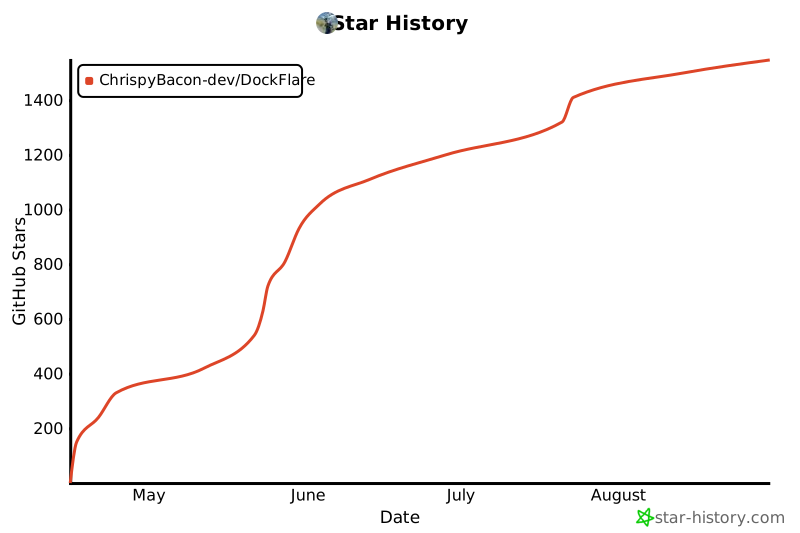
## Star History
[](https://www.star-history.com/#ChrispyBacon-dev/DockFlare&Date)